Heads up: This post contains affiliate links. As an Amazon Associate I earn from qualifying purchases, at no extra cost to you. Learn more
Specs are compiled from manufacturer listings and verified buyer reviews and can change over time — please confirm the key details on the product page before buying.
If you are shopping for a multi-head machine, the honest answer is that very few printers on the market actually carry four or more toolheads — and the ones that do cost serious money and reward a specific kind of buyer. This guide covers the machines that genuinely print multiple colors or materials in one job, explains which ones use a true multi-toolhead system versus an automatic filament changer, and tells you plainly which setup fits the work you actually do.
This guide is built by comparing the manufacturers’ published specifications and the patterns across verified customer reviews, so you get each pick’s real strengths and trade-offs instead of marketing spin.
You will see the difference between a single nozzle swapping spools and a machine with separate printheads, because that gap decides your print time, your waste, and your color accuracy. Here is what genuinely separates a capable multi-color machine from a 4 Head 3D Printer that only looks the part on paper.
Top Picks
How To Choose The Best 4 Head 3D Printer
Start with one question: do you need several colors in a single object, or several materials with different properties? A filament changer feeds different spools through one nozzle, which means color changes cost you purge time and a little waste. A true multi-toolhead machine parks separate hotends and picks each one up as needed, so a color switch is a mechanical handoff rather than a long flush. That single design choice shapes your speed, your waste, and how clean your color boundaries look.
Toolheads Versus Filament Changers
Count the nozzles, not the spools. A printer can advertise a big color count while running a single hotend, and that is a legitimate design — it just behaves differently. Machines with independent dual extruders, like the Raise3D E2, can run duplication or mirror mode, printing two identical or mirrored parts at once. Machines that pair with an automatic feeding box reach high color counts through one nozzle. Know which one you are buying, because it changes what a “head” actually means on your bench.
Build Volume In Real Terms
Measure the tallest thing you plan to print before anything else. A 260 × 260 × 260 mm build area covers most figurines, brackets, and prototype housings. A 390 × 390 × 340 mm platform is where large molds and one-piece industrial parts live. If your models are small and detailed, a resin machine with a 302.4 × 161.98 × 300 mm volume gives you sharp detail and room to batch parts.
Chamber Heat And Material Choice
Engineering filaments warp when the air around them is cold. A heated chamber holds a steady warm envelope, and machines here advertise figures like 65 °C active heating or a 55 °C enclosed chamber. If you only print PLA and PETG, you can skip that feature and save money. If you print ABS, ASA, PC, or carbon-fiber nylon, the chamber is what keeps a large part flat instead of curled at the corners.
Side-by-Side Comparison
| Model | Best For | Build Volume | Multi-Color System | Max Speed | Amazon |
|---|---|---|---|---|---|
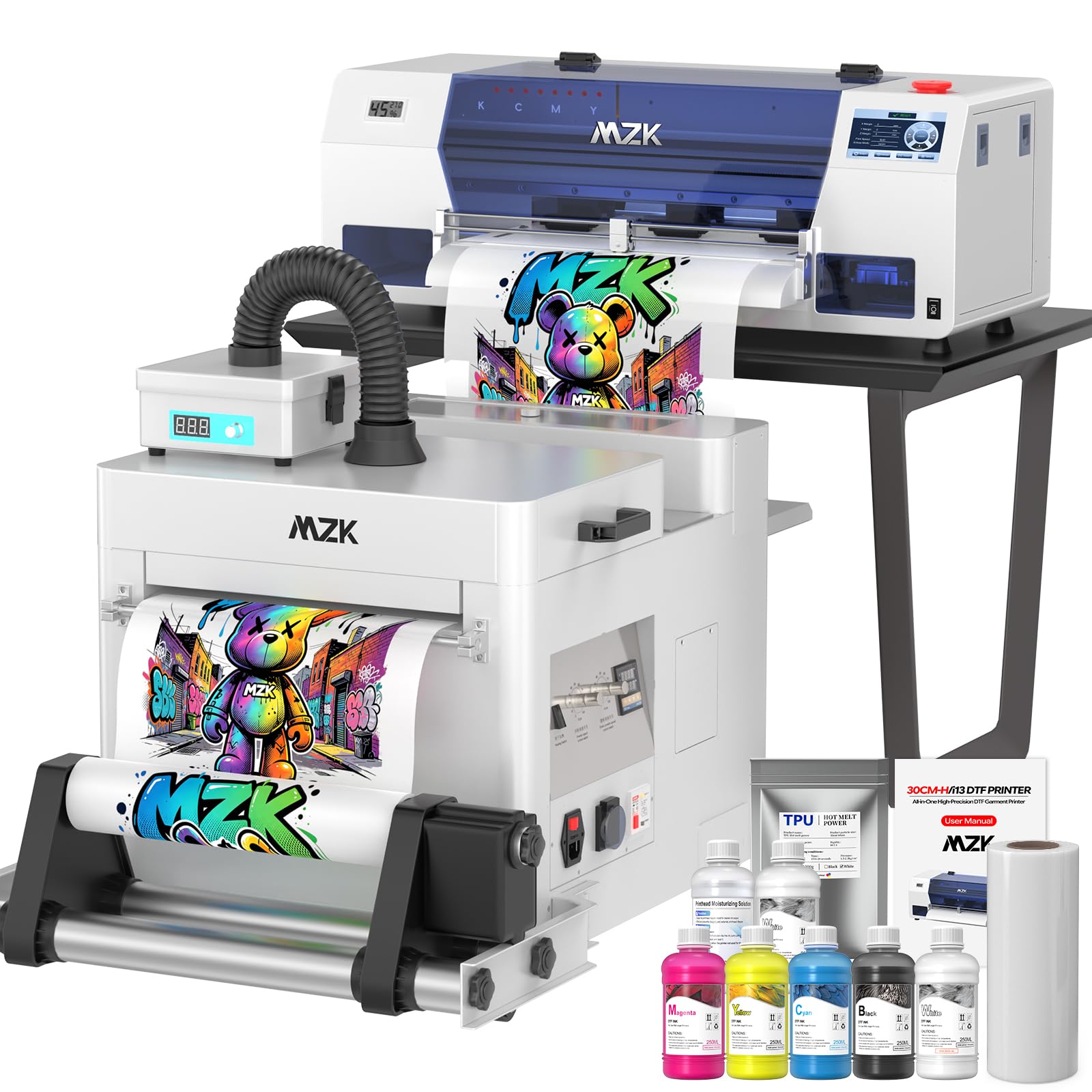
| MZK A3 i3200 DTF Printer★ Best Overall | Apparel and transfer printing | 13 x 41 inches media | Six-color ink set | — | Amazon |
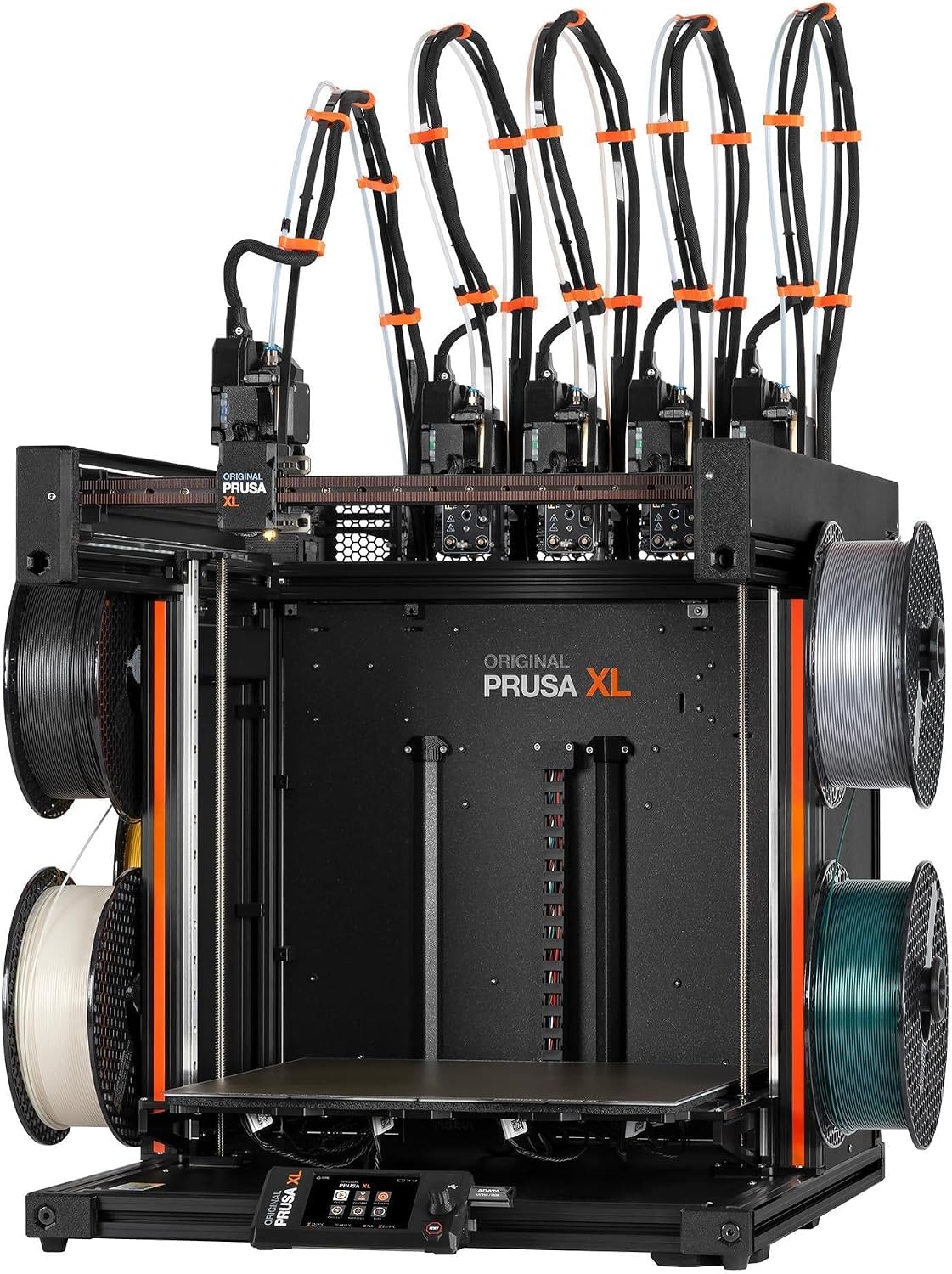
| Original Prusa XL 5-ToolheadTrue Multi-Head | True multi-material prototyping | 14.17 × 14.17 × 14.17 in | Five toolheads | — | Amazon |
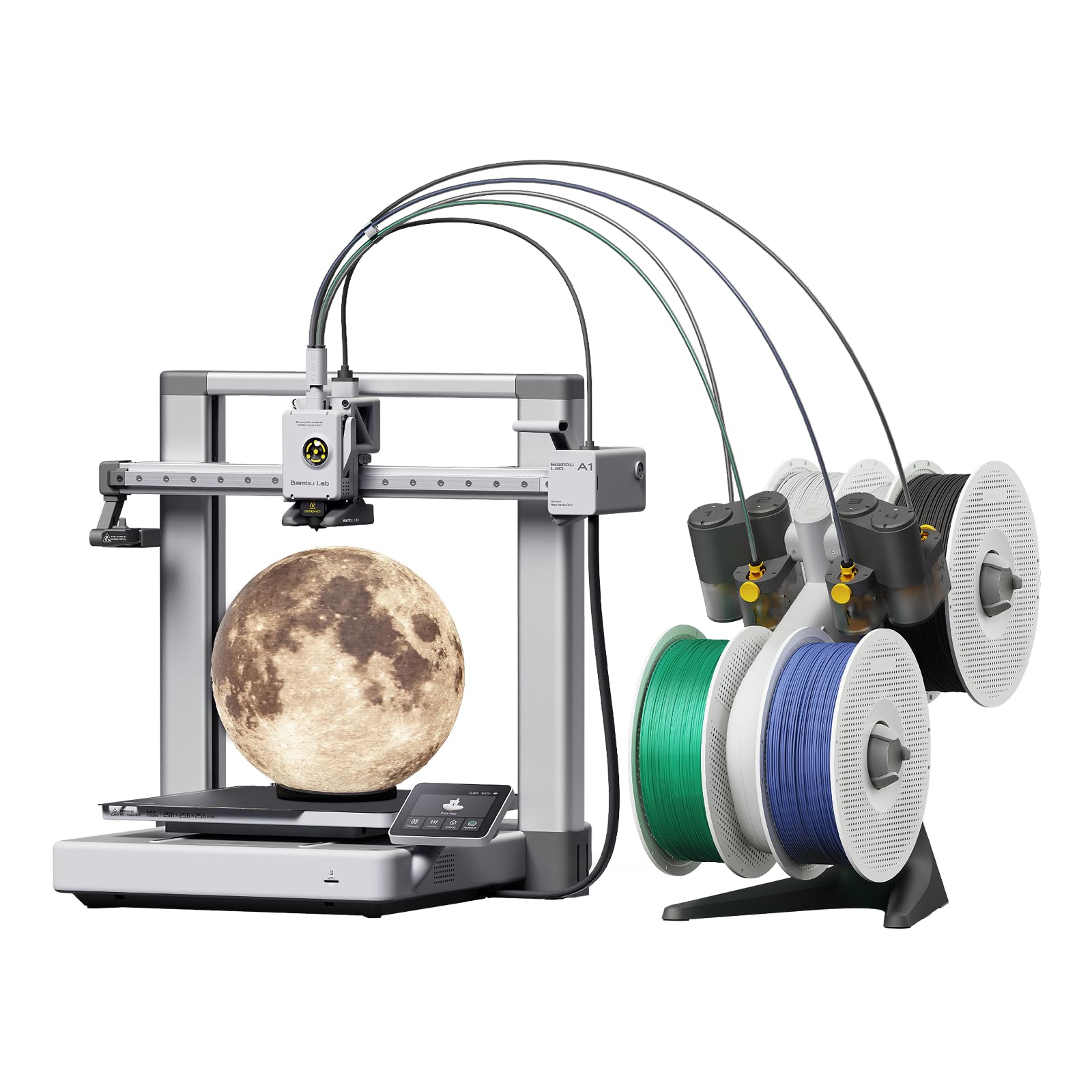
| Bambu Lab A1 Combo + LED KitEasiest Start | First multi-color printer | — | AMS lite | 10,000 mm/s² acceleration | Amazon |
| Creality K2 SE Combo | Fast multicolor on a budget | 220 × 215 × 245 mm | CFS | 500 mm/s | Amazon |
| Creality K2 Combo (A) | 16-color expandable printing | 260 × 260 × 260 mm | 4 × CFS, up to 16 colors | 600 mm/s | Amazon |
| ANYCUBIC Photon P1 | Dual-material resin detail | — | Dual-color/-material resin | — | Amazon |
| QIDI PLUS4 | High-temperature filaments | 12 x 12 x 11 in | QIDI BOX compatible | — | Amazon |
| ELEGOO Jupiter 2 | Large resin builds | 302.4 × 161.98 × 300 mm | Single resin vat | — | Amazon |
| QIDI Max4 Combo | Large high-temp parts | 390 × 390 × 340 mm | QIDI BOX compatible, 16 colors | 800 mm/s | Amazon |
| Original Prusa CORE One | Enclosed all-round reliability | 250 × 220 × 270 mm | Single extruder | — | Amazon |
| Raise3D E2 | Duplication and mirror mode | 13 x 9.4 x 9.4 in | Independent dual extruders | — | Amazon |
Detailed Reviews
1. MZK Industrial A3 i3200 DTF Printer
Our pick — 4.5+★ from 60+ verified ratings; the strongest balance of quality and price.
A full apparel-printing setup that builds a T-shirt design in roughly 2.5 minutes.
If your goal is printing onto fabric rather than building plastic up layer by layer, this MZK machine is the complete package: printer, shaker, laptop, and purifier in one box. The Epson i3200 industrial printhead (a heavy-duty print engine built for long runs) turns out an A3 design in about 2.5 minutes and an A4 design in about 1 minute, per the maker. It hits a 720 × 3600 dpi resolution with G7 color calibration, which is the language a print shop uses to mean colors match what you see on screen.
What makes it practical for a small business is the upkeep engineering. A holiday-mode auto-clean cycle fights nozzle clogging during downtime, continuous white-ink stirring keeps pigment from settling, and dual ink monitoring flags a low tank before a job stalls halfway. The 5-inch touchscreen runs nozzle checks, printhead cleaning, and one-click ink filling without a computer attached. Layouts up to 13 × 41 inches are supported.
The catch is that this is not a hobby machine — it is an apparel production tool with an industrial price and a learning curve to match. Your color accuracy and print quality are praised widely across its reviews, and setup draws real praise too. Reliability is the honest split in the feedback, with some units arriving that would not run, so buy from a seller with a clear return path. Non-consumable parts carry a 1-year warranty and the printhead gets 6 months.
Where It Pulls Ahead
- Roughly 2.5-minute A3 prints put real throughput on your table
- 720 × 3600 dpi with G7 calibration keeps colors consistent
- Timed cleaning and white-ink circulation cut clog downtime
- Ships with film, six inks, powder, and a maintenance kit
What To Weigh First
- Industrial workstation footprint and setup depth
- Reliability feedback is mixed — some units arrive dead
- Ink and powder are ongoing consumable costs
Built for: side hustlers and custom apparel creators who print on cotton, polyester, denim, canvas, and nylon for paying customers.
Think twice if: you want a plastic-part printer for the workbench — this one puts ink on fabric, not filament on a bed.
2. Original Prusa XL 5-Toolhead 3D Printer
Five separate toolheads park and swap, so color changes skip the purge-and-waste cycle.
This is the closest thing on the list to the four-head idea done properly — and then some. Five toolheads mean you can load five different materials or colors and print them in one job, with smart tool management handling the handoffs. That matters most for functional prototypes that need a rigid body with a flexible hinge, and for full-color visual models where you want clean color boundaries instead of blended transitions.
It is a large machine in every sense. The 14.17 × 14.17 × 14.17 inch build volume is genuinely big, and at 75 pounds it is 2.6 times the weight of the Bambu Lab A1 Combo at 28.5 pounds — you will want a dedicated bench, not a shelf. The segmented heated bed (separate warming zones under the plate) improves first-layer adhesion across that whole span while cutting the energy wasted on empty areas.
Performance is the thing that wins people over here — it is routinely called the strongest consumer multi-material printer available. What keeps it from a higher score is the reliability and value conversation: some operators report it not living up to the price, and a handful describe it as an expensive toy. Treat it as a professional prototyping platform with Prusa’s lifetime technical assistance behind it, and the math works. Cheaper multi-color machines exist; none of them hand off between five physical hotends.
The honest trade: you are paying for tool-change engineering and a 75-pound CoreXY frame, not for a plug-and-play desk toy. Factor in the separate-parts assembly at unboxing — the LCD, extruder, Wi-Fi antenna, and spool holder ship detached for safe transport.
The verdict: buy this when a single job needs multiple materials with different mechanical properties and you cannot afford purge waste.
Look elsewhere if: your prints are one color and one material — the five-toolhead advantage never gets used.
3. Bambu Lab A1 Combo with AMS lite and LED Lamp Kit
The multi-color entry point that calibrates itself and runs quiet enough to sit beside you.
Multi-color filament printing usually means fiddling with offsets and leveling before every job. The A1 Combo takes that off your plate with full-auto calibration — bed leveling, Z-offset, and the rest handled by the machine. It pairs with AMS lite, the four-spool feeding unit, so you can load several colors and let it switch as the model builds. Acceleration of 10,000 mm/s² is what makes it feel quick between moves rather than sluggish on long straight runs.
At 28.5 pounds and 23.01 x 21.06 x 16.77 inches it is a benchtop machine, and it is the direct counterpoint to the Prusa XL — 75 pounds and 35.43 x 31.49 x 31.49 inches by comparison. Active motor noise canceling keeps the sound down while you work nearby, and the 1-clip quick swap nozzle makes a worn tip a thirty-second job. The included LED Lamp Kit turns compatible printed designs into working lamps, which is a neat first project for learning the multi-color workflow.
Quality and ease of use are what carry this one — it is the friendliest first multi-color machine in the group, and the free model library gives you something to print on day one. The friction shows up in reliability and instructions: some owners hit frequent errors while others report smooth running, so budget a couple of evenings to learn its quirks. Durability talk leans negative in the feedback, which is the trade for its price tier.
Why it earns a spot: no other machine here gets a beginner printing multi-color objects with fewer manual steps.
What to plan for: AMS lite is required for the color switching, and it ships with the Combo — buy it separately and you are paying twice.
Reach for this if: you are new to multi-color printing and want the calibration done for you.
skip it if: your bench shakes and you need the heavier frame a large CoreXY gives you.
4. Creality K2 SE Combo with CFS Multicolor System
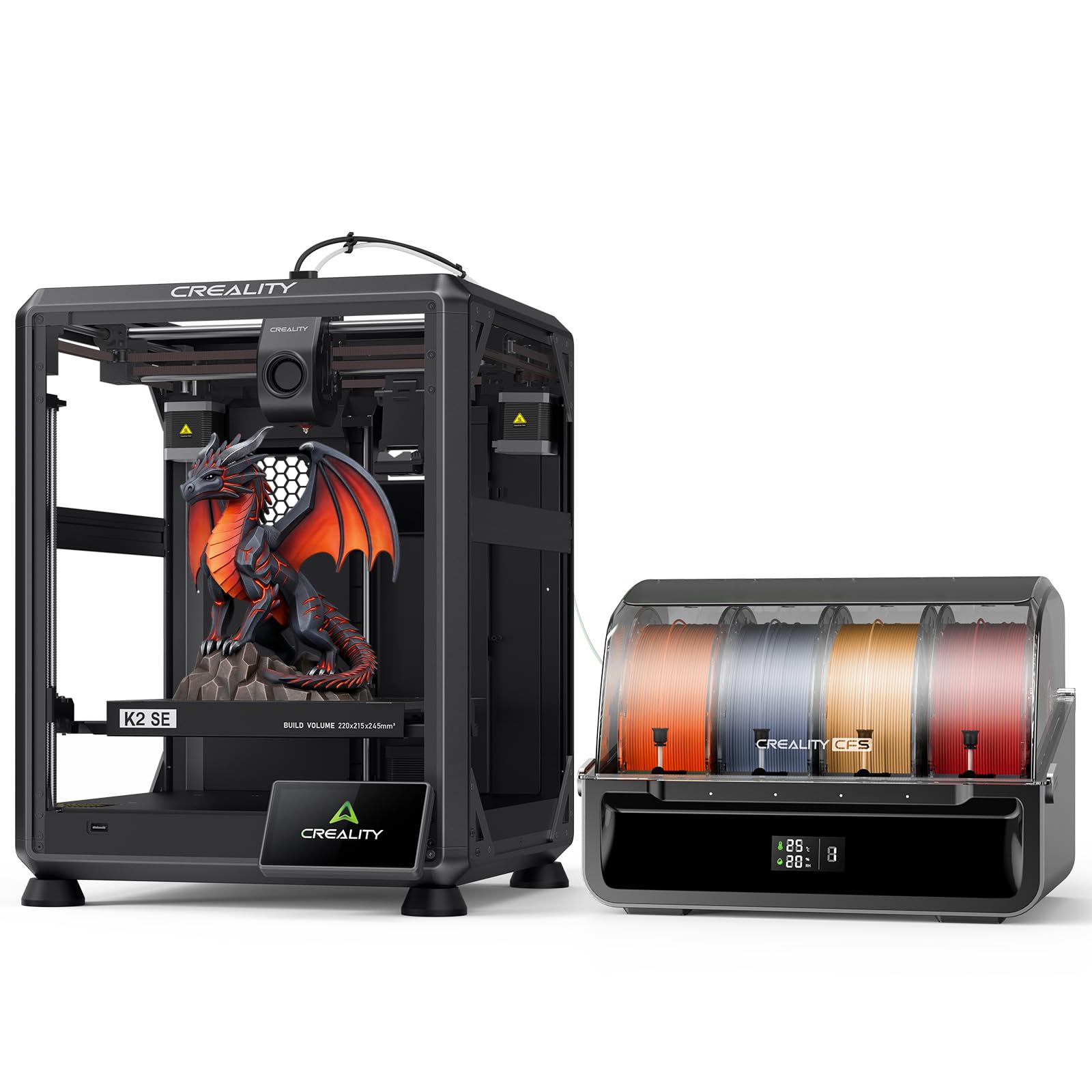
A metal-framed workhorse that turns a multicolor Benchy around in under an hour.
Sitting in the mid-range, the K2 SE Combo is the value play for anyone who wants multicolor without paying industrial money. It reaches 500 mm/s with 20,000 mm/s² acceleration through a next-gen motion system, and it backs that speed with a die-cast aluminum alloy frame — reinforced gussets and crossbeams that keep vibration out of the print. The build area is 220 × 215 × 245 mm, which handles functional parts and prototypes comfortably.
The CFS, Creality’s filament management unit, does the color switching with auto-recognition and moisture-proof spool storage, so a multicolor model builds without you standing over it. Smart auto leveling probes only the area you are actually printing on, which is a genuine time saver on small parts. The modular direct-drive extruder takes a quick-swap clog-free nozzle, and hardened steel gears keep feeding steady through long jobs.
It reads as a decent first printer and a genuine workhorse in the feedback — the speed claim holds up in real prints rather than just on the spec sheet. Where you should set expectations is complexity: a CFS-based multicolor setup has more moving parts than a single-spool machine, and Creality OS is where you manage multi-filament and LAN control. The 27.5-pound frame stays put on a desk.
Speed read: 500 mm/s with a rigid metal chassis is a rare combination at this position in the market.
Set expectations: the “Skip the failure model” function and run-out sensor are there precisely because multicolor jobs can go wrong mid-print.
The right fit: makers who want fast multicolor and a stiff metal frame without moving into premium territory.
Not the fit: anyone printing parts taller than the 245 mm build height.
5. Creality K2 Combo (A) with CFS and AI Camera
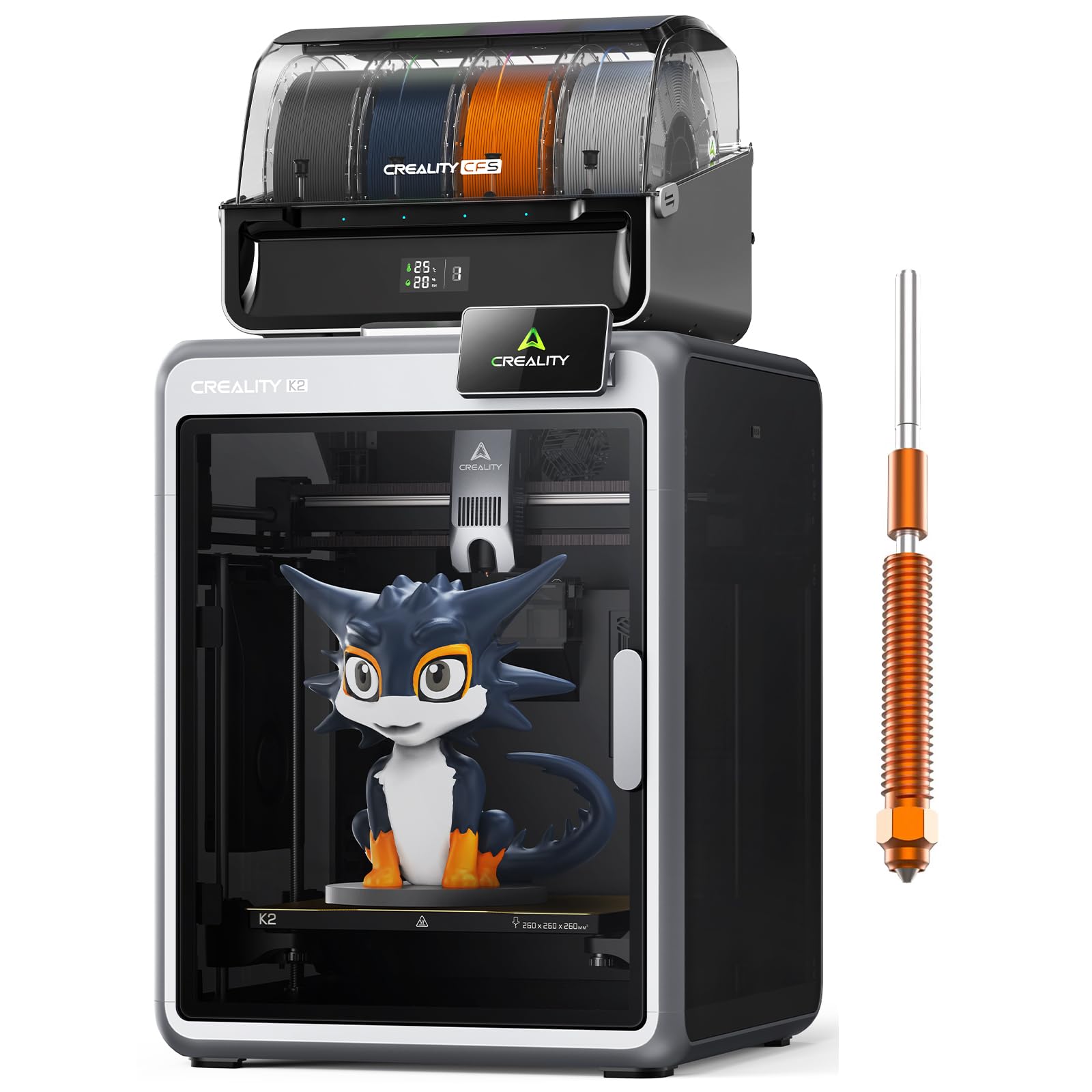
Chain four CFS units and sixteen colors become selectable in a single print.
Here is the machine for the person who keeps running out of colors. One CFS unit ships in the box, and each additional unit adds four more spools for up to 16 colors across four units. The 260 × 260 × 260 mm build volume covers most everyday scenarios, and the point of all those colors is simple — fewer painted finishing steps after the part comes off the bed.
What separates it from the K2 SE above is the quiet engineering. Step-servo motors and dynamically balanced fans keep it at a level the maker compares to someone typing on a laptop. Three of those step-servo motors sit in the extruder and on the X/Y axes, adjusting torque in under a millisecond, which is the mechanism behind its speed and extrusion consistency. The AI camera watches for spaghetti failures and idle states in real time.
from the start, it arrives pre-assembled for plug and play — unwind, fit the screen, and print. That ease of assembly and use is exactly what the reviews reward, with prints described as clean straight from unboxing. Build quality is the split in the feedback, so inspect the frame and gantry on arrival. At 65.9 pounds it is heavy enough to stay planted through fast 600 mm/s moves.
The headline: 600 mm/s with 16-color expandability puts it above the SE on both speed and color range.
The check: you only get the full 16 colors if you buy the extra CFS units — one is in the box.
Suits: small shops and creators who want maximum color without repainting finished parts.
Consider the alternative: the K2 SE if you print in fewer colors and prefer a lighter frame.
6. ANYCUBIC Photon P1 Resin 3D Printer
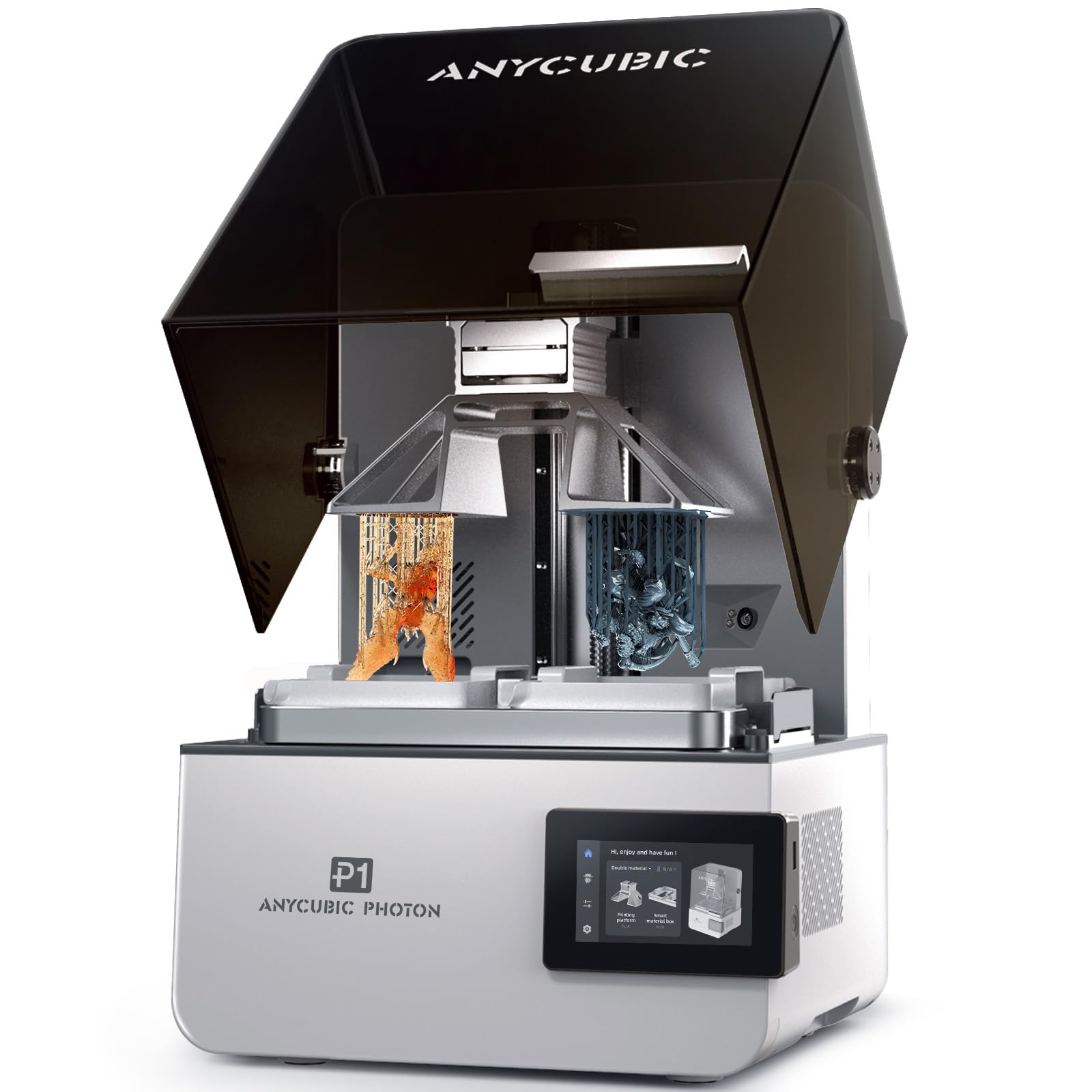
Two resins, two colors, one vat session — resin detail without a second machine.
Filament printers build with heat; this one builds with light and liquid resin. That method is why fine detail comes out so sharp, and the Photon P1 adds dual-color and dual-material printing to it — two materials laid down in the same session, which also cuts how much expensive resin goes into small test models. It handles ultra-high viscosity resins up to 8,000 cps, which the maker describes as 40 times standard resin thickness, so industrial formulations are on the table.
Wave Release Technology generates micro-airflow as the build plate lifts, cutting the peel force that causes failed resin prints by 60%. Smart Leveling 3.0 arrives factory-calibrated, self-checks before each print, and reads pressure at all four corners, so there is no manual leveling ritual. The AI monitoring system checks plate installation and bottom-layer separation, plus resin level and vat residue.
A stable ball screw and precision guide rails keep the lift smooth, and at 39 pounds it is manageable on a bench. Resin printing brings its own housekeeping — you will work with liquid resin, clean parts, and keep the machine level. That is the nature of the format, not a fault of this unit.
Standout Strengths
- Dual-color and dual-material printing in one machine
- Release force cut by 60% with Wave Release Technology
- Factory calibration plus four-corner pressure feedback
- Handles resins up to 8,000 cps
Worth Knowing
- Resin handling and cleanup are part of every session
- A different workflow from any filament printer here
For detail work: miniature painters and prototype makers who want dual material options in resin.
Skip if: you want large structural parts — that is a job for the filament machines.
7. QIDI PLUS4 CoreXY 3D Printer with 65℃ Chamber Heating

An 80W hotend that reaches 370°C, built for the filaments most printers refuse.
When your material list includes PPS-CF, PPA-CF, ABS, ASA, PC, or PA, you need heat that a standard printer cannot supply. The PLUS4 runs an 80W high-temperature hotend with a multi-metal integrated throat nozzle up to 370°C, and it supports that material range with a second-generation active chamber heating system at 400W of heating power. Air circulation and dual-layer insulation hold that 65 °C chamber even, so ABS and carbon-fiber parts cool without warping or cracking.
Print size comes in at 12 x 12 x 11 inches, enough to run several models in one batch. The CoreXY structure keeps speed high without sacrificing precision, and an independent dual motor-driven Z-axis with a 6mm thickened aluminum hot bed platform keeps the plate strong and flat. Linear shafts and lead screws upgraded to 10mm diameter add rigidity where it counts.
Printer quality is what wins people over here — it is the strongest consensus in the group, with print quality and print speed close behind. The honest split is in reliability and bed leveling, where some operators report excellent auto leveling and others run into problems. The heated chamber also takes a while to reach its set temperature. Multicolor comes by way of the QIDI BOX automatic feeding box, a separate add-on compatible with the integrated filament cutter.
One clear win: a 370°C hotend and 400W chamber heating open a material list that most machines here cannot touch.
One clear cost: chamber heat is not instant — budget warm-up time into high-temp jobs.
Best used by: engineers and makers working in carbon-fiber and high-temperature filaments.
Overkill for: PLA-only printing, where the chamber and hotend headroom never get used.
8. ELEGOO Jupiter 2 Large 16K Resin 3D Printer
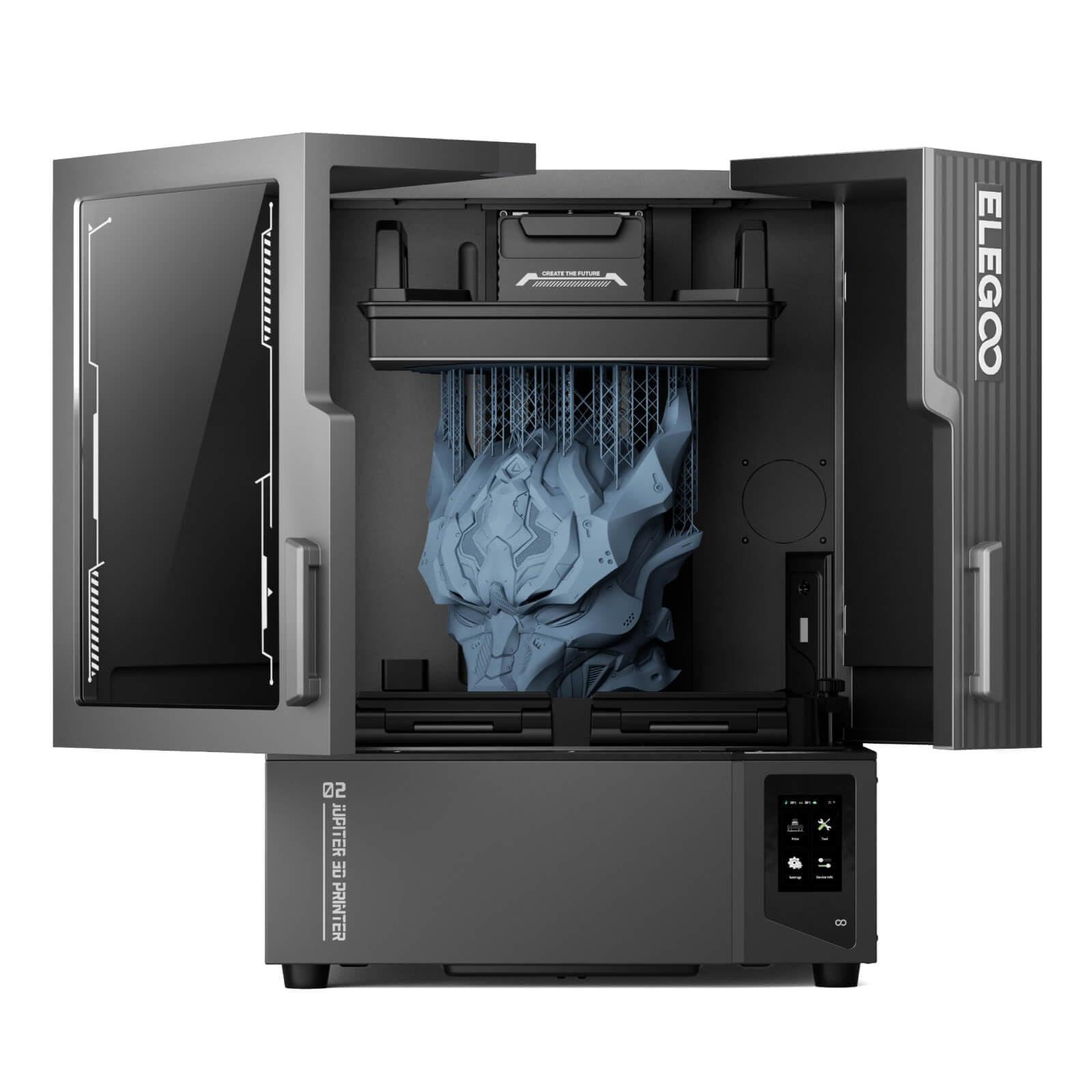
A 16K resin screen and a 302.4 × 161.98 × 300 mm vat for statues, not trinkets.
Resin machines usually top out at small parts. The Jupiter 2 goes the other way with a build volume the maker describes as 2.5 times larger than the Saturn 4, which is the difference between printing a figurine and printing a display piece. The 15120 × 6230 resolution panel with 20 × 26 μm XY resolution keeps that size from costing you detail, and the fully enclosed light source eliminates light leaks for uniform exposure across the plate.
Housekeeping is handled more than on most resin printers. Smart tank heating keeps resin at a precise 30 °C, an automated resin system refills mid-print, and multi-point auto leveling removes the manual step. The double-door design with a transparent viewing window lets you watch without opening the chamber, and the resin drip tray catches spills before they reach your bench. A 4-inch touchscreen runs the interface, and it is compatible with the Elegoo Marsmate air purifier.
Print quality is the standout in the feedback — parts come off clean and detailed. Performance and reliability are where opinions divide, with some units reported failing from the start, so test yours thoroughly in the return window. At 63.8 pounds and with a 27.95 x 20.08 x 19.29 inch footprint, give it a dedicated station with room for post-processing.
Why size matters here: 300 mm of Z height plus 16K detail is a combination few resin printers offer at any price.
Plan around it: the quick-swap release film and dual-band Wi-Fi cluster management make maintenance and multi-printer work easier than the footprint suggests.
Pick it for: large resin display pieces and batch production where one tall print beats many small ones.
Pass if: you need structural plastic parts — resin is brittle next to filament.
9. QIDI Max4 Combo with 390×390×340mm Build Volume
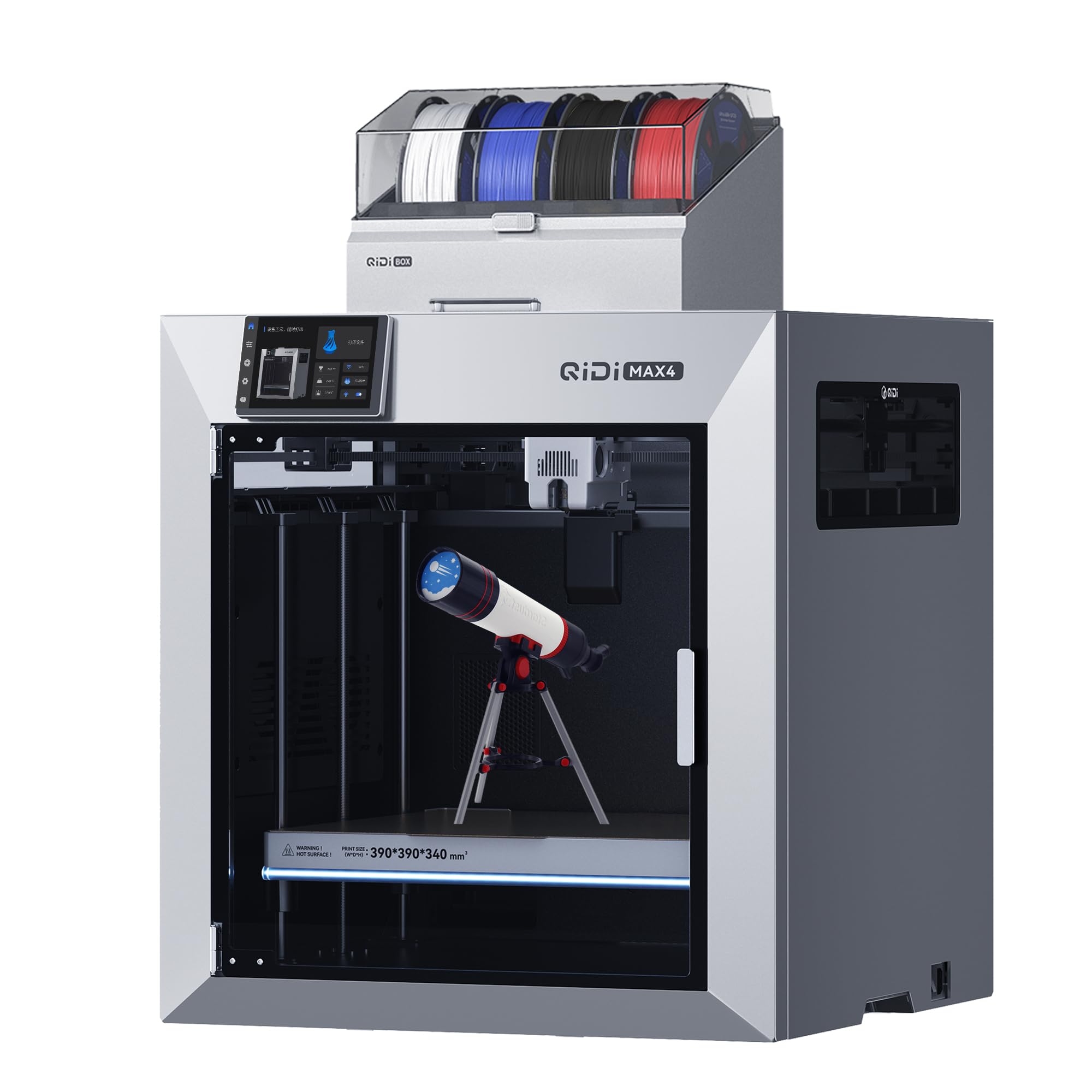
Industrial-sized parts in one piece, without slicing a model into glue-together sections.
The Max4 Combo is the answer to a specific frustration: splitting a large part into sections because the bed is too small. Its 390 × 390 × 340 mm print area is 55% larger than the previous MAX3, and a full-surface silicone heated bed distributes temperature evenly so a big footprint still sticks. Large molds, custom prototypes, and industrial components print in one go.
Speed and precision are both high here. Closed-loop motors on the X/Y axes (motors that correct their own position) push a maximum printing speed of 800 mm/s with 30,000 mm/s² acceleration, while a 2mm lead screw and anti-backlash nut on the Z-axis reduce vertical gaps for smooth surface quality. A 40mm³/s high-flow hotend with a hardened steel nozzle handles standard PLA and ABS as well as abrasive carbon-fiber-reinforced nylon, backed by a 65°C active heated chamber for ABS-CF, PC, and PPS-CF.
Setup and build quality are what earn the praise — it performs well from the start and the software is easy to follow, with large prints handled comfortably. What you should know before ordering: the Max4 series does not include the Polar Cooler, which is a separate purchase. Multicolor needs the QIDI BOX, and 16-color printing is reachable that way. At 120 pounds, plan a permanent spot rather than moving it between jobs.
Value in one line: the largest build volume on the list paired with 800 mm/s speed is uncommon at this position.
Buyer beware line, said plainly: budget for the Polar Cooler separately — it is not in the box.
It earns the bench: workshops printing oversized single-piece molds and prototypes in engineering filaments.
Wrong tool for: a small studio with no floor space for a 120-pound machine.
10. Original Prusa CORE One Assembled 3D Printer
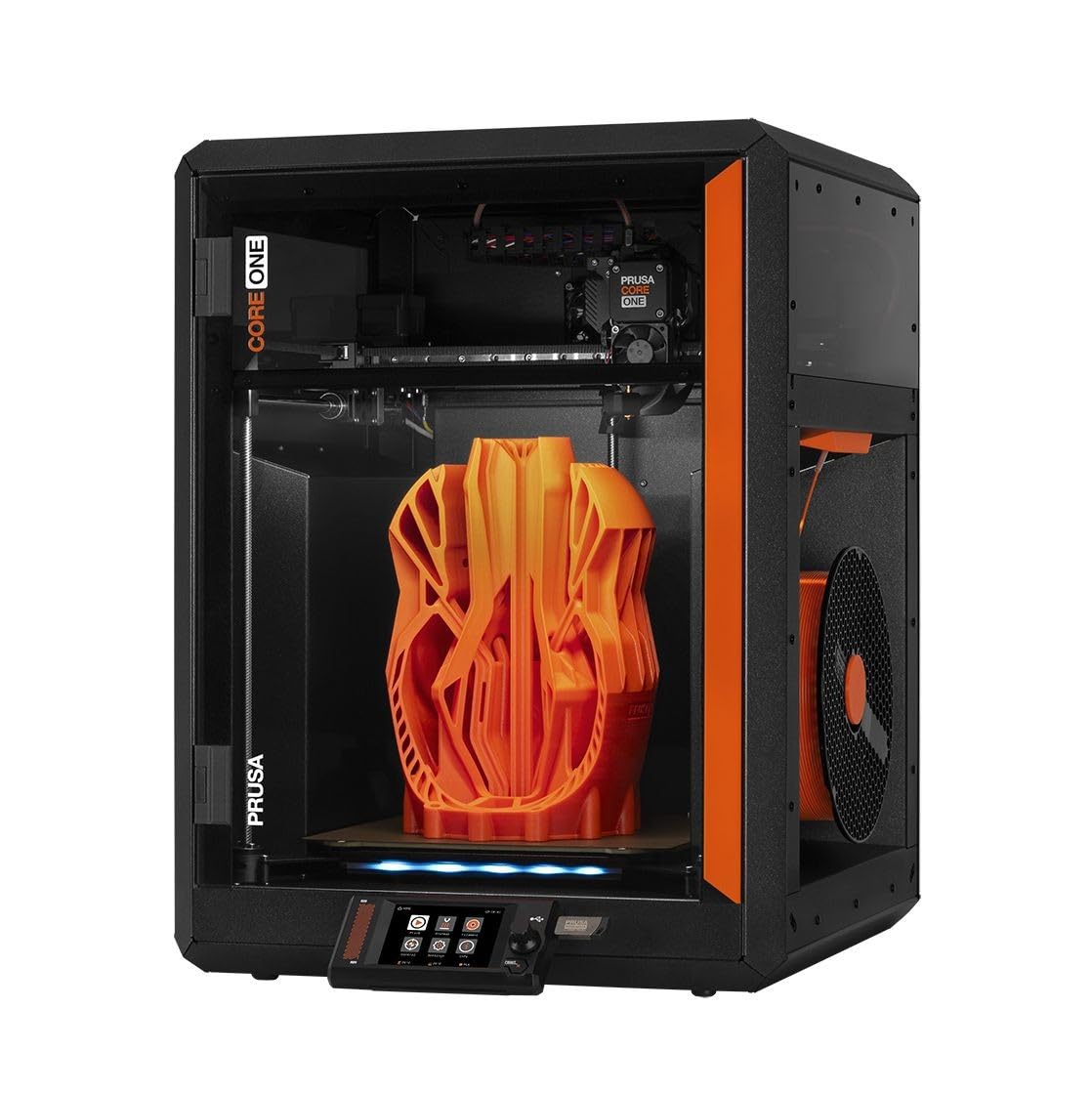
Ships assembled and tested with an enclosed chamber that holds up to 55 °C.
Arriving assembled and tested changes the first day with a printer. The CORE One comes from the start ready to print its first model in minutes, and the included 1 kg spool of Prusament PLA in Galaxy Black means you do not need filament on hand. The enclosed chamber reaches up to 55 °C with active temperature control, and it handles PLA and PETG even with the door closed, moving up to ASA, PC, or Nylon when you need tougher materials.
The CoreXY design with an all-steel exoskeleton frame is built for firmness, and that rigidity shows in print quality on 250 × 220 × 270mm of build area. A removable print sheet makes part release simple. Prusa backs it with lifetime technical assistance and 24-hour customer service, and the one-click printing path through Prusa’s slicer keeps the setup short.
Print quality and speed are the strengths that come through clearly, and the machine reads as a dependable workhorse for a wide spread of materials. The split in opinion sits in reliability and value — the same machine is called both dependable and not worth its price, depending on who you ask. Calibration reviews also divide. At 56.8 pounds inside a 16.3 x 17.5 x 21.8 inch frame, it is a bench printer rather than a floor machine.
What stands out: an enclosed, temperature-controlled chamber that takes the draft out of your workshop bench.
The catch: enclosed printing narrows the PLA and PETG airflow story — the maker addresses that directly with active control rather than leaving it to guesswork.
The buyer: someone who wants a sealed, assembled machine for materials beyond PLA without building a kit.
Try something else if: multicolor is your priority — this one runs a single extruder.
11. Raise3D E2 Desktop 3D Printer with IDEX

Two independent extruders that double your output in duplication or mirror mode.
The E2 is the printer for anyone who treats print time as a cost. Its IDEX system (independent dual extruders — two nozzles that move on their own) runs in Duplication Mode to print two identical models at once, or Mirror Mode to produce a part and its inverse in one session. That is a different kind of doubling from swapping colors: it is two parts per job instead of one.
Setup is handled with auto bed leveling and a video-assisted offset calibration system that walks you through checking geometric alignment. A 7-inch on-board touchscreen with on-screen assistance runs the whole interface. Filament run-out sensors pause the job when a spool empties, and power loss recovery stores progress and resumes when power returns — both genuinely useful on long runs.
Material range is wide: 1.75mm filament in PLA, ABS, HIPS, PC, TPU, TPE, Nylon, PETG, ASA, PP, PVA, plus glass fiber infused, carbon fiber infused, metal fill, and wood fill, all within the 300°C temperature range. The build area is up to 13 x 9.4 x 9.4 inches with a flexible build plate and a heated bed up to 110°C. Wi-Fi and ethernet with a live camera allow remote monitoring, and HEPA air filtration is built in. At 110 pounds it is a floor-standing machine in a 23.5 x 23.9 x 18.3 inch envelope.
Twin-nozzle payoff: duplication and mirror modes make it the only machine here designed to print two copies in parallel.
Honest limit: one extruder feeds one filament, so this is a two-material system, not the sixteen-color expandability of the CFS machines above.
Built for: small-batch production and engineering shops where two simultaneous parts beat one fast part.
Mismatch if: multi-color figurines are the goal — the CFS machines cover that ground.
Know the Specs
Toolhead Count and Hotend Temperature
Toolhead count tells you how many materials can print without a swap-and-purge cycle. The Prusa XL’s five toolheads park separately, so a color or material change is a physical handoff. Hotend temperature sets your material ceiling — an 80W hotend reaching 370°C on the QIDI PLUS4 open up high-temp filaments, while a 300°C range on the Raise3D E2 covers the everyday list of PLA, ABS, PC, Nylon, and TPU. Match the ceiling to the materials you actually buy.
Build Volume and Chamber Heat
Build volume decides the largest single piece you can print. The QIDI Max4 at 390 × 390 × 340 mm is the largest platform here, while the ELEGOO Jupiter 2 stretches to 302.4 × 161.98 × 300 mm in resin. Chamber heat keeps high-temp materials from warping: the QIDI PLUS4 raises its chamber with 400W of heating power, and the Prusa CORE One holds up to 55 °C with active control. If you print only PLA, treat chamber heat as optional.
Common Questions
Does a 4 head 3D printer actually print four colors at once?
How many colors can the Creality K2 Combo (A) reach?
What can a multi-toolhead printer do that a filament changer cannot?
Do I need a heated chamber for ABS and carbon-fiber nylon?
Is resin printing better than filament printing for detailed models?
How large a model can the QIDI Max4 Combo print in one piece?
What is IDEX on the Raise3D E2 and who needs it?
Does the Bambu Lab A1 Combo include the AMS lite in the box?
Will a DTF printer replace a 3D printer for my apparel business?
What maintenance does a resin printer need between prints?
How fast does the Creality K2 SE Combo print compared with the K2 Combo (A)?
The Bottom Line
For most buyers chasing a genuine multi-head setup, the Original Prusa XL 5-Toolhead is the one that delivers the format properly — five physical toolheads, a 14.17 × 14.17 × 14.17 inch build volume, and real material handoffs instead of purge cycles. If you print apparel rather than parts and want a production line in one box, the MZK A3 i3200 DTF Printer handles fabric work with an industrial printhead and timed self-cleaning. And if multicolor on a benchtop is the whole goal, the Bambu Lab A1 Combo gets you there with automatic calibration and AMS lite included.
One last nudge worth acting on: if your prints include engineering filaments, the machines with real chamber heat — the QIDI PLUS4 at 65 °C and 370°C hotend, or the Prusa CORE One at up to 55 °C — are the ones that keep large parts flat. Buying a fast open-frame machine first and discovering the warp later is the common costly detour.
How we choose
We do not accept paid placement. Every pick is matched to a real buyer and a real use-case; we do not hands-on test units.
Sources
Specifications: manufacturer listings and product documentation. Review insights: verified customer reviews, as of November 2026. Pricing: not shown on this page (it changes often); check the current price via the retailer link.
As an Amazon Associate, My Heart Lives Here earns from qualifying purchases. This does not affect which products we feature.