Heads up: This post contains affiliate links. As an Amazon Associate I earn from qualifying purchases, at no extra cost to you. Learn more
Specs are compiled from manufacturer listings and verified buyer reviews and can change over time — please confirm the key details on the product page before buying.
You do not need a giant gaming card to get a crisp 4K desktop. You need a small, low-power card that slots into an office tower and drives your monitors without a separate power cable. A GT 1030-class card does exactly that, and this guide tells you which one to grab for a media PC, an older Dell Optiplex, or a home-theater build, and which ones to leave on the shelf.
This guide is built by comparing the manufacturers’ published specifications and the patterns across verified customer reviews, so you get each pick’s real strengths and trade-offs instead of marketing spin.
The catch with these cards is the memory type: the same model name can hide either fast GDDR5 or slower DDR4 inside. That single detail decides whether your card feels snappy or sluggish, which is why this breakdown of the 1030 video card market points out the memory spec on every single pick.
Top Picks

How To Choose The Best 1030 Video Card
Start with the memory type, not the model name. Nvidia’s GT 1030 chip ships with either GDDR5 or DDR4 memory, and the two perform very differently even though the box says the same thing. GDDR5 moves data much faster, so it handles a 4K desktop and light games far better. When you see DDR4 in the spec list, treat it as a card for basic display output only.
Check the memory type before anything else
Look for the letters after the capacity: “2GB GDDR5” is the fast version, while “4GB DDR4” or “GDDR4” is the slower one despite the bigger number. A card with less capacity but faster memory often feels quicker in everyday use. Do not assume a bigger number on the box means a faster card.
Match the card to your case size
Slim office towers and small home-theater boxes need a low-profile card (a short card that comes with a smaller metal bracket for the back of the case). Most picks here ship with that bracket in the box, so check the listing before you buy. A full-height card simply will not close inside a slim chassis.
Confirm your monitor connections and resolution
These cards drive a 4K screen at 60Hz over HDMI or DisplayPort, but the exact ports vary by model. If you run two monitors, make sure the card has the right mix of outputs you need, like one HDMI plus one DisplayPort. Check the maximum resolution the listing states so you are not surprised after installation.
Side-by-Side Comparison
| Model | Best For | Memory | Form Factor | Max Resolution | Amazon |
|---|---|---|---|---|---|
| ZOTAC GeForce GT 1030 2GB GDDR5★ Best Overall | Slim office and HTPC builds | 2GB GDDR5 | Low-profile | 3840×2160 | Amazon |
| maxsun GEFORCE GT 1030 4GB GDDR4Mini ITX Pick | Mini ITX builds on a budget | 4GB GDDR4 | Mini ITX | 3840 x 2160 | Amazon |
| maxsun GEFORCE GT 1030 2GB GDDR5 | Small-form-factor and low-profile builds | 2GB GDDR5 | Low-profile SFF | 3840 x 2160 | Amazon |
| msi Gaming GeForce GT 1030 4GB DDR4 | Entry-level gaming and micro PCs | 4GB DDR4 | Low-profile OC | 3840×2160 | Amazon |
| ASUS GeForce GT 1030 2GB GDDR5 | Quiet multimedia and Dell SFF upgrades | 2GB GDDR5 | Passive low-profile | 1920×1200 | Amazon |
| MSI GEFORCE GT 1030 2GHD4 LP OC | Fanless silent desks | 2GB DDR4 | Passive low-profile | 4096×2160 | Amazon |
| MSI GeForce GT 1030 4GHD4 LP OC | 4GB at maximum resolution | 4GB GDDR4 | Low-profile OC | 2560×1600 | Amazon |
Detailed Reviews
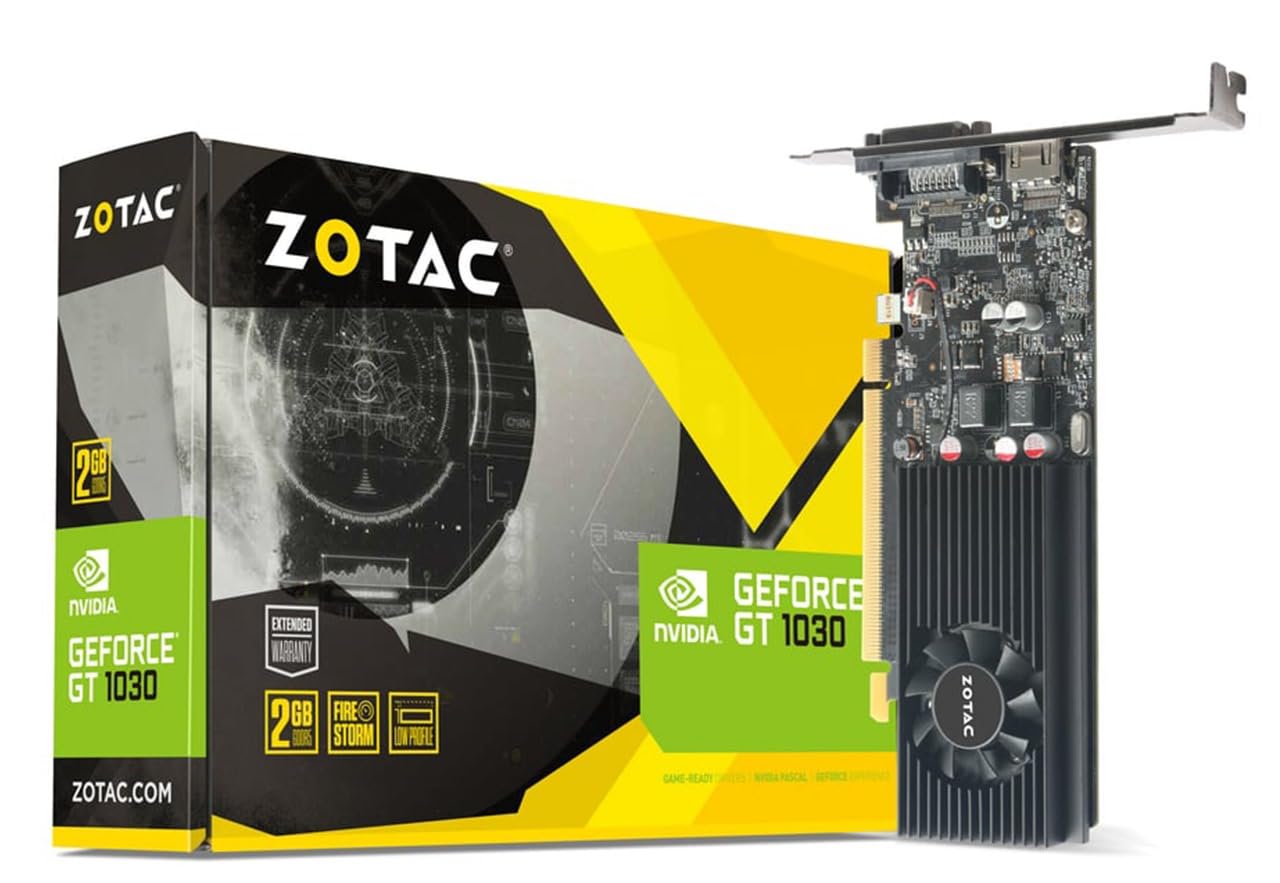
1. ZOTAC GeForce GT 1030 2GB GDDR5 Low Profile
Our pick — 4.5+★ from 1,500+ verified ratings; the strongest balance of quality and price.
A low-profile 2GB GDDR5 card that drives a full 3840×2160 desktop in a slim office tower.
This is the pick most buyers should land on. It holds 4.5+ stars from 1,500+ owners, who praise its speed in everyday desktop and video tasks. It carries 2GB of GDDR5 memory, the fast version of the memory, and that is the number that matters when your desktop has to push a high-resolution display all day.
The card drops into a low-profile build without fuss. ZOTAC ships a low-profile bracket in the box alongside the full-height one, so it fits the smaller metal slot at the back of slim cases. It handles a 3840×2160 display, which is the full 4K desktop at a sharp pixel count, and it does this without needing a separate power cable from your power supply. One buyer of this card described a 1440p monitor running smoothly off it, which is exactly the kind of real-world result the spec sheet promises.
You get a clear trade-off here. The GDDR5 memory (a faster type of graphics memory) makes this the quicker card in its class, but the capacity is 2GB. The MSI 4GB card lower down this list carries double that at 4GB, for buyers who think they need the bigger buffer. For a media center or an office workstation, though, the speed of GDDR5 beats the extra room of DDR4 every time you click a window or scroll a webpage.
Where it earns top spot
- Fast GDDR5 memory keeps desktop and video work responsive
- Low-profile bracket included so it drops into slim chassis
- Pushes a full 3840×2160 4K signal without extra power
- Windows 10, 8 and 7 support with easy driver updates through GeForce Experience
Where it holds back
- 2GB capacity is the smaller option next to the 4GB cards here
- Registration on the ZOTAC site is needed for the extended warranty
Reach for this if: you want the best balance of speed and fit for a slim office or home-theater PC.
Think twice if: you are set on 4GB of memory, in which case the MSI 4GB card lower down is the closer match.
2. maxsun GEFORCE GT 1030 4GB GDDR4 Mini ITX
A mini ITX 4GB GDDR4 card with a 3.5in fan, sized for the tightest small-form-factor builds.
The headline here is the size. This is a mini ITX design (a compact board built to fit the smallest desktop cases), and it pairs a 3.5in fan with silver-plated PCB work and solid capacitors for lower temperature and more stable running. If your build has almost no clearance, that small footprint is the reason to look here.
The clock runs up to 1380 MHz with a 4GB GDDR4 module on a 2100 MHz memory speed, and it drives a 3840 x 2160 display. Compare that to the ZOTAC above: both sit in the same GT 1030 family, but the ZOTAC uses GDDR5 while this one uses GDDR4 memory, so the ZOTAC is the quicker of the two for graphics work. This card leans toward buyers who need the compact form and a little more memory headroom rather than maximum memory speed.
Here is the honest part. The performance picture across buyers is split, and a fair number note the card runs fine while others find it falls short for demanding tasks. Read this as a card for light gaming and desktop duty, not a graphics powerhouse. It handled 1080p at the lower settings in everyday play, which is about what a GT 1030 chip delivers wherever you buy it.
Small-case answer: For a case where nothing else physically fits, the mini ITX shape and 4GB GDDR4 give you a working 4K-capable card where a full-size model would be a non-starter.
Set your expectations: The memory is GDDR4 rather than GDDR5 and the performance verdict is divided, so plan for desktop and light-game use, not heavy graphics.
Best suited to: mini ITX builders who value a small physical footprint above raw memory speed.
Less ideal if: you want the fastest memory in this class, where the GDDR5 cards pull ahead.
3. maxsun GEFORCE GT 1030 2GB GDDR5 Low Profile

Compact and GDDR5-fast, with the low-profile bracket ready in the box.
For a small-form-factor machine, the two things that matter are fit and memory speed, and this card delivers both. It measures 6.1″L x 2.71″W, notably slimmer than the MSI 4GB card’s 9.5″L x 6.2″W footprint, so it slips into tight cabinets where the bigger board will not. The low-profile bracket is included, and the card runs a Pascal GP108 core with 384 stream processors.
It keeps older games playable: it runs 3D games at 30-40 fps (frames per second, the number of images drawn each second), which is smooth enough for older titles at moderate settings. The boost clock reaches 1468 MHz, with 2GB of GDDR5 running at 6000 MHz memory speed over a 64-bit interface, giving a 48GB/s bandwidth (how much data the memory moves each second). That GDDR5 memory is what separates it from the DDR4 cards on this list: the maker rates it faster than the 2GD4 version of the same chip.
The graphics performance is where buyers split down the middle. Some find it entirely satisfactory for what they paid, while others expected more from a card carrying this name. That is the nature of a 1030 chip: it is an upgrade over integrated graphics for a small PC, not a gaming card. If you keep it to desktop work, media, and lighter games at reduced settings, it holds up well.
Footprint win: At 6.1″L x 2.71″W this is one of the roomier fits in a slim case, and the GDDR5 memory keeps it quick for its class.
Know the ceiling: Graphics horsepower is a mixed bag across buyers, so treat 30-40 fps and moderate settings as the realistic target.
Great match for: a slim PC that needs both a compact card and fast GDDR5 memory.
Look elsewhere if: you expect a full gaming-card experience, since the graphics performance is only mid-pack.
4. msi Gaming GeForce GT 1030 4GB DDR4 LP OC

The 4GB option for micro PCs that want a little headroom over 2GB.
Here is where capacity jumps: this MSI card carries 4GB of DDR4 memory against the 2GB on the ZOTAC up top, a genuine step up in memory room. The boost clock hits 1430 MHz, and it outputs over DisplayPort 1.4a and HDMI 2.0b, so you can run a modern monitor straight from either port. The 4K UHD resolution at 3840×2160 keeps a sharp desktop for office work and streaming.
Entry-level gaming is where it lands in practice. Buyers have run older titles like Half-Life 2 at 1080p on high settings without trouble, which tells you the ceiling is classic and indie games rather than current blockbusters. It fits nicely in micro PCs, and the single-fan OC design (a factory overclock, meaning it ships running faster than the base spec) gives you a bit more speed from the start.
One thing to weigh: this is DDR4 memory, so despite the 4GB capacity it is not the fastest memory type here. Compatibility is a mixed story, because NVIDIA no longer actively supports this board’s architecture even though it works fine on Windows 11. That means it is a buy-for-now card, not a future-proofing pick.
What you gain
- 4GB DDR4 gives double the memory capacity of the 2GB cards
- DisplayPort 1.4a plus HDMI 2.0b for flexible monitor hookups
- 1430 MHz boost clock from the factory OC design
- Runs older games like Half-Life 2 at 1080p on high settings
What to keep in mind
- DDR4 memory is slower than the GDDR5 cards here despite the 4GB
- NVIDIA no longer actively supports this architecture
Pick it when: you want 4GB of memory and modern DisplayPort plus HDMI in a micro PC.
Pass on it if: you need the fastest memory type, where the GDDR5 picks do better.
5. ASUS GeForce GT 1030 2GB GDDR5

A fanless 2GB GDDR5 card that runs silent in a living-room media PC or quiet workstation.
Silence is the reason this card exists. ASUS uses a passive heatsink with no fan, so it makes no noise at all, which is exactly what you want in a living-room media PC or a quiet workstation. It ties the ZOTAC at the top of this list at 4.5+ stars from a large pool of buyers, who repeatedly cite its silent running and solid performance.
It runs a 1506 MHz boost clock in OC mode on 2GB of GDDR5, the fastest boost clock here and ahead of the maxsun 2GB GDDR5’s 1228 MHz core figure. That GDDR5 memory keeps the desktop and video playback smooth. The card needs no extra power connector, drawing everything from the slot, and it stays cool without a fan spinning up. Buyers have happily dropped it into Dell Optiplex 790 SFF systems, a common slim office box, and run titles like Fortnite and Counter-Strike on it.
The limit to know about is resolution. ASUS lists the maximum at 1920×1200 pixels, so this is not the card for a 4K monitor at full resolution the way the ZOTAC or MSI cards are. If your screen is 1080p or 1200p, that ceiling never bothers you. If you already own a 4K panel and want native output, look at one of the higher-resolution picks instead.
Quiet by design: Across 25 quiet-related mentions the fanless heatsink draws steady praise, and its 1506 MHz boost clock is the highest here.
The resolution caveat: Its 1920×1200 maximum rules it out for full 4K output, so pair it with a 1080p or 1200p display.
Made for: silent HTPC and office builds on a 1080p or 1200p screen.
Not for: anyone driving a 4K monitor who needs native resolution at that pixel count.
6. MSI GEFORCE GT 1030 2GHD4 LP OC

A fanless 2GB DDR4 card with fin cooling that runs completely silent in an HTPC or office desktop.
MSI built this one around silence. An array of fins handles cooling with no fans at all, so the card runs completely noiseless, the same goal as the ASUS above but reached with a different cooling design. It is compact at 5.9″L x 2.7″W, small enough to tuck into a tight HTPC case without crowding the rest of the build.
The chip is a Pascal GP108-310-A1 running at a 1189 MHz base clock and a 1430 MHz boost, with 2GB of DDR4 memory at 1050 MHz over a 64-bit interface for 16.8GB/s bandwidth. That is DDR4, not GDDR5, so this is a card for display duty and everyday desktop work rather than anything graphics-heavy. It outputs up to 4096×2160, which covers a full 4K screen for browsing, video, and office apps.
The trade-off is the memory type. At 2GB of DDR4 it gives you the silent build and the 4K output, but it will not match the GDDR5 cards on memory speed. If silence is the whole point of your build and you mostly watch video or work in documents, that balance makes sense. If you want to game even lightly, the GDDR5 picks give you more headroom for the same kind of money.
Silence-first pick: Passive fin cooling and a compact 5.9″L x 2.7″W body make this a natural fit for a quiet home-theater box.
Memory trade-off: DDR4 memory rather than GDDR5 means you should keep this to display and desktop work, not gaming.
Right for: a completely silent HTPC or office PC that needs 4K output.
Wrong for: light gaming, where the DDR4 memory holds it back against the GDDR5 cards.
7. MSI GeForce GT 1030 4GHD4 LP OC

A low-profile 4GB GDDR4 card with 2100 MHz memory, for buyers who want more capacity and the highest memory clock here.
This MSI card puts 4GB of GDDR4 on a 64-bit bus with memory running at 2100 MHz, and a 1430 MHz GPU clock on the boost. That is the top memory speed in this group and the bigger 4GB capacity, so it is aimed at the buyer who wants both numbers up. It comes with DisplayPort and HDMI output for modern monitors.
The low-profile OC design keeps it a fit for slim machines, and at 5.91″L x 2.72″W it stays compact. The cooler runs quiet enough for an office desk. If you are upgrading an older desktop and want more memory headroom than a 2GB card gives, this is the pick that balances capacity with a faster memory clock than the DDR4-only MSI model above.
Two details to check before you commit. MSI lists the maximum resolution here at 2560×1600, below the 3840×2160 of some cards on this list, so confirm that covers your monitor. And note the memory is GDDR4, not GDDR5, so while the capacity is generous, the GDDR5 cards still win on raw memory type. This is a card for capacity and speed in the memory clock, not for a full 4K screen at native resolution.
Why it earns a look
- 4GB capacity with 2100 MHz memory, the highest memory clock here
- Low-profile OC design fits slim desktop cases
- 1430 MHz boost clock and DisplayPort plus HDMI outputs
Where it falls short
- Maximum resolution listed at 2560×1600, not full 4K
- Memory is GDDR4 rather than the faster GDDR5
Choose it if: you want 4GB of memory at the highest memory clock in a low-profile card.
Check first: your monitor resolution, since its 2560×1600 maximum is below the 4K cards here.
Know the Specs
GDDR5 vs DDR4 vs GDDR4 Memory
The memory type decides how quickly the card moves data, and it matters more than capacity on a GT 1030. The letters tell you the speed class: GDDR5 is the fast option and the one to chase for smooth desktop work and light games. DDR4 and GDDR4 are slower, so a card with 4GB of DDR4 can still feel less brisk than a 2GB card with GDDR5. When you scan a listing, read the memory type before you look at the number in front of it.
Low-Profile and Passive Cooling
A low-profile card is a short board that comes with a smaller metal bracket for the back of slim cases, so it fits office towers and home-theater boxes. Passive cooling means fins instead of a spinning fan, which makes the card completely silent but relies on airflow in your case. Both features point at the same buyer: someone upgrading a small, quiet machine rather than a full tower built for gaming.
Max Resolution and Outputs
The listed maximum resolution is the sharpest screen the card can drive, and it varies by model here from 1920×1200 up to 4096×2160. Match that number to your monitor before you buy, because a card capped lower than your screen will not show native resolution. Also check the outputs, since most cards here offer HDMI and either DVI or DisplayPort, and you want the port your monitor uses.
Clock Speed and Power Draw
The boost clock is how fast the GPU runs under load, and the cards here range from 1228 MHz up to a 1506 MHz boost on the ASUS. A higher clock helps, but memory type matters just as much on this chip. These cards draw their power from the PCIe slot with no separate cable, so they suit older power supplies and prebuilt desktops. Check that your machine has an open slot before you install.
Common Questions
Will a GT 1030 video card fit in my slim office PC?
What is the difference between GDDR5 and DDR4 on a GT 1030?
Can a GT 1030 run a 4K monitor at 60Hz?
Do these cards need a separate power cable from the power supply?
Is a fanless GT 1030 safe for a home-theater PC?
Can I use a GT 1030 for gaming?
Will a GT 1030 work with Windows 11?
Which has more memory, the 4GB or the 2GB cards?
Do I need a special motherboard for a GT 1030?
The Bottom Line
For most buyers, the standout in this 1030 video card roundup is the ZOTAC GeForce GT 1030 2GB GDDR5. Its GDDR5 memory and low-profile bracket (a shorter mounting plate that fits slim cases) hit the balance of speed and fit for slim builds. If silence is non-negotiable, the fanless ASUS GeForce GT 1030 delivers quiet 1080p duty. And for a 4GB buffer in a low-profile card, the msi Gaming GeForce GT 1030 4GB is the one to reach for. One honest nudge: the ZOTAC already carries the strongest rating of the group at 4.5+ stars, and it earns that with the fast memory type most buyers overlook.
How we choose
We do not accept paid placement. Every pick is matched to a real buyer and a real use-case; we do not hands-on test units.
Sources
Specifications: manufacturer listings and product documentation. Review insights: verified customer reviews, as of November 2026. Pricing: not shown on this page (it changes often); check the current price via the retailer link.
As an Amazon Associate, My Heart Lives Here earns from qualifying purchases. This does not affect which products we feature.