Heads up: This post contains affiliate links. As an Amazon Associate I earn from qualifying purchases, at no extra cost to you. Learn more
Specs are compiled from manufacturer listings and verified buyer reviews and can change over time — please confirm the key details on the product page before buying.
If you are adding two 16GB DDR5 sticks, the thing that matters most is whether the pair actually boots and runs at full speed in your board — not the shiny heat spreader. This guide covers seven 16GB DDR5 modules that buyers report working cleanly, and it tells you plainly which ones suit a used laptop, a fresh desktop build, or a gaming rig pushing high clock speeds.
This guide is built by comparing the manufacturers’ published specifications and the patterns across verified customer reviews, so you get each pick’s real strengths and trade-offs instead of marketing spin.
Each module below is one 16GB stick, so buying two doubles your capacity. Here is the plain-English breakdown of the 2 16GB DDR5 RAM Sticks worth putting in your machine today.
Top Picks


How To Choose The Best 2 16GB DDR5 RAM Sticks
Your motherboard decides almost everything before the sticks do. A DDR5 slot is keyed so only DDR5 fits — you cannot mix it with DDR4, and a laptop SO-DIMM will not go into a desktop slot. Check your manual for whether it takes DIMM (the long desktop stick) or SO-DIMM (the short laptop stick) before you buy anything.
Match the speed your board can actually run
Memory speed is listed in MHz, and a higher number means data moves faster between the CPU and the RAM. The catch is your motherboard and processor have a ceiling. A 6000MHz stick will often drop to a lower speed if your board cannot hold that frequency — so buy speed your hardware can actually reach, not the biggest number on the box.
Lower CL timing is snappier, higher is cheaper
CL (cas latency — the delay before your memory answers a request, counted in clock cycles) decides how quickly your RAM reacts. At the same speed, a CL30 kit answers faster than a CL46 kit, which helps in fast-paced games and heavy multitasking. Tighter timings usually cost more, so decide if you want the last few frames or just stable everyday speed.
Buy in matched pairs for two sticks
Two single modules bought separately can work, but a matched pair is tested to run together and is the safer bet for hitting rated speed. If you plan to fill two slots, buy two identical modules with the same part number — mixing brands or speeds can force the whole system down to the slower module’s pace.
Side-by-Side Comparison
| Model | Best For | Speed | Form Factor | CL Timing | Amazon |
|---|---|---|---|---|---|
| Kingston FURY Beast 16GB 5200MHz★ Best Overall | Everyday desktop builds | 5200 MT/s | DIMM | CL40 | Amazon |
| ADATA 16GB DDR5-6000Best for Gamers | Gaming rigs with RGB | 6000 MHz | DIMM | CL30 | Amazon |
| A-Tech 16GB DDR5 4800MHz SODIMM | Laptop memory upgrades | 4800 MHz | SO-DIMM | CL40 | Amazon |
| CORSAIR Vengeance SODIMM 16GB | Gaming laptops | 5600 MHz | SO-DIMM | CL48 | Amazon |
| Samsung 16GB DDR5 5600MHz SODIMM | Plug-and-play laptop upgrades | 5600 MHz | SO-DIMM | CL46 | Amazon |
| Crucial 16GB DDR5 4800MHz UDIMM | Intel and AMD desktop builds | 4800 MHz | UDIMM | CL40 | Amazon |
| Crucial Pro 16GB DDR5 6000MHz | High-speed overclocking | 6000 MHz | UDIMM | CL36 | Amazon |
Detailed Reviews
1. Kingston FURY Beast 16GB 5200MHz DDR5 CL40 Desktop Memory
Our pick — 4.5+★ from 300+ verified ratings; the strongest balance of quality and price.
The dependable desktop starter that boots clean and stays out of the way.
For a first DDR5 build, Kingston’s FURY Beast at 5200 MT/s (megatransfers per second, the rate data moves in and out of memory) is the sensible anchor. Its CL40 latency means it answers memory requests after 40 clock cycles — fine for everyday apps, browser tabs, and games. At 39 g it is a light desktop stick, and the low-profile heat spreader keeps it clear of big air coolers.
What wins people over is the memory quality, which is the trait most praised in owner feedback, followed closely by value. Buyers describe it as simply working — stable under load, no drama at startup. The Intel XMP 3.0 certification (a one-step profile you switch on in BIOS to hit rated speed) and qualification by major motherboard makers make setup close to automatic. Plug it in, enable the profile, and it should run at its rated speed.
The honest catch is speed ambition. If you are chasing 6000MHz with tight timings for competitive gaming, the ADATA Lancer Neon below runs at CL30 and 6000MHz — noticeably quicker on paper. For everyone building a solid daily-use desktop, this Beast is the least fussy path. Kingston’s 4.5+ star standing across 300+ ratings backs a reputation for reliability, and two of these side by side fill a dual-channel board neatly.
Where it shines
- XMP 3.0 certified so rated 5200 MT/s is a BIOS switch away
- Low-profile spreader fits under bulky CPU coolers
- Qualified by leading motherboard makers for clean boot
- Total module weight of 39 g keeps slot stress minimal
Worth knowing first
- 5200 MT/s sits below the 6000MHz tier for hardcore gaming
- CL40 timing is looser than the CL30 and CL36 options here
Grab this one: everyday desktop builders who want two sticks that boot first try and run at rated speed with one BIOS toggle.
Hold off: if frame-chasing at 6000MHz CL30 is your goal — the ADATA or Crucial Pro modules below fit that brief better.
2. ADATA Memory Module DIMM 16GB DDR5-6000 (Lancer Neon RGB)
Tight timings and a light show for builds that want to be seen.
The ADATA Lancer Neon leads with its timing: CL30 at 6000MHz is the snappiest combination in this lineup, and that tighter latency is exactly what fast-paced games notice. Where the Kingston runs CL40 and the Samsung runs CL46, this module answers requests at 30 cycles — a real edge when every millisecond of response counts. It carries Intel XMP 3.0 support, so you flip it on in BIOS and it should hold rated speed on a compatible board.
The RGB lighting is the visible perk, and the module is heavier than most at 72 g, which is a fair jump from the 9.07 g CORSAIR SODIMM here. That weight comes from the heat spreader and lighting hardware, and it stays within what a DIMM slot comfortably holds. Buyers chasing a matched pair should note this is a single 16GB module, so you order two for a dual-channel setup.
One practical consideration: the lighting hardware and tight timings make this pick more about performance and looks than pure value per gigabyte. If you want a subtle build with zero setup fuss, the Kingston above is the calmer choice. If your rig has a window panel and you care about raw speed at 6000MHz, this is the stick that matches the ambition. A 4.0+ star standing across 60+ ratings signals buyers are generally satisfied with what they get.
Sharpest timings here: CL30 at 6000MHz beats both the Kingston’s CL40 and the Samsung SODIMM’s CL46 on paper — the tightest latency in this group.
Heavier than most: at 72 g it is a thick module with RGB and a spreader, versus the 9.07 g CORSAIR SODIMM — worth clearing cooler space before you seat two.
The one for speed and style: gamers who want CL30 at 6000MHz plus visible RGB in a windowed case.
Not for minimalists: if you want a quiet, no-BIOS-tuning build, the Kingston FURY Beast above is a friendlier first stick.
3. A-Tech 16GB DDR5 4800MHz SODIMM Laptop RAM

A small laptop stick with a big warranty behind it.
This is the short SO-DIMM (the compact memory stick laptops and mini PCs take), and it fits DDR5 notebook slots. At 4800MHz with CL40 timing it is not the fastest module here, but laptops rarely need the top speed to feel fresh — they need a stable upgrade that fits. The 262-pin SO-DIMM layout is standard JEDEC DDR5 at 1.1V, and A-Tech says no expertise is required to install it: open the access panel, seat it, close up.
The brand backs every module with a Limited Lifetime Warranty and a support team that walks you through the swap. At 12.75 g it is a featherweight stick built for thin laptop chassis. That combination — small, standardized, warranty-backed — is the reason it fits the upgrade role for notebooks and all-in-one machines.
Know your ceiling before buying: some slim laptops solder their RAM down or cap upgrades at a specific speed, so confirm your model accepts a 16GB DDR5 module first. The 4800MHz rated speed is the honest limiter versus the 5600MHz CORSAIR and Samsung laptop sticks here — but if your machine tops out at 4800, paying for more speed buys you nothing. A 4.5+ star standing across 50+ ratings supports the dependability pitch.
What makes it work
- Standard 262-pin SO-DIMM fits DDR5 laptop and mini PC slots
- Limited Lifetime Warranty with guided support
- Just 12.75 g, sized for slim chassis
- JEDEC-standard 1.1V, Non-ECC Unbuffered for broad compatibility
Read before checkout
- 4800MHz is below the 5600MHz laptop modules in this list
- Confirm your laptop has an accessible, upgradeable RAM slot
A smart laptop pick: notebook and all-in-one owners who want a warranty-backed 16GB bump at standard speed.
Look elsewhere: if your laptop already runs 5600MHz memory — the CORSAIR or Samsung SODIMMs match that pace.
4. CORSAIR Vengeance SODIMM DDR5 16GB 5600MHz CL48

Faster laptop memory built for gaming rigs, and it sets itself up.
The CORSAIR Vengeance SODIMM sticks at 5600MHz, the higher of the two laptop speeds in this lineup, and it auto-sets to maximum speed on compatible systems without a BIOS trip. That makes it the low-effort choice for a gaming laptop or a small-form-factor PC that already supports that frequency. Reliability is the trait buyers praise most, and the memory quality draws steady praise — this is a module you drop in and largely forget about.
With CL48 timing it carries the loosest latency of the laptop sticks here, though the higher 5600MHz speed partly offsets that in day-to-day use. It is the lightest module in the whole article at 9.07 g — a bare SODIMM that slips into a laptop bay with a screwdriver. It is compatible with a broad spread of Intel and AMD systems, including many performance laptops and Intel NUC kits.
Now the fair warning: the rated maximum speed depends on your motherboard and CPU, and CORSAIR says hitting it may require BIOS adjustment on some machines. If your laptop is a mainstream model that tops out at 4800MHz, you will not feel the 5600MHz ceiling. Pair it with a machine built to run that speed. A 4.5+ star standing across 140+ ratings reflects strong buyer confidence.
Why owners trust it: reliability is the single most-praised quality in feedback, and many report clean, issue-free running over months of use.
The honest trade-off: looser CL48 timing and a mixed read on price — and rated speed hinges on your board and BIOS cooperation.
Best for gaming laptops: owners who want 5600MHz and auto-speed setup without BIOS fiddling on a compatible machine.
Think twice if: your laptop caps at 4800MHz — that ceiling makes the speed premium go unspent.
5. Samsung 16GB DDR5 5600MHz PC5-44800 CL46 SODIMM Laptop RAM

The laptop stick that just shows up and is recognized on first boot.
Samsung’s 5600MHz SODIMM is the module to grab when you want zero friction. Compatibility is the quality that draws the most praise in owner feedback, and the memory quality earns healthy marks too — owners mention the machine picking it up with no drama. It is a single rank (1Rx8) module, meaning memory chips sit on one side of the board, which tends to play nicely with laptops that are finicky about what they accept.
At 5600MHz with CL46 timing it compares well against the CORSAIR SODIMM’s CL48 at the same speed — a slightly tighter response, which helps in games and heavy apps. It runs at the JEDEC-standard 1.1V (the baseline voltage DDR5 memory officially uses), so it should meet a compatible laptop’s spec without tuning. This is also the faster laptop option on paper versus the A-Tech’s 4800MHz.
The one thing to verify is fit: this is for select DDR5 laptops and notebooks, so check your model’s slot and RAM generation first. It is not a desktop stick and will not go into a DIMM slot. If your laptop supports DDR5 at 5600MHz, this is one of the lower-fuss 16GB upgrades you can buy. A 4.5+ star standing across 80+ ratings signals buyers finding it right for their systems.
The appeal
- Compatibility is the top-praised strength — recognized on first boot
- 5600MHz with tighter CL46 timing than the CORSAIR’s CL48
- Single rank 1Rx8 layout suits fussy laptops
- JEDEC-standard 1.1V, Non-ECC Unbuffered
Check beforehand
- SO-DIMM only — will not fit a desktop DIMM slot
- Rated for select DDR5 laptops, not every notebook
A no-drama upgrade: laptop owners who value instant recognition and a slightly tighter 5600MHz timing.
skip it if: you are building a desktop — you need the full-size DIMM sticks above instead.
6. Crucial 16GB DDR5 4800MHz UDIMM Desktop Memory
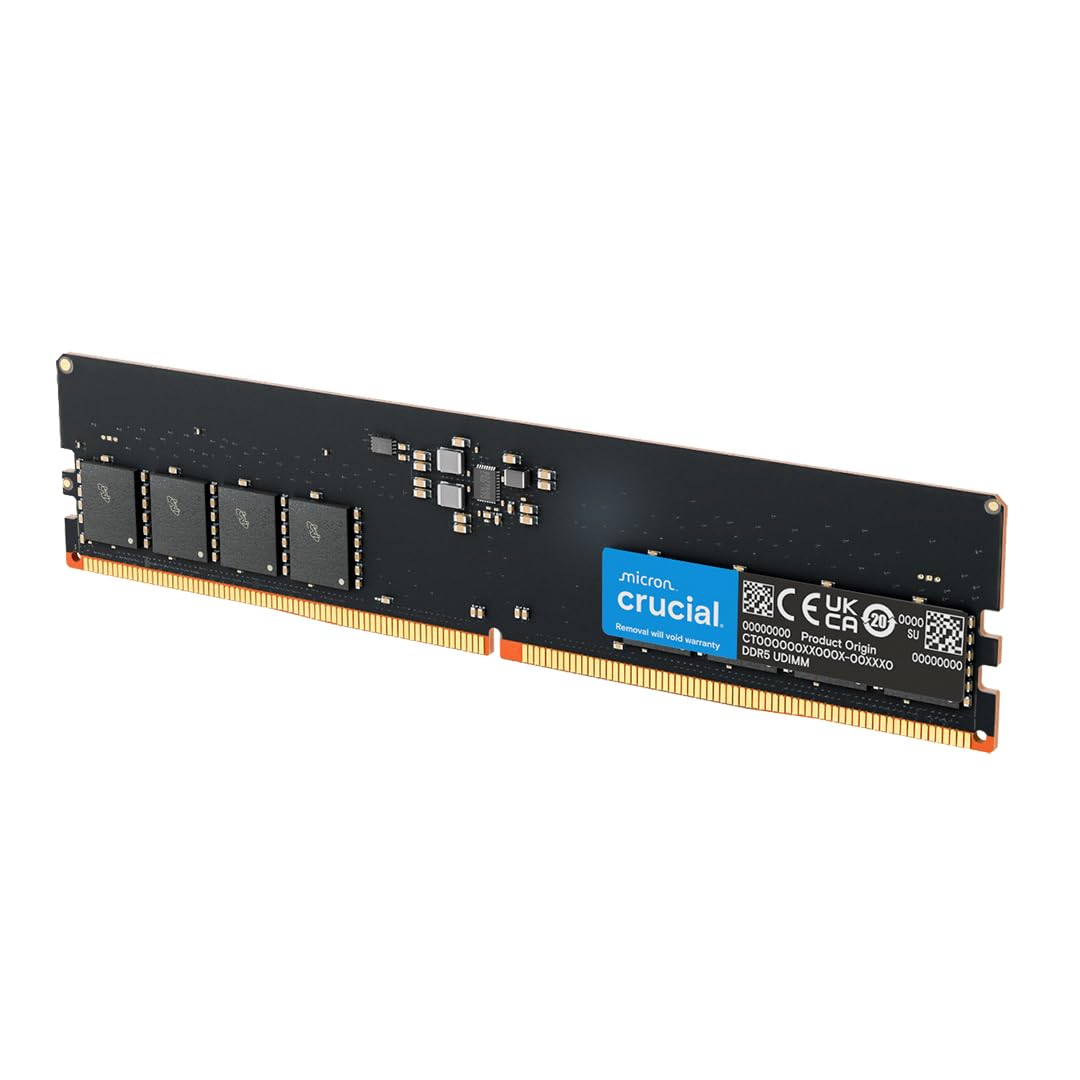
The safe-fit workhorse for a fresh Intel or AMD desktop build.
Crucial’s 4800MHz UDIMM is a 288-pin desktop stick that plays nicely with both major platforms. The same module supports Intel XMP 3.0 and AMD EXPO (the two brands’ one-click speed profiles built into the RAM), which saves you hunting for a version that matches your CPU brand. At 4800MHz and CL40 timing it is a steady everyday performer rather than a speed demon — good for smoother multitasking and responsive apps.
Buyers rate functionality highest and quality close behind — the story of a stick that just works so you can get on with your build. It is tuned for 13th Gen Intel Core and AMD Ryzen 7000 Series processors, so it drops into a modern DDR5 rig cleanly. It holds a 4.0+ star standing across 500+ ratings, making it the most-reviewed module in this guide, and Micron’s 42 years of memory manufacturing sit behind the brand.
The caveat is speed and the odd fit surprise. Compared with the Crucial Pro 6000MHz below, this stick runs at 4800MHz — quieter on paper for heavy gaming. Compatibility is also mixed in owner feedback: many report it fitting ITX builds cleanly, while an occasional machine rejects it. If your board is especially particular, check its qualified vendor list before buying. For a first budget desktop build, its 4800MHz CL40 spec is a dependable starting point.
The draw: dual XMP 3.0 and EXPO support on one stick means Intel and AMD builders both get a simple path to rated speed.
Be wary of: the 4800MHz ceiling versus the Crucial Pro 6000MHz below — and confirm your board is on Crucial’s compatibility list.
Solid first-build buy: Intel and AMD desktop owners who want cross-platform XMP/EXPO support and a well-reviewed everyday stick.
Not for speed chasers: if you want 6000MHz for gaming, step up to the Crucial Pro below.
7. Crucial Pro DDR5 Overclocking Edition 16GB 6000MHz CL36

Fast, tight, and honest — a 6000MHz stick that respects your build.
The Crucial Pro Overclocking Edition is the speed-and-timing champion of this desktop group. It runs at 6000MHz — 1200MHz above the A-Tech’s 4800MHz — and does it at CL36, tighter than the ADATA’s CL30 at the same speed only marginally but with a lower 1.35V versus the 1.1V standard tier. That 6000MHz/CL36 combination makes it a top-tier pick for a gaming rig running heavy workloads.
It ships as a single 16GB DIMM in the standard 288-pin UDIMM (unbuffered DIMM) layout, compliant with the industry DDR5 UDIMM spec, so it drops into most modern desktop boards. At 34 g it is a mid-weight module — lighter than the 72 g ADATA and heavier than the 39 g Kingston. Buy two for a matched 32GB setup, and it should run at rated speed on a board that supports DDR5-6000.
Two things to plan for. The taller profile and speed headroom expect a board that can actually hit 6000MHz — confirm yours lists that frequency before buying. And it is a premium module, so the value argument is stronger for daily gaming than for a light-use build. A 4.5+ star standing across 40+ ratings makes it the highest-rated desktop stick in this list, and customers note running it at speed with no trouble. If 6000MHz is your target, this stick hits it at CL36.
Why it earns the crown
- 6000MHz with tight CL36 timing — fastest combo in this desktop set
- Standard 288-pin UDIMM layout fits most modern boards
- 34 g weight keeps install simple, lighter than the ADATA’s 72 g
- Supports high-speed DDR5-6000 systems for gaming and workloads
Plan around
- Rated 6000MHz needs a board that can reach it
- Premium positioning makes it pricier than the 4800MHz daily sticks
The gamer’s pick: owners building a 6000MHz rig who want tight CL36 timing and a top rating behind it.
For light use only: it may be more speed than a simple office desktop needs — the Kingston is a calmer starting point there.
Know the Specs
Speed in MHz and MT/s
This figure is how quickly data moves between memory and processor. A 6000MHz module runs noticeably faster than a 4800MHz one, but your board and CPU set the ceiling — buy speed your hardware can actually reach.
CL (Cas Latency)
A lower CL number means the memory answers a request after fewer clock cycles, so CL30 responds faster than CL46 at the same speed. Tighter timing shows up in games and heavy multitasking, and it usually costs more.
DIMM vs SO-DIMM
DIMM is the long desktop stick; SO-DIMM is the shorter stick laptops and mini PCs use. They are not interchangeable — check which one your machine’s slot takes before ordering.
XMP 3.0 and EXPO
These are one-click factory profiles that set memory to its rated speed. Intel boards use XMP, AMD boards use EXPO — buying memory that supports your platform’s profile makes hitting rated speed a simple BIOS toggle.
Common Questions
Can I mix two different 16GB DDR5 sticks in the same PC?
Will a DDR5 stick fit my older DDR4 motherboard?
Do I need to enable XMP or EXPO to get rated speed?
Does a lower CL number actually make games faster?
How do I know if my laptop takes a SO-DIMM?
Is two 16GB sticks better than one 32GB stick?
What happens if my board can’t hit my RAM’s rated speed?
Can I upgrade a laptop that has soldered RAM?
Do DDR5 sticks generate a lot of heat?
Will a taller heat spreader block my CPU cooler?
The Bottom Line
For most desktop builders, the 2 16gb ddr5 ram sticks starting point is the Kingston FURY Beast because it boots clean at rated speed with a single XMP toggle, and its low-profile spreader clears bulky coolers. If you want the tightest timings and RGB for a gaming rig, reach for the ADATA Lancer Neon at 6000MHz CL30. And for laptop owners, the Samsung 5600MHz SODIMM is the fuss-free upgrade that gets recognized on first boot.
How we choose
We do not accept paid placement. Every pick is matched to a real buyer and a real use-case; we do not hands-on test units.
Sources
Specifications: manufacturer listings and product documentation. Review insights: verified customer reviews, as of November 2026. Pricing: not shown on this page (it changes often); check the current price via the retailer link.
As an Amazon Associate, My Heart Lives Here earns from qualifying purchases. This does not affect which products we feature.