Heads up: This post contains affiliate links. As an Amazon Associate I earn from qualifying purchases, at no extra cost to you. Learn more
Specs are compiled from manufacturer listings and verified buyer reviews and can change over time — please confirm the key details on the product page before buying.
Buying an AM4 ITX motherboard feels like shopping a closing-down sale. The processors are cheap and proven, but the mini-ITX boards that fit them are slowly disappearing from shelves. That matters because AM4 chips only fit AM4 boards — there is no adapter, no fallback, and no way to squeeze a Ryzen 5000 into an AM5 socket. So the question is not which board is cleverest. It is which one you can actually find for the processor you already own or plan to buy, without getting stranded.
This guide is built by comparing the manufacturers’ published specifications and the patterns across verified customer reviews, so you get each pick’s real strengths and trade-offs instead of marketing spin.
A 170mm square board has to fit your case, your cooler and your wallet. The picks below cover every viable route into small-form-factor AM4, from a budget-first ASRock to a dual-M.2 GIGABYTE, and the quick comparison table shows which am4 itx motherboard matches the build you already have in mind.
Top Picks


How To Choose The Best AM4 ITX Motherboard
Pick your processor first, then the board. The AM4 socket (the square bed of pin holes the CPU drops into) locks you to this platform. The chipset — A520, B550 or X570 — decides how much of that processor you can actually use. Get the socket right and the rest of the build falls into place.
Check the chipset before anything else
A520 boards are the entry tier: they run Ryzen 3000 and 4000 series processors and handle everyday builds, but they cap what you can do with the platform. B550 boards sit a rung higher and add PCIe 4.0 support, which is the difference between a graphics card running at full lane speed and one running at half. If you plan to keep this machine for years and slot in a modern GPU, B550 is the floor worth standing on.
Two memory slots, and that is final
Every board on this list has two DIMM slots (the long channels that DDR4 memory sticks click into). That is a physical limitation of the mini-ITX form factor, not a cost cut. You buy two sticks once and you are done — there is no room to add a third later. Choose a matched dual-channel kit sized for what you will run in two or three years, not what you need on day one.
Cooler clearance is the hidden trap
On a 170mm board, the CPU socket sits close to the memory slots and the rear I/O shield. A tower air cooler with a wide base plate can overhang the first DIMM slot and force you to mount the fan higher, or block it entirely. Check the cooler’s published socket clearance against the board layout before you buy. Low-profile air coolers and 240mm all-in-one liquid loops are the safest pairings here.
Storage and expansion in a small box
One PCIe x16 slot is all you get for a graphics card — no second slot for a capture card or sound card. So M.2 slots carry the load. A board with two M.2 slots lets you run a fast boot drive and a larger storage drive without cables snaking through the case. With one M.2 slot, plan on adding a SATA drive instead.
Side-by-Side Comparison
| Model | Best For | Chipset | M.2 Slots | Wi-Fi | Amazon |
|---|---|---|---|---|---|
| GIGABYTE B550I AORUS PRO AX★ Best Overall | Most AM4 builders | AMD B550 | 2 (PCIe 4.0 + 3.0) | Wi-Fi 6 | Amazon |
| ASRock A520M-ITX/ACBudget Champion | Tight budget builds | AMD A520 | — | 2.4/5 GHz antennas included | Amazon |
| GIGABYTE A620I AX | Cheapest route into AM5 | AMD A620 | Single M.2 | Realtek Wi-Fi 6E | Amazon |
| ASRock B650I Lightning WiFi | Fast storage on AM5 | AMD B650 | 2 (PCIe 5.0 + 4.0) | Intel Wi-Fi 6E | Amazon |
| MSI MPG B850I Edge TI WiFi | Flagship small-form-factor power | AMD B850 | 2 (Gen5 + Gen4) | Wi-Fi 7 | Amazon |
| GIGABYTE B850I AORUS PRO | Latest-socket value | AMD B850 | 2 | Wi-Fi 7 | Amazon |
| ASUS ROG Strix B850-I Gaming WiFi | Overclockers and tinkerers | AMD B850 | 2 (both PCIe 5.0) | Wi-Fi 7 | Amazon |
Detailed Reviews
1. GIGABYTE B550I AORUS PRO AX
Our pick — 4.0+★ from 1,500+ verified ratings; the strongest balance of quality and price.
The B550 board that made small-form-factor AM4 feel like a first-class build.
Own a Ryzen 5000 chip and a case the size of a shoebox? This is the board most builders land on. The AMD B550 chipset supports Ryzen 5000, 4000 and 3000 series processors, so it swallows nearly every AM4 chip still worth buying. You also get PCIe 4.0 (the fast data lane standard) on both the x16 graphics slot and the first M.2 slot. That means your graphics card and NVMe drive both run at their rated PCIe 4.0 pace instead of being throttled back a generation.
Storage is where it pulls ahead of the budget ASRock A520M-ITX/AC, which has no second M.2 landing pad at all. Two M.2 slots here mean one fast boot drive plus a second drive for files, with no SATA cables threading through a cramped case. Networking comes from Wi-Fi 6 and 2.5 GbE LAN (a 2.5-gigabit wired port). That port is two and a half times the speed of the old 1-gigabit standard, so large game downloads and file transfers across your home network finish sooner. A USB 3.2 Gen 2 Type-C port on the rear rounds out the external connections.
Build quality is what wins people over here. The 8-layer circuit board, digital 8-phase power design and extended VRM heatsink with an aluminium backplate keep the VRM cool under a sustained load in a compact case. The integrated I/O shield saves a fiddly assembly step, and Q-Flash Plus lets you flash the BIOS from a USB stick without a processor installed — useful if the board ships with firmware older than your chip. At 1 kg, it feels like a slab rather than a sheet of fibreglass.
The honest catch is connectivity. Wireless is the weak link on this board — dropouts and Bluetooth stumbles are the recurring theme, so plan on a wired connection or a cheap USB Wi-Fi adapter if your desk sits far from the router. Occasional reports of a board that will not power up exist too, which is the nature of any mass-produced PCB. Those are the exceptions rather than the rule, but worth knowing before you commit.
What earns its keep
- Two M.2 slots, one running PCIe 4.0 — fast boot drive plus bulk storage without SATA cables
- 8+2 power phase design with extended VRM heatsink and aluminium backplate for stable thermals
- Q-Flash Plus updates the BIOS without a CPU installed
- 2.5 GbE LAN and USB 3.2 Gen 2 Type-C on the rear panel
Where it asks patience
- Wi-Fi 6 module is the weakest part of the package — wired is the safer bet
- A minority of boards arrive dead or fail early; RMA is the fallback
- B550 caps you at Ryzen 5000 — no path to a 7000-series chip later
Reach for this if: you are building a Ryzen 5000 mini-ITX machine and want two M.2 drives, PCIe 4.0 and a board that will not buckle under a sustained load.
Look elsewhere if: Wi-Fi is your only network option and you refuse to run a cable or add an adapter.
2. ASRock A520M-ITX/AC
The cheapest honest way into a Ryzen mini-ITX build, and it knows it.
This is the board for the build where the case, the cooler and the processor already ate the budget. ASRock’s A520M-ITX/AC runs on the AMD A520 chipset — the entry rung of the AM4 ladder — and supports Ryzen 3000, 4000 and 5000 series processors. DDR4 memory is rated up to 4733+ in overclock mode, which is generous for a board at this tier and means a fast RAM kit is not wasted on it. The size is the standard 170mm square, so it drops into any mini-ITX chassis.
The physical build is where it genuinely holds up. Owners keep coming back to the quality of the thing, and it is the most-praised trait on the listing by a margin — the board feels more substantial than its position on the price ladder suggests. Value is the second theme: it does the basic job of getting a Ryzen system running in a small box. DisplayPort and HDMI outputs feed a processor with integrated graphics, and 7.1-channel audio comes via the Realtek ALC887 codec (the audio chip). Wi-Fi antennas are in the box, so you are not hunting for a separate card on day one.
Now the limits. There is one PCIe 3.0 x16 slot, so your graphics card runs a generation behind the B550 boards above — fine for a mid-range GPU, tight if you plan on a high-end card. Memory clock support is listed at 2400 MHz from the start, so fast kits need manual tuning rather than profile loading. And the A520 chipset simply cannot open up everything a Ryzen 5000 chip can do.
The posting question: post failures are the mixed signal on this board — a share of units never make it to a boot screen, and that is real. Most buyers never hit it, but buy from a seller with a clean return path and you remove the risk entirely.
BIOS reality check: flashing the firmware splits opinion. Some find it simple, others fight it. Do it with a stable USB stick and the manual open, and Q-Flash style updates are manageable. Just do not attempt it on a rushed evening.
Suits the builder who wants a small Ryzen machine for desktop work and light gaming without overspending on the foundation.
Wrong pick if you are slotting in a high-end graphics card — the single PCIe 3.0 x16 slot will hold it back.
3. GIGABYTE A620I AX
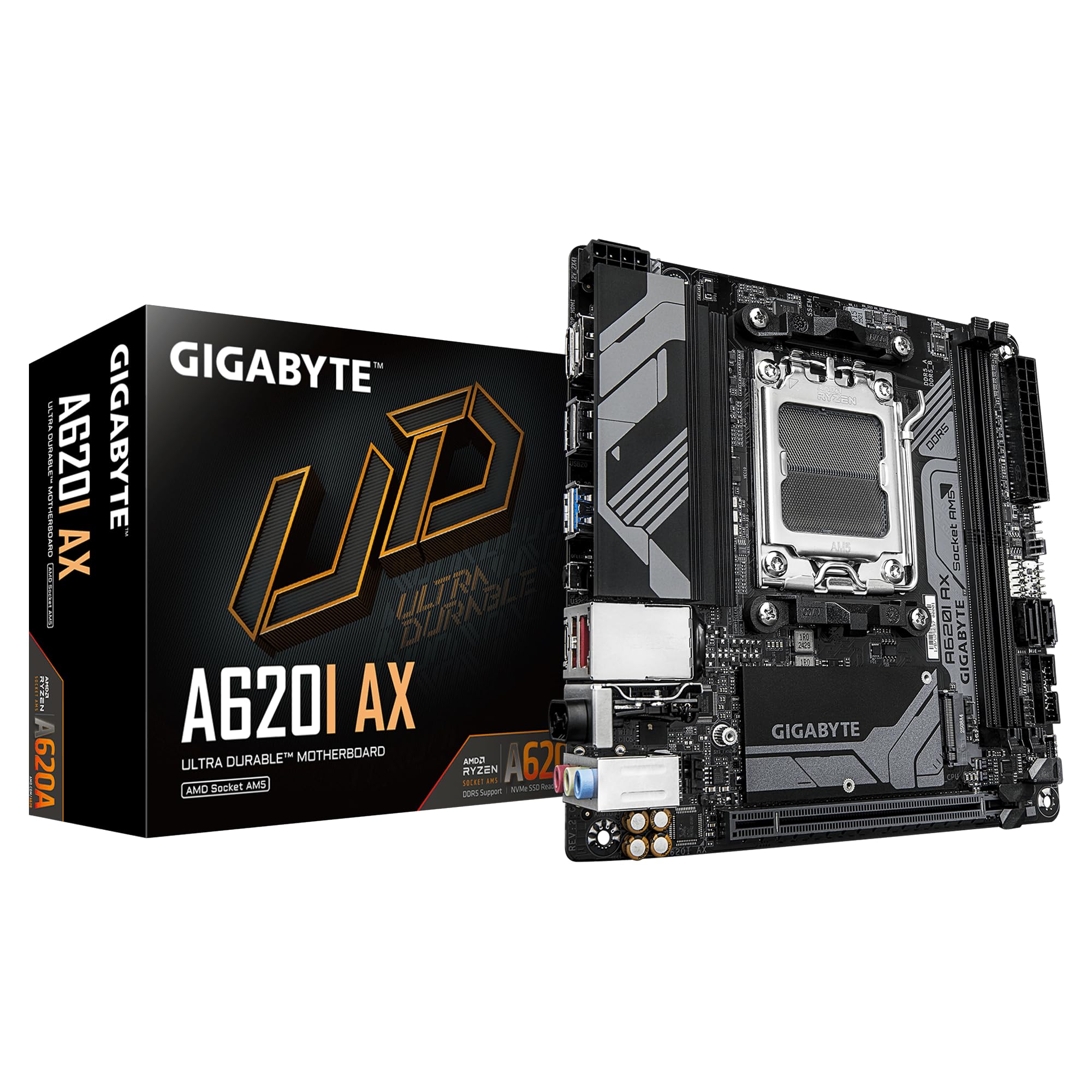
An AM5 board at entry money — just know the socket changed under you.
Stop here and read the socket. This is an AM5 board, not AM4 — it takes AMD Ryzen 7000 series processors and DDR5 memory, which means none of your existing AM4 chips or DDR4 sticks will drop into it. If you are migrating from an older Ryzen system and keeping the processor, this is not your board. It earns a place on this list because it is the cheapest way into current-generation small-form-factor AMD, and plenty of buyers building fresh are weighing exactly that trade.
The A620 chipset gives you a 5+2+1 phase VRM (the power stages that feed the processor) on a compact board. It also adds a PCIe x16 slot with an EZ-Latch quick-release tab instead of a fiddly retention clip — you press a latch and the card comes out, no screwdriver poking at a hidden tab. Wi-Fi 6E taps the 6 GHz band for less congestion in apartment blocks, so your connection stays steadier when neighbors crowd the airwaves. The Realtek 2.5GbE wired port gives you a fast cable option when wireless gets crowded. Q-Flash Plus and RGB Fusion header support round out the software side.
The numbers that shape the decision are memory-related. This board supports 64 GB of DDR5, and it is rated at 2133 MHz memory clock — the slow end of the spectrum, so a high-speed DDR5 kit will not run near its sticker rating. Compared with the MSI MPG B850I Edge TI WiFi, which carries 128 GB of memory capacity, this is half the ceiling. That is fine for a two-stick everyday build; it is not a board for a memory-hungry workstation.
Why it earns a slot
- Cheapest ticket to an AM5 Ryzen 7000 mini-ITX build
- EZ-Latch makes graphics card swaps tool-free
- Wi-Fi 6E with 2.5GbE LAN covers both wireless and wired
- Installation is repeatedly described as straightforward
Set expectations here
- AM5 socket — no AM4 processor or DDR4 memory compatibility
- Single M.2 slot; plan a SATA drive for extra storage
- 64 GB memory ceiling and 2133 MHz rating cap fast RAM kits
- Board feel is split — some find it light for the tier
The right call for: a from-scratch Ryzen 7000 build where the board must stay cheap and you only need one NVMe drive.
Keep looking if: you already own an AM4 processor — this socket will not accept it.
4. ASRock B650I Lightning WiFi

Two M.2 slots, one of them PCIe 5.0, in a case that barely fits your hand.
When storage speed is the whole point of a small-form-factor build, this board leads. The ASRock B650I Lightning WiFi carries a PCIe 5.0 x4 M.2 slot alongside a PCIe 4.0 M.2 slot. The first is PCIe 5.0, double the bandwidth of PCIe 4.0, so a top-spec SSD loads game levels and large project files faster. Dual M.2 slots mean you can run a boot drive and a bulk drive without a single SATA cable inside a cramped chassis. It supports AMD Ryzen 9000, 8000 and 7000 series processors on AM5, so the upgrade path runs forward for years.
Memory headroom is the standout figure. The board is rated for DDR5 overclocked to 7200+ in dual-channel, which is a lot of bandwidth for a 170mm board. Power delivery is 8+2+1 phase with Dr.MOS components — the individual power stages that keep the processor fed steadily — and that stability matters more in a small case where airflow is scarce. Cooling is handled by heatsinks over both the VRM and the M.2 slots, and network duty falls to Phantom Gaming 2.5G LAN plus Intel Wi-Fi 6E.
Here is the physical reality: this board is listed at 12.2 inches by 8.27 inches by 1.97 inches, against 6.69 by 6.69 by 1.7 on the GIGABYTE B550I AORUS PRO AX. That is the retail packaging footprint, not the board itself, which is the standard 170mm square. Still, it is a large box for a small board, so check the physical space in a tight chassis. The other consistent theme is reliability: this board is easy to work with and the setup flow is clean, but a share of buyers report early failures. Buy from a seller with a solid return window.
What it delivers: PCIe 5.0 storage, DDR5 7200+ memory support, 8+2+1 phase power and Wi-Fi 6E in one 170mm package. It is the fastest all-round B650 mini-ITX option here.
What to plan around: BIOS Flashback and ASRock’s Auto Driver Installer make the first boot easy, but the board is only as reliable as the unit you receive. Keep the RMA path in reach.
Choose it when storage speed and a forward AM5 upgrade path matter more than squeezing every dollar out of the build.
Think twice if you are building in an ultra-tight chassis and want to verify the box fits — or if you want a board with a longer reliability track record.
5. MSI MPG B850I Edge TI WiFi
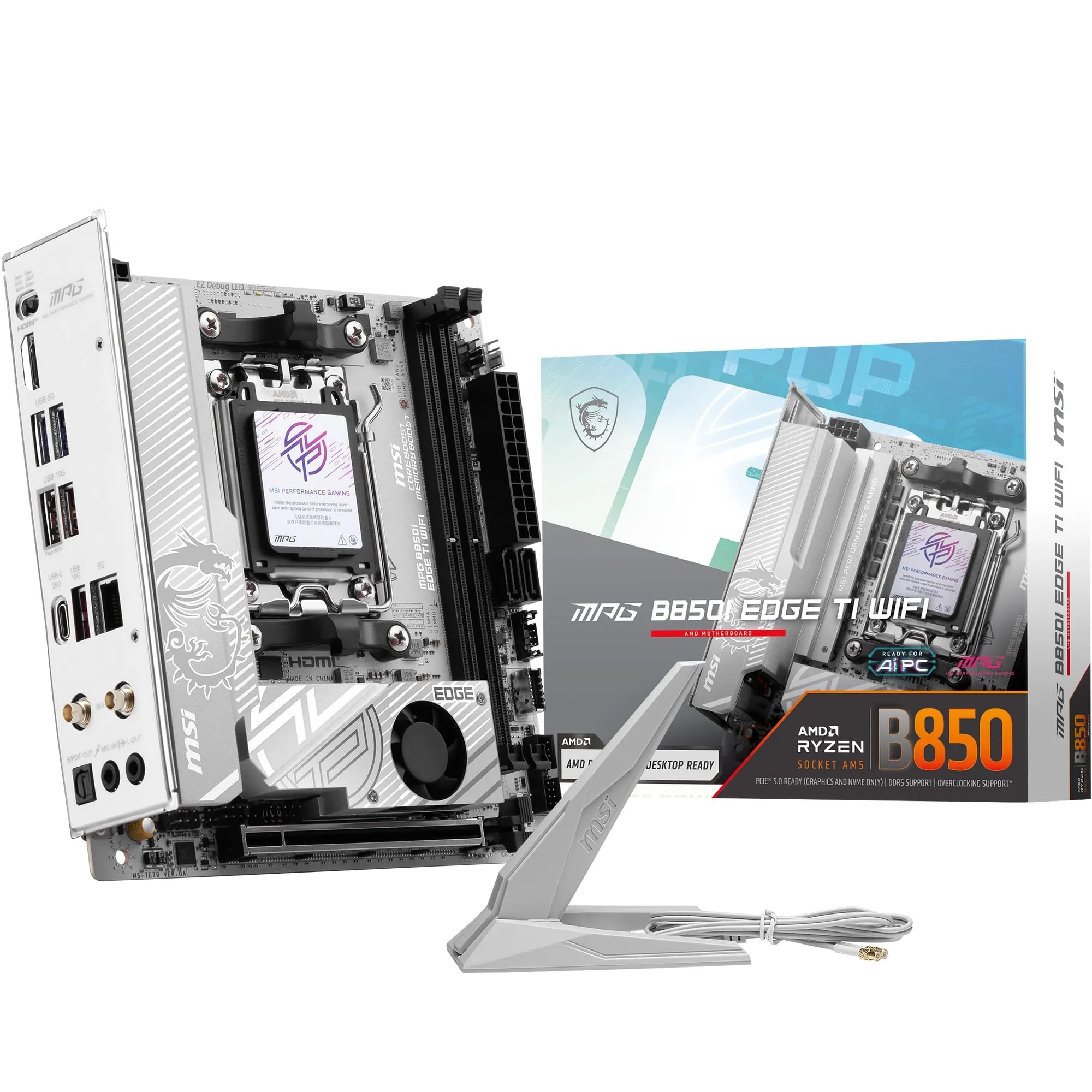
The 90A power stage board that makes a mini-ITX case feel like a full tower.
Building a high-end Ryzen 9000 system and refusing to compromise on power delivery? This is the board the others get measured against. The MPG B850I Edge TI WiFi runs a Direct 8-phase VRM rated at 90A per stage with SPS components — those are the individual power stages feeding the processor. At 90A per stage it is overkill for most chips, which is the point: a top-end Ryzen 9000 holds steady voltage under sustained load. The 7W/mK MOSFET thermal pads (a measure of how well they move heat) plus an extended heatsink keep the VRM cool when a compact case is fighting for airflow.
Memory capacity is the number that separates it from the GIGABYTE A620I AX. This board supports 128 GB of DDR5 to the A620I’s 64 GB, and the overclock ceiling is rated at 8200+ MT/s in 1DPC 1R configuration. That means a two-stick kit can be pushed hard without the board becoming the bottleneck. Networking is full-speed Wi-Fi 7 with Bluetooth 5.4 and a 5Gbps LAN port — the 5-gigabit wired port is the highest on this list, double the 2.5 GbE on the B550I AORUS PRO AX below it in price.
Dual M.2 slots split the generations: one Gen5 x4 slot rated at 128Gbps and one Gen4 x4 slot at 64Gbps. The combo-fan header handles both a pump and a system fan, which is the piece that lets a small loop breathe. Rear I/O includes USB Type-C at 20Gbps and 7.1-channel audio with Audio Boost 5, including S/PDIF output. Buyers consistently describe this board as the small-form-factor build with no weak corner — quality first, reliability second, setup third.
Where the money goes
- Direct 8-phase VRM at 90A per stage — headroom for the top Ryzen 9000 chips
- 128 GB DDR5 capacity and 8200+ MT/s memory ceiling
- Wi-Fi 7, Bluetooth 5.4 and a 5Gbps LAN port
- Combo-fan header for pump and system fan, plus 20Gbps USB-C on the rear
Worth knowing first
- AM5 socket — no AM4 processor or DDR4 support
- Value for money splits opinion at the top of the market
- The lightest review base of any board here, so fewer long-term reports to lean on
Built for: a no-compromise Ryzen 9000 mini-ITX machine where power delivery, memory headroom and Wi-Fi 7 all matter at once.
Overkill if: you are running a mid-range chip and a single NVMe drive — the money is better spent elsewhere in that build.
6. GIGABYTE B850I AORUS PRO

Same socket, same Wi-Fi 7, lighter on the power stages than the flagship.
GIGABYTE’s take on the current AM5 mini-ITX recipe runs an 8+2+1 power phase design with 80A smart power stages on the AMD B850 chipset, supporting Ryzen 9000, 8000 and 7000 series processors. That 80A per stage figure sits below the 90A rating on the MSI MPG B850I Edge TI WiFi. For most builds it makes zero practical difference — both boards have more power delivery than a mid-range Ryzen chip will ever ask for. Only the top-end chips would want the extra headroom.
Memory is DDR5 across two DIMMs with 128 GB capacity and a 5200 MHz rated clock speed. Compare that to the MSI’s 8200+ MT/s ceiling and you see the tier gap clearly — this board will not push a premium DDR5 kit to its sticker speed without manual overclocking. For a two-stick everyday build, 5200 MHz is ample. Storage is covered by two M.2 slots, and cooling comes from VRM and M.2 Thermal Guard heatsinks plus EZ-Latch for tool-free graphics card removal. Wi-Fi 7 and 2.5GbE LAN handle networking.
what separates it from the rest of the list is the coverage. GIGABYTE backs this board with a 5-year warranty, the same term it offers on the A620I AX — a longer safety net than you typically see on a motherboard. Setup is described as easy, with the build quality drawing repeated praise. The honest caveat is reliability: reports split between units that run rock solid for months and a minority that fail within two months. That split is the strongest argument for buying from a seller with a generous return policy.
Verdict in one line: Wi-Fi 7, two M.2 slots and a 5-year warranty, at a lower power-stage rating than the flagship — the sensible middle of the premium tier.
Fits you if you want modern AM5 connectivity and a long warranty without paying flagship prices for power delivery you will never use.
Pass if you are chasing peak memory overclock speeds or running a flagship processor that genuinely needs the higher power-stage rating.
7. ASUS ROG Strix B850-I Gaming WiFi

Two PCIe 5.0 M.2 slots and AI tuning for the builder who wants every dial.
Count the M.2 slots here: two, and both are PCIe 5.0. The ASUS ROG Strix B850-I Gaming WiFi is the only board on this list with two full Gen5 storage slots, one capped by a large heatsink to stop a fast drive from throttling during long transfers. Add PCIe 5.0 x16 for the graphics card and you have a mini-ITX board that will not bottleneck any current component. It supports AMD Ryzen 9000, 8000 and 7000 series processors on AM5, with Wi-Fi 7 and 2.5G LAN for networking.
Power delivery is 10+2+1 stages rated at up to 70A each with ProCool power connectors — the beefy connectors that resist heat at the power joint. The thermal side is a massive heatsink with an integrated I/O cover and high-conductivity thermal pads. On the software front, ASUS AI Overclocking, AI Advisor and AI Networking II handle tuning automatically, which means you do not need to know the first thing about voltage curves to get a stable overclock. AEMP handles memory profile loading for you.
The caveat here is the one that follows flagship boards around. Reliability, compatibility and value all split opinion — a chunk of buyers love the feature density, and a chunk find it hard to justify the premium. This is the board you pick because you want dual Gen5 storage and AI tuning, not because it is the sensible value play. Buy it for the slots and the software, and keep the return window in mind.
The defining spec: dual PCIe 5.0 M.2 slots with one heavily heatsinked — nothing else on this list has that pairing, and it means two top-speed NVMe drives without compromise.
For the tinkerer who wants dual Gen5 storage, AI-assisted overclocking and a board that will not cap a high-end graphics card.
Not for you if you want the simplest value story — the feature list is aimed at people who will use every one of them.
Know the Specs
Chipset: A520 vs B550
The chipset is the traffic controller of the board, deciding which features your processor can reach. A520 is the entry tier — it runs Ryzen 3000 and 4000 series processors and handles everyday builds, but capping PCIe support to 3.0 means a modern graphics card runs a generation behind. B550 adds PCIe 4.0 on both the x16 graphics slot and the first M.2 slot, which is why most AM4 builders choose it. If you plan to keep the machine for years, B550 is the floor worth standing on.
Power phases and VRM cooling
A power phase is a set of components that feeds the processor with clean, steady voltage. More phases and higher current ratings per stage mean the board holds up under a sustained load without sagging. A 6+2 design like the GIGABYTE B550I AORUS PRO AX is enough for most Ryzen chips; the 90A-per-stage VRM on the MSI MPG B850I Edge TI WiFi is headroom for top-end chips. In a small case, the heatsink over the VRM matters as much as the phase count — extended heatsinks and thermal pads stop the board from throttling when airflow is tight.
M.2 slots and PCIe generations
An M.2 slot is the flat connector that takes a stick-shaped NVMe SSD. PCIe 4.0 doubles the bandwidth of PCIe 3.0, and PCIe 5.0 doubles that again. In real use, a PCIe 4.0 drive loads large game levels and project files noticeably faster than a PCIe 3.0 drive, while a PCIe 5.0 drive is future-proof for the next few years. Two M.2 slots let you run a fast boot drive plus a storage drive with no SATA cables, which matters in a cramped mini-ITX chassis.
DDR4 vs DDR5 on a mini-ITX board
AM4 boards take DDR4 memory; AM5 boards take DDR5. They are not interchangeable, and a mini-ITX board has only two slots, so the choice is locked in at the point of purchase. DDR4 is cheaper and proven on the AM4 socket, with boards like the GIGABYTE B550I AORUS PRO AX rated to 3200 MHz. DDR5 boards like the ASRock B650I Lightning WiFi push to 7200+ in overclock mode. Pick the memory type your processor requires.
Common Questions
Will a Ryzen 5000 processor work in the GIGABYTE B550I AORUS PRO AX?
Can I put an AM4 processor in the ASRock B650I Lightning WiFi?
How much memory can these mini-ITX boards hold?
Will a tower air cooler fit in a mini-ITX case with these boards?
Do I need a graphics card if the board has HDMI and DisplayPort?
Is two M.2 slots worth paying for on a small board?
What does PCIe 5.0 M.2 actually change compared with PCIe 4.0?
Is a 2.5GbE LAN port meaningfully faster than a standard 1GbE port?
Can a mini-ITX AM4 board run a high-end graphics card?
The Bottom Line
For most AM4 builders, the am4 itx motherboard answer is the GIGABYTE B550I AORUS PRO AX — dual M.2 with PCIe 4.0, an 8-layer board with extended VRM cooling, and support for every Ryzen 5000, 4000 and 3000 chip you might own. It is the board that makes a small AM4 build feel finished rather than compromised. Building to a hard budget with a modest graphics card? The ASRock A520M-ITX/AC covers the basics at entry-level money. And for anyone moving to current-generation Ryzen, the MSI MPG B850I Edge TI WiFi brings 90A power stages, Wi-Fi 7 and a 5Gbps LAN port into the same footprint.
How we choose
We do not accept paid placement. Every pick is matched to a real buyer and a real use-case; we do not hands-on test units.
Sources
Specifications: manufacturer listings and product documentation. Review insights: verified customer reviews, as of November 2026. Pricing: not shown on this page (it changes often); check the current price via the retailer link.
As an Amazon Associate, My Heart Lives Here earns from qualifying purchases. This does not affect which products we feature.