Heads up: This post contains affiliate links. As an Amazon Associate I earn from qualifying purchases, at no extra cost to you. Learn more
Specs are compiled from manufacturer listings and verified buyer reviews and can change over time — please confirm the key details on the product page before buying.
If you are shopping for a 5060 Ti, the first decision is not the brand on the box — it is memory. The 16GB versions cost more but hold their footing as games grow heavier, while the 8GB cards save you money today and ask you to turn textures down sooner. Everything else, from fan noise to card length, is a smaller variable than that one choice.
This guide is built by comparing the manufacturers’ published specifications and the patterns across verified customer reviews, so you get each pick’s real strengths and trade-offs instead of marketing spin.
The card that gets closest to the whole package for most people is the ASUS PRIME, though the ZOTAC and PNY cards ask a much smaller footprint question. Below you will find the full breakdown of the 5060 ti range, sorted by what each board actually does well.
Top Picks


How To Choose The Best 5060 Ti
Every 5060 Ti runs on the same NVIDIA graphics chip (the processor that draws your games), so what you actually choose between depends on three things: how much memory the card carries, how big the cooler is, and how far the maker pushed the clock speed (how fast the chip runs) from the start.
Memory Is The Fork In The Road
Pick 16GB if you plan to keep the card for years or run games at 1440p with high texture settings. Pick 8GB only if you play at 1080p and want to spend less now. The memory (VRAM, the card’s own working space for textures and models) is the part you cannot add later — it is soldered to the board.
Measure Your Case Before You Fall In Love
Card length and slot thickness decide whether a board fits. Some 5060 Ti models are short two-slot designs built for small cases, while others stretch to 12.9 inches and sit 2.5 slots deep. Check your clearance against the exact model, not against the chip name.
Clock Speed Is The Smallest Difference
Boost clocks across these cards sit in a narrow band, so the fastest board in this group is not dramatically ahead of the slowest in everyday play. What you actually feel is cooler size and fan noise, because a card that runs cool holds its boost clock longer during a long gaming session.
Side-by-Side Comparison
| Model | Best For | Memory | Boost Clock | Card Length | Amazon |
|---|---|---|---|---|---|
| ASUS PRIME RTX 5060 Ti 16GB OC★ Best Overall | Most buyers | 16 GB GDDR7 | 2647 MHz OC | 12″ | Amazon |
| MSI Gaming RTX 5060 Ti 16G OCTop Performer | 1440p gaming | 16 GB GDDR7 | 28 MHz | 12.9″ | Amazon |
| Gigabyte WINDFORCE OC 16G | Gaming and content creation | 16 GB GDDR7 | 2587 MHz | — | Amazon |
| ZOTAC Twin Edge OC 8GB | Small-form-factor builds | 8 GB GDDR7 | 2602 MHz | 8.7″ | Amazon |
| PNY RTX 5060 Ti 8GB OC Dual-Fan | Budget-conscious 1080p rigs | 8 GB GDDR7 | 2407 MHz | 9.65″ | Amazon |
Detailed Reviews
1. ASUS PRIME GeForce RTX 5060 Ti 16GB GDDR7 OC Edition
Our pick — 4.5+★ from 250+ verified ratings; the strongest balance of quality and price.
The 16GB card that stays calm and quiet while it works.
Here is the board that balances the whole equation. It carries 16GB of GDDR7 memory — the card’s own high-speed working space for textures — which is the one part of a graphics card you can never upgrade later. It also fits small-form-factor cases thanks to ASUS marking it SFF-Ready, a tag meaning the card is built to sandwich into compact builds.
ASUS pushes the clock to 2647 MHz in OC mode against a 2617 MHz default, a small bump that you can flip between on the fly. The dual BIOS switch toggles a Quiet profile and a Performance profile, so you pick silence for late-night sessions and speed for heavy work. The 0dB technology stops the fans entirely during light loads, which is why the card keeps drawing quiet-operation praise. On cooling, buyers report it “maintains temperatures below 70 degrees Celsius” under load. Its 16 GB of GDDR7 doubles the ZOTAC Twin Edge’s 8 GB, giving it far more texture headroom at 1440p.
The catch worth knowing: at 12 inches long and 2.5 slots deep, it is a chunkier board than the compact ZOTAC. For 1440p and a multi-year build, though, this is the safest pick in the group.
What It Nails
- 16GB GDDR7 memory for modern texture-heavy games
- 2647 MHz OC mode with a Quiet/Performance BIOS switch
- 0dB fans stop spinning at light load
- SFF-Ready for compact builds
Where It Asks More
- 12 inches long and 2.5 slots deep
- Costs more than the 8GB models
Buy it for: anyone building a 1440p machine they plan to keep for years.
Think twice if: your case clearance is tight — the ZOTAC below is far shorter.
2. MSI Gaming RTX 5060 Ti 16G OC
The long, cool-running 16GB board with a fan design built for pressure.
MSI’s taking on the same 16GB GDDR7 memory as the ASUS, but arrives with a very different physical shape. It stretches to 12.9 inches long — longer than the ASUS PRIME’s 12 inches and much longer than the 8.7-inch ZOTAC — so your case needs to be the deep kind. In return, the cooler is built around paired fan blades MSI calls TORX Fan 4.0, plus heat pipes pressed to the GPU for good contact.
Owners describe games running smoothly at high settings, and several note it holds up well even at 1440p resolution — the resolution range where 16GB of memory really starts to matter. It also brings three DisplayPort 2.1a ports and one HDMI 2.1b, so you can run multiple monitors without hunting for adapters. The Mystic Light RGB is fully controllable through MSI Center, which lets you tune system behaviour alongside the lighting.
Two honest limits: the card is long, so verify clearance before you commit, and the listed clock speed figure in its spec sheet reads oddly compared with the rest of the lineup. What it does not lack is memory headroom or port count — it is a solid 1440p machine.
The 1440p argument: 16 GB GDDR7 plus three DisplayPort 2.1a outputs is a comfortable multi-monitor setup for high-refresh 1440p play.
Measure the case: 12.9 inches of card needs a deep enclosure, and that is the single thing most likely to send it back.
Meant for: mid-tower and full-tower builds chasing smooth 1440p frames.
Not for: mini-ITX enclosures — go short with the ZOTAC instead.
3. ZOTAC Gaming GeForce RTX 5060 Ti 8GB Twin Edge OC
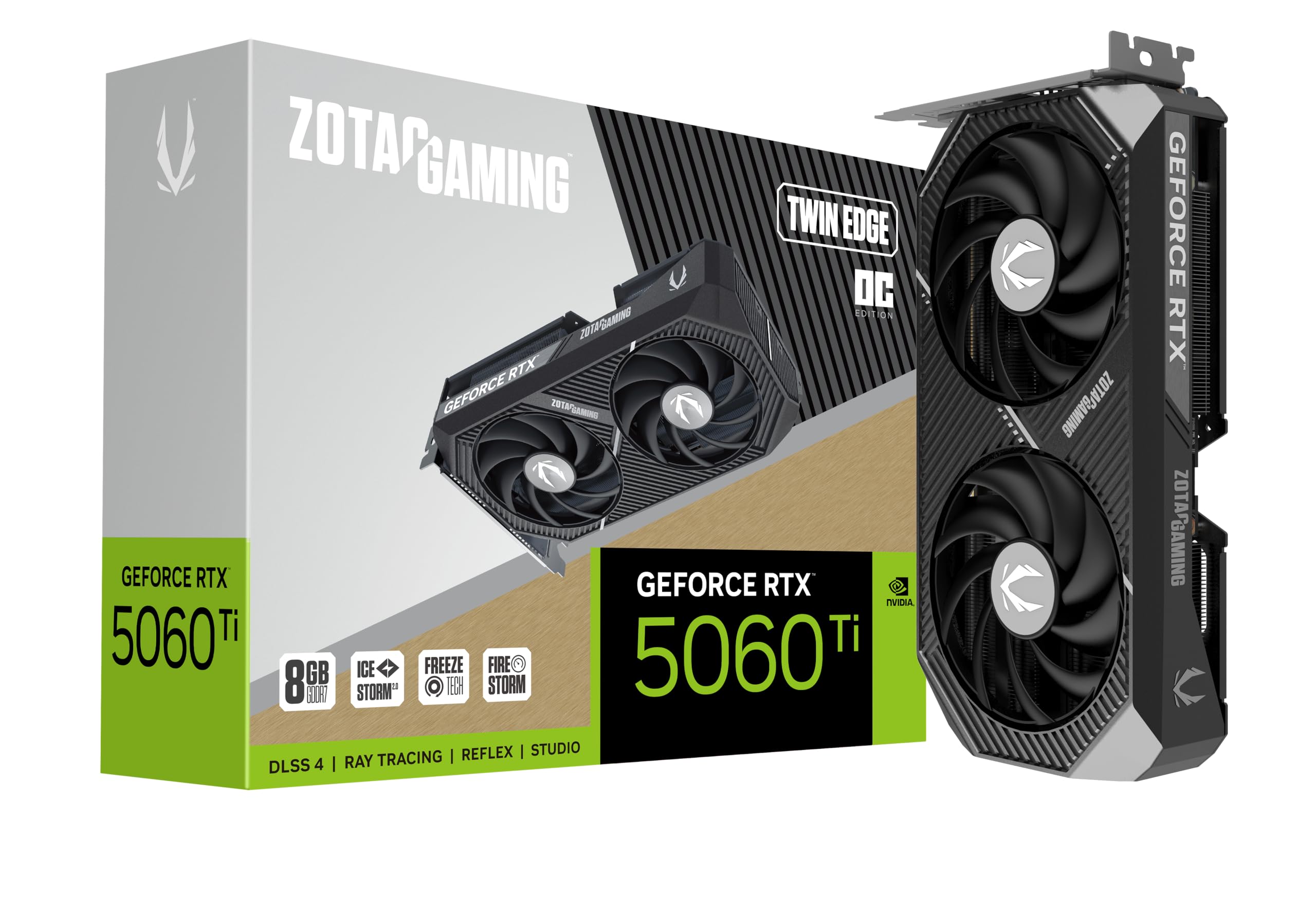
Eight inches and a half of card that still plays everything.
If your case makes the decision for you, this is the one. At 8.7 inches long and a 1.6-inch width, it is dramatically more compact than the MSI board’s 12.9-inch length — a difference that can decide whether a small-form-factor build even closes. ZOTAC also makes this SFF-ready, so the compact tag is deliberate, not accidental.
Behind the two 90mm BladeLink fans sits an IceStorm 2.0 cooler with composite heat pipes and a pass-through airflow design, plus FREEZE Fan Stop to spin down the fans at idle. The boost clock is listed at 2602 MHz, and the memory is 8GB of GDDR7 on a 128-bit interface running 28 Gbps. That means fewer textures held at once than the 16GB ASUS or Gigabyte, but a lower spending point. It also offers 8K-ready output with four display connections across DisplayPort 2.1b and HDMI 2.1b.
The genuine trade-off is memory. Buyers who plan to keep this card for years and play at 1440p with high textures will feel the 8GB ceiling long before they feel any clock-speed gap. Buyers who play at 1080p and need an 8.7-inch card for a small case will not.
Where The Compact Size Pays Off
- 8.7″ length fits small-form-factor builds
- SFF-ready with FREEZE Fan Stop
- DisplayPort 2.1b plus HDMI 2.1b across four displays
Where It Cuts Back
- 8GB memory limits texture headroom at 1440p
Best fit: small cases and 1080p setups where clearance is the deciding factor.
Skip if: you want 16GB to grow into — step up to the ASUS or Gigabyte.
4. Gigabyte GeForce RTX 5060 Ti WINDFORCE OC 16G

Sixteen gigabytes of memory in a board built for work as much as play.
Gigabyte’s entry sits in the same high-memory tier as the ASUS card — 16GB of GDDR7 on a 128-bit interface, which is 16 GB against the ZOTAC and PNY boards’ 8 GB. The card runs a 2587 MHz core frequency and sticks to a single cooling system named WINDFORCE, backed by reinforced construction that helps guard against sagging.
Its standout feature is the explicit gaming-and-content-creation tag, and that makes sense: 16GB of memory is the part that matters when you render a video timeline or run a large game texture pack. It outputs across three DisplayPort connections plus one HDMI, giving you plenty of flexibility for multiple monitors. The card also carries a full PCIe 5.0 x16 interface to match its Blackwell chip.
The hard truth: this is one of the more expensive cards on this list, so you are paying a premium for the Gigabyte name and build. If value is your priority and 16GB is not essential, the ASUS PRIME gets you the same memory class for less. If your budget stretches to the premium, its reinforced build and 16 GB justify the extra spend.
Why it holds up: 16GB GDDR7 and a PCIe 5.0 x16 interface make this a capable workstation-and-gaming board for editing and heavy texture loads.
The premium reminder: it costs more than the ASUS 16GB card, so match it to a budget you can justify before choosing it.
Suits: creators who edit video by day and game by night without swapping cards.
Ask first: whether the premium over the ASUS 16GB is worth a reinforced build for the work you do.
5. PNY NVIDIA GeForce RTX 5060 Ti 8GB OC Dual-Fan
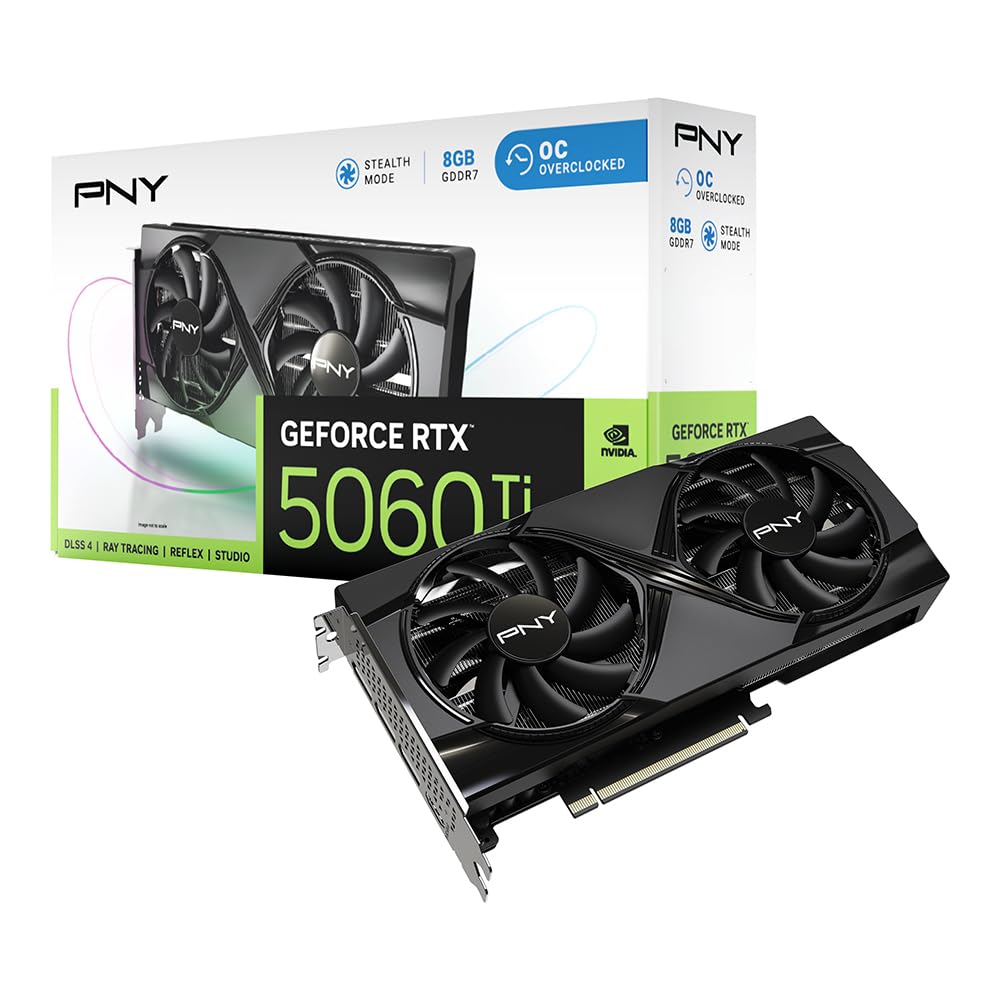
The value card that does 1080p without complaint or extra noise.
This is where the money goes furthest. PNY fits a dual-fan cooler and a vented metal backplate onto a board that stays short at 9.65 inches — closer to the ZOTAC’s 8.7 inches than to the MSI’s 12.9 inches. It carries 8GB of GDDR7, so it plays the same high-texture ceiling game as the ZOTAC, but the factory-tuned 2692 MHz boost clock gives it a little extra push over the reference spec.
Buyers consistently praise its price-to-performance, calling it the best bang for the buck in the lineup. Owners mention running three screens at 1080p (1,920 x 1,080 pixels) and reaching over 100 fps (frames per second, the smoothness of the picture) in most games, which is the balance this card is built for. VelocityX software lets you tune core and memory clocks, set fan curves, and save up to five profiles, so you can dial it in once and forget it.
The limitation is the same as the ZOTAC’s: 8GB of memory means you will turn down textures before you turn down resolution in the coming years. If you plan on 1440p or a long upgrade runway, the 16GB ASUS is the safer long bet. For a 1080p build on a tight budget, its 2692 MHz boost clock and 9.65-inch length are hard to fault.
The Value Case
- Factory-tuned 2692 MHz boost clock
- 9.65″ length fits most mid-tower cases
- VelocityX software with five saved profiles
- 1080p multi-monitor performance that just works
The Ceiling To Know
- 8GB memory needs texture cuts sooner at 1440p
- No 16GB option in this model
Go here for: a 1080p gaming rig that keeps its spending tame.
Look up to the ASUS if you want 16GB and a longer upgrade window.
Know the Specs
GDDR7 Memory (VRAM)
VRAM is the card’s own working space for textures, models, and shaders. More of it means you can hold higher-resolution game textures without dips. The 16GB models here — ASUS, MSI, and Gigabyte — keep their footing longer as games grow heavier, while the 8GB ZOTAC and PNY ask you to turn textures down sooner. This is the specification that cannot be upgraded after purchase.
Boost Clock And Cooling
Boost clock is the speed the GPU climbs to under load, measured in megahertz. On this lineup the numbers sit in a narrow band — 2587 MHz to 2692 MHz — so the gap between them is small in practice. What people actually notice is heat and noise. A card that sustains its boost clock through a long session feels smoother than one that throttles as temperatures climb.
Common Questions
Is the 16GB version of the 5060 Ti worth more than the 8GB?
Will a 5060 Ti fit in a small-form-factor case?
What power connector does a 5060 Ti use?
How many monitors can a 5060 Ti run at once?
Is a 5060 Ti good for video editing as well as gaming?
Does a 5060 Ti support 8K output?
Will my older PCIe slot work with a 5060 Ti?
How quiet are these cards during light use?
Do 5060 Ti cards vary much in physical size?
The Bottom Line
For most people building a 1440p machine, the winner is the ASUS PRIME RTX 5060 Ti 16GB because it pairs 16GB of GDDR7 memory with quiet 0dB cooling, a dual BIOS switch, and SFF-ready sizing. If you have a long MSI-based or multi-monitor build, the MSI Gaming RTX 5060 Ti 16G brings 16GB plus three DisplayPort 2.1a outputs. And for a small case or a tight 1080p budget, the ZOTAC Twin Edge and PNY dual-fan cards cover you at a shorter length and lower spend. Match your VRAM to your resolution, measure your case clearance, and any of these five will serve you well.
How we choose
We do not accept paid placement. Every pick is matched to a real buyer and a real use-case; we do not hands-on test units.
Sources
Specifications: manufacturer listings and product documentation. Review insights: verified customer reviews, as of November 2026. Pricing: not shown on this page (it changes often); check the current price via the retailer link.
As an Amazon Associate, My Heart Lives Here earns from qualifying purchases. This does not affect which products we feature.