Heads up: This post contains affiliate links. As an Amazon Associate I earn from qualifying purchases, at no extra cost to you. Learn more
Specs are compiled from manufacturer listings and verified buyer reviews and can change over time — please confirm the key details on the product page before buying.
Buying a used motherboard is the one place in a PC build where a single bent pin can waste your whole weekend. The good news is that the used board market is full of healthy AM4 and LGA 1700 boards pulled from working machines, and the trick is knowing which spec actually matters before you hand over any money. What follows lines up seven boards worth your attention, each with the socket, memory support and connectivity facts spelled out so you can match one to your CPU without guessing.
This guide is built by comparing the manufacturers’ published specifications and the patterns across verified customer reviews, so you get each pick’s real strengths and trade-offs instead of marketing spin.
You will see which socket fits your chip, how many memory slots you get, and where each board quietly cuts corners. The shortlist below covers the 2nd hand motherboard options that hold up best once the shrink wrap is long gone.
Top Picks


How To Choose The Best 2nd Hand Motherboard
A used motherboard is only a bargain if it matches the CPU you already own or plan to buy. Get the socket wrong and nothing else on the spec sheet rescues you. Get it right and a used B550 or B760 board can carry a build for years.
Start with the socket, not the price
AMD’s AM4 socket (the square of pinholes the processor drops into) covers Ryzen 3000, 4000 and 5000 series chips, which is why so many used AM4 boards are still selling. Intel’s LGA 1700 socket takes 12th, 13th and 14th Gen Core processors. Confirm your exact chip on the maker’s CPU support list before you commit — a board that lists one generation often supports several, but not always.
Chipset decides what you can plug in
The chipset is the traffic controller that decides how many fast lanes your parts get. A B550 board gives you PCIe 4.0 for the graphics card and at least one M.2 slot (the small slot for a stick-shaped SSD). An A520 board steps down to PCIe 3.0, which is fine for most cards but caps your SSD speed. On Intel, B760 brings PCIe 5.0 and H610 keeps things more basic.
Memory slots and rated speed
Two memory slots (DIMMs) is enough for a 16 GB or 32 GB build. Four slots leave room to add more later, and the highest supported capacity on these boards reaches 128 GB on the GIGABYTE B550M K. Rated memory clock speed is the ceiling the board advertises for RAM — higher numbers mean headroom for faster kits.
Check the ports before you commit
On a used board, the rear port cluster is where the previous owner’s wear shows. Count the USB ports you actually need, confirm there is an HDMI or DisplayPort output if you plan to run without a graphics card, and check whether WiFi is built in or you need to add a card. Limited USB connections are the most common complaint on budget AM4 boards.
Side-by-Side Comparison
| Model | Best For | Socket / Chipset | Memory Slots | Top Memory Speed | Amazon |
|---|---|---|---|---|---|
| GIGABYTE B550M K★ Best Overall | All-round AM4 value | AM4 / AMD B550 | 4 | 3200 MHz | Amazon |
| ASRock B550M-HDVBudget Display Hub | Budget office and legacy monitors | AM4 / AMD B550 | 2 | 2400 MHz | Amazon |
| MSI A520M-A PRO V1 | Cheap APU and emulation builds | AM4 / AMD A520 | 2 | 4600 MHz | Amazon |
| ASUS B760M-AYW WiFi D4 II | Fast DDR4 on Intel | LGA 1700 / Intel B760 | 2 | 8000 MHz | Amazon |
| ASUS Prime B550M-A WiFi II | WiFi-equipped AM4 builds | AM4 / AMD B550 | — | 2133 MHz | Amazon |
| MSI PRO H610M-G DDR4 | Intel workhorse builds | LGA 1700 / Intel H610 | — | 3200 MHz | Amazon |
| Gigabyte A520I AC | Small-form-factor AM4 | AM4 / AMD A520 | 2 | — | Amazon |
Detailed Reviews
1. GIGABYTE B550M K AMD AM4 Micro-ATX Motherboard
Our pick — 4.5+★ from 1,000+ verified ratings; the strongest balance of quality and price.
Four memory slots on a used AM4 board is the headroom most budget builds never get.
The number that decides this pick is 128 GB — the maximum memory capacity the GIGABYTE B550M K accepts across its four DIMM slots, which means you can start with two sticks and still have room to grow. The AMD B550 chipset also gives you PCIe 4.0 on the main graphics slot and a PCIe 4.0 M.2 slot plus a second M.2 running PCIe 3.0, so a fast NVMe SSD and a full-size graphics card can live on the same board.
Power delivery is a digital 3+3 VRM design with what GIGABYTE describes as premium chokes and capacitors, paired with chipset heatsinks to move heat away from the board. For a Ryzen 5000-series chip, that 3+3 VRM with chipset heatsinks is what keeps the board steady under a mid-range build rather than throttling. Compatibility is where the board earns its following: Ryzen 3000, 4000 and 5000 series all work on AM4, and the board ships ready for a 5700X3D straight from the start per owner reports.
The trade-off is at the rear panel. USB connections are limited, and that is the one recurring note in owner feedback even after the two M.2 slots get praise. If you run a lot of peripherals, factor a USB hub into your plan. The crowd favorite here sits at 4.5+ stars across 1,100+ ratings, and it carries the most ratings of any board on this list.
Where it wins the used-market argument
- 128 GB max memory across four DIMM slots — twice the slot count of the MSI A520M-A PRO V1
- PCIe 4.0 x16 plus two M.2 slots for a fast card and fast storage together
- Runs Ryzen 5000 from the start, including the 5700X3D
What you give up
- USB port count is thin — budget for a hub
- No built-in WiFi, so plan a card or a wired run
Buy it for: a used AM4 build where you want upgrade room and PCIe 4.0 storage without hunting for extras.
Look past it if: you need a cluster of USB devices hanging off the back panel every day.
2. ASRock B550M-HDV Socket AM4 Micro-ATX Motherboard
Three video outputs on a used board is a lifeline for older monitors and office desks.
Most boards give you one or two display outputs. This one hands you HDMI at 4K 60Hz, DVI-D and D-Sub, which means that old VGA monitor in the closet still has a job. That is the whole pitch for a repurposed office PC, and it makes the ASRock B550M-HDV a sensible choice for the used-board shopper who is not chasing frame rates.
The rest of the board is lean but honest. Two DDR4 DIMM slots handle dual-channel memory and overclocked speeds up to 4733+ (OC), and a 6 power phase design with 50A power chokes feeds the processor. You get one Hyper M.2 slot for a PCIe Gen4x4 or SATA3 SSD plus four SATA3 ports for older drives, so storage is flexible even on a budget. Six USB 3.2 Gen1 ports and Gigabit LAN sit at the back, and ASRock adds Full Spike Protection on the USB, audio and LAN ports to guard against electrical surges — a real consideration on used hardware.
This is also the lightest board on the list at 1.5 pounds, 1.1 pounds under the 2.6-pound ASUS Prime B550M-A WiFi II, so shipping is less of a gamble. Boot behavior is the one thing to verify: some buyers report it works straight from the start while others could not get it to post. Ask the seller whether it was pulled from a working system, and you sidestep the most common frustration.
Why it earns a slot: three display outputs and a genuinely low weight make it the best fit for an office rebuild or a hand-me-down desk machine.
The honest catch: you are trusting a used seller on boot, so confirm it came from a running PC before you buy.
Reach for this if: you are rebuilding an older AM4 machine and still rely on a VGA or DVI monitor.
Skip the hassle if: you want a guaranteed dual-channel memory ceiling right out of the gate — two slots is the limit.
3. MSI A520M-A PRO V1 Gaming Motherboard

For a cheap emulation box built around an APU, this board knows exactly what it is.
The MSI A520M-A PRO V1 is the entry-level board done with focus. It supports 3rd Gen AMD Ryzen desktop processors and the Ryzen 4000 G-Series chips with built-in graphics, which is the pairing that makes sense for a budget emulation PC or a small gaming machine that skips a dedicated card. Turbo M.2 runs at PCI-E Gen3 x4 to get the most from an NVMe SSD, and Audio Boost gives the onboard sound a bit more muscle than the price implies.
Memory tops out at 4600 MHz in overclocking mode across two DIMM slots, and Dragon Center software pulls MSI’s tools into one window for tuning and monitoring. The chipset is AMD A520, so PCIe runs at Gen 3 rather than Gen 4 — a real step down from the B550 boards above but rarely felt on an APU build where the graphics card is integrated. Owners describe strong performance for the money, and the board is a favorite for cheap emulation rigs.
What you should know going in: this is a two-slot memory board, half the slot count of the GIGABYTE B550M K’s four, so plan your capacity up front. It has the smallest review base of the group, which means less owner history to lean on — but the reports that exist are consistently positive on performance. For a used A520 board feeding a Ryzen APU build, it does the job without pretending to be more.
The case for an APU build
- Supports Ryzen 4000 G-Series processors with built-in graphics
- Turbo M.2 at PCI-E Gen3 x4 for responsive drive speeds
- Audio Boost onboard sound with DVI and HDMI outputs
The limits to plan around
- Only two DIMM slots — buy your memory once and buy it right
- A520 caps the board at PCIe 3.0
Suits you if: you are pairing a Ryzen APU with a compact used PC and want the software and ports sorted.
Think twice if: you plan to add a second graphics card or a Gen 4 SSD — the A520 chipset is the ceiling here.
4. ASUS B760M-AYW WiFi D4 II Intel B760 Motherboard
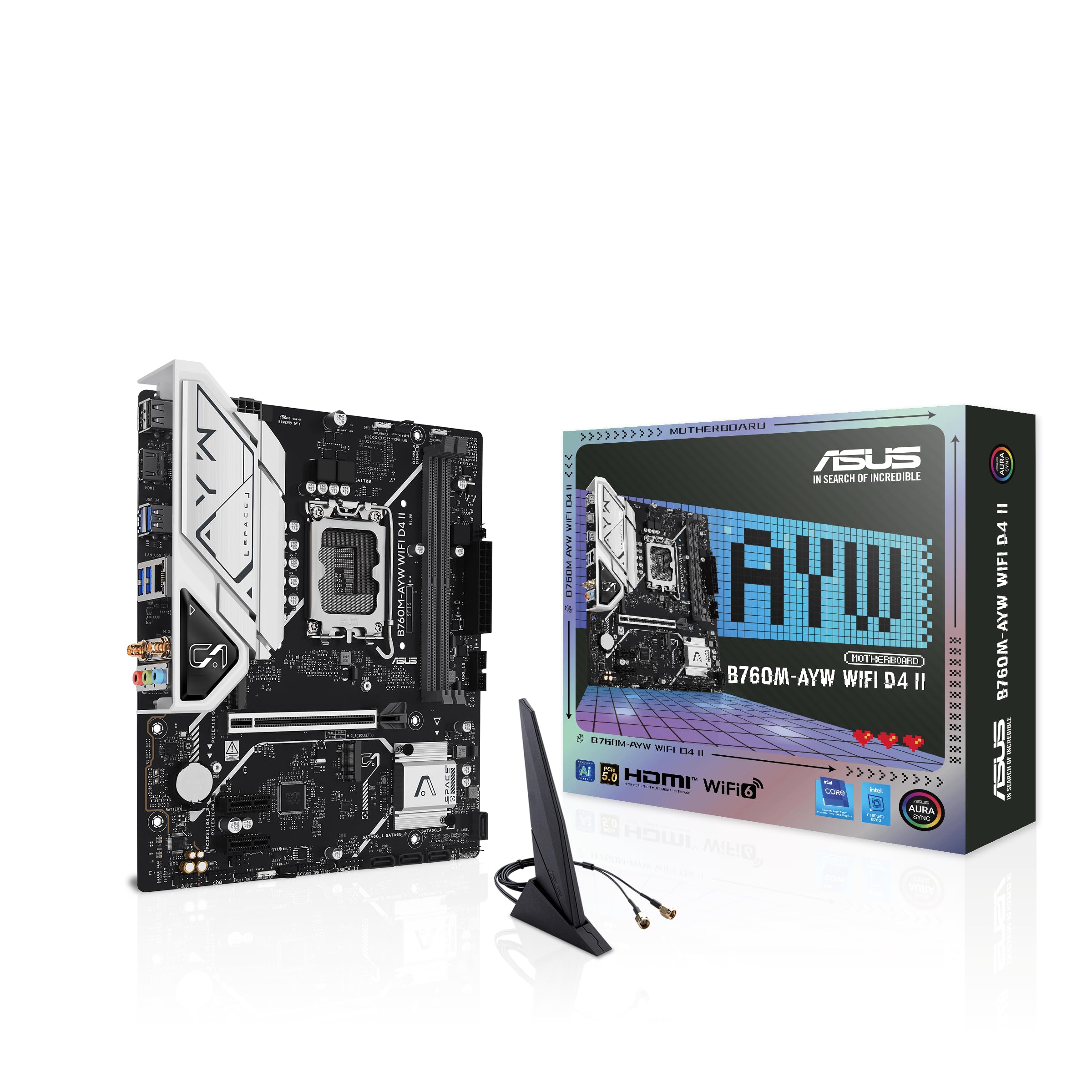
8000 MHz memory support on a DDR4 board is the widest headroom here by a mile.
Line this up against the ASUS Prime B550M-A WiFi II and the gap is enormous: 8000 MHz rated memory clock on the B760M-AYW WiFi D4 II versus 2133 MHz on the Prime, even though both are DDR4 boards. That is the number to care about if you already own a fast kit or want to squeeze a tighter kit later. The Intel B760 chipset also brings PCIe 5.0 on the main graphics slot, two M.2 slots, Realtek 2.5Gb Ethernet and Wi-Fi 6 built in, so networking is handled without an add-in card.
The socket is Intel LGA 1700, and ASUS lists support for 14th, 13th and 12th Gen Core processors plus Pentium Gold and Celeron. Cooling gets a VRM heatsink and a PCH heatsink along with hybrid fan headers, which keeps the board steady under an everyday gaming load. Aura Sync headers let you sync RGB strips with other Aura-capable gear, and the compact dimensions keep it out of the way in a small case.
Two DIMM slots cap memory at 96 GB, so this is not the board for a 128 GB workstation build — that is the GIGABYTE B550M K’s territory. Setup and build quality are where the board draws its praise, and it fits snugly into a modest gaming machine for buyers sticking with an older 12th or 13th Gen chip. If you are shopping used and already have a 12th or 13th Gen LGA 1700 CPU on the shelf, this is the board that rewards it.
Standout spec: 8000 MHz memory support — the highest rated memory speed of any board on this list, and 2.5Gb Ethernet on top of Wi-Fi 6 means fast wired and wireless in one step.
Watch the ceiling: two slots and 96 GB max, so a heavy memory build has to look elsewhere.
Pick this for: a used Intel 12th, 13th or 14th Gen system where fast memory and built-in WiFi matter.
Pass if: your build needs more than 96 GB of memory or a Gen 4-only CPU path.
5. ASUS Prime B550M-A WiFi II AMD Micro ATX DDR4 Motherboard

WiFi 6 and a PCIe 4.0 x16 slot on AM4 — the wired-free build without a network card.
If a cable run to your desk is not happening, this board solves it. Wi-Fi 6 (802.11ax) is built in alongside 1Gb LAN, and you still get a PCIe 4.0 x16 SafeSlot for a modern graphics card plus dual M.2 slots, one of which runs at PCIe 4.0 x4 for a fast NVMe drive. HDMI 2.1 handles 4K at 60Hz, and D-Sub and DVI outputs keep older monitors in play.
The 5X Protection III suite is the used-buyer detail worth noting: LANGuard, DRAM overcurrent protection, overvoltage protection and stainless-steel back I/O all guard the board against the kind of strain a previous owner might have put it through. ASUS OptiMem lays out the memory traces to run kits at higher frequencies with lower voltages. Physical bulk is the trade-off — at 2.6 pounds and 10.5 by 2.8 by 10.8 inches, it is the heaviest board here, 1.1 pounds over the 1.5-pound ASRock B550M-HDV, so check your case clearance and shipping expectations.
One caution before you buy: the Prime line lists compatibility with 3rd Gen AMD Ryzen processors, so verify your exact chip against ASUS’s support list rather than assuming a later Ryzen 5000 chip drops in. Get that confirmation and you have an AM4 board with Wi-Fi 6, 1Gb LAN and 5X Protection III that normally costs extra.
Right choice for: an AM4 build that needs WiFi and a graphics card upgrade path in one board.
Check first: that your specific Ryzen processor appears on ASUS’s CPU support list for this board.
6. MSI PRO H610M-G DDR4 Motherboard
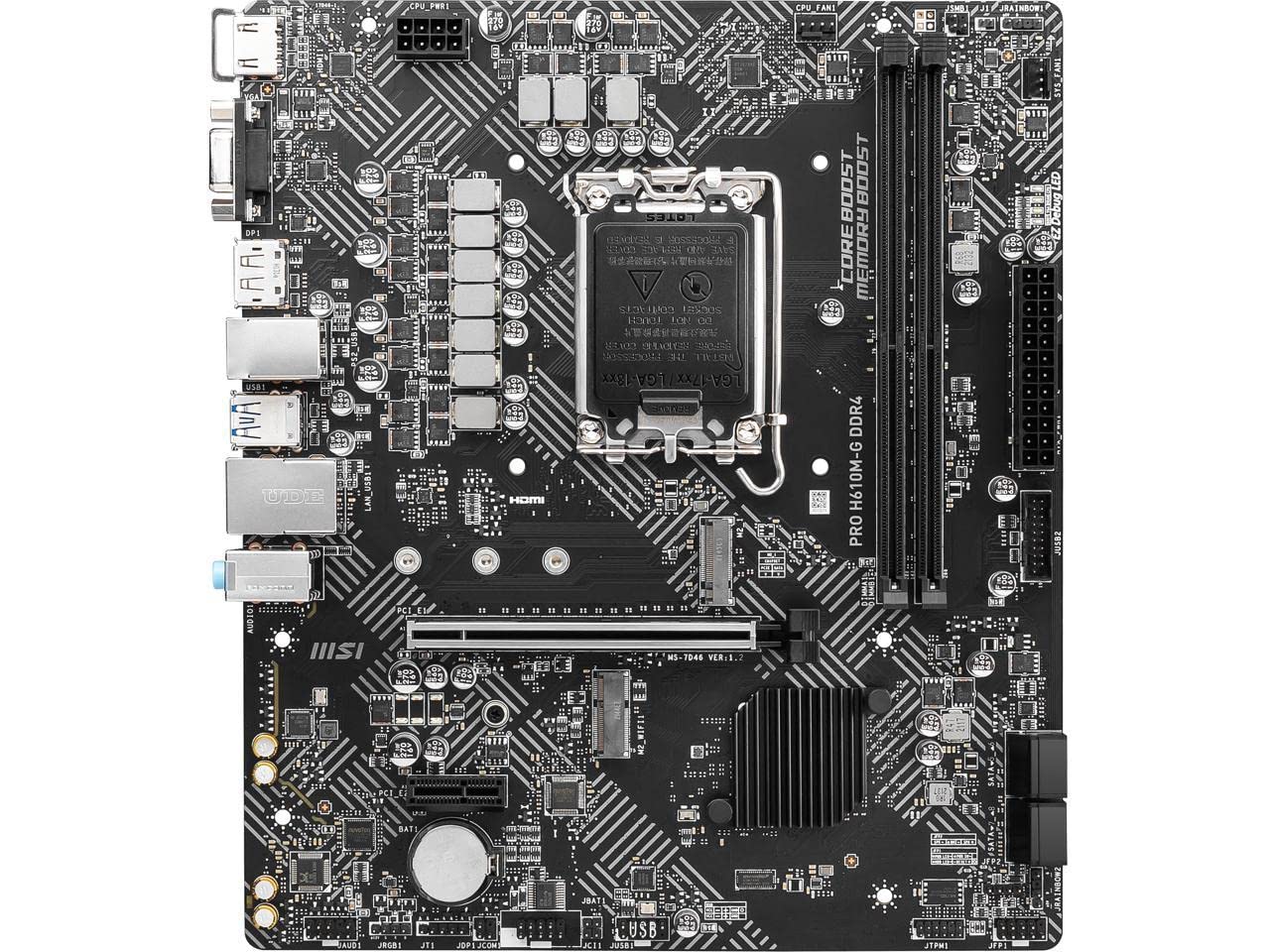
A board that runs a 12th, 13th or 14th Gen Intel chip all day without drama.
Reliability is the word that keeps coming back on this board, and that is exactly what you want from a used Intel system. Support spans 12th, 13th and 14th Gen Intel Core, Pentium Gold and Celeron processors on LGA 1700, so a wide spread of chips will drop in. Core Boost pairs a digital power design with a premium layout to push more cores, and Memory Boost tunes the signal path for stable memory behavior.
The one spec that protects your investment is Steel Armor, the reinforced shielding around the graphics card slot that guards an installed card against bending and electromagnetic interference. If you plan to carry this board around or ship it with a card installed, that matters. DDR4 memory runs at 3200 MHz, and the ALC audio and M.2 storage round out a workhorse layout that owners describe as fast and dependable for a budget build.
Setup is the mixed note — some builds go together smoothly and some need more patience than expected, so read the manual for the front panel wiring before you start. The rear I/O is also on the sparse side. Neither is a reason to walk away from an H610 board that owners trust to run a full working day.
What keeps it steady
- Supports 12th, 13th and 14th Gen Intel Core on LGA 1700
- Steel Armor shields the graphics card slot against bending and EMI
- Core Boost and Memory Boost for steady power and memory signals
Where it stays basic
- Front panel setup is more involved than some builders expect
- Rear I/O is limited — plan your peripherals
Made for: an Intel desk machine that has to boot every morning and keep running.
Look elsewhere if: you want a generous port cluster or a plug-and-play build first time.
7. Gigabyte A520I AC Mini-ITX Motherboard

The only Mini-ITX board here, where every millimetre of the case counts.
Mini-ITX is the small-square board standard for compact PCs, and this board is built for exactly that. It packs a Direct 6 phase digital PWM design with 55A DrMOS for power delivery, an tune VRM heatsink to keep it cool, and one NVMe PCIe 3.0 x4 M.2 slot for a fast stick SSD. Intel Dual Band AC WiFi and Bluetooth come built in, along with an Ultra Durable antenna, so a compact build gets wireless without an add-in card.
The chipset is AMD A520, so it supports 3rd Gen AMD Ryzen processors on AM4 and runs PCIe 3.0 x16 for the graphics card rather than the faster Gen 4. Two DIMM slots handle dual-channel DDR4, and the ALC887 audio codec looks after sound. Rear DisplayPort and 2x HDMI cover up to three display outputs, which is more than most compact cases will ever use.
The wireless is the known variable. It works well with a Ryzen 5600X per owner reports, but connectivity issues come up in some cases, so test the WiFi as soon as the board arrives and fall back on the 1GbE LAN if needed. If a Mini-ITX case is a non-negotiable part of your build, this is the only board here that fits.
The size story: Mini-ITX form factor with 55A DrMOS power stages and a dedicated VRM heatsink — a genuinely small board that does not choke its processor on power delivery.
The network reality: test the built-in wireless early and keep the GbE LAN in reserve.
Choose it for: a compact SFF build around a 3rd Gen Ryzen chip with no room for a WiFi card.
Hold off if: you want PCIe 4.0 graphics support or a guaranteed wireless connection from the start.
Know the Specs
Socket and chipset
The socket is the physical seat for your CPU — AM4 for most Ryzen 3000, 4000 and 5000 chips, and LGA 1700 for Intel 12th, 13th and 14th Gen Core processors. The chipset is the controller that decides your PCIe generation and port count. A B550 or B760 board gives you more lanes and newer standards; an A520 or H610 board trims them to keep the build lean. Match the socket first, then pick the chipset that covers your parts.
Memory slots and rated speed
Each DIMM slot holds one memory stick, and two slots is enough for most 16 GB or 32 GB builds. Four slots on a board like the GIGABYTE B550M K reach a 128 GB ceiling, which is the capacity spec, not the speed. Rated memory clock speed (measured in MHz) is the ceiling the board advertises for RAM, so a higher number leaves room for a faster kit later. Check both together before you buy a used board.
PCIe generations and M.2
PCIe is the lane system that shuttles data between the board, your graphics card and your SSD. Gen 4 and Gen 5 lanes move data faster, but the difference only shows with hardware that supports them. An M.2 slot holds a stick-shaped SSD and cuts out the cable run of a 2.5-inch drive. Count the M.2 slots and note their generation — a PCIe 4.0 M.2 slot on the ASUS Prime B550M-A WiFi II is worth more than a PCIe 3.0 slot if you plan a fast NVMe drive.
Form factor and rear I/O
Micro-ATX is the middle size that fits most mid-tower cases with room to spare. Mini-ITX is the small-square standard for compact builds, and it forces you to check case clearance before anything else. The rear I/O is the back panel cluster of USB, video and network ports, and it is where a used board shows age. Confirm you have the HDMI or DisplayPort output and the USB ports you need before you commit.
Common Questions
Can a used motherboard be sold with bent CPU pins?
Will a used AM4 board support my Ryzen 5000 CPU?
Is a B550 board better than an A520 for a used build?
How many memory slots do I actually need?
Do I need built-in WiFi on a desktop motherboard?
What is the difference between PCIe 4.0 and PCIe 3.0 on a used board?
Will a Micro-ATX board fit my case?
Should I buy a used board with no reviews or history?
Do I need to update the BIOS on a used motherboard?
What should I inspect first when a used board arrives?
The Bottom Line
For most used builds, the 2nd hand motherboard worth starting with is the GIGABYTE B550M K — four memory slots up to 128 GB, PCIe 4.0 on both the graphics slot and an M.2 slot, and Ryzen 5000 support without a BIOS flash. If you are building on Intel and want the fastest DDR4 memory plus built-in WiFi, the ASUS B760M-AYW WiFi D4 II leads that side of the list at 8000 MHz rated memory. And for a small-form-factor AM4 machine where the case leaves no room for a network card, the Gigabyte A520I AC fits where the others cannot. Whichever you pick, verify the socket against your CPU and inspect the pins the day it lands.
How we choose
We do not accept paid placement. Every pick is matched to a real buyer and a real use-case; we do not hands-on test units.
Sources
Specifications: manufacturer listings and product documentation. Review insights: verified customer reviews, as of November 2026. Pricing: not shown on this page (it changes often); check the current price via the retailer link.
As an Amazon Associate, My Heart Lives Here earns from qualifying purchases. This does not affect which products we feature.