Heads up: This post contains affiliate links. As an Amazon Associate I earn from qualifying purchases, at no extra cost to you. Learn more
Specs are compiled from manufacturer listings and verified buyer reviews and can change over time — please confirm the key details on the product page before buying.
You want one power brick that fills your laptop and your phone at the same time. That is the promise of a 240W USB-C charger, and most of these deliver it only from the right port. The wattage on the box is a ceiling shared across every port, not a guarantee to each one, so a “240W” charger can hand your laptop far less the moment you add a second device. The picks below are sorted by how cleanly they split that shared wattage across ports, not by the headline number.
This guide is built by comparing the manufacturers’ published specifications and the patterns across verified customer reviews, so you get each pick’s real strengths and trade-offs instead of marketing spin.
Some chargers here are travel bricks with a DC plug for gaming laptops, others are desktop hubs with displays that show exactly where the watts go. This breakdown covers port splitting, cable ratings, and heat so you can pick the right 240W USB-C charger in a couple of minutes.
Top Picks


How To Choose The Best 240W USB-C Charger
The first thing to understand is that 240W is a total, not a gift to every port. A charger rated 240W can send 140W to one laptop port and split the rest among the others — or drop that laptop port the moment you plug in a second device. Buy for the port count and split rule your devices need, not the 240W on the box.
Check the single-port maximum, not just the total
What matters for a big laptop is the most any one port can deliver. On these chargers that single-port ceiling is 140W on the top USB-C port. A 140W port is what fast-charges a 16-inch MacBook Pro; a 100W port is enough for most 14-inch work laptops. If your laptop needs the full 140W, confirm the charger keeps that figure when other ports are empty.
Match the cable to the port
A charger can only push what the cable allows. Several of these ship with a 100W USB-C cable, which will cap a 140W port at 100W until you swap in a cable rated for the higher wattage. The GEARit unit prints a port-wattage chart on its base for exactly this reason — it tells you which port to use for which device.
Decide between a desktop hub and a travel brick
A desktop station with four to six ports stays on your desk and replaces a drawer of chargers. A travel brick like the SlimQ is small enough to pack and adds a DC plug for gaming laptops that do not charge over USB-C at all. Weigh how often you move versus how many devices sit plugged in at once; that single question picks the form factor for you.
Know what PD 3.1 and PPS do for you
PD 3.1 is the newer power standard that allows the higher 140W range on USB-C, so it is what lets these chargers feed a big laptop. PPS is a tuning protocol that lets a Samsung Galaxy phone pull its fastest charge rather than a slower fallback. Both are worth having, and most picks here list them.
Side-by-Side Comparison
| Model | Best For | Top Single-Port Output | Ports | Amperage | Amazon |
|---|---|---|---|---|---|
| SlimQ 240W Universal Compact Gaming Laptop Charger★ Best Overall | Gaming laptops with a DC barrel jack | 240W DC / 100W USB-C | 1 DC + 2 USB-C | 12 A | Amazon |
| ThunderGo 240W GaN 4-Port Charging StationTravel Pick | One-bag travel with a laptop and phone | 140W (USB-C1) | 3 USB-C + 1 USB-A | 5 A | Amazon |
| TOPADRE 240W USB C Charger with DisplayDual-Laptop Pick | Two laptops at once with live power readout | 140W + 100W dual | 6 ports | 3.5 A | Amazon |
| GEARit 240W USB C Charger Block | Cleaning up a cluttered desk | 140W (USB-C1) | 4 ports | — | Amazon |
| QQAPL 240W GaN USB C Charging Station | Running several laptops on one desk | 140W (C1 and C2) | 6 ports | 5 A | Amazon |
| SmallRig 240W USB-C Charger | Camera batteries and V-mount packs | 140W per USB-C | 4 USB-C | 4 A | Amazon |
| USATEKO 240W GaN 6-Port Charging Station | Desk hub with on-screen power meters | 140W (C1 and C2) | 4 USB-C + 2 USB-A | 5 A | Amazon |
| E-Tank 7-in-1 Desktop Charging Station | Replacing a whole power strip | 140W (USB-C1) | 3 AC + 4 USB-C | 5 A | Amazon |
Detailed Reviews
1. SlimQ 240W Laptop Charger
Our pick — 4.5+★ from 100+ verified ratings; the strongest balance of quality and price.
The only pick that feeds a gaming laptop through a DC barrel jack at a full 240W.
Most gaming laptops will not pull their full power over USB-C at all, which is where this SlimQ earns its spot. It has a built-in DC port rated to 240W for laptops with a barrel jack, plus two USB-C ports at up to 100W each. You can run the laptop and charge your phone and headphones from one brick instead of three. That matters if you haul a chunky OEM gaming-laptop power supply between a desk and a backpack.
The amperage figure tells the story — 12 A here against 5 A on the ThunderGo, a 2.4x gap. In practice that headroom is why the DC side can hold a heavy gaming load while the USB-C ports top up smaller gear. Owners praise the build most of all, describing it as solid and anything but flimsy, and the compact shell is a repeat theme. One thing to plan for: the DC adapter tip is not in the box. You pick the correct tip for your laptop brand separately from SlimQ’s store, so confirm the fit before you rely on it.
The trade-off is a smaller USB-C ceiling. Those two USB-C ports max at 100W, so a 16-inch MacBook that wants 140W will charge more slowly here than on the ThunderGo or the QQAPL. Reliability marks are mixed in the wider feedback, so treat the one-year warranty as your safety net rather than an afterthought.
Where it wins
- Full 240W through the DC port for gaming laptops that ignore USB-C
- Charges three devices at once from a single brick
- 12 A rating — 2.4x the ThunderGo’s 5 A
- Packs small and light next to a traditional laptop power supply
Where it asks more of you
- DC adapter tip sold separately — not included
- USB-C ports cap at 100W, short of a 140W laptop’s wish
Buy this if: your laptop has a DC barrel jack and you want one travel brick for the whole bag.
Think twice if: your machine charges only over USB-C and wants the full 140W.
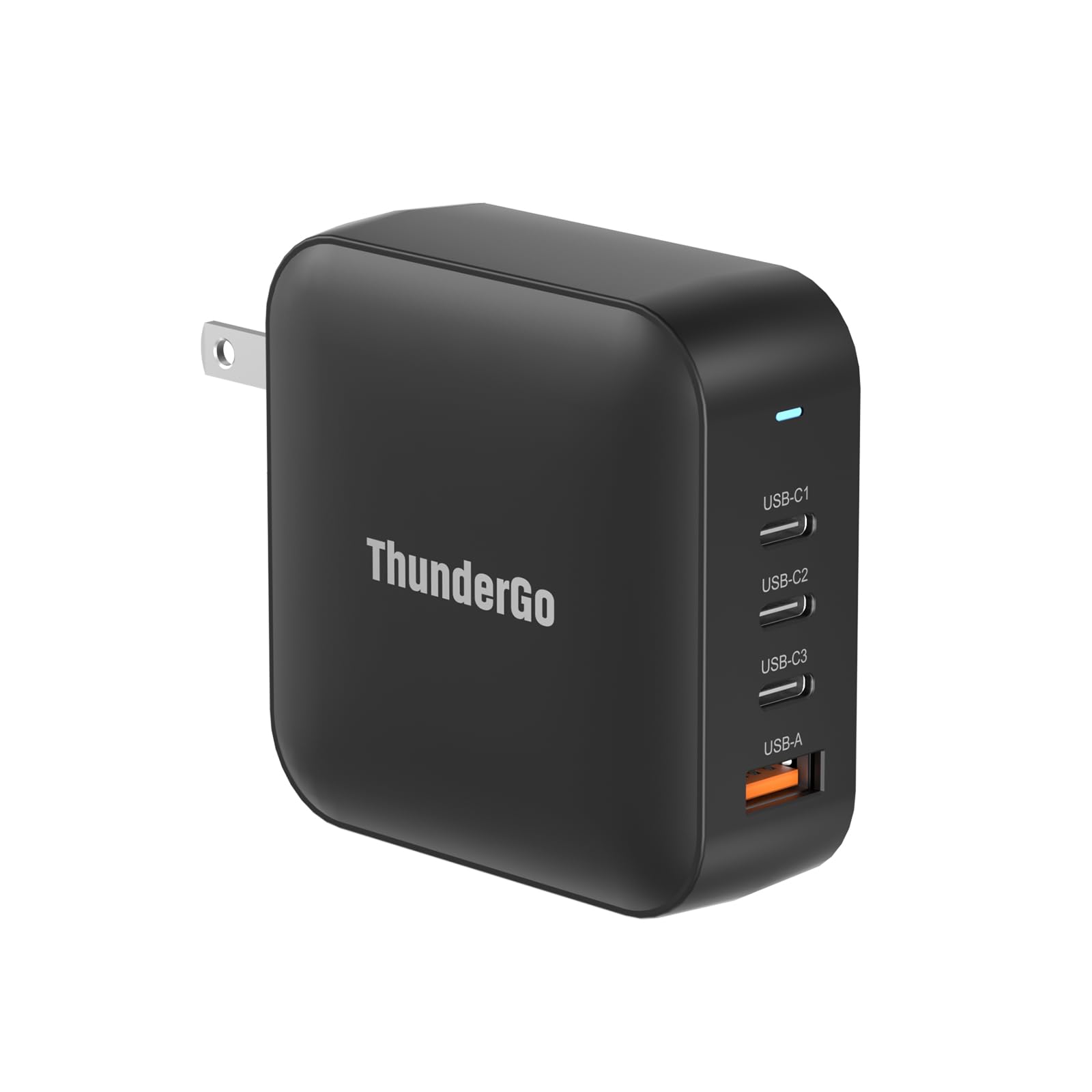
2. ThunderGo 240W GaN Charger
A pocketable four-port brick that hands a MacBook Pro its full 140W from one port.
The headline here is the primary USB-C port at 140W, reached over PD 3.1 at 28V/5A — the voltage and current combination that lets a 16-inch MacBook Pro charge at full speed. Three USB-C ports and one USB-A port share up to 240W total across four devices. It reads 5 A, the same current ceiling as the GEARit and QQAPL, so it is in the same class as those on raw amps despite the smaller shell.
What owners notice first is that it just works: the fast-charging behavior and the ability to power a 100W laptop both come up, and the travel-friendly size suits a laptop bag. GaN internals — gallium nitride, a semiconductor that runs cooler and more compact than the older silicon used in traditional chargers — are why it stays small at this output. The recurring complaint is heat. It warms up under load, which is common for a compact brick pushing this much, so give it air rather than burying it under papers.
One catch to know going in: full 240W needs the right port pairing, such as C1 plus C2 or C2 plus C3, so read the port rules before you assume every combination delivers the ceiling. For a laptop, phone, and earbuds on the move, though, this is the easiest of the group to justify packing.
Best-for reality check: the 140W single port is the spec that matters for big laptops, and it delivers that here.
The heat note: it gets warm under sustained load; keep it ventilated and it behaves.
Reach for this if: you carry a fast-charging laptop and want one compact brick for the whole trip.
Look elsewhere if: you push all four ports hard at once and want it to stay cool to the touch.
3. TOPADRE 240W USB C Charger
Two laptops, one brick, and a screen that shows you the watts in real time.
Run USB-C1 and USB-C2 together and this TOPADRE splits into 140W and 100W, which is enough to fast-charge two 14-inch MacBook Pros at the same time. That pairing is the reason to choose it over the ThunderGo, whose strengths center on a single high port and portability. Six ports total cover laptops, phones, a tablet, and a watch without a second brick on the desk.
The digital display is the feature that wins people over. Its display shows live power draw, and output steps down once a battery passes 70% to ease constant high-power stress. Functionality is what owners note most — it handles high-draw laptops, and the power output reads strong in real use. Value is the other mixed note, so weigh the display against whether you truly need six ports.
The 7-chip architecture and PD 3.1 support are behind the stable output, and the 24-month warranty is a longer cushion than the SlimQ’s one-year. If you rotate between two work machines at one desk, this is the one that keeps both fed.
Strong points
- 140W + 100W dual-laptop charging from two USB-C ports
- Live digital readout of charging power
- Six ports replace a drawer of smaller chargers
- 24-month warranty
Fair caveats
- 11.3 oz (320 g) — a desktop unit, not a pocket one
- Value gets mixed reads; the display is the premium you pay for
Best fit: a two-laptop desk where you want to see where the power is going.
Not for: minimal travel — the weight and screen suit a fixed spot.
4. GEARit 240W USB C Charger Block
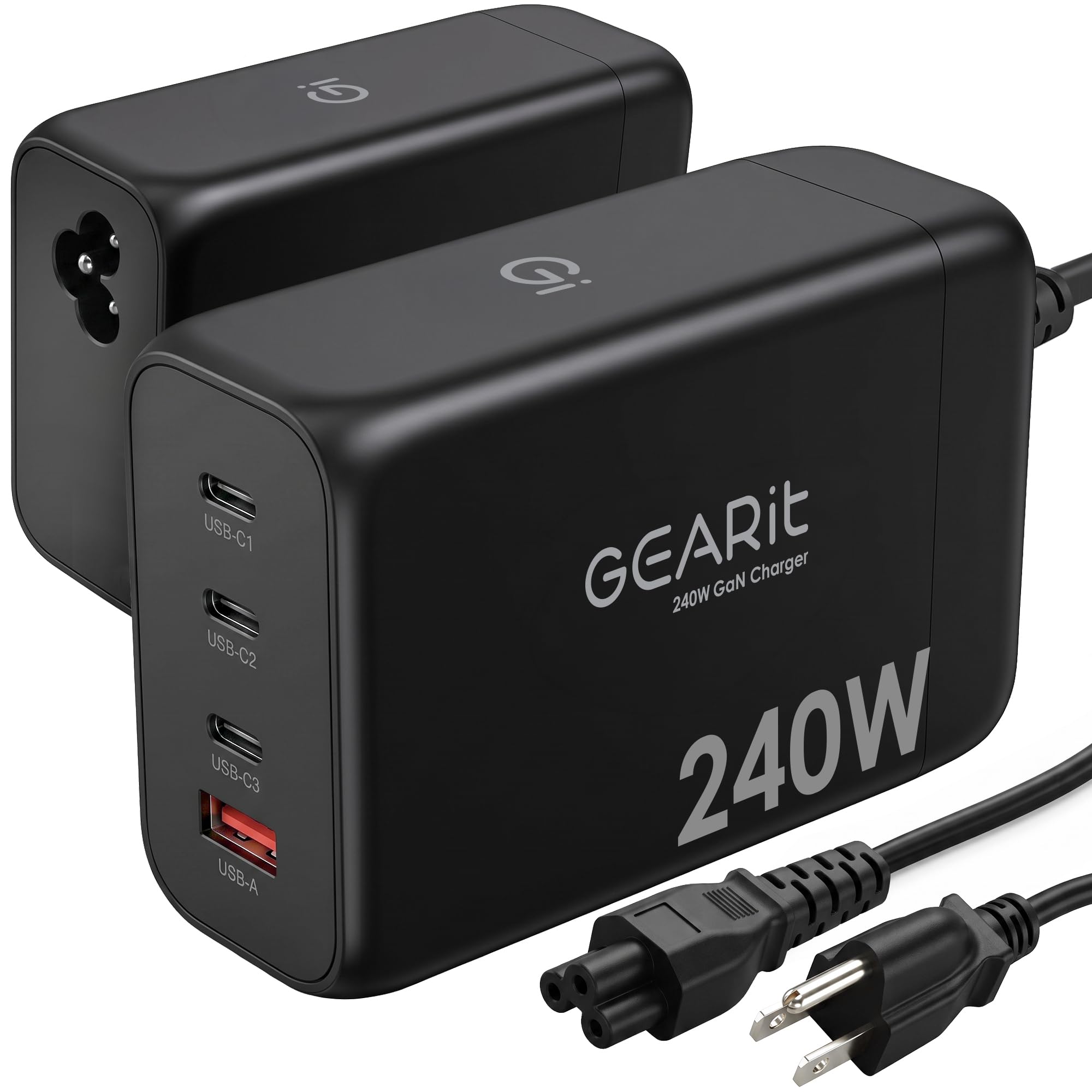
A four-port block built to swallow the pile of chargers on your desk.
The port map is the selling point: USB-C1 at 140W, USB-C2 at 100W, USB-C3 at 30W, and a USB-A at 22.5W, all pulling from 240W total. That lets a 140W MacBook Pro and a second laptop run at full speed at the same time. The detachable 3.3 ft (1m) AC cord unplugs for packing, and a printed wattage chart on the base takes the guesswork out of which port feeds which device.
GaN construction keeps a desktop-charger footprint smaller than most laptop bricks, so it sits quietly in place of the old assembled mess. PD 3.1 and PPS mean correctly negotiated fast charging to a MacBook, Dell XPS, iPhone, iPad, Galaxy, or Pixel, and each device pulls what it is rated for.
Consider what it is not: this is a charger block, not a plug-in power strip, and it tops out at four ports. If you want AC outlets in the same unit, the E-Tank covers that; if you just want your laptop and phone charged from one tidy brick, the cord-plus-chart setup here is the cleaner answer.
The practical win: the detachable cord and printed port chart cut desk clutter and setup time.
The honest limit: four ports and no AC outlets — it replaces chargers, not your wall strip.
Pick it for: a single-laptop desk drowning in old wall chargers.
Pass if: you also want plug sockets alongside your USB ports.
5. QQAPL 240W GaN Charging Station
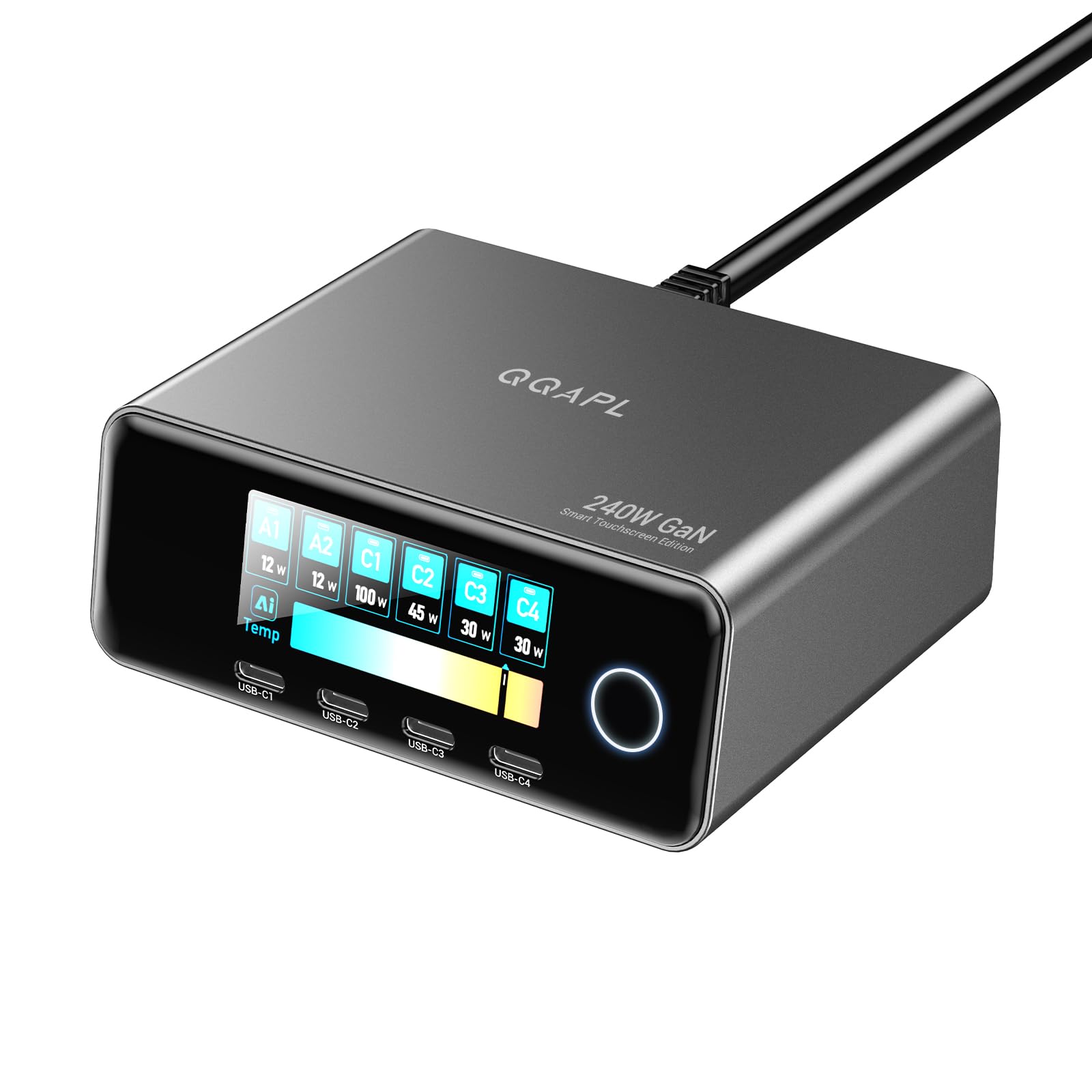
Four laptops at once, with a touchscreen that reports temperature as well as watts.
This is the port-heavy end of the group: two USB-C ports at 140W, two more at 100W, and two USB-A at 30W, all drawing from 240W total. The upside is breadth — QQAPL pitches it for running 4 laptops simultaneously, which suits a shared workstation or a small team bench. The 2.26-inch LCD touchscreen tracks total output, per-port power, and temperature status, so you can see a hot port before it becomes a problem.
PD 3.2 AVS and PPS match power to whatever is plugged in, from an iPhone to a Samsung to a tablet. Safety protections include over-voltage, over-current, short-circuit, and intelligent temperature control, with certification to CE, FCC, ROHS, and UL 62368-1 for the electrical build. Compact it is not: at 15.94 oz (452 g) it is presented by the maker as roughly the weight of two large phones, which reads as a desk fixture rather than a travel item.
Compared with the TOPADRE, this trades the dual-laptop simplicity for two more USB-A ports and a temperature readout — the difference between charging a pair of laptops and charging a whole bench. If your setup is one desk with one laptop, the extra ports are overhead you will rarely touch.
Why you’d want it
- Two 140W USB-C ports plus two 100W ports for multi-laptop desks
- Touchscreen shows total output, per-port power, and temperature
- Over-voltage, over-current, short-circuit, and temperature protection
Why you might skip it
- 15.94 oz (452 g) — desk-bound, not a bag item
- Six ports is more than a single-laptop setup needs
Ideal for: a bench or studio running several laptops off one station.
Overkill for: one desk, one laptop, one phone.
6. SmallRig 240W USB-C Charger
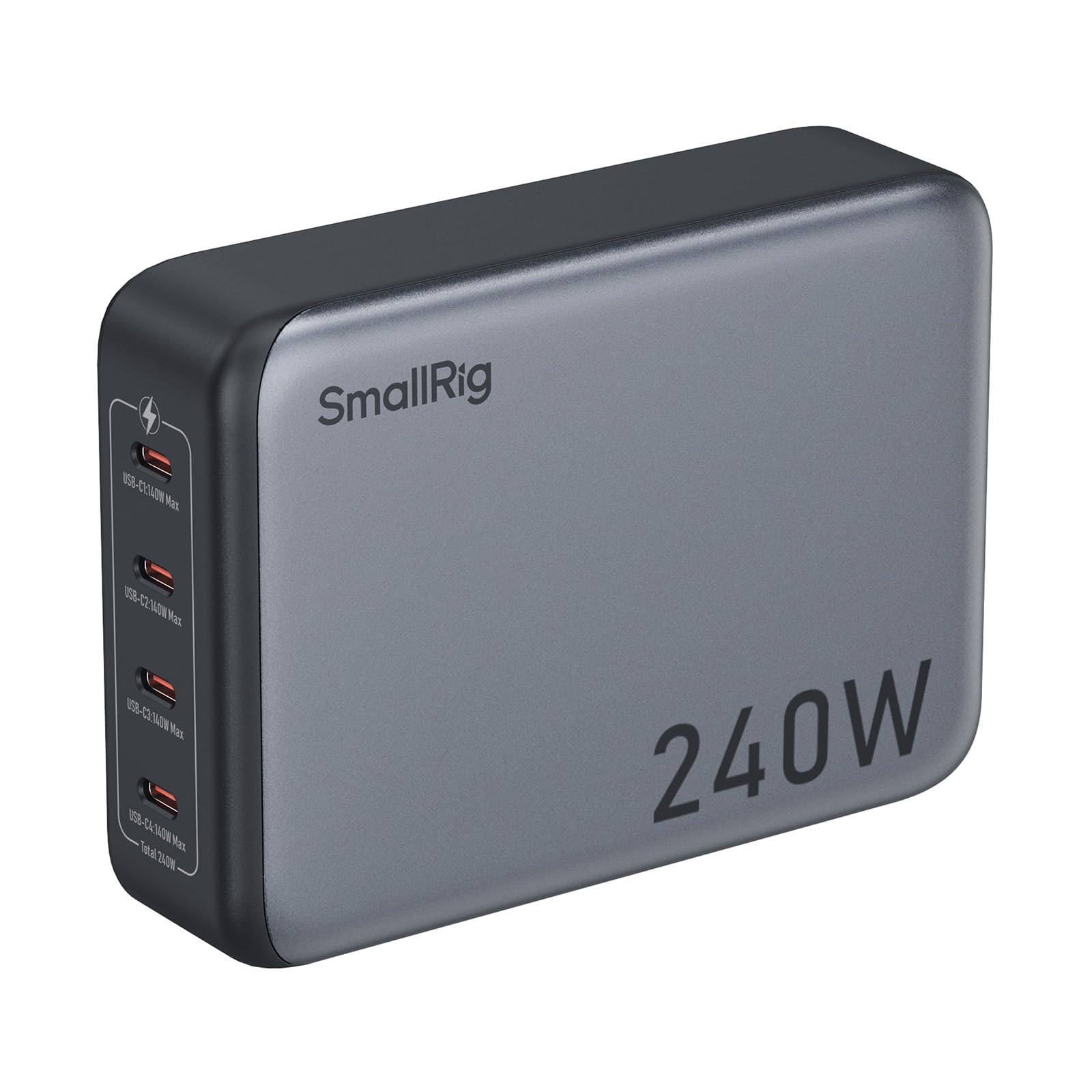
Four USB-C ports that each reach 140W — built for camera batteries, not just laptops.
Every one of the four USB-C ports supports up to 140W over PD3.1, which is unusual among these picks — most reserve the top figure for one or two ports. For a photographer or videographer, that means charging V-mount packs, NP-F batteries, and rechargeable camera batteries alongside a laptop without hunting for which port does what. The total power is 240W, rated at 4 A.
Per-port short-circuit and over-current protection cover each output, which matters when you plug in expensive camera cells. It ships with the adapter bracket and an AC cable in the box, and the grey housing is designed to sit on a shelf or in a studio. It reads heavier on the spec sheet than the travel-minded bricks here, so treat it as a location or studio charger rather than a pocket one.
Where it differs from the SlimQ is the target device. That one feeds a gaming laptop through a DC jack; this one feeds camera power over four identical USB-C ports. If your bag is camera gear and not a console-grade laptop, this is the pick aimed at your workflow.
The standout spec: four USB-C ports at 140W each is the widest high-power spread here.
Frame it for: studio and location camera charging, where V-mount and NP-F packs need real watts.
Built for: photographers and videographers charging camera batteries over USB-C.
Wrong tool if: you mainly want a featherweight travel charger.
7. USATEKO 240W GaN Charging Station
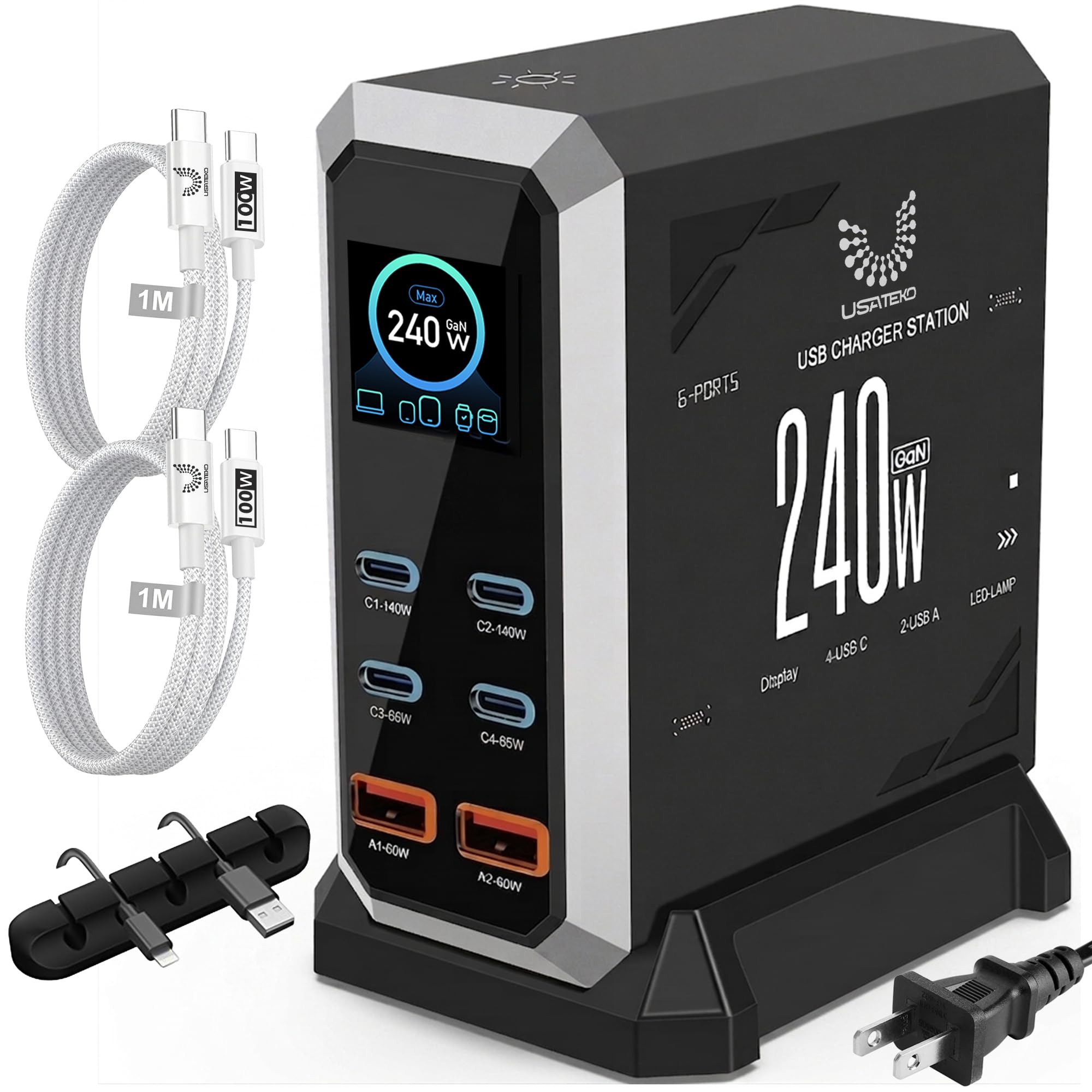
Six ports, a live power readout per port, and two 100W USB-C cables thrown in.
Port count is the draw here: four USB-C and two USB-A sharing 240W, with C1 and C2 each reaching 140W on a single device. The USB-C port tally runs ahead of the ThunderGo’s three, and the extra USB-A covers older gadgets without a dongle. A built-in LCD shows real-time output for each port plus total usage, toggleable with a touch button — a bedside, desk, or office detail that makes the invisible visible.
The bundle saves you a second purchase: two braided 100W USB-C cables and a cable organizer ship in the box, so the desk is organized the day it lands. PD3.1, PD3.0, PPS, and QC4+ cover the common fast-charge protocols. The 110–240V input means it travels internationally, though it is a desktop station with a stand rather than a pocket brick. Over-charge and over-heat protections round out the everyday setup.
Just be clear on the ceiling: 140W is a single-port figure on C1 or C2, and the 240W is shared across six ports. If you want the two-laptop split with 140W and 100W held at once, the TOPADRE spells that out more directly; this one is happier as a catch-all workspace hub.
What’s in the box that matters
- Two braided 100W USB-C cables and a cable organizer included
- LCD shows per-port and total power output
- Four USB-C ports — more than the ThunderGo’s three
Where it should be sized
- 240W is shared across six ports — not 240W to each
- Desktop station with a stand, not a travel brick
Good match: an organized workspace that wants cables and a power meter in the box.
Mismatch if: you need a pocket-sized charger for a commute.
8. E-Tank 7-in-1 Desktop Charging Station
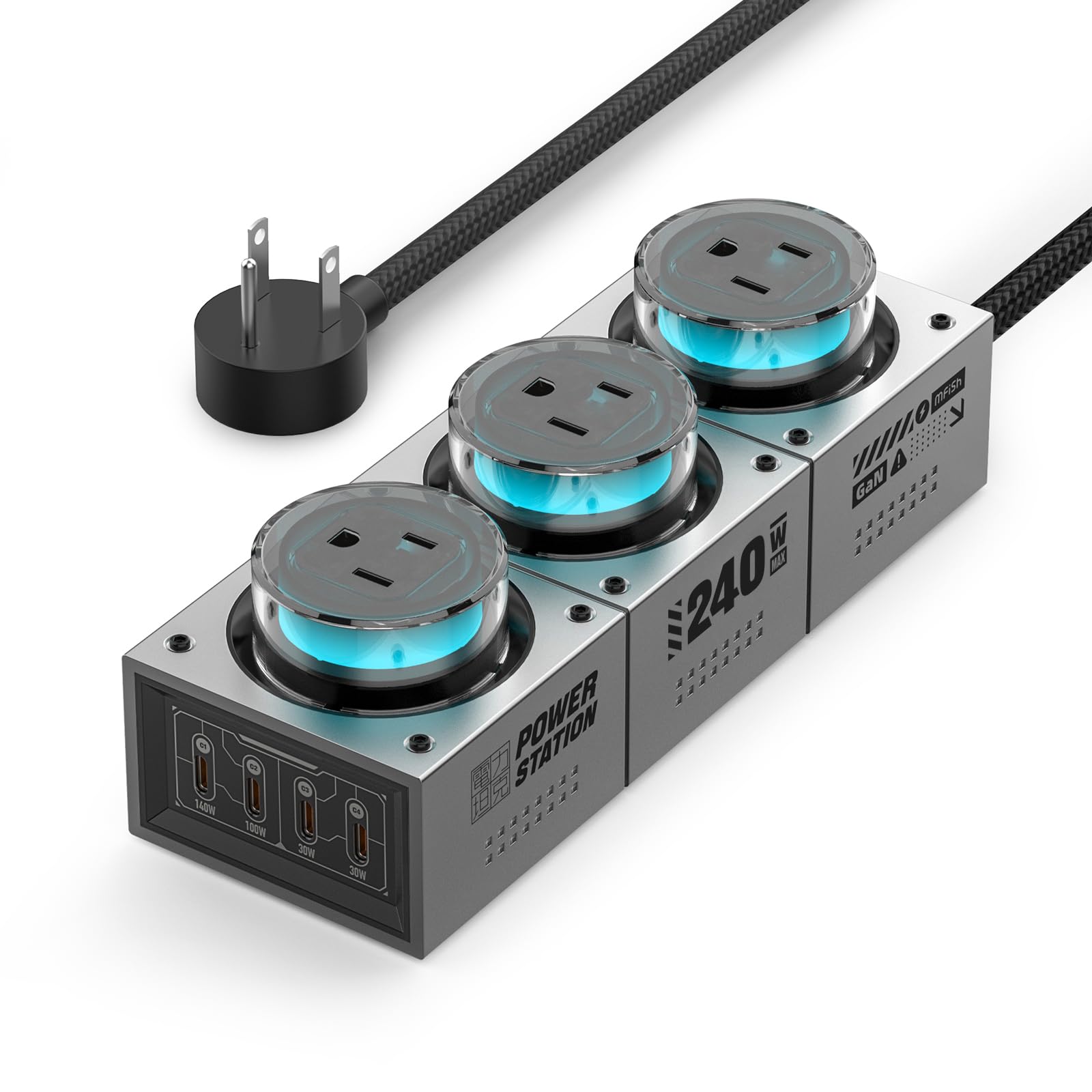
The only pick that swaps a wall strip for a desk hub with actual plug sockets.
This one is a different animal: three AC outlets sharing a 1250W maximum, plus four USB-C ports totaling up to 240W shared. USB-C1 reaches 140W for a big laptop, C2 runs to 100W, and C3/C4 push 30W each. That mix lets you plug a monitor and desk lamp into the AC side while the USB side handles laptop, phone, and tablet — the closest thing here to replacing a power strip outright.
Build quality is what owners appreciate most, followed by the look: transparent outlet covers and RGB lighting give it a creator-studio or gaming-setup presence, and it is designed around a fixed home-office spot rather than a bag. GaN III with smart power sharing spreads the load across connected USB-C devices. It measures 7.72 × 2.76 × 2.36 inches at 32.13 oz (2.01 lb), so plan a dedicated corner for it.
The honest catch: the wider feedback flags wiring and safety on some units, paired with value being a sticking point, so inspect the build and the AC side carefully on arrival. The USB-C ceiling is also capped at 140W on C1 only. If you want a hub that folds a power strip and a charger into one box, this does that; if you want pure laptop charging, a simpler brick gets you there with less to check.
Why it’s here: three AC outlets plus four USB-C in one desk unit is a combination none of the others offer.
Inspect on arrival: wiring and safety come up in the wider notes, so check the AC side carefully and lean on the return window.
Choose it for: consolidating a power strip and a charger into one desk fixture.
skip it if: you want a simple, light USB-C charger and nothing more.
Know the Specs
Total watts vs single-port watts
A “240W” rating is the sum across all ports, shared. A single port can hit 140W, and every device beyond that splits the rest. Buy for the single-port maximum your laptop needs, then confirm how the charger behaves when you add a phone.
PD 3.1 and PPS
PD 3.1 is the newer USB-C power standard that opens the 140W range, which is what lets these units charge a big MacBook Pro at speed. PPS tunes output to a Samsung Galaxy so it draws its fastest charge. Look for both if you mix Apple and Android gear.
Cable ratings
A 140W port only delivers 140W if the cable supports it. Several picks include a 100W cable, which caps that port at 100W until you swap it. Match your cable’s wattage to your port’s expectation.
GaN and heat
Gallium nitride parts run cooler and more compact than older silicon, which is why these bricks shed size. Compact units still warm up under sustained load. Let any of them breathe instead of covering them.
Common Questions
Do I get 240W to every port at once?
Will a 140W port fast-charge a 16-inch MacBook Pro?
Why is my laptop charging slower than expected when other ports are used?
Can a 240W USB-C charger charge a gaming laptop over USB-C?
Does PPS matter for a Samsung phone?
Do I need a special cable to reach 140W?
Is it normal for these chargers to get warm?
Can I use a desktop station like the E-Tank for travel?
Will a 240W charger charge headphones, tablets, and earbuds?
What is the difference between a charger block and a charging station?
The Bottom Line
You have two clear directions here, and both are honest. If your laptop has a DC barrel jack and you want one travel brick that runs the whole bag, the SlimQ 240W Universal Compact Gaming Laptop Charger is the pick, with its 240W DC port and two 100W USB-C ports. If your laptop charges over USB-C and you want portability plus a full 140W single port, the ThunderGo fits best. And for a desk running several laptops with a live power readout, the TOPADRE with its 140W + 100W dual split is the one to reach for — the crowd favorite across the desk-hub picks, and it earns that with a display that shows exactly where the watts go.
How we choose
We do not accept paid placement. Every pick is matched to a real buyer and a real use-case; we do not hands-on test units.
Sources
Specifications: manufacturer listings and product documentation. Review insights: verified customer reviews, as of November 2026. Pricing: not shown on this page (it changes often); check the current price via the retailer link.
As an Amazon Associate, My Heart Lives Here earns from qualifying purchases. This does not affect which products we feature.