Heads up: This post contains affiliate links. As an Amazon Associate I earn from qualifying purchases, at no extra cost to you. Learn more
Specs are compiled from manufacturer listings and verified buyer reviews and can change over time — please confirm the key details on the product page before buying.
Here is the short answer: the right 16GB RAM stick for you is the one that physically fits your machine and runs at a speed your motherboard actually supports. Get that wrong and a perfectly good module will sit unused in a drawer. Get it right and your laptop or desktop stops stuttering — tabs open instantly and apps switch without a pause. The picks below are sorted by what each one fits, not by price, so you can find your machine’s match fast.
This guide is built by comparing the manufacturers’ published specifications and the patterns across verified customer reviews, so you get each pick’s real strengths and trade-offs instead of marketing spin.
Your laptop is crawling, and you want a 16GB RAM stick that actually fits your machine. The picks below are grouped by form factor, so you can spot yours at a glance.
Top Picks

How To Choose A 16GB RAM Stick
Most RAM mistakes happen before you ever open the box. Buy the wrong shape and it will not seat in the slot at all. Buy the wrong generation and the board refuses to boot. So work through these checks in order — form factor first, generation second, speed last.
Check the form factor before anything else
A laptop, notebook, mini PC, or all-in-one takes a SO-DIMM — a short, stubby stick about the length of your thumb. A full desktop tower takes a DIMM, which is roughly twice as long. The pin count is the giveaway: 260-pin means SO-DIMM, 288-pin means DIMM. A 260-pin module will never fit a 288-pin slot, no matter how carefully you push.
Match the DDR generation your board uses
DDR4 and DDR5 have different notch positions, so they are not interchangeable. A DDR4 board will not accept DDR5 and vice versa. If you are unsure, look up your laptop or motherboard model on the maker’s site and check the memory type it lists. This single check saves more returns than any other.
Understand what the MHz number and CL number do
The MHz figure is how many million cycles the memory runs per second — higher is faster. The CL figure (cas latency) is how many of those cycles it waits before answering a request — lower is snappier. That is why a 6000MHz CL30 module is a quicker part than a 4800MHz CL40 one. Speed only matters up to what your motherboard supports, though. A fast stick in a slow board will simply downclock to a speed the board can handle.
Side-by-Side Comparison
Every row shows the same three specs so you can scan trade-offs without decoding marketing language. Form factor tells you where it fits, speed tells you how fast it runs, and CL tells you how snappy it responds.
| Model | Best For | Form Factor | Speed | CL | Amazon |
|---|---|---|---|---|---|
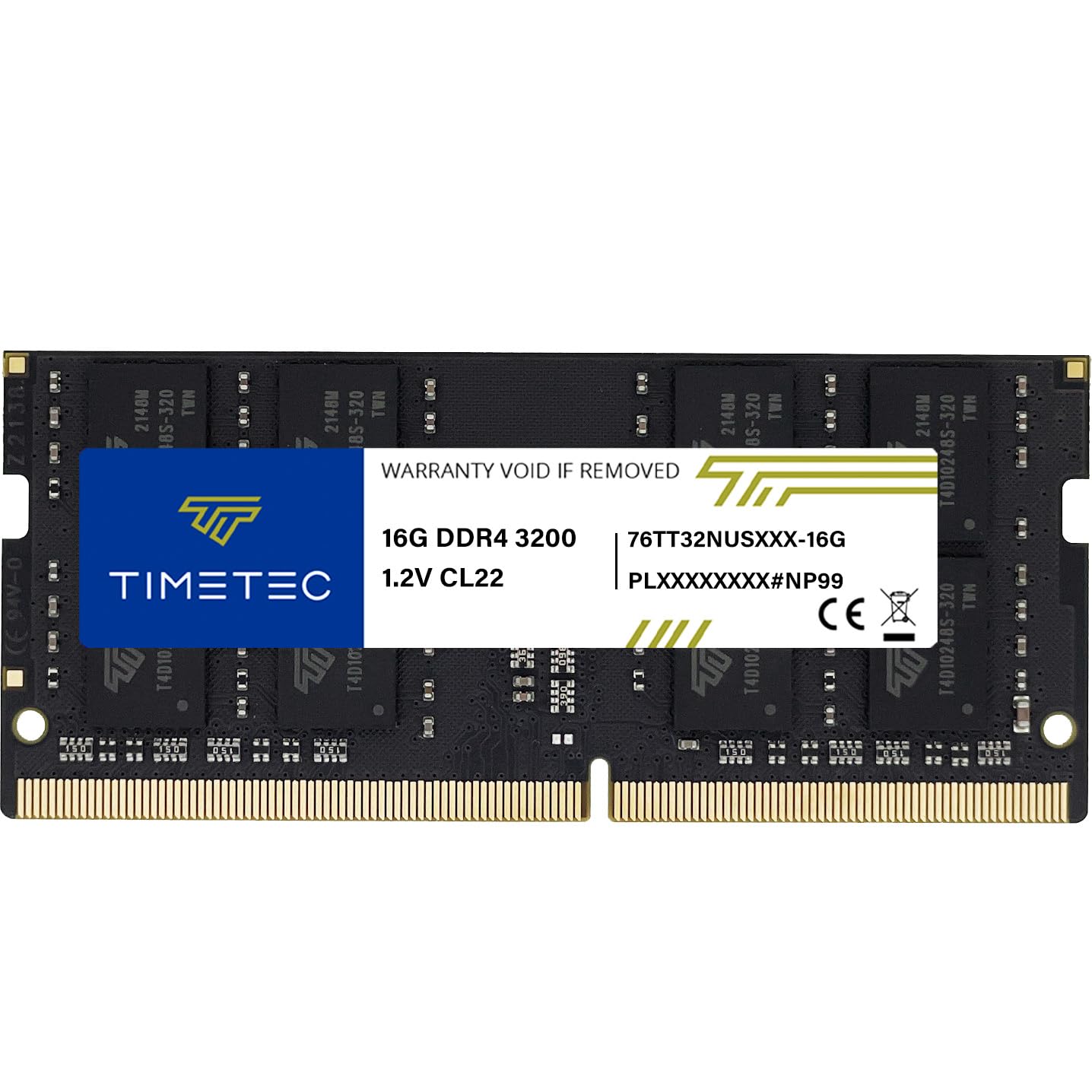
| Timetec 16GB DDR4 3200MHz SODIMM★ Best Overall | Laptops, mini PCs, AIOs | SO-DIMM 260-pin | 3200 MHz | CL22 | Amazon |
| Samsung 16GB DDR4 3200MHz SODIMMTop Performer | Laptop upgrades with dual rank | SO-DIMM 260-pin | 3200 MHz | CL22 | Amazon |
| Patriot Viper Venom RGB DDR5 6000MHz | Gaming builds with RGB | DIMM 288-pin | 6000 MHz | CL30 | Amazon |
| G.SKILL RipjawsV DDR4 3200MT/s | Intel and AMD desktops with XMP | DIMM 288-pin | 3200 MT/s | CL16 | Amazon |
| Crucial 16GB DDR5 5600MHz | Modern Intel Core and Ryzen 7000 | UDIMM 288-pin | 5600 MHz | CL46 | Amazon |
| A-Tech 16GB DDR4 2400MHz UDIMM | Older DDR4 desktops and workstations | UDIMM 288-pin | 2400 MHz | CL17 | Amazon |
| Crucial 16GB DDR5 4800MHz | DDR5 desktops with modest needs | UDIMM 288-pin | 4800 MHz | CL40 | Amazon |
Detailed Reviews
1. Timetec 16GB DDR4 3200MHz PC4-25600 SODIMM Laptop RAM
Our pick — 4.5+★ from 650+ verified ratings; the strongest balance of quality and price.
The plug-and-play fix for a laptop that has started dragging its feet.
This is the pick that suits most people walking into a shop with a slow laptop. It is a single 16GB module in SO-DIMM shape — the 260-pin size that drops into laptops, notebooks, mini PCs, and all-in-ones. At 3200MHz it runs at the quickest common DDR4 laptop speed, and the 1.2V rating is the standard low voltage DDR4 expects. Non-ECC and unbuffered means it is a plain consumer module, not server kit.
Buyers report their laptops feel fast again after installing this Timetec SO-DIMM, and the memory quality is what wins them over. Fitting it is a plug-and-play job that needs no expertise — just check your system’s manual first. Timetec backs it with a limited lifetime warranty and US-based technical support, which matters if a slot turns out to be fussy.
One honest catch: the PCB colour and rank (1Rx8 or 2Rx8) can vary by production batch, so you cannot pick your board colour. Performance and quality stay consistent across all Timetec products per the maker, but if a matching green stick is a must for you, that is luck of the draw. Also worth knowing: this 3200MHz module will automatically downclock to 2933MHz or 2666MHz in a system that only supports those speeds, so a slower laptop still benefits.
Where it earns its place
- 260-pin SO-DIMM fits laptops, mini PCs, and all-in-ones
- 3200MHz DDR4 speed with automatic downclocking to 2933MHz or 2666MHz
- Plug-and-play install with no expertise required
- Limited lifetime warranty with US-based support
What to plan around
- PCB colour and rank vary by batch
- Not compatible with desktop DIMM slots
Reach for this if: you are upgrading a DDR4 laptop, mini PC, or all-in-one and want the fastest common laptop speed without fuss.
Look elsewhere if: you are working inside a desktop tower — this will not fit a 288-pin DIMM slot.
2. Samsung 16GB DDR4 3200MHz SODIMM PC4-25600 CL22
Same shape as the Timetec, but built on a dual-rank memory layout.
Where this Samsung module separates itself is rank: it is 2Rx8 dual rank, while the Crucial DDR5 stick in this list is 1Rx8. On paper rank is dull, but in real use a dual-rank module can give slightly better memory efficiency on a laptop board that plays nicely with it. The rest is very familiar DDR4 laptop territory — 3200MHz, CL22, 1.2V, 260-pin SO-DIMM, non-ECC and unbuffered.
Quality is the headline. Owners tend to talk first about how solidly it performs, then about what it costs relative to what they got. Samsung runs every module through quality-assurance testing before it ships, and the result shows in a stick that most buyers simply fit and forget. It works in a wide spread of DDR4 laptops, notebooks, and all-in-ones, and there is a real-world thread of buyers fitting it into all-in-one systems and getting a clean boot.
The honest caveat is reliability chatter — one strand of feedback reads mixed rather than uniformly glowing, even though the bulk of opinion is positive. Treat that as sizing guidance, not a warning: if you want the safest possible match, confirm your laptop accepts dual-rank SODIMMs first. Compare it against the G.SKILL DDR4 module below and this one has the higher cas latency — CL22 versus CL16 — a trade-off that buys you dual rank instead.
What it delivers: a dual-rank 3200MHz laptop module with the quality-assurance testing you would expect from a memory maker that builds the chips too.
What to weigh: CL22 is a looser latency figure than the CL16 on the G.SKILL desktop kit below, and the dual-rank layout wants a board that handles it.
The straightforward buy if: your laptop takes a 260-pin DDR4 module and you value the assurance of vendor-tested memory over the lowest latency figure.
Double-check first if: your laptop model has a known preference for single-rank SO-DIMMs.
3. Patriot Viper Venom RGB DDR5 16GB 6000MHz CL30

The 6000MHz DDR5 stick with a tighter CL30 that makes the older kits look slow.
If you are building or refreshing a DDR5 desktop and want the memory to be the quick part, this is the one to shortlist. It runs at 6000MHz with CL30-40-40-76 timings — a snug latency for that speed. Put it next to the A-Tech DDR4 2400MHz on this list and the gap is enormous: 6000MHz versus 2400MHz is 2.5 times the data rate. Against the Crucial DDR5 5600MHz, the Patriot also leads on speed while holding a lower CL (30 versus 46), which is the combination gamers chase.
One stick covers both Intel and AMD DDR5 builds, because it supports XMP 3.0 and AMD EXPO overclocking (two auto-tuning profiles that set the speed for you) on the same module. On-Die ECC (built-in error checking at the chip level) guards your data, and Patriot builds it at 16GB in a single stick. The RGB lighting is the visual payoff for a windowed case. At 52g it weighs roughly three times the bare Crucial DDR5 module at 16.6g — a chunkier heat-spreader and light diffuser on top of the memory.
The catch is one you should plan for, not fear: XMP and EXPO are overclocking profiles, so the board has to support the speed you paid for or it will fall back to a slower JEDEC default. That means checking your motherboard’s memory QVL before you buy. It is also DDR5 only — a DDR4 board will not accept it at all.
Why it earns the premium slot
- 6000MHz DDR5 speed with CL30 latency
- XMP 3.0 and AMD EXPO on one module
- On-Die ECC for chip-level error checking
- RGB lighting on a 52g module
The fine print
- Overclocking profiles need a board that supports them
- DDR5 only — no DDR4 boards
Pick it for: a modern DDR5 gaming build where the RGB and the 6000MHz CL30 combo are the reason you are upgrading.
Pass it by if: you are still on DDR4, or your board cannot run 6000MHz and you would rather not tinker with BIOS profiles.
4. G.SKILL RipjawsV DDR4 16GB 3200MT/s CL16

A tight CL16 desktop kit that punches above its cost.
This RipjawsV module is the value play for a DDR4 desktop that wants low latency without the DDR5 price. It is a 288-pin DIMM (the long desktop stick) at up to 3200MT/s with CL16-18-18-38 timings and 1.35V under XMP. Against the Samsung SODIMM above, that is a real latency advantage — CL16 versus CL22, a gap the numbers make plain — though the Samsung is a laptop part, so the two are different tools for different machines.
What owners keep coming back to is raw performance across both processor camps. Buyers run it happily on Intel chips including the i7 8700K and on AMD Ryzen systems, and the installation is quick — one buyer reports noticeably better PC performance within ten minutes of fitting it. That is the profile of a kit that does its job quietly and lets you get on with gaming or work.
The one rule you cannot ignore with this stick is the no-mixing warning. G.SKILL sells memory kits as matched sets designed to run together, and mixing them can bring on stability issues or outright failure — so buy the kit you need and pair it with the same, not a random spare. It also needs overclocking and BIOS adjustments for the top speed, and it boots at the JEDEC default (the slow baseline speed) until you enable XMP. Those are overclocking realities, not flaws.
Latency read: CL16 on a 3200MT/s DDR4 kit is the low-latency end of the desktop DDR4 world, and it shows up in quick system responses.
Setup note: enable XMP in BIOS to reach full speed, and keep this kit matched — do not mix it with other modules.
Choose it when: you want low-latency DDR4 for an Intel or AMD desktop and are comfortable turning on XMP in BIOS.
Think again when: you were planning to drop it in alongside a different brand of memory — matched kits only with this one.
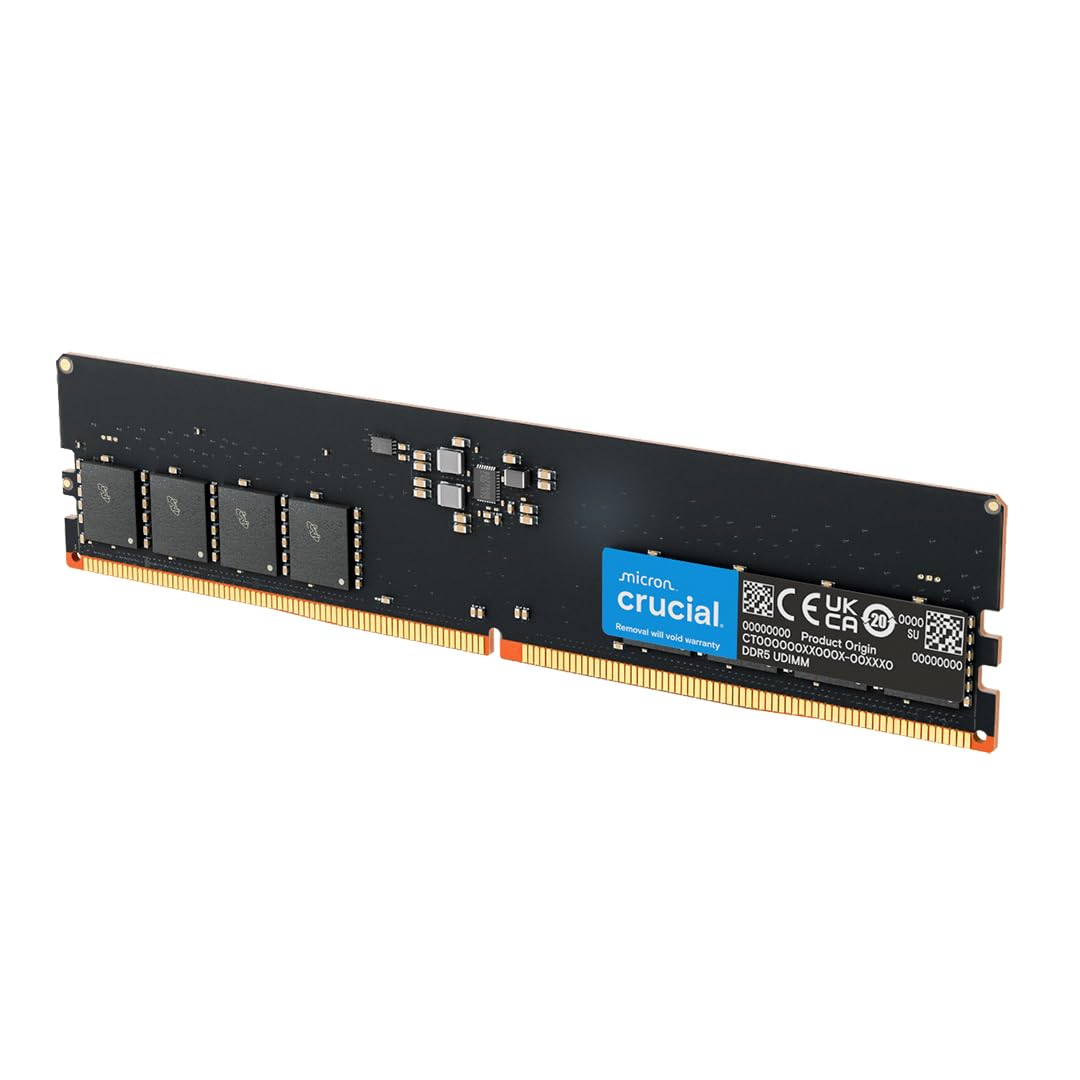
5. Crucial 16GB DDR5 5600MHz UDIMM Desktop Memory
The DDR5 workhorse for Intel Core and Ryzen 7000 builds that just need to work.
If you have a 13th Gen Intel Core or an AMD Ryzen 7000 Series system, this is the drop-in DDR5 module that fits without drama. It runs at 5600MHz but will also operate at 5200MHz or 4800MHz through versatile downclocking, so it drops to your board’s ceiling instead of refusing to play. It is a 288-pin UDIMM, 1.1V, non-ECC, 1Rx8 single rank — the practical baseline for a modern desktop.
Owners mention this Crucial DDR5 UDIMM slots in and does its job with no compatibility drama on their rigs — functionality above all. Micron builds it, and Crucial cites the company’s 42 years of memory expertise, a pedigree claim you can take as marketing. The quality testing at component and module level is a real spec worth knowing. Both Intel XMP 3.0 and AMD EXPO run on the same module, so you can pick up a profile on either platform.
Rank is the tell versus the Samsung above: this Crucial is 1Rx8 while the Samsung DDR4 SODIMM is 2Rx8, a difference in memory layout you should weigh if your board is picky. It is also lighter on the scales than the Patriot at 16.6g to 52g, though that is really just the bare-module design rather than a benefit you feel. If you want the simplest modern desktop upgrade path with no RGB nonsense attached, this is it.
Standout strengths
- 5600MHz with automatic downclock to 5200MHz or 4800MHz
- Intel XMP 3.0 and AMD EXPO on one module
- 1.1V non-ECC UDIMM, 288-pin
- Micron quality testing at component and module level
Trade-offs to know
- Single rank 1Rx8 may behave differently on fussy boards
- CL46 is a looser latency than the Patriot kit
Best fit for: a modern Intel Core or Ryzen 7000 desktop that wants reliable DDR5 at 5600MHz with no RGB.
Check first if: your board has a known preference for dual-rank memory.
6. A-Tech 16GB DDR4 2400MHz UDIMM Desktop RAM

The slow-but-steady desktop module for older DDR4 towers that just need more room.
A-Tech’s pitch is simple: breathe life into an aging DDR4 desktop. This is a single 16GB DIMM at 2400MHz, PC4-19200, CL17, 1.2V, non-ECC, 2Rx8 dual rank, 288-pin. Fit it in a workstation or older tower that caps out at 2400MHz and you get a real capacity boost — more tabs and apps open before the slowdowns start.
Nobody buys this for the speed number. Put it head-to-head with the Patriot DDR5 6000MHz on this list and the gap is huge: 2400MHz versus 6000MHz. But that comparison misses the point — this is for machines that cannot use DDR5 anyway. On the latency side it is CL17 against the Crucial DDR5’s 46 — not apples to apples across generations, but it shows this module stays tight for its speed class.
Where A-Tech backs it up is support: a lifetime warranty and a friendly tech team you can speak to before and after the purchase. That matters on older hardware, where a compatibility snag can otherwise leave you guessing. What to know before buying is that a 2400MHz module in a modern board will feel slow, so this is a capacity fix for legacy desktops rather than a speed upgrade. Match it to a board that lists 2400MHz support and it does exactly what it says.
Why it works: 16GB of DDR4 at 2400MHz with dual rank and a lifetime warranty is the no-nonsense capacity fix for a legacy desktop.
The honest limit: this is a 2400MHz stick, so on a board that can run faster memory it will hold the whole system at the slower speed.
Worth it for: older DDR4 desktops and workstations that max out at 2400MHz and need 16GB more breathing room.
Not the one if: you are building a fast modern desktop — the speed ceiling here would hold you back.
7. Crucial 16GB DDR5 4800MHz CL40 Desktop Memory
The 4800MHz DDR5 baseline — slower on paper, fine in practice for most desktops.
Not every DDR5 build needs 6000MHz. This Crucial module runs at 4800MHz, PC5-38400, CL40, 1.1V, non-ECC, in a 288-pin UDIMM. It lists compatibility across 12th Gen Intel Core and AMD Ryzen 7000 processors, and XMP 3.0 and AMD EXPO are both supported on the module. For a desktop that was built around 4800MHz memory and does not need more, it slots in and does the job.
Owners consistently favor function over flash: the recurring theme is memory that works cleanly, with quality called out as the second strong note. The value angle is real too — this is the builder’s pick when you want DDR5 without chasing speed figures. What you get in return is headroom for more tabs and apps at once, plus smoother response in games and everyday workloads.
Compatibility, though, is the part to handle with care. It fits an ITX build cleanly with no issues for many, but it does not work in every OEM system — a Dell Precision 3660 is one machine it has failed on. So before you buy, check your specific motherboard or desktop model against Crucial’s support tools. Its CL40 latency sits tighter than the Crucial 5600MHz’s CL46, though the extra speed of the pricier kit more than offsets that on paper. Do your homework and this DDR5 stick is a solid, honest baseline.
Where it fits well
- 4800MHz DDR5 at CL40, 1.1V, 288-pin UDIMM
- XMP 3.0 and AMD EXPO supported
- Works in many ITX builds without issue
- Micron component and module testing
Where to be careful
- Not compatible with every OEM system — verify your model
- 4800MHz is slower than the 5600MHz Crucial above
The calm choice for: a DDR5 desktop built around 4800MHz where the goal is reliable memory, not headline speed.
Skip the guesswork by: confirming your exact board or prebuilt model accepts it first.
Know the Specs
Form Factor and Pin Count
The form factor is the physical shape of the memory — SO-DIMM is the short one for laptops and mini PCs, DIMM is the long one for desktop towers. The pin count confirms it: 260-pin means SO-DIMM, 288-pin means DIMM. A 260-pin module will not seat in a 288-pin slot, so check this first.
Speed in MHz and CL Latency
Speed in MHz describes how many million cycles the stick runs per second — a higher number means faster data flow. CL (cas latency) describes how many cycles it waits before responding — a lower number means snappier answers. Both matter together: a 6000MHz CL30 part is quicker than a 4800MHz CL40 one.
DDR Generation
DDR4 and DDR5 have different notch positions and voltages, so they are not interchangeable. Match the generation to your board — a DDR4 system cannot use a DDR5 stick and the reverse is true. When in doubt, look up your laptop or motherboard model’s memory spec before buying.
Rank and ECC
Rank (1Rx8 or 2Rx8) describes how the memory chips are laid out on the module — dual rank can improve efficiency on a compatible board, but a picky board may prefer single rank. Non-ECC is standard consumer memory; ECC is for servers that need error correction. DDR5 modules also carry On-Die ECC built into the chips.
Common Questions
Will a 16GB RAM stick work in my laptop?
What is the difference between SO-DIMM and DIMM?
Does higher MHz always mean better performance?
Is CL16 better than CL22?
Can I mix two different RAM sticks in one computer?
Do I need to change BIOS settings to get full RAM speed?
Is DDR4 still worth buying?
Will a 16GB RAM stick void my laptop warranty?
What does dual rank 2Rx8 mean for my system?
Will 16GB be enough for gaming and everyday work?
The Bottom Line
For most people, the 16gb ram stick to start with is the Timetec 16GB DDR4 3200MHz SODIMM — it is the fastest common laptop speed, installs without expertise, and downclocks gracefully in slower systems. Desktop owners on DDR5 should reach for the Crucial 16GB DDR5 5600MHz, which plays nicely across Intel Core and Ryzen 7000 platforms. If you want low-latency DDR4 with RGB-free simplicity, the G.SKILL RipjawsV 3200MT/s CL16 is the one to grab. And for a legacy desktop that just needs more room, the A-Tech 16GB DDR4 2400MHz fits boards that cannot use anything newer. Whatever you choose, match the form factor and generation to your machine first — that one check is the difference between a smooth upgrade and a drawer ornament.
How we choose
We do not accept paid placement. Every pick is matched to a real buyer and a real use-case; we do not hands-on test units.
Sources
Specifications: manufacturer listings and product documentation. Review insights: verified customer reviews, as of November 2026. Pricing: not shown on this page (it changes often); check the current price via the retailer link.
As an Amazon Associate, My Heart Lives Here earns from qualifying purchases. This does not affect which products we feature.