Heads up: This post contains affiliate links. As an Amazon Associate I earn from qualifying purchases, at no extra cost to you. Learn more
Specs are compiled from manufacturer listings and verified buyer reviews and can change over time — please confirm the key details on the product page before buying.
The fastest way to waste money on memory is to buy the right speed and the wrong shape. A 16GB DDR4 3200MHz stick comes in two physical formats — a long 288-pin module for desktop towers and a short 260-pin one for laptops — and neither will fit the other’s slot. Get that one detail right, and the rest is easy: pick the latency and voltage your board can actually run, then buy the kit that matches it. This guide walks you through the real buying decisions for 16GB DDR4 3200MHz RAM, from CL16 gaming kits down to budget-friendly single sticks.
This guide is built by comparing the manufacturers’ published specifications and the patterns across verified customer reviews, so you get each pick’s real strengths and trade-offs instead of marketing spin.
The best pick here anchors everything: a laptop module that just works and boots on the first try, no BIOS fiddling needed. Read on to see how each 16GB DDR4 3200MHz RAM option fits a different build.
Top Picks


How To Choose The Best 16GB DDR4 3200MHz RAM
The single most common mistake buyers make is grabbing a 16GB DDR4 3200MHz stick without checking the slot shape first. A desktop motherboard takes a 288-pin DIMM, while a laptop or mini PC takes a 260-pin SODIMM. They are not interchangeable, and no adapter will help you. Confirm the form factor before anything else.
SODIMM vs UDIMM — Match the Pin Count to Your Machine
Look at your existing memory stick or your laptop’s spec sheet. If it says 260-pin, you need a SODIMM like the Crucial CT16G4SFRA32A. If it says 288-pin, you need a UDIMM DIMM aimed at desktops. Getting this wrong is the number one return reason for memory, and it has nothing to do with quality.
CAS Latency and the CL16 vs CL22 Difference
CAS latency (CL) is the delay between a memory request and when the data arrives. A CL16 kit responds faster than a CL22 kit at the same 3200MHz speed. That gap matters most for gaming and high-refresh displays. If you are on a tight budget and just need multitasking headroom, CL22 is perfectly fine and will save you money. For overclockers and gamers chasing frame-time consistency, CL16 is the smarter pick.
Why Your 3200MHz Kit Might Run at 2666MHz
Not every motherboard can run memory at its rated 3200MHz. Some systems top out at 2933MHz or 2666MHz, so a 3200MHz stick will automatically downclock to match. That is normal behavior, not a defect. If your board supports XMP 2.0, you can enable the full 3200MHz speed with a single BIOS setting. Without XMP, the memory simply runs at whatever your platform allows.
Side-by-Side Comparison
| Model | Best For | Form Factor | Speed | CAS Latency | Amazon |
|---|---|---|---|---|---|
| Crucial 16GB DDR4 3200MHz SODIMM★ Best Overall | Laptop and mini PC upgrades | SODIMM 260-pin | 3200MHz | CL22 | Amazon |
| Timetec Pinnacle Konduit 16GB KitTop Performer | Gaming desktops with XMP | UDIMM 288-pin | 3200MHz | CL16 | Amazon |
| PNY DDR4 16GB Kit (2x8GB) | Small-form-factor builds | DIMM 288-pin | 3200MHz | CL16 | Amazon |
| Silicon Power DDR4 16GB Kit | Budget desktop 16GB | UDIMM 288-pin | 3200MHz | CL22 | Amazon |
| Timetec 16GB DDR4 3200MHz UDIMM | Single-stick desktop upgrade | UDIMM 288-pin | 3200MHz | CL22 | Amazon |
| A-Tech 16GB DDR4 2666MHz UDIMM | Budget desktop with older boards | UDIMM 288-pin | 2666MHz | CL19 | Amazon |
| Timetec 8GB DDR4 2666MHz SODIMM | Budget laptop 8GB upgrade | SODIMM 260-pin | 2666MHz | CL19 | Amazon |
Detailed Reviews
1. Crucial 16GB DDR4 3200MHz Laptop Memory (CT16G4SFRA32A)
Our pick — 4.5+★ from 17,000+ verified ratings; the strongest balance of quality and price.
The 260-pin SODIMM that boots on the first try in laptops and mini PCs.
If you are upgrading a laptop or mini PC, this is the 16GB DDR4 3200MHz module to put on your shortlist. It is a 260-pin SODIMM (the short laptop shape) built around 1.2V and CL22 latency. That means lower power draw and the speeds your mobile processor can actually run. The star of the show is raw compatibility — 4.5+ stars across thousands of buyers who mostly care that it just works.
What wins people over is functionality. It is the most-discussed thing across owner feedback, and the recurring theme is that the module performs exactly as described in a wide range of machines — old NUCs, 13th-gen Intel laptops, AMD Ryzen 7000 systems. Installation is often a five-minute job with a small screwdriver. As buyers report of the whole experience: it is a cheap way to revive an aging laptop. Unlike the Timetec dual-stick gaming kit further down, this is a single 16GB module, so you keep one slot free for expansion later.
The honest catch is speed tuning. This is a CL22 module, so it has a slower response time than the CL16 kits in this list — 22 versus 16. For everyday multitasking, browsers, spreadsheets, and video calls, you will never notice it. If you are gaming on a high-refresh laptop display and counting every millisecond, the CL16 kits are the faster path. Also check your laptop’s voltage requirement: this one is 1.2V, which is standard DDR4, but a few rare platforms need something else.
Why it earns the top spot
- SODIMM 260-pin shape drops straight into laptop and mini PC slots.
- 1.2V and CL22 keep heat and power draw low in thin chassis.
- Compatibility is the strongest theme — works across Intel and AMD generations.
- Single 16GB module leaves a second slot open for future expansion.
Where it accepts limits
- CL22 is slower than CL16 for competitive gaming and high-refresh work.
- Laptop-only — it will not fit a desktop DIMM slot.
- Some buyers need to check their platform voltage before committing.
Reach for this if: you are upgrading a laptop or mini PC and want the least fuss possible.
Think twice if: your machine is a desktop tower — you need the 288-pin UDIMM kits instead.
2. Timetec Pinnacle Konduit 16GB Kit (2x8GB) DDR4 3200MHz CL16
The 2x8GB CL16 desktop kit that responds in 16 cycles instead of 22.
For desktop builders who want the lowest latency at 3200MHz, this is the one. It is a 16GB kit made of 2x8GB modules in a 288-pin UDIMM (desktop) form factor. The headline number is CAS latency 16 — versus 22 on the Silicon Power kit below, a 38% slower response on paper. In a game, that translates to a snappier read on memory when the action spikes, which keeps frame times steadier.
The dual-stick layout also lets you run dual-channel mode, which doubles the memory bus width and is the single biggest free performance gain most desktop owners overlook. It ships with XMP 2.0 (Extreme Memory Profile, a one-click overclocking preset). One BIOS setting and the kit jumps to its rated 3200MHz with CL16-18-18-38 timings. It runs at 1.35V, which is higher than the standard 1.2V on the non-gaming kits but normal for a low-latency overclocking module. And yes, that white aluminum heat spreader is there for looks as much as cooling — appearance is one of the things buyers specifically call out.
Quality is the thing everyone raves about here, and it holds up at 4.5+ stars. The realistic trade-off is that 1.35V is a modest bump in voltage, so the very smallest power-limited builds should weigh the CL22 kits instead. If your motherboard is a plain OEM board with no XMP support, you will leave performance on the table — check that your BIOS has an XMP toggle before paying for a CL16 kit.
What the numbers say: CL16 versus CL22 at the same 3200MHz is the defining spec of this list, and this kit sits on the fast side of that line. Combine it with 2x8GB dual-channel and you get the best dollar-for-performance story for a desktop gamer.
The shape of the caveat: 1.35V XMP voltage is a small but real consideration for ultra-low-power builds, and it needs a board that speaks XMP.
Choose this when: you are building or upgrading a gaming desktop with an XMP-capable board.
Pass if: your board has no XMP toggle or you need a single-stick laptop solution.
3. PNY DDR4 16GB (2x8GB) 3200MHz CL16 Low Profile

The 32mm low-profile kit that clears big air coolers and mini-ITX cases.
That 32mm height is the reason this kit exists. A 32mm low-profile module clears the oversized air coolers and small-form-factor cases that eat regular heat-spreadered sticks for breakfast. It is a 2x8GB DDR4 3200MHz kit with CL16 timing and 1.35V, so it delivers the same 3200MHz speed and low latency as the Konduit above — just in a shorter body.
Intel XMP 2.0 is on board, so you can push it to the rated 3200MHz from one BIOS setting. The kit is also backwards-compatible with 3000MHz, 2933MHz, 2800MHz, 2666MHz, 2400MHz, and 2133MHz, which matters if you are moving it into an older rig. That range of compatibility means it will downclock gracefully rather than refuse to post in a board that cannot hit 3200MHz. Buyers who have small-form-factor builds with tight clearance are the exact market for this one.
Here is the fair warning: your motherboard’s clearance is the axis to check first. If you have a standard mid-tower with plenty of headroom above the RAM slots, a taller kit with a bigger heat spreader will work just as well — the low profile is a solution for a specific problem, not a universal upgrade. And as with any CL16 1.35V kit, it needs XMP support to reach its rated speed.
The defining spec: 32mm height — that is the whole pitch, and it is a real one for SFF builds, air-cooled servers, and mini-ITX cases. CL16 at 3200MHz means you are not sacrificing speed to get the shorter height.
Who needs the standard height instead: if clearance is not an issue in your case, a full-height kit with a larger heat spreader is a fine alternative.
Fit this if: you run a small-form-factor or air-cooler-cramped desktop where height clearance is tight.
Look wider if: you have a standard mid-tower — the low profile becomes a solution to a problem you do not have.
4. Silicon Power DDR4 16GB Kit (2x8GB) 3200MHz CL22

The 2x8GB CL22 kit for a desktop that just needs 16GB.
Two 8GB sticks, 3200MHz, CL22, 1.2V — this is the everyday desktop upgrade. JEDEC compliance (the industry standard for memory compatibility) and a lifetime warranty are the quiet wins here. Low 1.2V voltage means less power draw than the 1.35V gaming kits, and CL22 at 3200MHz is plenty for office work, media, and light gaming. Timings are 22-22-22-52, standard for a value kit.
Value is the thing buyers praise most, and it is easy to see why: you get 16GB in dual-channel for a budget-friendly number. The speed and reliability picture is more mixed. Some owners are happy with the speeds, while a few note failures after extended use. That is worth knowing going in, but read it in context: a 4.5+ star average over a large pool suggests the majority are satisfied, and this is a mainstream workhorse, not a premium overclocker.
If you have an XMP board and you plan to push memory hard, the 38% faster CL16 response on the Konduit or PNY kits is a smarter long-haul bet. If your priority is fitting 16GB into a desktop on a tight budget and you are not chasing frames, this kit is the value play. Just note it is a 288-pin UDIMM — desktop only, no laptop slots.
Standout value points
- 2x8GB dual-channel kit at 3200MHz for a budget-friendly outlay.
- 1.2V low voltage keeps the power bill and heat down.
- JEDEC-compliant and backed by a lifetime warranty.
- 22-22-22-52 timings are solid for everyday multitasking.
Honest trade-offs
- CL22 is the slower latency option if you game at high refresh rates.
- Mixed reliability reports mean it is a workhorse, not a premium overclocker.
- 288-pin UDIMM, so desktop slots only.
Buy this if: you need 16GB in a standard desktop and want the best value on the page.
Spend up if: you game competitively and want the faster CL16 kits instead.
5. Timetec 16GB DDR4 3200MHz UDIMM Desktop RAM
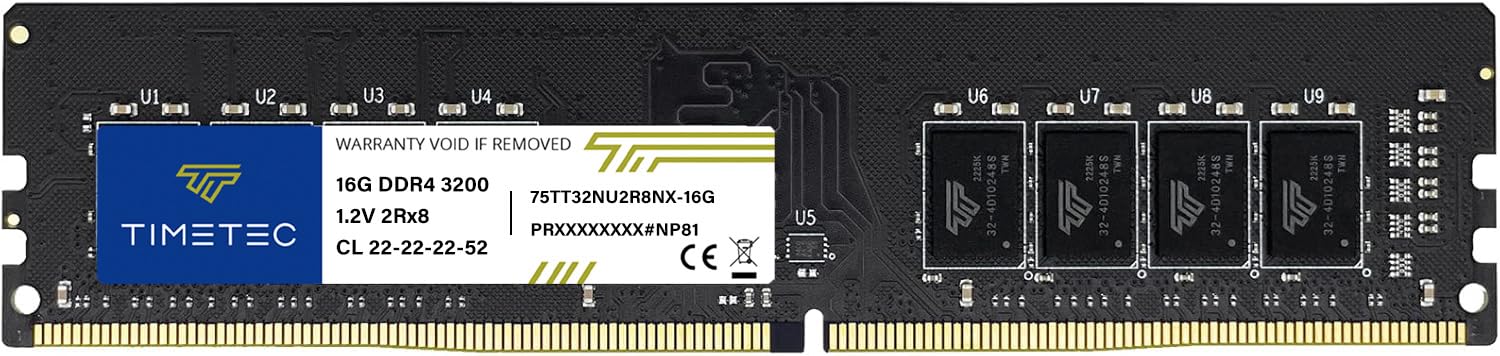
One 16GB 288-pin stick that downclocks to whatever your board supports.
A single 16GB 288-pin module is the clean solution for a motherboard with limited slots. This Timetec UDIMM runs at 3200MHz, CL22, 1.2V, in a dual-rank 2Rx8 (denser) configuration. The clever part is the automatic downclock: this 3200MHz memory will step down to 2933MHz or 2666MHz if your board only supports those speeds, so you will not get a no-boot screen in an older system. Plug-and-play, no expertise needed.
Because it is one module, you trade a little dual-channel headroom for a slot you keep free. In everyday use, that is a fine trade — browsing, documents, and media playback hardly notice. Where it gives ground is heavy gaming and video editing, which love dual-channel bandwidth. A 2x8GB kit is the stronger choice for those tasks. Timetec backs it with a limited lifetime warranty and U.S.-based support.
Note the form factor: 288-pin UDIMM, so it goes in a desktop or workstation, not a laptop. And because it only has a limited review base, treat it as a reliable basic upgrade rather than a proven performance ticket. Pair it with a matching stick later if you want dual-channel.
The one-slot logic: 16GB in a single module means you can add a second stick down the road without discarding anything. The automatic downclock to 2933MHz or 2666MHz protects older boards from compatibility surprises.
The trade you are making: single-channel operation gives up some bandwidth versus a 2x8GB kit — noticeable only in heavy gaming or editing.
Right for: desktops with a single free slot and an older board that needs graceful downclocking.
Wrong for: gaming rigs where you want dual-channel bandwidth from day one.
6. A-Tech 16GB DDR4 2666MHz UDIMM Desktop RAM

The CL19 288-pin stick for desktop boards that top out at 2666MHz.
Not every desktop wants 3200MHz. If your motherboard’s ceiling is 2666MHz, buying a faster kit just means it runs slower anyway. This A-Tech module meets the board where it lives: 2666MHz, CL19, 1.2V, 288-pin UDIMM, in a single 16GB stick. CL19 is a touch quicker in response than the CL22 kits at this speed, and the 1.2V JEDEC standard keeps power modest.
Functionality is the defining theme — the module does exactly what it says, and easy installation is a recurring positive. That is what you want from a budget upgrade: no surprises, no BIOS puzzles. A-Tech backs it with a lifetime warranty and a tech support team you can reach before and after purchase, which is a real plus for a first-time upgrader.
The honest limitation is the speed ceiling: 2666MHz is where this module sits, so it is not the pick for a modern gaming board that can hit 3200MHz. It is the correct choice for an older desktop, a hand-me-down office PC, or a workstation that runs a fixed 2666MHz profile. Check your slot type — 288-pin desktop only, no laptop SODIMM.
What it gets right
- 2666MHz CL19 is a good fit for boards that max out at that speed.
- 1.2V JEDEC-standard voltage keeps power draw modest.
- Lifetime warranty and reachable tech support suit first-timers.
- Simple plug-and-play install with no BIOS fiddling required.
What to weigh first
- 2666MHz is slower than the 3200MHz kits for modern builds.
- Single 16GB stick, so no dual-channel benefit from the start.
- Desktop 288-pin only — not for laptops.
Pick it for: a desktop or workstation that runs at 2666MHz and needs reliable 16GB without overclocking.
Skip it for: a modern gaming board where you want the full 3200MHz headroom.
7. Timetec 8GB DDR4 2666MHz SODIMM Laptop RAM
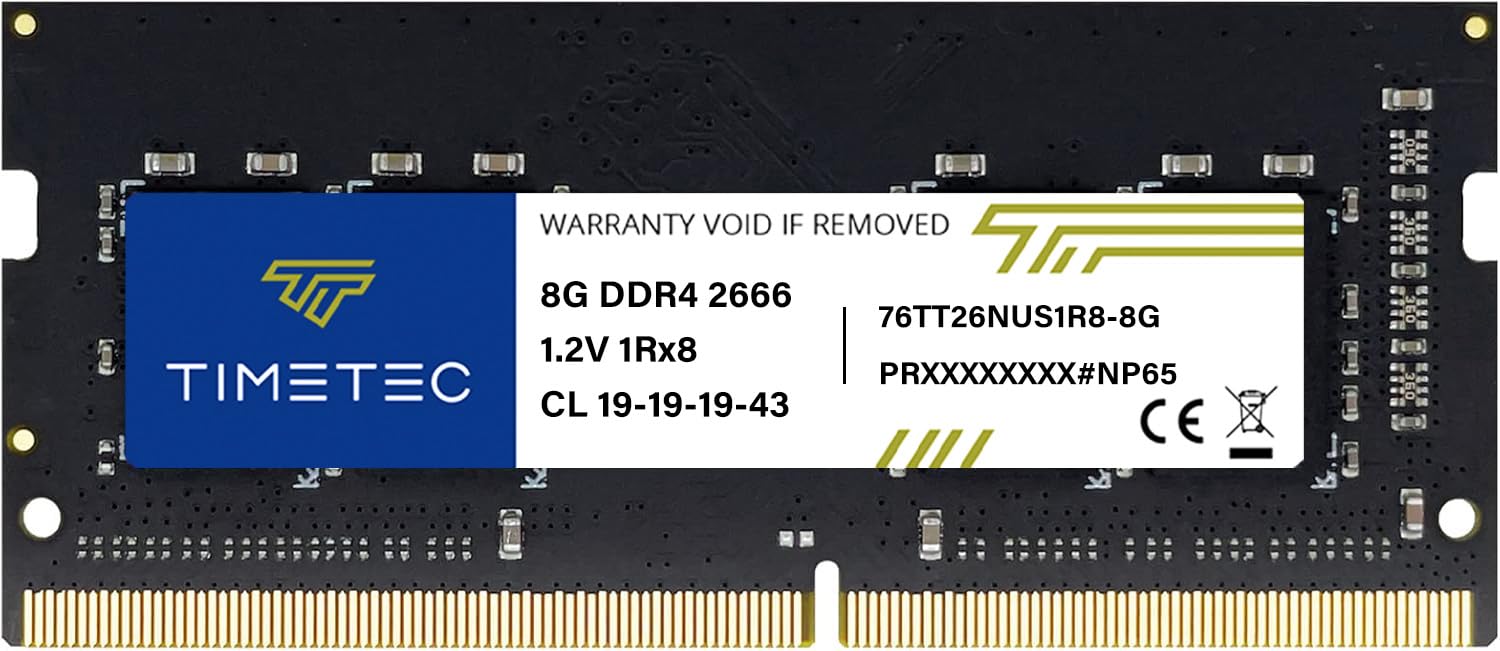
The 8GB 260-pin SODIMM for older laptops that just need more than 4GB.
This is the 8GB member of the family, and it deserves a spot for one clear reason: plenty of older laptops and mini PCs do not need 16GB, they just need more than 4GB or 8GB of slow RAM. This 260-pin SODIMM runs at 2666MHz, CL19, 1.2V, non-ECC, and it is genuinely plug-and-play. If your machine currently lags when you open a browser and a document together, this is a cheap way to fix that.
The speed gain is the payoff. Owners mention the upgrade made an old Acer Aspire 3 considerably faster, and the module is recognized instantly by systems like the Synology 920+. Functionality and memory quality are the strong points, which is exactly what you want from a budget stick. And the price-to-capacity trade mirrors the comparison at the top of this list: the Pinnacle Konduit kit packs a 2x8GB 16GB total at 3200MHz, while this single module is a smaller, gentler step.
The limit is obvious: 8GB is half of the 16GB this guide is built around, and 2666MHz is slower than 3200MHz. For a modern laptop that runs demanding apps, a 16GB stick is the better upgrade. But for a second-hand laptop, a lightweight media machine, or a NAS that just needs more working memory, the 8GB module is the sensible, low-cost move. It is 260-pin SODIMM, so desktop owners should look elsewhere.
Where it earns its place: 8GB, 2666MHz, CL19, 1.2V — the essential specs for a basic laptop boost, at a budget-friendly price. Plug-and-play install means no BIOS work.
Where the ceiling sits: half the capacity of the 16GB picks and a 2666MHz speed, so power users should step up to a 16GB module.
This is your upgrade if: you have an older laptop or NAS that just needs more working memory than it has now.
Look at the 16GB picks if: you run heavy apps or want the full 3200MHz of this guide’s headline spec.
Know the Specs
Form Factor and Pin Count
The pin count tells you which slot the module fits. A 288-pin DIMM (sometimes called UDIMM) is the long module for desktop towers and workstations. A 260-pin SODIMM is the short one for laptops, mini PCs, and all-in-ones. They are not interchangeable — check your existing stick or your machine’s spec page before ordering. This one detail prevents more failed upgrades than any other.
Speed, CAS Latency, and Voltage
3200MHz is the transfer speed — how many million cycles per second the memory can run. CAS latency (CL) is the delay before data arrives, so a CL16 kit is more responsive than a CL22 kit at the same speed. Voltage matters too: 1.2V is standard DDR4, while 1.35V kits are set up for XMP overclocking. If your board lacks XMP support, a 3200MHz stick may quietly run at 2933MHz or 2666MHz, which is normal and not a fault.
Common Questions
Will a 16GB DDR4 3200MHz stick work in my laptop or desktop?
Is CL16 better than CL22 for gaming?
Why does my 3200MHz RAM only run at 2666MHz?
Do I need a 2x8GB kit or a single 16GB stick?
Will a laptop SODIMM fit in a desktop computer?
Is 1.35V safe for my desktop motherboard?
How do I know if my board supports XMP 2.0?
Can I mix a 16GB 3200MHz stick with an older 8GB stick?
Does RAM speed actually matter for everyday use?
Is a low profile RAM kit worth it over a standard height kit?
The Bottom Line
For most people, the 16gb ddr4 3200mhz ram winner is the Crucial 16GB DDR4 3200MHz SODIMM because it drops into a laptop or mini PC and just works, with 4.5+ stars across thousands of owners. If you are building a gaming desktop and want the faster CL16 response, grab the Timetec Pinnacle Konduit 16GB Kit. And for a standard desktop where value matters most, the Silicon Power DDR4 16GB Kit is the one to reach for.
The one honest nudge: confirm your slot shape before anything else — 260-pin for laptops, 288-pin for desktops — and the winner above is the safest, most proven starting point on this page.
How we choose
We do not accept paid placement. Every pick is matched to a real buyer and a real use-case; we do not hands-on test units.
Sources
Specifications: manufacturer listings and product documentation. Review insights: verified customer reviews, as of November 2026. Pricing: not shown on this page (it changes often); check the current price via the retailer link.
As an Amazon Associate, My Heart Lives Here earns from qualifying purchases. This does not affect which products we feature.