Heads up: This post contains affiliate links. As an Amazon Associate I earn from qualifying purchases, at no extra cost to you. Learn more
Specs are compiled from manufacturer listings and verified buyer reviews and can change over time — please confirm the key details on the product page before buying.
You need one thing from a 16-inch sleeve: your laptop goes in, comes out the other side unscratched. The catch is that “16 inch” on a listing means almost nothing. Every maker measures differently, and a sleeve that swallows a MacBook Pro 16 may swim around a slim 15.6-inch ultrabook. The seven picks below cover the real range — a drop-tested shoulder bag, a thin canvas slipcase, a rigid clamshell — and each one lists its actual internal dimensions so you can match it to your machine before you buy.
This guide is built by comparing the manufacturers’ published specifications and the patterns across verified customer reviews, so you get each pick’s real strengths and trade-offs instead of marketing spin.
What separates a sleeve that protects from one that just carries is padding thickness, corner coverage, and honest sizing. The list below does that math for you, so you can match interior dimensions to your machine in one pass rather than ordering three and returning two.
Top Picks


How To Choose The Best 16 Inch Laptop Sleeve
Start with a tape measure and your laptop’s own footprint, not the marketing title. A sleeve is a box of fixed size, and your machine either slides into it or it does not. Everything else — padding, pockets, handles — is a bonus you weigh after the fit is confirmed.
Measure the inside, not the outside
The internal dimension is the number that counts. The JETech sleeve, for example, lists a 15.75 x 10.94 x 0.94 inch interior, which tells you exactly what will sit inside it. The exterior figure is always larger because it includes the padding wall and the zipper bulge — useful for knowing whether it slides into your backpack, useless for judging fit. Lay your laptop on a table with a ruler against its longest edge and its depth, and compare those two figures directly to the listed interior.
Decide how much padding you actually need
A padded sleeve is built to absorb the everyday knock of a bag swinging into a desk leg or a train seat. Thicker foam and reinforced corners buy more margin for a hard drop, but they also add bulk and weight. A measured approach: pick a firm, corner-protected shell if your laptop rides loose in a backpack, and a lighter slipcase if it already lives inside a structured bag with its own padding.
Weigh the pocket system against the slim factor
Front zippered pockets hold a charger, cable, mouse, or pen, and they keep small items from rattling loose in your main bag. The trade-off is thickness — a pocketed sleeve bulges once it is loaded. A hidden back pocket gives you a spot for a passport or phone without adding visible bulk. If you only ever carry the laptop, a plain slipcase stays flatter inside a briefcase and is easier to slide in and out.
Know what water resistance really covers
A water-resistant coating handles a splash or a light rain shower on the walk from the car to the door. It is not a dry bag. On sleeves that list it, the coating sits on the outer fabric to keep brief contact from soaking through to the lining. A hard-shell case adds a rigid barrier on top of that. Neither claims to survive a dunking, so treat the term as everyday splash defense rather than waterproofing.
Side-by-Side Comparison
| Model | Best For | Stated Internal Size | Max Device Size | Carry Style | Amazon |
|---|---|---|---|---|---|
| tomtoc Protective Shoulder Bag★ Best Overall | Drop-prone commutes and travel | 14.02 x 9.88 x 0.67 in | 16 inches | Shoulder strap or handle | Amazon |
| Lacdo 360° Protective SleeveBest Value | Everyday carry with room for extras | — | 16 inches | Grab handle | Amazon |
| JETech Laptop Sleeve | Slim protection that fits inside a bag | 15.75 x 10.94 x 0.94 in | 15.75 inches | Sleeve only | Amazon |
| BAGSMART Case with Handle | Carrying a laptop plus a separate pouch | — | 16 inches | Top handle | Amazon |
| MOSISO Laptop Bag | Business travel with a trolley belt | 15.55 x 11.22 x 2.16 in | 16 inches | Shoulder strap and PU handle | Amazon |
| Pelican Ranger Series Sleeve | Rough handling and hard knocks | — | 16.2 inches | Elastic handle | Amazon |
| Thule Gauntlet Sleeve | Working straight out of the case | Fits up to 14.1 x 9.7 in | 16 inches | Sleeve, clamshell | Amazon |
Detailed Reviews
1. tomtoc Protective Laptop Shoulder Bag for 16″ MacBook Pro
Our pick — 4.5+★ from 850+ verified ratings; the strongest balance of quality and price.
Corner guards on all four edges turn a careless knock into a non-event.
If your laptop rides loose and you have cringed at the sound of it hitting a chair leg, this is the one to look at first. The tomtoc wraps each of the four corners in its CornerArmor reinforcement, adds a high-resilience edge, then lines the inside with high-density soft padding — a full perimeter of cushioning rather than a single sheet on the bottom. It carries a military standard drop designation (MIL-STD-810H), which is a published test standard for surviving drops and shocks rather than a marketing phrase.
The carry system is the standout. A detachable, adjustable shoulder strap comes with a nonslip ergonomically thick pad, and you can slide the bag onto your backpack or into a travel case when you would rather not wear it. Inside, the tri-compartment layout splits a main laptop bay from a front organizer with small pockets for a charger cable, a USB hub, or an iPad, plus a strap for an AirTag or key. There is a hidden back pocket for documents, a phone, and cards that stays out of view while you are moving through a crowd.
Material choices lean practical: YKK zippers, padded PU leather handles, water-resistant recycled fabric, and a soft fleece lining. The interior measures 14.02 x 9.88 x 0.67 inches, and the maker lists fit for a 16-inch MacBook Pro plus the Razer Blade 15/16, ThinkPad X1 Extreme 15-inch, 15.6-inch Acer Aspire 5/3, and Dell Inspiron 16 — so check your own machine against that 14.02-inch interior before you commit. Owners praise the build quality and fit most, and it holds a 4.5+ star rating across 800+ owners.
What earns the top spot
- Reinforced corners on all four edges backed by a published MIL-STD-810H drop standard
- Detachable padded shoulder strap plus a handle, so you can wear it or slide it into a bigger bag
- Three compartments with an AirTag/key strap and a hidden back pocket for documents and a phone
- YKK zippers, PU leather handles, and a fleece lining that is soft against the lid
Where it asks something of you
- The 14.02 x 9.88 inch interior is roomier than a slim 15.6-inch ultrabook needs, so a small machine will shift
- It is a bag, not a flat slipcase — it will not slide into a tight laptop slot the way a bare sleeve does
Reach for this if: your laptop travels in a crowded bag or a car seat and you want corner protection plus a real strap you can swap in and out.
Think twice if: you want the flattest possible carrier to slot into an already-padded backpack sleeve.
2. Lacdo 360° Protective 16 Inch Laptop Sleeve Case
Three storage zones and a grab handle, without the bulk of a full briefcase.
The Lacdo keeps a main bay for the machine, adds two front zippered pockets, and finishes with one large compartment on the back for an iPad, mouse, charger, power cord, cables, earphone, pens, a hard drive, or a power bank. The strong metal zippers are two-way, so you can pull from either side for quick access during a meeting.
Protection comes from a shockproof soft lining and a thickened edge, described by the maker as 360° all-around cushioning against daily bumps and accidental drops. The outer shell is anti-scratch canvas fabric with a waterproof coating meant to deflect splashing water or rain on your walk in. A stretchable grab-handle on top lets you switch between carrying it as a briefcase and slipping it under your arm like a plain sleeve. At 0.34 kg it stays easy to drop into a backpack or tote.
On fit, this one leans generous. Its item dimensions of 15.75 x 1.18 x 11.81 inches sit alongside a 16-inch maximum device size, versus the JETech sleeve’s 16.38 x 11.34 x 1.69 inches — that 4% more exterior gap and 2% larger maximum device size mean the Lacdo swallows a slightly bigger machine and leaves a touch more breathing room inside. The internal pockets are sized so a charger and its power cord sit neatly rather than tumbling together, which is the storage win owners keep mentioning alongside the overall build quality. It wears a 4.5+ star rating over a very large owner base.
The everyday win: dedicated spots for a charger, cable, and mouse mean you stop digging through your main bag for them, and the canvas outer shrugs off scuffs in a tote.
The honest caveat: a roomier interior helps bigger 16-inch machines but leaves a slim ultrabook with some play, and the waterproof coating is for splashes and rain, not for submerging the case.
Pick this one if: you want one carrier for the laptop plus its accessories and you like the grab-handle option for short walks between rooms.
Move on if: your laptop is a thin 15-inch ultrabook that needs a snug interior to stop it rattling.
3. JETech Laptop Sleeve for 16-Inch Devices, Dark Grey

The thinnest profile here, with foam cushions and a pocket for the small stuff.
Not everyone wants a bag strapped to their shoulder. If your laptop already lives inside a structured backpack or briefcase and you just want a soft layer between the lid and the world, the JETech does that at its most stripped back. Inner foam cushions guard against dust, scratches, drops, and shocks, and the whole sleeve slides into a briefcase, backpack, or suitcase without adding a second carry system you have to manage.
It is also the most transparent pick on sizing. The internal dimensions are 15.75 x 10.94 x 0.94 inches and the exterior is 16.38 x 11.33 x 1.69 inches — those figures let you check your own machine against a real interior before ordering. The listed compatibility runs wide: MacBook Pro 16-inch (M5 down to M1, 2026–2019), MacBook Air 15-inch, Surface Laptop 4/3 15-inch, Surface Book 3/2 15-inch, Dell XPS 15-inch, Dell Inspiron 15–16-inch, Samsung Chromebook 4+/Pro 15.6-inch, HP Envy/Pavilion/EliteBook 15.6-inch, and Lenovo ThinkPad X1 16-inch among others.
An extra front pocket takes pens, a phone, cables, a charger, or a power bank within reach. The splash-proof exterior blocks water and steam and wipes clean, which is enough for a rainy dash to the car. Owners love the fit most, with protection close behind, and it holds a steady 4.5+ star rating across a large owner base. One honest wrinkle: zipper quality draws a split verdict in owner reports, with most finding it smooth and a few finding it gives out quickly, so treat this as a careful-packing sleeve rather than one you yank shut one-handed.
Where it excels: the precise 15.75 x 10.94 inch interior makes matching your laptop easy, and it stays flat enough to disappear into a bag you already own.
What to know going in: there is no handle and no shoulder strap, so all the carrying happens in your other bag.
Make this yours if: you want thin, honest protection and you already carry a good backpack or briefcase.
Look elsewhere if: you need a handle or strap to carry the sleeve on its own.
4. BAGSMART Laptop Case 15-16 inch with Handle

A separate little pouch for your mouse and earphones — a detail most sleeves skip.
The BAGSMART earns its place on a small but real convenience: it ships with its own accessory bag. Drop your mouse, earphones, or even makeup into it, then clip it on or leave it behind as the day demands. That kind of modular flexibility is uncommon in a sleeve, and it pairs with a puffy, soft plush inner lining that cushions the laptop against falls, shocks, bumps, scrapes, and scratches.
The padding is three-layered with a soft border, built for shock resistance and long-lasting durability. A metal zipper glides open for access, and a sturdy top handle lets you carry it comfortably for a while rather than just from desk to desk. The front zippered pocket holds a charger, mouse, cable, phone, memory cards, an external hard drive, or pens. At 10.88 ounces it stays light enough to slide into a tote, briefcase, or backpack.
The 15.94 x 0.98 x 11.47 inch dimensions cover a 15–16 inch machine, and the compatibility list includes MacBook Air/Pro 15–16 inch, Dell XPS 15/16, Lenovo ThinkPad X1 Carbon and Yoga Slim 7 Pro 16-inch, HP Spectre x360 and Envy 16, ASUS ZenBook Pro 16, Microsoft Surface Laptop 6 15-inch, and Huawei MateBook 16s. Owners praise the build quality and looks most, but padding draws mixed reviews — plenty for some, thin for others. If you want a sleeve to survive real drops, look at the firmer options above; if you want a light, stylish case with a bonus pouch, this delivers.
The draw: the free accessory bag is genuinely useful for keeping a mouse and cable separate from the laptop, and the pink finish stands out from the usual black.
The trade-off: protection is a softer, lighter build than a hard shell, so it suits careful carrying more than rough handling.
Best matched to: someone who wants a lightweight, good-looking case with a dedicated spot for small accessories.
Not the one for: heavy travel where the laptop gets tossed around and needs rigid corner armor.
5. MOSISO Laptop Bag for Men, 15-16 inch Computer Bag
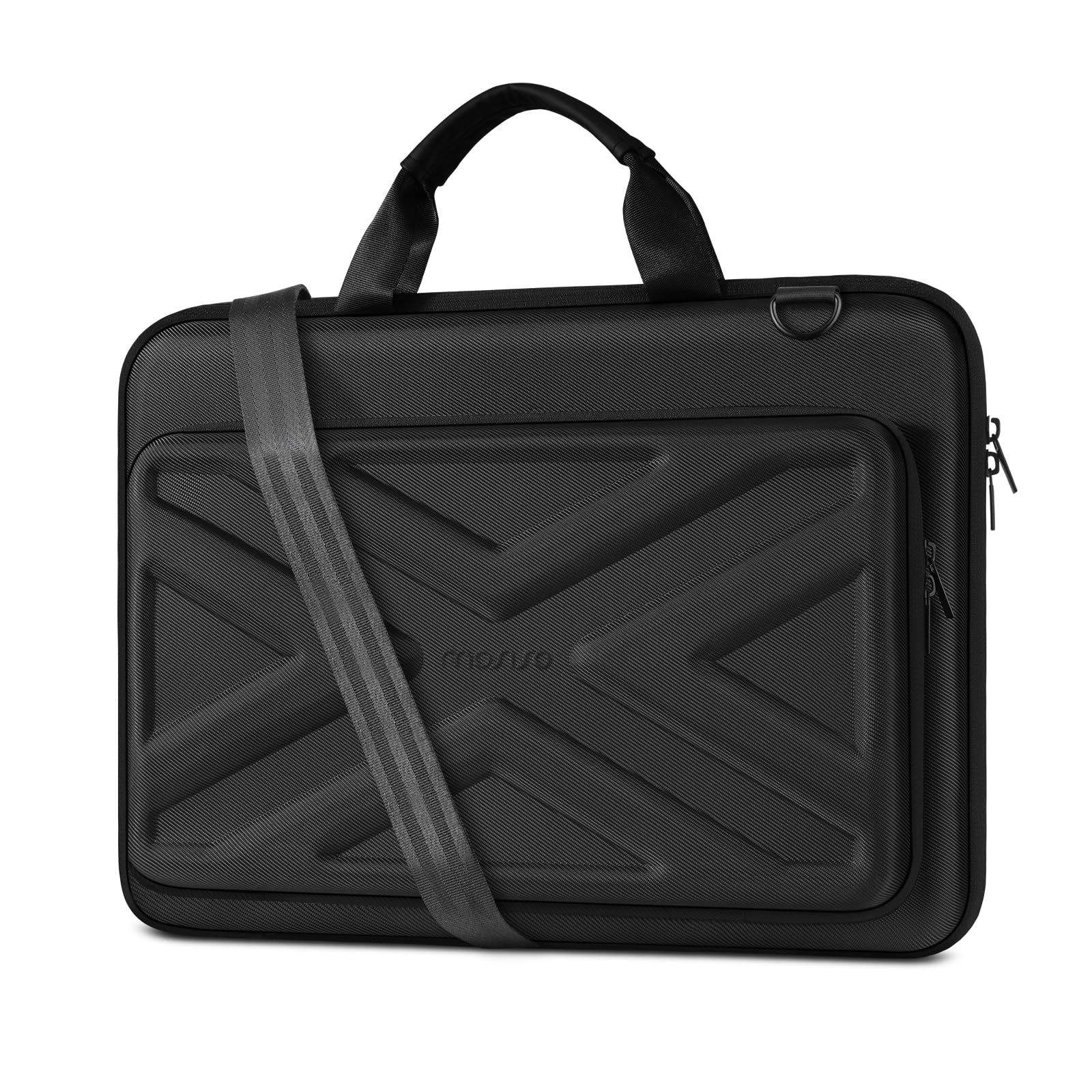
Opens flat to 180 degrees and clips onto a suitcase handle for the airport run.
Frequent flyers will spot the feature that matters most here: a back trolley suitcase belt that lets the whole bag ride on your rolling luggage instead of over your shoulder. The shell is thickened EVA material — a molded foam-like layer that stays shockproof, dustproof, and water-resistant — with a soft velvet-filled interior to keep the laptop free of scratches and bumps. The bag can open fully at 180 degrees, so you lay it flat and lift your machine straight out instead of wrestling it free.
Inside, the main compartment holds the laptop, a tablet, and cables, while a front outer zippered pocket gives quick access to a phone, charger, adapter, pen slots, wallet, and keys.
Carrying is versatile: a removable, adjustable shoulder strap with a pad ranges from 33.86 inches up to a maximum of 63.39 inches, and a PU handle offers a grab-and-go option. Between those you can wear it as a shoulder bag, a carrying case, a sleeve, a handle bag, a messenger, a crossbody, or a briefcase. Compatibility covers MacBook Air 15-inch and MacBook Pro 16-inch, Surface Laptop and Book 15-inch, and ASUS, Acer, and HP 15.6-inch lines. Owners cite capacity and protection most, and it holds a 4.5+ star rating across 800+ owners; the recurring gripe is the zipper — smooth for most, sticky for a few.
Standout design: the rigid EVA shell and the trolley belt together make it the most travel-minded pick in this group.
Size to note: the 2.16-inch interior is deep and protective, but it is bulky next to a thin sleeve and wants room in your bag.
The right call for: anyone who travels by plane or train and wants the bag to hook onto luggage and open flat.
Better to skip if: you want a compact slipcase that vanishes into a slim backpack.
6. Pelican Ranger Series Laptop Sleeve, 16 Inch

A four-layer shell that takes the hit so a 16.2-inch laptop does not have to.
Pelican built its name on protecting gear, and this sleeve leans hard into that. A four-layered hard shell stacks 900D Nylon — a tough, tightly woven fabric — with EVA and Neoprene layers to shield the device from accidental shocks, bumps, drops, and impacts. Multiple layers of padded foam add shock absorption and pressure resistance, and an interior neoprene woven layer keeps the lid free of scratches. A safety strap holds the machine in place so it does not slide around once it is zipped in.
It carries up to a 16.2-inch machine, the largest device fit here, and extends that to MacBook models well beyond the Pro 16, including iPad Pro, iPad Air, and Samsung Galaxy Book 3 Pro 360. An extra mesh storage area holds a power adapter, keyboard, mouse, tablet, or other accessories. The zippers are heavy-duty and water-resistant, and the rugged nylon outer resists wear and wipes clean while also protecting the case itself when it rides inside a larger briefcase. An elastic carrying handle and double metal secure zip lock round it out as a travel-ready carrier.
Owners notice the durability and protection most, and the case carries a 4.5+ star rating across 800+ owners. At 1.9 pounds it is the heaviest here, which is the flat cost of that much protection.
Why it appeals: the layered shell and safety strap make it the pick for anyone who has dropped a laptop before and does not want a repeat.
The catch: 1.9 pounds and a generous 16.2-inch fit mean it adds real weight and a little looseness around a 16-inch MacBook Pro.
Go for this if: your laptop faces genuinely rough handling and you want layers of rubber, foam, and nylon around it.
Pass if: you want a featherweight sleeve and your machine is a snug-fit MacBook Pro that this runs slightly large on.
7. Thule Gauntlet Sleeve, Fits 16″ MacBook
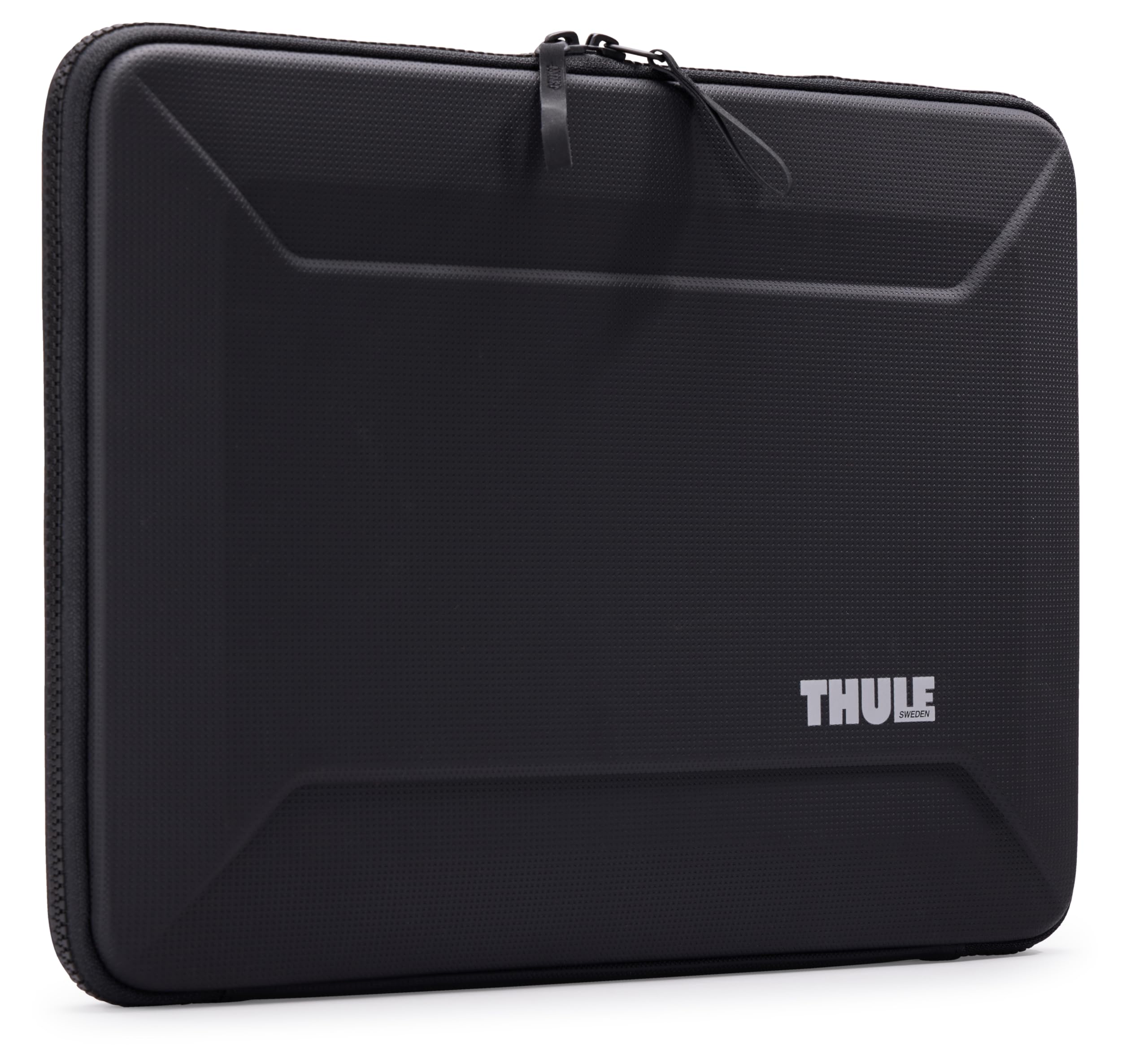
A rigid clamshell you can open and keep working from without pulling the laptop out.
There is a specific kind of buyer for the Gauntlet: someone who works on a laptop all day and wants a case that doubles as a portable desk surface. The clamshell design opens wide enough to use the machine directly inside it, so you flip the lid, get to work, and zip it shut again when you move on. A rigid exterior with enhanced corner and edge protection guards the device, while a padded interior keeps the hardware free of bumps and scratches.
The sizing is stated plainly for a reason. It fits a 16-inch MacBook Pro, a 15-inch MacBook Air, or laptops up to 35.8 x 24.6 cm (14.1 x 9.7 inches) — so a wider 16-inch machine from another brand may not clear that interior. The recycled-material story is a real draw for some: 100% recycled interior fabrics and webbing, and partly recycled exterior fabric and foam. At 0.5 kg it stays light despite the rigid frame.
Owners value the protection most, then the looks and sturdy feel of the tough textile outer. A TSA checkpoint goes through without issue for travelers, and the fit is dialed in for 16-inch MacBooks. The zipper is the recurring caution: some buyers report it failing over time, so zip it slowly and do not overstuff. The Gauntlet holds a 4.5+ star rating across 270+ owners and sits at the premium end of this list, priced for its rigid frame and recycled build.
What makes it different: the clamshell opening lets you keep working in the case, and the rigid shell with reinforced corners protects harder than fabric alone.
Fit caution: that 14.1 x 9.7 inch interior limit is tight, so measure a non-Apple 16-inch machine before ordering.
For the work-from-anywhere crowd: the rigid, recycled clamshell is ideal if you want to open up and keep typing.
Check your size first: a wide 16-inch laptop from another brand may exceed the stated 14.1 x 9.7 inch interior.
Know the Specs
Internal vs. External Dimensions
The interior figure is the one that decides fit — it is the space your laptop actually occupies inside the sleeve, measured as length by depth by thickness. The exterior figure is always larger because it adds the padding wall and the zipper bulge, and it is what tells you whether the case fits into your backpack or briefcase slot. Read both. A sleeve with a generous exterior and a snug interior protects well but may not slide into a tight bag; a sleeve with a thin wall is easier to stow but cushions less.
Padding Layers and Corner Reinforcement
A basic sleeve relies on one or two layers of foam to soften a knock. More protective designs add dedicated corner armor or a rigid shell so a drop on the edge is spread across a wider area rather than concentrated on one spot. Thicker padding and reinforced corners mean more margin for a hard hit, at the cost of added bulk and weight. If your laptop rides loose in a bag, favor corner protection; if it is already well-padded inside a structured bag, a lighter slipcase is often enough.
Common Questions
Will a 16 inch laptop sleeve fit my 15.6 inch laptop?
How do I measure my laptop for a sleeve?
Is a hard shell sleeve better than a soft padded one?
Does water resistant mean my laptop is safe in the rain?
Can I carry a sleeve on its own as a bag?
What size laptop does a 16 inch MacBook Pro need?
Will a 16 inch sleeve hold my charger and mouse too?
Do laptop sleeve zippers wear out?
Is a 16 inch laptop sleeve allowed through airport security?
What is the difference between a laptop sleeve and a laptop bag?
The Bottom Line
For most people, the 16 inch laptop sleeve winner is the tomtoc Protective Shoulder Bag — the four-corner armor, the military-standard drop designation, and the detachable padded strap give it the most complete protection and carry setup here, and it holds 4.5+ stars across 800+ owners. If you want the most storage for the least bulk while keeping a grab handle, the Lacdo 360° Protective Sleeve gives you three pockets and a generous fit. And if you travel by plane and want the bag to clip onto luggage, the MOSISO Laptop Bag with its trolley belt and 180-degree opening is the one to reach for.
How we choose
We do not accept paid placement. Every pick is matched to a real buyer and a real use-case; we do not hands-on test units.
Sources
Specifications: manufacturer listings and product documentation. Review insights: verified customer reviews, as of November 2026. Pricing: not shown on this page (it changes often); check the current price via the retailer link.
As an Amazon Associate, My Heart Lives Here earns from qualifying purchases. This does not affect which products we feature.