Heads up: This post contains affiliate links. As an Amazon Associate I earn from qualifying purchases, at no extra cost to you. Learn more
Specs are compiled from manufacturer listings and verified buyer reviews and can change over time — please confirm the key details on the product page before buying.
Your Mac Studio is a beautiful slab of aluminum that eats a shocking amount of desk real estate. These mounts lift it under, upright or onto a VESA arm so the space comes back to you.
This guide is built by comparing the manufacturers’ published specifications and the patterns across verified customer reviews, so you get each pick’s real strengths and trade-offs instead of marketing spin.
A good mount gets your Mac Studio off the desktop without choking its airflow. Here is the best mac studio mount for cleaner, cooler, more usable workspace.
Top Picks

Side-by-Side Comparison
| Model | Best For | Mount Style | Material | Fit | Amazon |
|---|---|---|---|---|---|
| HumanCentric Under Desk Mount Mac Studio★ Best Overall | Reclaiming desk space | Under-desk | Alloy steel | Mac Studio | Amazon |
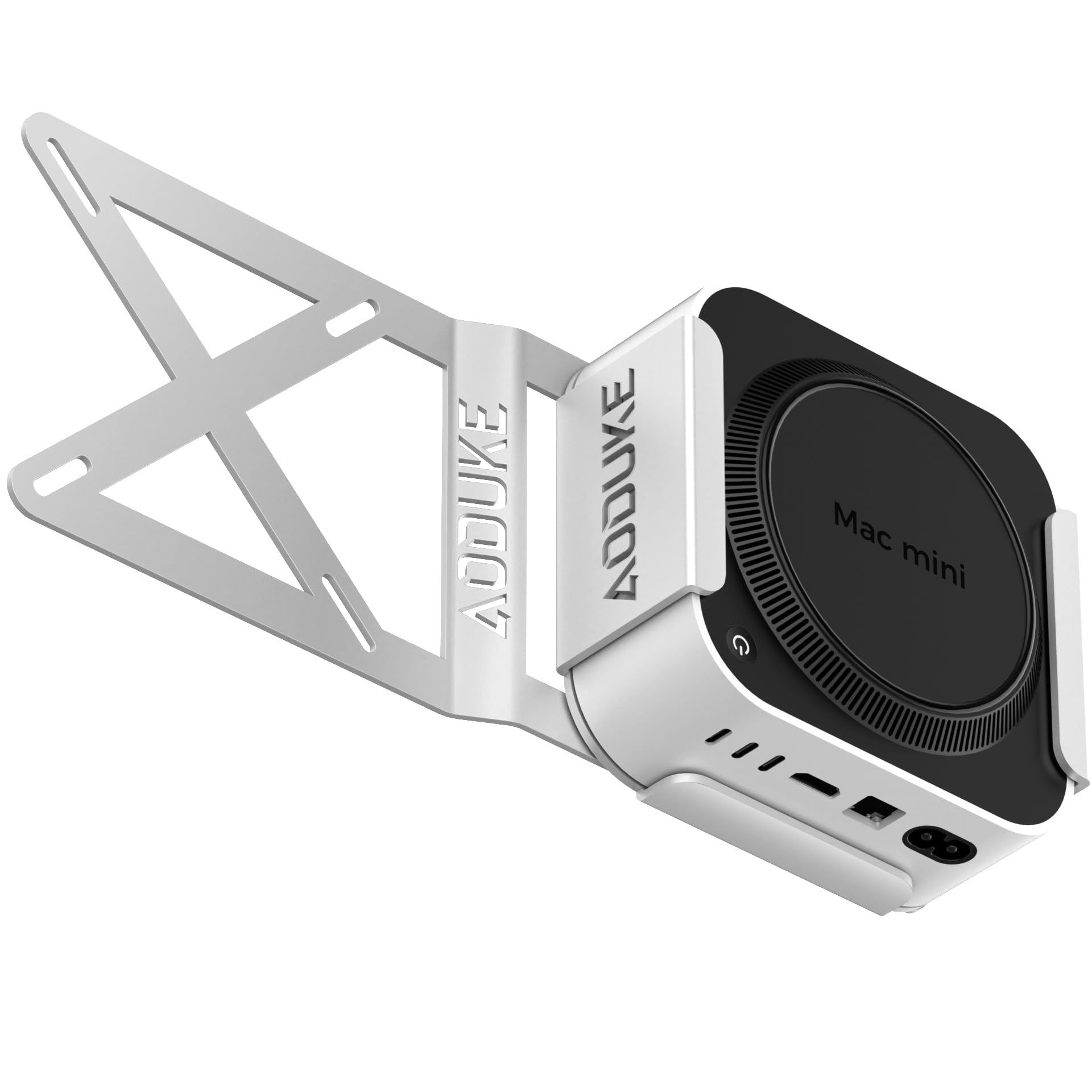
| Aluminum Alloy Mac mini M4/M5/M6 Pro VESA BracketBest for VESA Arms | Mac mini on an arm | VESA extension | Metal | Mac mini | Amazon |
| Mac Studio Stand Aluminum | Vertical, tidy setups | Upright stand | Aluminum | Mac Studio | Amazon |
| Acrylic Mac Studio Stand | Dusty rooms | Upright stand | Acrylic | Mac Studio | Amazon |
| Acrylic Stand for Mac Studio M1-M4, Mac mini M1 M2 2010-2023 | Mixed hardware | Upright stand | Acrylic | Studio and mini | Amazon |
| VIVO Pole Mounted Monitor Arm | Pole-based setups | Monitor arm | Alloy steel | 17 to 32 inch | Amazon |
| GEEKRIA Chassis Stand Mac Studio | Safeguarding the Mac | Upright stand | Acrylic | Mac Studio | Amazon |
Detailed Reviews
1. HumanCentric Under Desk Mount Mac Studio
Our pick — 4.5+★ from 200+ verified ratings; the strongest balance of quality and price.
The straightforward answer for anyone who just wants the Mac Studio off the desktop.
This is an under-desk cradle built specifically around the Mac Studio’s shape, bolted beneath the worktop so the machine disappears from view. Two open sides keep ports reachable and let the chassis breathe while cables tuck neatly out of the way.
The trade-off is that installation means drilling or screwing into your desk, and once it is up there you will want to think through cable slack before you commit. It is a permanent-feeling solution, not something you move around.
Why it wins
- Frees the entire desktop
- Solid, secure hold
Needs desk fixing
- Permanent installation
Clutter-free desks: Anyone whose Studio currently squats on the worktop.
Setup effort: Requires screwing into the desk and planning cable routing.
2. Aluminum Alloy Mac mini M4/M5/M6 Pro VESA Bracket
Turns an existing monitor arm into a home for a Mac mini.
This bracket slots between your monitor and its VESA stand, adding an extra panel so a Mac mini can ride along behind the screen. It is aimed squarely at people already living with a 75×75 or 100×100 VESA setup.
Note that it is built for the mini rather than the Studio, and it only works if you already own a compatible VESA arm. Without that hardware, there is nothing here to mount to.
Strengths
- Hides the mini behind the monitor
- Scratch-resistant finish
Hardware dependent
- Needs an existing VESA arm
Arm owners: Desk setups that already use a VESA monitor stand.
Not for Studio: Designed for Mac mini models, not the Mac Studio chassis.
3. Mac Studio Stand Aluminum
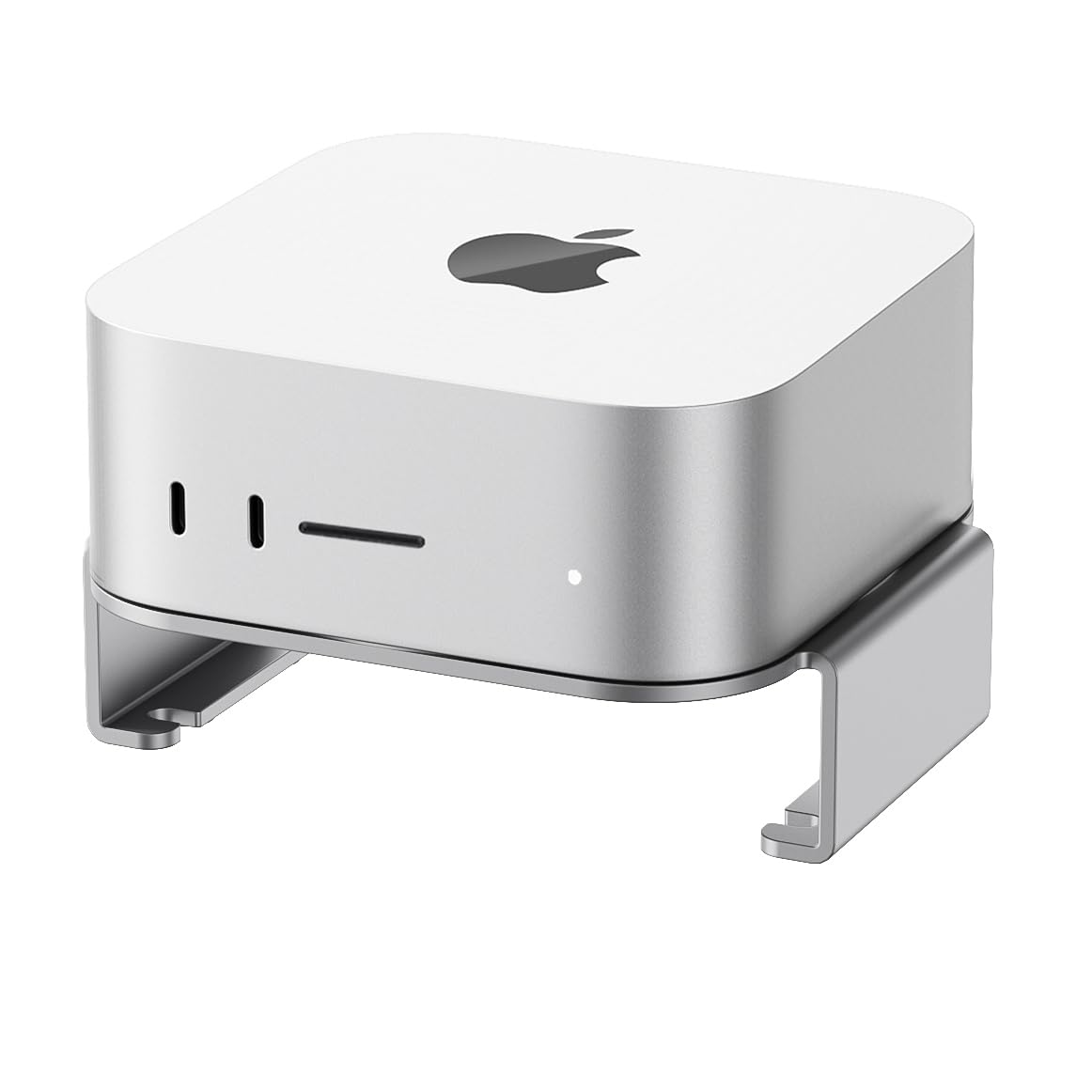
Stands the Studio on its side in a cradle cut to match its curves.
A silver aluminum stand that holds the Mac Studio vertically, molded to the machine’s exact proportions so it sits snug rather than wobbling. The open design is meant to help heat dissipate instead of pooling around the chassis.
It is a desktop stand, so it does not free up the footprint so much as make it taller and tidier. You still need clear vertical space above it, and the sticky pad fixing means it prefers a stable surface.
What works
- Precise, snug fit
- Aluminum looks the part
Footprint trade
- Takes vertical clearance
Minimalist desks: Owners who like the Studio standing beside the display.
Height needed: Requires free space above the machine.
4. Acrylic Mac Studio Stand

A transparent cradle with a washable filter tucked into its base.
This acrylic stand is cut from Mac Studio molds so the machine drops in precisely, and the clear PMMA keeps the aluminum visible from every angle. A detachable dust net at the bottom traps debris before it reaches the vents.
Acrylic is lighter and less premium-feeling than metal, and it will show fingerprints and scratches over time. The filter is the real draw, but it needs occasional cleaning to stay useful.
Highlights
- Filter guards the intake
- Clear, unobtrusive look
Material limits
- Acrylic scratches easily
Dust-prone spaces: Rooms with pets, carpets or open windows.
Care needed: Clear plastic shows marks and wants gentle cleaning.
5. Acrylic Stand for Mac Studio M1-M4, Mac mini M1 M2 2010-2023
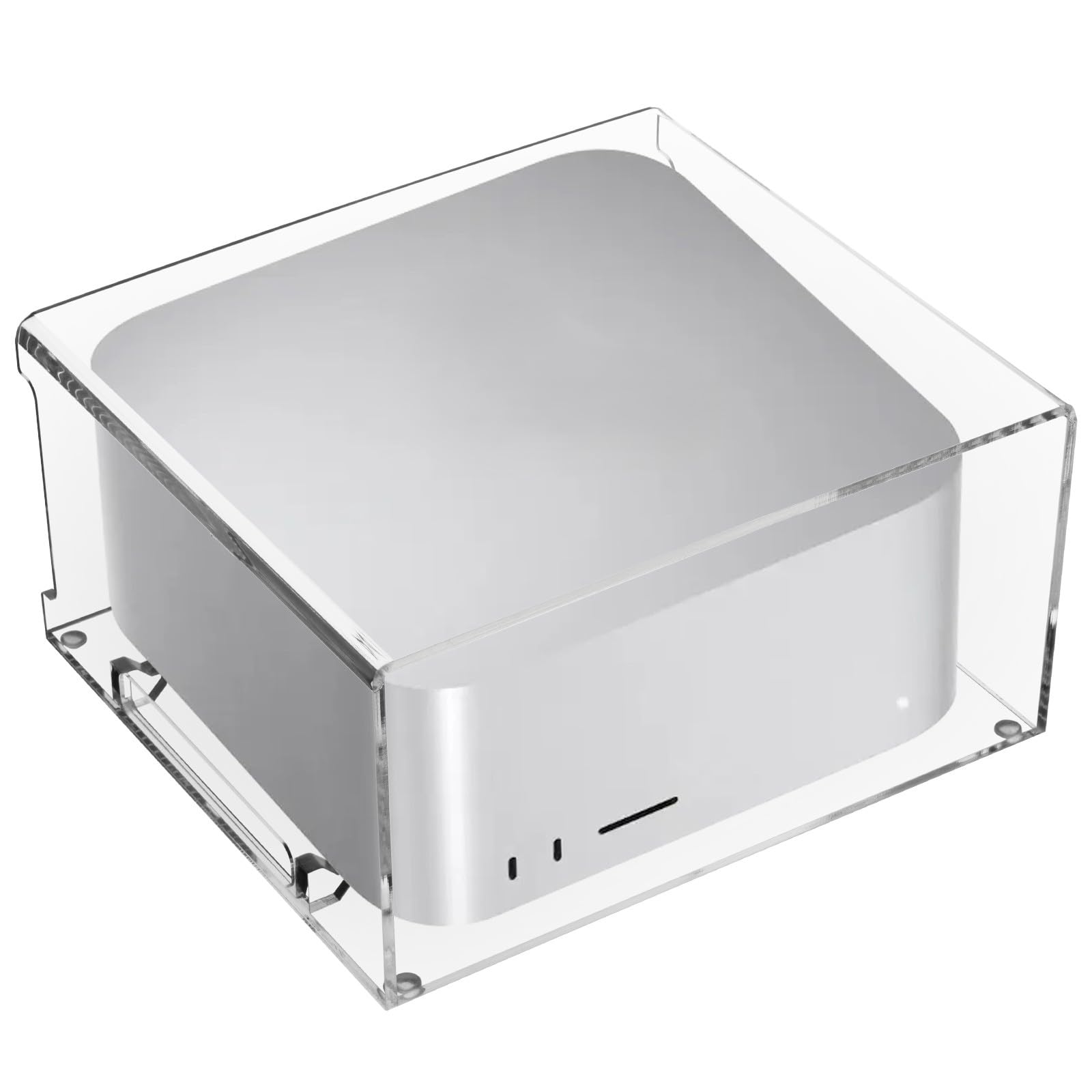
One clear acrylic holder that covers both the Studio and older minis.
A glossy clear stand sized for the Mac Studio range and also compatible with Mac mini models going back years, which makes it a flexible pick if your hardware changes. A small back guardrail and rubber base keep things steady.
The broad compatibility means the fit is less tailored than a Studio-only cradle, and the glossy acrylic finish is a fingerprint magnet. It is a budget-friendly compromise rather than a precision instrument.
Good to know
- Works across models
- Stable rubber base
Fit compromise
- Glossy finish smudges
Upgraders: Desks that may swap between a Studio and a mini.
Less tailored: Universal sizing means a looser fit than dedicated cradles.
6. VIVO Pole Mounted Monitor Arm

A full-motion monitor arm that clamps to a pole you already have.
This pneumatic arm mounts to an existing pole and carries screens from 17 to 32 inches, holding up to 17.6 lbs with VESA 75×75 or 100×100 spacing. It is the pick if your goal is repositioning a display rather than cradling the Mac itself.
Be aware the pole is not included, so this only works if you already run one. Stability is the recurring complaint, and heavier screens can feel wobbly at full extension.
What shines
- Full motion articulation
- Good value for the reach
Honest caveats
- Pole sold separately
Pole users: Anyone with an existing pole mount to build on.
Wobble risk: Can feel unsteady with heavier screens at full stretch.
7. GEEKRIA Chassis Stand Mac Studio
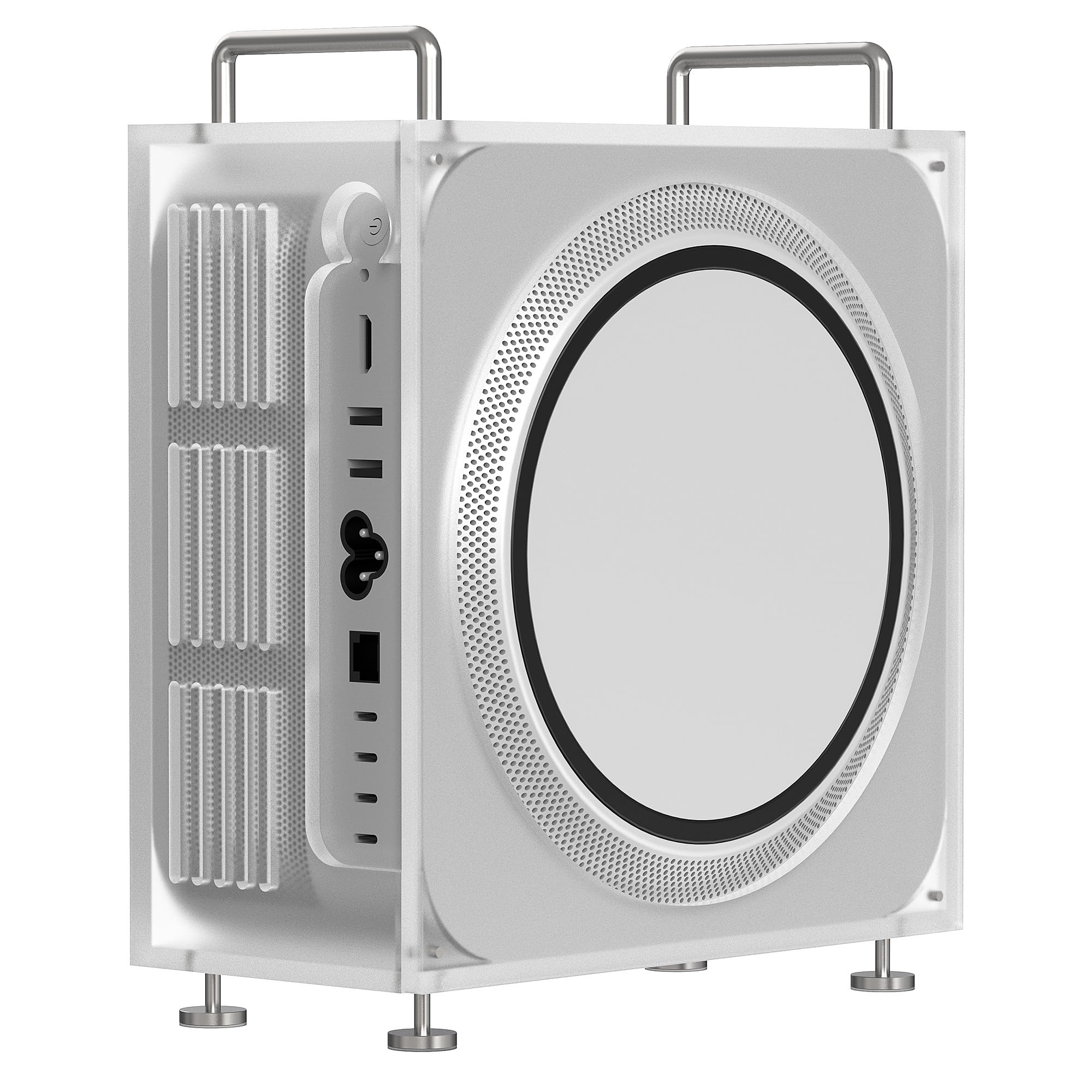
Lifts the Studio upright and shields it from the everyday hazards of a desk.
A frosted acrylic chassis stand that holds the Mac Studio vertically, keeping it clear of spills and dust while opening up desktop space. The frosted finish softens the look compared with clear plastic.
It is a stand rather than a mount, so the machine stays on the desk surface, and acrylic demands the same gentle handling as any plastic cradle. Protection is the point here, not heavy-duty fixing.
Why consider it
- Guards against spills
- Frosted finish hides marks
Light duty
- Desk-bound, not fixed
Clumsy-desk insurance: Desks where drinks and dust are a real risk.
Not a mount: Stays on the desktop rather than under or on an arm.
Common Questions
Does a mount affect Mac Studio cooling?
Can I mount a Mac Studio under a glass desk?
Do these fit every Mac Studio generation?
The Bottom Line
For most buyers, the best mac studio mount winner is the HumanCentric Under Desk Mount Compatible with Mac Studio, M4 M3 M2 M1 because it bolts the machine out of sight while leaving ports and vents open, which is exactly what most Studio owners are trying to achieve. If you would rather keep the Studio upright and visible, Mac Studio Stand – Aluminum Desktop Stand Designed Only for Mac Studio,Improved Airflow Effectively Dissipate Heat, Desk Organization and GEEKRIA Chassis Stand, Compatible with Apple 2026 Mac Studio for M5/M4/M1 Max, M5/M3/M2 Ultra, Acrylic Computer Case Holder, Mount, Desktop Accessories, tune Heat Dissipation (Frosted) are the tidier choices, while Acrylic Mac Studio Stand for M4 M3 M2 M1 Max/Ultra,Detachable Air Filter adds a dust filter for messier rooms. For arm-based setups, VIVO Pole Mounted Monitor Arm for 17″ to 32″ Screens, Holds 17.6 lbs is the one to weigh.
How we choose
We do not accept paid placement. Every pick is matched to a real buyer and a real use-case; we do not hands-on test units.
Sources
Specifications: manufacturer listings and product documentation. Review insights: verified customer reviews, as of November 2026. Pricing: not shown on this page (it changes often); check the current price via the retailer link.
As an Amazon Associate, My Heart Lives Here earns from qualifying purchases. This does not affect which products we feature.