Heads up: This post contains affiliate links. As an Amazon Associate I earn from qualifying purchases, at no extra cost to you. Learn more
Specs are compiled from manufacturer listings and verified buyer reviews and can change over time — please confirm the key details on the product page before buying.
Every card here carries the same 8 GB of GDDR6 memory (fast graphics memory that holds your game’s textures) and the same NVIDIA GeForce RTX 3060 Ti chip underneath. So why does one run whisper-quiet in a small case while another howls like a leaf blower? The answer is cooling and board design, and that is what actually separates these nine cards. Below you get the picks that keep the chip fed, cool, and quiet without wasting a slot.
This guide is built by comparing the manufacturers’ published specifications and the patterns across verified customer reviews, so you get each pick’s real strengths and trade-offs instead of marketing spin.
Read on for the picks that hold their clock speed without rattling your desk, plus the plain specs to check before you buy the best 3060 ti 8gb graphics card for your case.
Top Picks


How To Choose The Best 3060 Ti 8GB Graphics Card
You will not pick between graphics chips here — every card in this list runs the same NVIDIA GeForce RTX 3060 Ti. What you are really choosing is the board around it: the fan setup, the factory boost clock, the length that has to squeeze into your case, and the video outputs that connect to your monitor. Get those four right and you are done.
Cooling and noise come before clock speed
A two-fan card like the ZOTAC Twin Edge is compact and easy to fit, but a three-fan design usually moves the same air at lower fan speed, which means less whine under load. If your PC sits on the desk next to you, pay for the bigger cooler. If it lives under the desk, the smaller card is fine and frees up room.
The boost clock is a small lever, not a big one
Boost clock is the speed the GPU (graphics processor) pushes itself to when it has thermal headroom, measured in MHz. Factory overclocked cards ship a few tens of MHz above reference. That is a real gain, but it is small — a card that stays cool and holds its boost is worth more than a big headline number that throttles.
Measure your case before you fall in love
These cards range from a short 8.7-inch board to a long 14.9-inch one, and a long card will not fit a compact case no matter how good it is. Check the length and width against your clearance before anything else. Then check that your power supply has the right PCIe cables, because the card needs them to boot.
Side-by-Side Comparison
| Model | Best For | Boost Clock | Card Length | Max Resolution | Amazon |
|---|---|---|---|---|---|
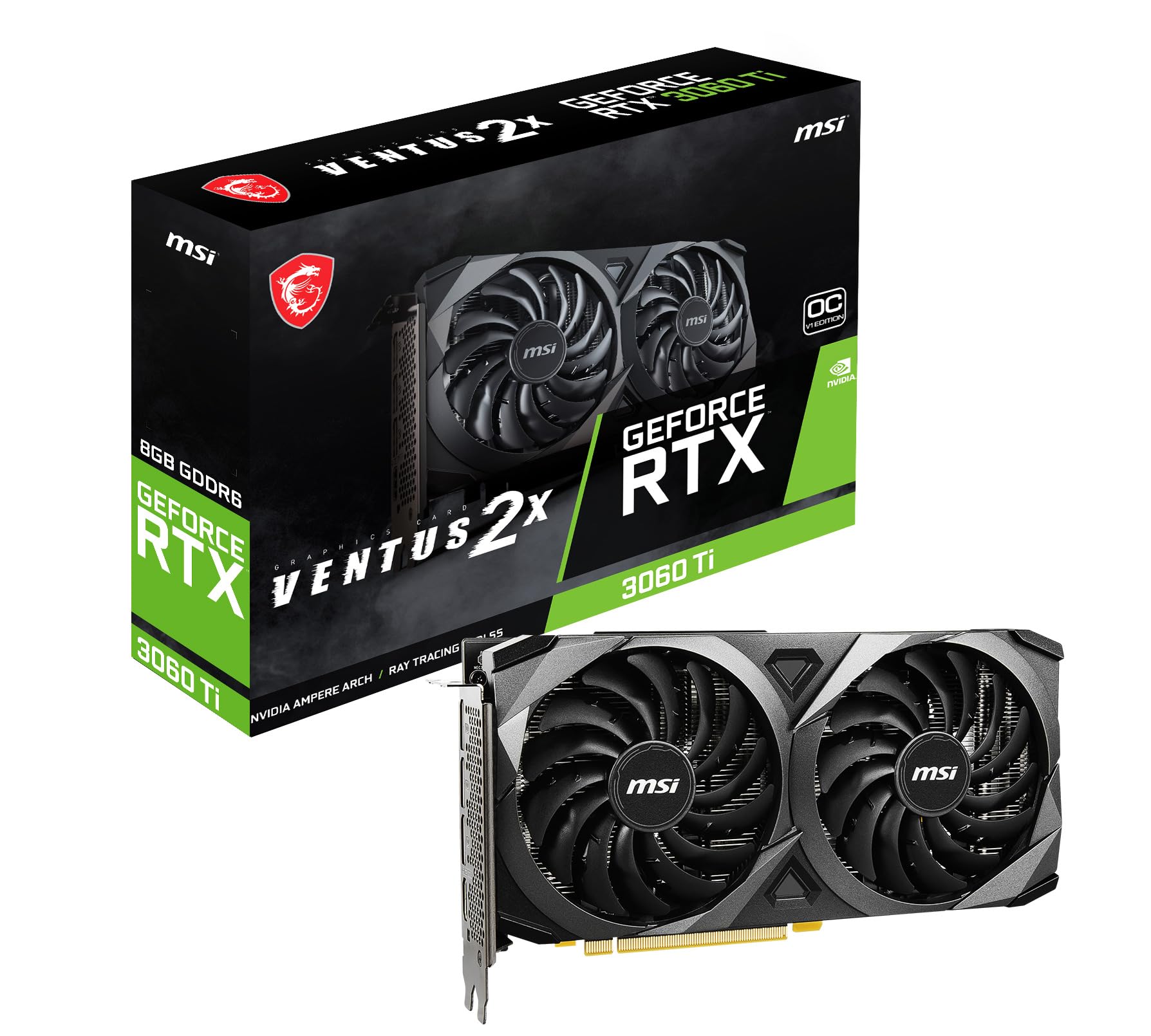
| GIGABYTE MSI Gaming RTX 3060 Ti Ventus 2X★ Best Overall | Balanced all-rounder | 1695 MHz | 9.1″L x 4.9″W | 7680 x 4320 | Amazon |
| NVIDIA GeForce RTX 3060 Ti Founders EditionReference Pick | The reference card | — | 12″L x 6″W | 3840 x 2160 | Amazon |
| GIGABYTE RTX 3060 Ti Gaming OC PRO 8GCoolest Operator | Cool and quiet builds | — | 11″L x 4.6″W | 7680 x 4320 | Amazon |
| ASUS TUF Gaming RTX 3060 Ti V2 OC | Durability-first builds | 1785 MHz (OC mode) | 11.85″L x 5.63″W | 7680 x 4320 | Amazon |
| EVGA RTX 3060 Ti FTW Ultra Gaming | Overclocking headroom | 1800 MHz | 14.9″L x 8.6″W | 3840 x 2160 | Amazon |
| ZOTAC RTX 3060 Ti Twin Edge OC | Small cases | 1695 MHz | 8.7″L x 4.6″W | 7680 x 4320 | Amazon |
| Zotac AMP White Edition LHR | White-themed builds | 2 GHz GPU clock | — | 8K | Amazon |
| MSI RTX 3060 Ti Gaming X Trio | Big triple-fan cooling | 1830 MHz | 12.7″L x 5.5″W | 7680 x 4320 | Amazon |
| ASUS TUF Gaming RTX 3060 Ti OC Edition | Long-term reliability | 1785 MHz (OC mode) | 16″L x 9.2″W | 7680 x 4320 | Amazon |
Detailed Reviews
1. GIGABYTE GeForce RTX 3060 Ti LHR 8GB
Our pick — 4.5+★ from 550+ verified ratings; the strongest balance of quality and price.
The two-fan card that fits where the giant ones cannot, and still keeps score in 4K.
If your case is tight and you need a 9.1-inch card that still runs a 1695 MHz boost, start here. This card is built on the NVIDIA GeForce RTX 3060 Ti chip with 8 GB of GDDR6 memory — the fast memory that holds textures — and it runs a 1695 MHz boost clock (the speed it climbs to when it stays cool). It measures 9.1 inches long and 4.9 inches wide, which is compact enough to slide into a mid-tower build without a fight.
On the back it gives you three DisplayPort 1.4a outputs plus one HDMI 2.1 port, so you can run multiple monitors or a high-refresh screen without adapters. The card tops out at a 7680 x 4320 display resolution (that is 8K), which means 4K gaming and desktop work both have headroom to spare. Owners consistently praise its performance in modern games and everyday rendering.
The honest catch is fan noise. Some buyers are happy with how quiet it runs and others find the fans loud under load, so it depends on how hard you push it and how close it sits to your ears. Value is the other swing point: the price feels like a bargain to some and steep to others depending on what they came from. Neither is a defect — it is the trade-off of a compact two-fan board.
What earns the top spot
- Only 9.1″L x 4.9″W, so it clears tight case space the long cards cannot
- 1695 MHz boost clock keeps the RTX 3060 Ti chip at full song
- Three DisplayPort 1.4a plus HDMI 2.1 covers multi-monitor and high-refresh setups
- 7680 x 4320 max resolution gives room for 4K and beyond
What to keep in mind
- Fan noise is a split verdict — quiet for some, loud under heavy load for others
- A two-fan cooler is not built for aggressive overclocking
Reach for this if: you need a compact, capable 3060 Ti that fits a standard mid-tower and runs 4K without choking.
Look elsewhere if: you want a fan-silent card or plan to push serious overclocks on a triple-fan cooler.
2. Geforce Nvidia RTX 3060ti Founders Edition 8GB
The original design NVIDIA built the 3060 Ti around, in its own clean two-slot shell.
This is the card the chip was designed for. NVIDIA’s own Founders Edition runs the GeForce RTX 30 Series Ampere architecture with 8 GB of GDDR6 memory and the RT cores that power real-time ray tracing — the light-and-shadow effect that makes reflective floors and wet streets look physical. It connects over PCI Express, and it is built for desktop PCs.
The defining limit is resolution. Where several third-party cards in this list reach 7680 x 4320, this one lists a maximum of 3840 x 2160 — full 4K, which is exactly the panel most RTX 3060 Ti owners game on. It measures 12 inches long and 6 inches wide, so it needs a little more breathing room than the compact pick above. It supports NVIDIA DLSS, the AI upscaling that raises frame rates while keeping image quality intact, and NVIDIA Reflex for lower input lag in competitive shooters.
Owners treat it as a solid mid-tier GPU and consider it good value. The one honest note is noise — most find it very quiet, but under heavier loads it can be heard. That is a fair trade for a 12-inch reference card that is easy to power and priced as the baseline the rest of this list is measured against.
The clean baseline: full 4K output, DLSS and Reflex support, and the reference cooler — nothing extra to justify.
Where it stops: the 3840 x 2160 ceiling puts it below the 8K-capable third-party cards, and the fan is audible under load.
Pick it when: you want the reference card with a clean two-slot fit and 4K gaming is your target.
Pass on it if: you run a high-refresh 8K monitor or want the quietest cooler in the room.
3. GIGABYTE GeForce RTX 3060 Ti Gaming OC PRO 8G (REV3.0)
Three fans instead of two, and it shows in how quietly it keeps its cool.
Cooling is the whole pitch here. The GIGABYTE Gaming OC PRO runs three WINDFORCE fans over the 8 GB GDDR6 memory and a 256-bit memory interface, and it hits a 7680 x 4320 digital max resolution — 8K output for a monitor that can take it. The card is 11 inches long and 4.6 inches wide, so it needs a mid-tower at minimum.
That triple-fan setup is not wasted. Owners are consistently happy on the performance front, and cooling and quiet operation each come up as recurring positives — the card stays composed during long sessions instead of winding up. The Ampere architecture underneath brings the 2nd generation RT cores for ray tracing and 3rd generation Tensor cores for DLSS upscaling.
The split is likely familiar if you have shopped this tier at all: some buyers call it money well spent, others feel the markup is steep for the same chip everyone else is selling. That is a value judgment, not a cooling failure. If silence and temperatures matter more to you than the last few percent of clock speed, this is the sensible buy.
Why it earns a place: three fans, 8K output, and a cooler that stays quiet — the combination most builders actually feel day to day.
The trade-off: it costs more than a compact two-fan card for the same chip, and 11 inches of length rules out small cases.
Made for: builds where the PC sits close and quiet cooling beats a slimmer profile.
Think twice if: your case is short or you want the smallest footprint for the chip.
4. ASUS TUF Gaming NVIDIA GeForce RTX 3060 Ti V2 OC Edition

Dual ball bearings and military-grade parts, for the builder who wants it to just keep running.
Dual ball fan bearings and military-grade components are the reason to pick this one. The ASUS TUF V2 OC uses dual ball fan bearings, which the spec sheet says can last up to twice as long as sleeve bearing designs — a real difference if your PC runs all day. It carries a military-grade certification for its components, and ASUS ships a TUF certificate of reliability in the box.
On speed it runs an OC mode boost clock of 1785 MHz, settling to 1755 MHz in gaming mode — a meaningful step above the 1695 MHz cards in this list. It pushes up to 7680 x 4320 resolution and supports HDMI 2.1 and DisplayPort 1.4a, plus PCIe 4.0 for the fast lane to your CPU. It measures 11.85 inches long and 5.63 inches wide.
Performance is the clear strong suit in owner feedback, with no recurring problems on the operation side. Value is the one point of debate — some see a great card for the money, others feel it is overpriced against the chip’s other guises. At 2.5 pounds it is noticeably heavier than the EVGA FTW card below at 1.2 pounds, though that extra mass is part of why the cooler holds steady.
Built for the long haul
- Dual ball fan bearings rated by ASUS to last up to twice as long as sleeve designs
- 1785 MHz OC mode boost clock paces the field
- Military-grade components plus a TUF reliability certificate in the box
- PCIe 4.0 interface and HDMI 2.1 / DisplayPort 1.4a outputs
The counters
- Value is debated — the same chip sells cheaper elsewhere
- At 2.5 pounds it is the heaviest card here, so check your case support
Trust it if: you keep your PC running for hours and want bearings and components that take the wear.
Skip the markup if: you only care about raw clock speed and do not need the sturdier build.
5. EVGA GeForce RTX 3060 Ti FTW Ultra Gaming (08G-P5-3667-KL)

The highest boost clock in the lineup, in a body far lighter than its cooling would suggest.
Numbers first: this card runs a 1800 MHz real boost clock, the top of this list, over 8192 MB of GDDR6 memory. That beats the 1695 MHz cards by a clear margin, and against the ZOTAC Twin Edge’s 1695 MHz it leads on sustained clock speed. Cooling comes from EVGA’s iCX3 system, and buyers report temperatures staying below 65C under load — cool enough that the card keeps pulling its boost instead of easing off.
Here is the surprise: it weighs just 1.2 pounds where the ASUS TUF V2 is 2.5 pounds. Despite that lighter build it is the longest card in this article at 14.9 inches long and 8.6 inches wide, so measure your clearance carefully before ordering. It adds an all-metal backplate and adjustable ARGB lighting for looks.
Overclocking headroom earns genuine praise, which fits a card with this clock and this cooler. The mixed notes are worth hearing: some find it quiet and others get a grinding noise when the fans spin up, and value splits between worth-it and overpaid. A rare fan grind is a real-world caveat, not a reason to write off the card.
The case for it: 1800 MHz boost, sub-65C temperatures, and overclocking that owners actually enjoy pushing.
The size warning: 14.9 inches is the longest board here, so a compact case will not take it.
Choose this if: you have the case length, want the highest clock here, and like to tune your own curve.
Do not if: your build is short, or fan noise of any kind drives you up the wall.
6. ZOTAC GeForce RTX 3060 Ti Twin Edge OC
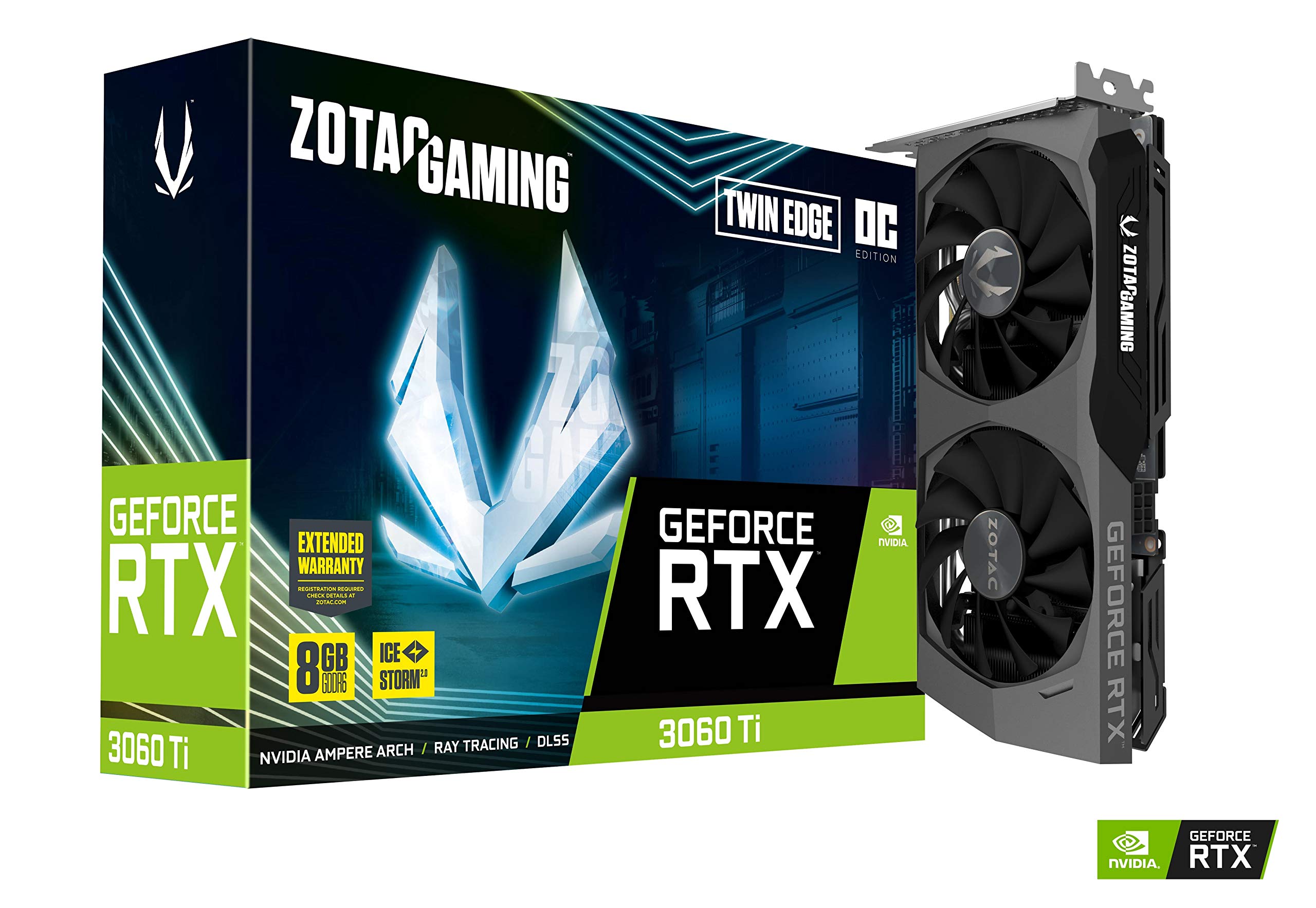
The shortest card here, small enough to disappear into a mini-ITX build.
At 8.7 inches long and 4.6 inches wide, this is the most compact card in the article — the one to reach for when the case is the boss. It still carries the full 8 GB of 256-bit GDDR6 running at 14 Gbps and a 1695 MHz boost clock, so the small size costs you nothing in memory or spec. It connects over PCIe 4.0.
The IceStorm 2.0 cooling uses Active Fan Control and Freeze Fan Stop, which shuts the fans off at idle so the card goes silent when you are just browsing. It reaches 7680 x 4320 — and that figure sits at the top of this field against the Founders Edition’s 3840 x 2160, so the twin-fan ZOTAC actually outputs more than double the pixels of the reference card. It also lists 4 Display Ready, HDCP 2.3, and VR Ready, with three DisplayPort 1.4a plus one HDMI 2.1 output.
Metal backplate and a white LED logo round out the look. The thing to weigh is the clock: at 1695 MHz it sits below the 1800 MHz EVGA and the 1830 MHz MSI cards, so you trade a little top-end speed for a much smaller footprint. For a small-form-factor gaming PC that is a fair swap.
Best for the tight build: 8.7 inches long, 1695 MHz boost, and fans that stop when you are not gaming.
The compromise: you give up the highest clocks in this list for the smallest body.
7. Zotac AMP White Edition LHR 8GB GDDR6

A white card for a white build, with a listed 2 GHz clock on the box.
If you are building around a white theme, this is the card that matches the rest of the inside of your case instead of fighting it. The Zotac AMP White Edition runs the RTX 3060 Ti chip with 8 GB of GDDR6 and lists a 2 GHz GPU clock with a 14000 MHz memory clock — the top clock figure in this lineup on paper.
It is LHR, meaning it ships with the lite hash rate limit, so it is aimed at gaming rather than mining. It lists 8K output alongside a 3840 x 2160 resolution value, so treat the output spec as your guide when you connect a monitor. It uses PCI Express and is built for desktops.
The thing to know before you buy is the thinner spec sheet: no published fan count, backplate callout, or length. Zotac publishes far less detail for this edition than for the black Twin Edge — no fan count, no backplate callout, no length figure — so check your clearance against your case rather than assuming it fits like the 8.7-inch card above. For a builder who only cares about how the finished machine looks, the white shell is the whole point.
Where it wins: a white edition shell plus a listed 2 GHz GPU clock and 14000 MHz memory clock for themed builds.
Read the fine print: the spec sheet is thin on cooling and dimensions, so confirm fit before ordering.
Get it when: the look of a white build matters and you want the listed top clock of this group.
Leave it if: you need published fan and length numbers to plan your case clearance.
8. MSI Gaming GeForce RTX 3060 Ti Gaming X Trio

The largest cooler and the highest clock in this list, built for comfortable long sessions.
This is the most powerful spec sheet here: a listed 1830 MHz graphics clock, the highest in the lineup, over 8 GB of GDDR6 on a 256-bit interface. MSI cools it with Tri-Frozr 2 and TORX Fan 4.0 blades under RGB lighting, and it pushes 7680 x 4320 resolution out of three DisplayPort 1.4a and one HDMI 2.1 port.
It measures 12.7 inches long and 5.5 inches wide, so it needs a roomy mid-tower. Against the EVGA’s 1800 MHz boost it sits a nose ahead on the clock figures, and it does that while carrying a bigger triple-fan cooler. If you want the chip running cool and unhurried with a lot of airflow around it, this is the configuration for it.
The trade-off is size and niche. A three-fan board this long is wasted in a compact case, and the higher clock comes with a higher position in this lineup than the compact options. Buy it when your case has room for 12.7 inches and you want the biggest triple-fan cooler working for you.
Why builders like it
- 1830 MHz listed clock — the highest in this article
- Tri-Frozr 2 and TORX Fan 4.0 keep the chip comfortably fed
- Full 8K output with three DisplayPort 1.4a plus HDMI 2.1
- 256-bit GDDR6 memory interface for steady throughput
Where it does not fit
- 12.7 inches long, so compact cases are out
- Triple-fan cooling is more card than a small build can use
The right call for: a roomy build that wants the top clock and the biggest cooler in this group.
Not for: mini-ITX cases or builds where a shorter card already does the job.
9. ASUS TUF Gaming GeForce RTX 3060 Ti OC Edition

Three axial-tech fans tuned to run reversed in the middle, for smoother airflow and quieter hours.
ASUS built this TUF OC Edition around three axial-tech fans, with more blades than before and a center fan that spins in the opposite direction — a small design trick to keep airflow even across the heatsink. It runs a 1785 MHz boost clock in OC mode, dropping to 1755 MHz in default mode, over 8 GB of GDDR6.
Durability gets the same treatment as the V2 above: dual ball fan bearings the spec sheet says can last up to twice as long as sleeve bearings, plus military-grade capacitors and other TUF parts. GPU Tweak II lets you tune clocks, control thermals, and watch system stats through one utility. The output side offers PCIe 4.0, HDMI 2.1, and DisplayPort 1.4a, with a 7680 x 4320 maximum resolution.
This is the longest card in the whole article at 16 inches long and 9.2 inches wide, so measure twice before you buy. If it fits, you get the quiet axial fan design and the same sturdy build as the V2 with a slightly different cooler layout. It is the pick for a full-size case and a builder who wants dual ball bearings rated to outlast sleeve designs.
A word on the fans: axial-tech blades with a reversed center fan, rated for long bearing life and steady airflow.
Check the tape measure: 16 inches is the largest footprint here, so a mid-tower may not clear it.
Fits the plan if: you have a full-size case and want ASUS’s quiet axial fan design with 1785 MHz boost.
Step back if: your case is compact or you are not sure about 16 inches of clearance.
Know the Specs
Boost Clock (MHz)
Boost clock is the speed the graphics chip climbs to when it has thermal headroom, measured in MHz. A card that runs cool holds its boost longer, which is why cooling and clock speed are linked. A higher number like 1830 MHz is a head start, but a cooler card at 1695 MHz can stay near its peak while a hot card falls back. Treat the clock as one signal, not the whole story.
Memory: 8 GB GDDR6 And Bit Width
The RTX 3060 Ti pairs 8 GB of GDDR6 memory with a 256-bit interface, and that pair is what carries your texture data and frame buffer. More memory bus width moves data faster. Every card here uses the same 8 GB and the same 256-bit bus, so memory is not the deciding factor between them — cooling, clock, and fit are.
Display Output And Max Resolution
DisplayPort and HDMI are the two ports that connect a card to a monitor. HDMI 2.1 and DisplayPort 1.4a are the newer standards here, and they carry higher resolution and refresh rate. A card that lists 7680 x 4320 output can drive an 8K display, while one capped at 3840 x 2160 tops out at 4K. Match the card’s output to your monitor’s inputs before buying.
Cooling, Fan Count, And Card Length
Fan count and card length decide where a card physically goes and how quiet it runs. Two-fan cards tend to be shorter and easier to fit; three-fan cards usually move more air at lower speed. Longer cards need larger cases, so check the published length against your clearance first. That single measurement will rule cards in or out faster than any benchmark.
Common Questions
Will an RTX 3060 Ti fit in my case?
What power supply do I need for an RTX 3060 Ti?
Is 8 GB of VRAM enough for modern games?
Can the RTX 3060 Ti run 4K gaming?
What is the difference between the LHR and non-LHR cards?
Does a higher boost clock actually mean better performance?
How many monitors can an RTX 3060 Ti drive?
Is a three-fan card worth it over a two-fan card?
What do I need to install an RTX 3060 Ti in my PC?
Does the RTX 3060 Ti support ray tracing and DLSS?
The Bottom Line
For most builders, the 3060 ti 8gb graphics card to buy is the MSI GeForce RTX 3060 Ti Ventus 2X because it is one of the few cards that fits a standard case at 9.1 inches while still pushing 7680 x 4320 and a 1695 MHz boost. If cooling and quiet hours matter more than the last fraction of clock speed, the GIGABYTE Gaming OC PRO with its three WINDFORCE fans is the calmer pick. And if you have a full-size case and want the top clock in this group, the MSI Gaming X Trio at 1830 MHz is the one to reach for.
How we choose
We do not accept paid placement. Every pick is matched to a real buyer and a real use-case; we do not hands-on test units.
Sources
Specifications: manufacturer listings and product documentation. Review insights: verified customer reviews, as of November 2026. Pricing: not shown on this page (it changes often); check the current price via the retailer link.
As an Amazon Associate, My Heart Lives Here earns from qualifying purchases. This does not affect which products we feature.