Heads up: This post contains affiliate links. As an Amazon Associate I earn from qualifying purchases, at no extra cost to you. Learn more
Specs are compiled from manufacturer listings and verified buyer reviews and can change over time — please confirm the key details on the product page before buying.
You want your screen hovering at eye level while you lie back — and that is the whole problem in one sentence. Below are the arms and mounts that genuinely work beside a bed, sorted by what each one is actually good at.
This guide is built by comparing the manufacturers’ published specifications and the patterns across verified customer reviews, so you get each pick’s real strengths and trade-offs instead of marketing spin.
The trick is matching reach, clamp thickness, and screen weight to your own setup before you buy anything. That single match decides whether you get a screen that floats where you want it or one that sags by bedtime, which is the core question behind any bed monitor mount.
Top Picks


How To Choose The Best Bed Monitor Mount
Bedside mounting is a geometry problem before it is a shopping problem. You need an arm long enough to clear a mattress or nightstand, a base that clamps something you actually own, and a weight rating above your screen. Get those three wrong and no amount of adjustability saves you.
Measure the reach before anything else
Reach is the horizontal distance from the clamp to the screen plate. A short arm forces the screen right up against the base, which means the mount ends up wedged behind your pillow instead of floating where you want it. Long-reach arms such as the 28-inch swing arm give you room to fold the screen away when you are done.
Check what the clamp can grip
A C-clamp needs a flat edge to bite — a desk, a nightstand, a headboard rail, a shelf. If the surface is thicker than the clamp opening, the mount will not seat. Measure the thickness of the edge you plan to clamp and compare it to the published range before ordering.
Match the weight rating with headroom
Gas-spring and pneumatic arms rely on counterbalance: the spring is tuned to hold a certain weight range, and it works best near the middle of that range. A screen far below the minimum will drift up; a screen above the maximum will sink. Stay inside the published numbers rather than at the edge of them.
Confirm the VESA pattern
VESA is the four-hole bolt pattern on the back of your screen, measured in millimetres between holes. Nearly everything here takes 75x75mm and 100x100mm, which covers most monitors and tablets. Check your screen’s pattern and weight together — one without the other tells you nothing.
Side-by-Side Comparison
| Model | Best For | Screen Range | Weight Limit | Mount Type | Amazon |
|---|---|---|---|---|---|
| Pixio PS1D Wave White Dual Monitor Arm★ Best Overall | Two screens on one desk | 17″–32″ per arm | 19.8 lbs per arm | Tabletop clamp | Amazon |
| VIVO Pole Mounted Monitor ArmPole Fit | Reusing an existing pole | 17″–32″ | 17.6 lbs | Pole mount | Amazon |
| VIVO Laptop Wall Mount | Wall-mounting a laptop | 10″–15.6″ | 9.9 lbs | Wall mount | Amazon |
| elitehood Aluminum iPad Desk Mount | Tablet over the bed | 4.7″–13″ | 4.4 lbs | C-clamp | Amazon |
| Pholiten Single Tall Monitor Mount | Floor-standing height | 13″–27″ | 22 lbs | Floor mount | Amazon |
| PUTORSEN Laptop Arm Mount | Laptop plus monitor | 17″–35″ | 19.8 lbs per arm | C-clamp or grommet | Amazon |
| FlexiSpot Ultrawide Monitor Arm | Big ultrawide panels | Up to 49″ | 44 lbs | C-clamp or grommet | Amazon |
Detailed Reviews
1. Pixio PS1D Wave White Dual Monitor Arm Stand
Our pick — 4.5+★ from 300+ verified ratings; the strongest balance of quality and price.
Two 17–32 inch screens on one tabletop clamp, each arm rated to 19.8 lbs.
If you are setting up a bedroom workspace for two displays — or a screen plus a second panel for reading — this is the arm that handles it without a second clamp eating your desk edge. Each arm carries up to 19.8 lbs, and each supports screens from 17 to 32 inches. That covers most monitors you would realistically put beside a bed. The VESA plates take both 75x75mm and 100x100mm bolt patterns, so you are not locked to one screen generation.
The metal enclosure feels solid rather than springy, and the VESA plates hold a screen without visible droop. The arms feel solid rather than springy, the plates hold a screen without visible droop, and the cable management slides into place with no screws at all — you route the cords through the clips and the desk edge stops looking like a nest.
The catch is the adjustability, which is the one area buyers split on. This is an articulating arm with a 45-degree maximum tilt, and it does not use a gas spring. So you set the position by tightening joints rather than by nudging a floating screen with one hand. Compared with the VIVO pole arm’s 70-degree tilt, this one gives you noticeably less range to angle a screen down toward a pillow. Fine for seated desk work; tighter if you want to lie back and look up.
What holds up in daily use
- Two arms on a single tabletop clamp, each rated to 19.8 lbs
- Handles 17 to 32 inch screens with 75x75mm and 100x100mm VESA plates
- Cable clips slide in without screws, so the run stays tidy
- Metal enclosure that reads as solid rather than flexy
Where it asks more of you
- 45-degree tilt is the narrowest angle range here — less useful for lying back
- No gas spring, so repositioning means loosening and retightening joints
- Needs a desk edge to clamp, not a bed frame or wall
Reach for this if: you are running two displays at a desk beside the bed and want one clean clamp holding both.
Think twice if: you want to angle a single screen steeply downward from a reclined position.
2. VIVO Pole Mounted Monitor Arm for 17″ to 32″ Screens
It clamps onto a pole you already own, and it tilts further than anything else on this list.
This is the smart pick if you already have a freestanding pole stand or a bed frame with a vertical post. The clamp grips any pole from 1.1 to 2.4 inches in diameter, and the whole clamp rotates around that pole — so you can swing the screen from desk position to bedside position without unbolting anything. The arm fits 17 to 32 inch screens weighing 4.4 to 17.6 lbs, with 75x75mm or 100x100mm VESA plates on the screen end.
The 70-degree tilt is the steepest here, and the pneumatic column holds height without knobs. You get +70 to -45 degrees of tilt, 180 degrees of swivel, full 360-degree rotation, and 10 inches of pneumatic height travel. That 70-degree tilt is the steepest here — the Pixio tops out at 45 degrees — which is exactly what you need when you want the screen angled down toward you in bed rather than standing bolt upright. The pneumatic column means you lift and it stays, no knobs to hunt for.
Two things to know before you commit. The pole is not included, so this only makes sense if you have the right diameter post already. And stability is the recurring gripe — with a heavier screen near the top of the weight range, some setups develop a wobble that needs re-tightening. Keep your screen nearer the middle of that 4.4 to 17.6 lb window and the arm behaves far better.
Best use case: a pole you already own plus a heavy screen that needs a steep downward tilt — that combination is where this arm is at its best.
The honest limit: pole not included, and heavier screens toward the 17.6 lb ceiling can introduce wobble that needs periodic re-tightening.
Suits you if: you have a 1.1 to 2.4 inch pole in place and want a screen that swings around it.
Not for you if: you need the mount to bring its own base to the party.
3. VIVO Laptop Wall Mount for 10″ to 15.6″ Screens

Bolts to the wall so your laptop floats beside the bed, with a tray that lets it breathe.
Not every bedside screen is a gaming monitor. If you read or stream on a laptop, this puts the machine at eye level on a wall-mounted arm and frees the mattress edge entirely. It fits laptops and notebooks from 10 to 15.6 inches and up to 9.9 lbs, which covers a small premium ultrabook as easily as a chunky 15-inch work machine. Compare that to the 32-inch screens the Pixio and VIVO pole arms take and you can see this is a purpose-built laptop holder, not a universal arm.
Rubber tabs grip the laptop without scratching it, and ventilation slots keep the fans clear. Rubber tabs grip the machine without scratching it, and the base has ventilation slots so the fans are not breathing against a solid plate while you watch a film in bed. The arm gives you +90 to -45 degrees of tilt, 180 degrees of swivel, 360-degree rotation, and tool-less height adjustment — so you can drop it to typing height or push it up for viewing without reaching for an Allen key.
Here is the honest part: this is a wall mount, so you need a wood stud or brick/concrete wall and a drill, and the arm needs at least 4.4 lbs in the tray to counterbalance properly. A very light laptop in the tray will want to ride up. The recurring note about wobble at extension is real too — keep the arm closer in for steady work and extend it mostly for watching.
Solid steel, real warranty: the alloy steel body carries a 3 Year Manufacturer Warranty, which is more coverage than most arms here offer.
The installation ask: stud or concrete wall, included mounting hardware, and a laptop that weighs at least 4.4 lbs for the counterbalance to work.
The right call when: your bedside screen is a laptop and you would rather drill a wall than clamp a desk.
Look elsewhere for: a monitor — the 15.6-inch size limit rules that out.
4. elitehood Aluminum iPad Desk Mount, 28in Long Arm
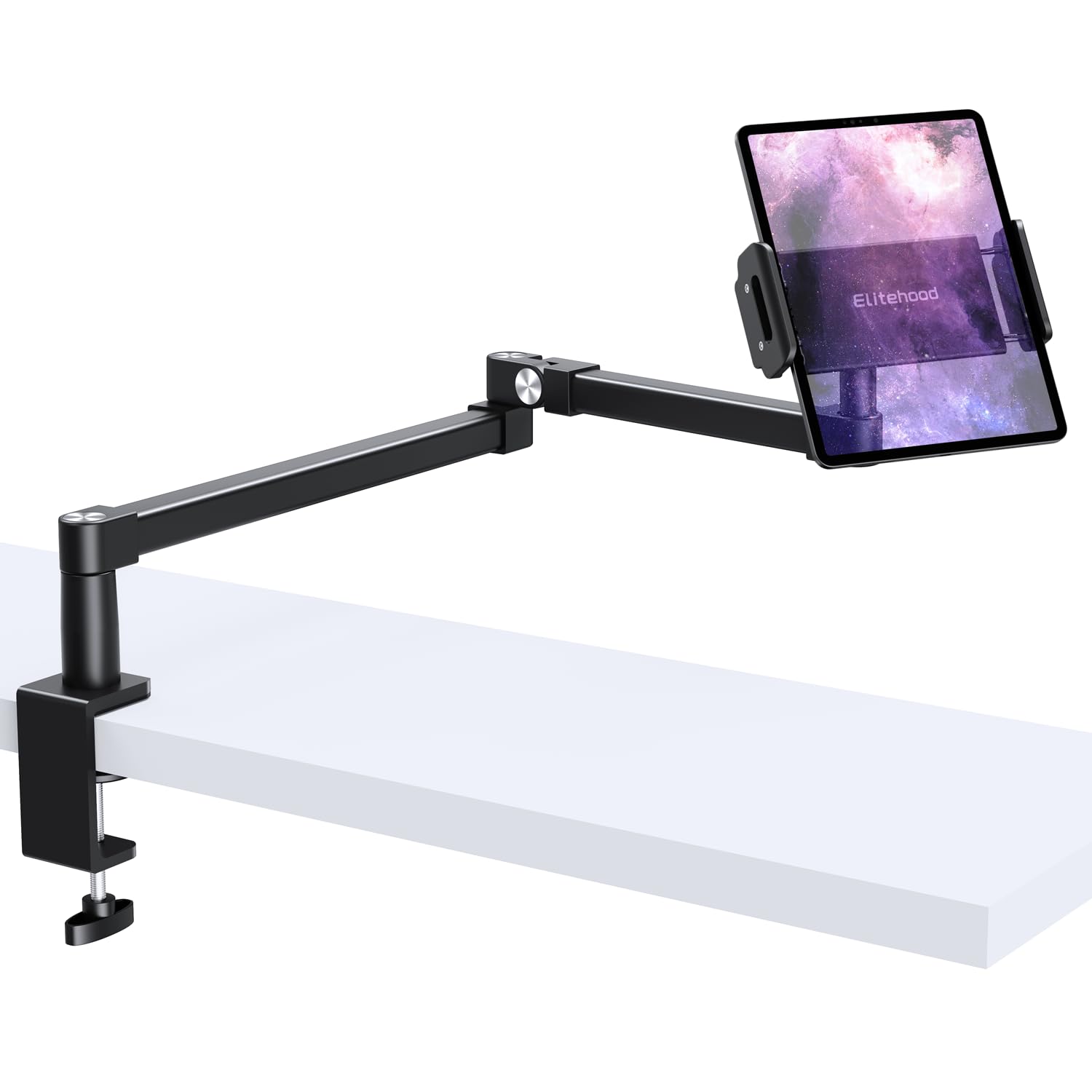
Twenty-eight inches of arm that swings a tablet right over your pillow and folds away after.
The arm extends 28 inches horizontally and rises 20 inches vertically, enough to swing an iPad over the mattress. The arm extends 711 mm — 28 inches — horizontally, and rises up to 508 mm (20 inches) vertically when you add the extension arm. That is enough to clamp the base to a nightstand, a headboard shelf, or a desk edge and still swing an iPad out over the mattress. It grips devices from 4.7 to 13 inches: iPad Pro and Air up to 13 inches, iPad Mini, Galaxy Tab, Surface Pro, Kindle Fire, and phones.
The three-axis articulating arm holds a tablet exactly where you leave it. The three-axis articulating arm lets you grab the tablet, tilt it and spin it, and it stays where you leave it. Owners describe the vertical joints as stiff enough to stop a full-size tablet sagging in portrait — which is the failure mode that ruins cheaper tablet arms. The hinge at the elbow is a patented metal design rated to 20,000 motion cycles, and the maximum load is 4.4 lbs.
The trade-off is that it is a tablet holder, not a monitor arm. That 4.4 lb ceiling puts it well under the 19.8 lbs of the Pixio or PUTORSEN, so a real display is out. There is also a mixed note on ease of use — the stiffness that stops sagging also means small position tweaks take a firm hand. And the C-clamp needs an edge up to 2 inches thick, so a very thick headboard rail will not fit.
Why it holds the tablet steady
- 28-inch horizontal reach and 20-inch vertical rise on the extension arm
- Aircraft-grade aluminum body with an anodized finish
- Patented hinge rated to 20,000 motion cycles
- Clamps edges up to 2 inches thick with no tools
What you trade away
- 4.4 lb load ceiling — tablets only, no monitors
- Stiff joints mean deliberate adjustment rather than one-finger nudging
Built for: tablet readers and video watchers who want the screen floating over the bed on a long swing arm.
Wrong tool for: anyone mounting an actual monitor above 4.4 lbs.
5. Pholiten Single Tall Monitor Mount with 47 inch Pole

A 47-inch pole that stands on the floor, so no desk edge or wall is required at all.
When there is nothing to clamp and nothing you want to drill, a freestanding floor mount solves the whole problem. This one stands on its own base and lifts a screen up a 47-inch pole, or installs through a grommet if you have a desk with a cable hole. The screen side fits 13 to 27 inch monitors up to 22 lbs — a larger weight ceiling than the VIVO pole arm’s 17.6 lbs, though a narrower screen range than the 32-inch Pixio and VIVO arms.
Height, depth, and tilt all adjust on the 47-inch pole, and the mount rotates from landscape to portrait by hand. Height, depth, and tilt all adjust so you can pull the screen to where your eyes actually are, and the mount rotates from landscape to portrait by hand. Assembly is quick — the maker states installation can be completed within 10 minutes, and the box includes the hardware and manual. Getting the screen off the desk also buys back the surface underneath for a keyboard, a book, or nothing at all.
The honest caution is tip risk. The base is freestanding, and the recurring complaint is that it can lean left or right too easily, especially once the pole is extended high with a screen on top. Keep it against a wall or in a corner, keep the pole lower for daily use, and it behaves. Some buyers also find the overall design less refined than a clamped arm — this is function over finish.
The floor-stand advantage: no clamp, no drill, no furniture damage — and a 22 lb weight capacity that handles a bigger screen than the pole-clamp VIVO.
The catch to plan around: freestanding bases can tip sideways at full extension, so position it against something solid.
Go with this if: you have floor space but no clampable edge, and your screen lands between 13 and 27 inches.
Reconsider if: the room has no wall or corner to brace a tall freestanding pole against.
6. PUTORSEN Laptop Arm Mount for 17-35” Monitors
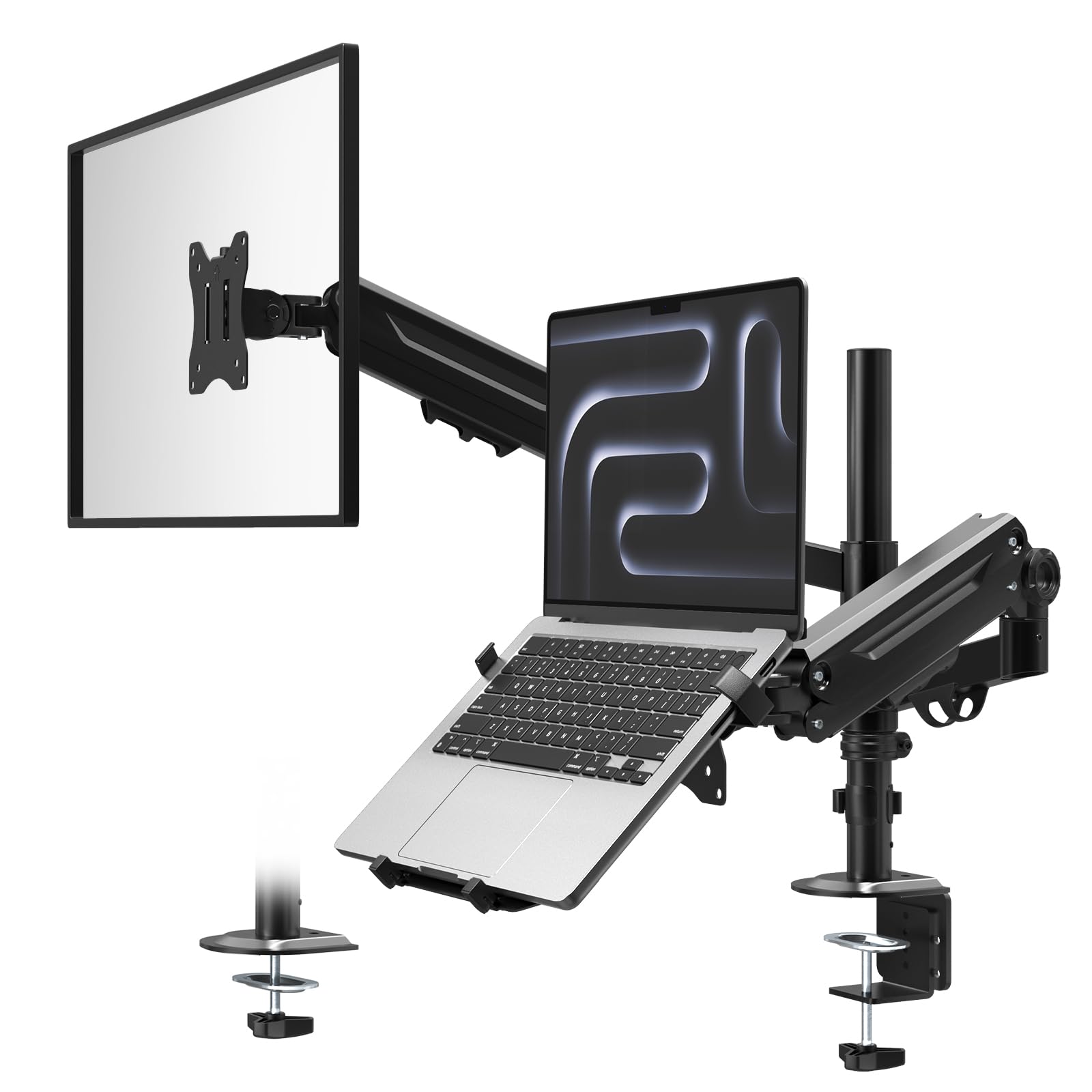
One clamp, two arms, two devices — a monitor and a laptop sharing the same pole.
If your bedside setup is a laptop driving a bigger screen, this mount is built for exactly that pairing. One arm holds a monitor from 17 to 35 inches up to 19.8 lbs with 75x75mm or 100x100mm VESA plates. The other holds a laptop from 12 to 18 inches, also up to 19.8 lbs, in a vented tray that keeps air moving under the machine. That 35-inch ceiling puts it above the Pixio and VIVO arms’ 32-inch limit, and the laptop reach of 18 inches goes beyond the VIVO wall mount’s 15.6 inches.
Mounting flexibility is the reason to pick it over a plain arm. You can C-clamp a desk edge from 0.39 to 3.14 inches thick, or run a grommet mount through a hole from 0.39 to 1.57 inches — so a desk with a cable cutout works without a clamp at all. The arms are individually removable, so you can run just the monitor arm today and add the laptop tray later. A 43.9 cm pole gives smooth height adjustment. Cable clips keep the run tidy.
The main thing to check is your laptop size. The tray takes 12 to 18 inches, so a small 11-inch machine will not sit properly, and the 19.8 lb per-arm limit is generous but firm. It clamps a desk, not a bed frame, so this is a bedside-desk solution rather than a true over-the-mattress arm.
The standout spec: two independent arms — one to 35 inches and one laptop tray to 18 inches — each rated to 19.8 lbs, both on a single mounting plate.
Size it up first: laptop must land between 12 and 18 inches, and the clamp needs a desktop edge or a grommet hole.
Pairs well with: a work-from-bed setup where a laptop and a larger monitor need to live together.
Not the one for: a single-device setup or a laptop smaller than 12 inches.
7. FlexiSpot Ultrawide Monitor Arm for 17 to 49 inch Screens
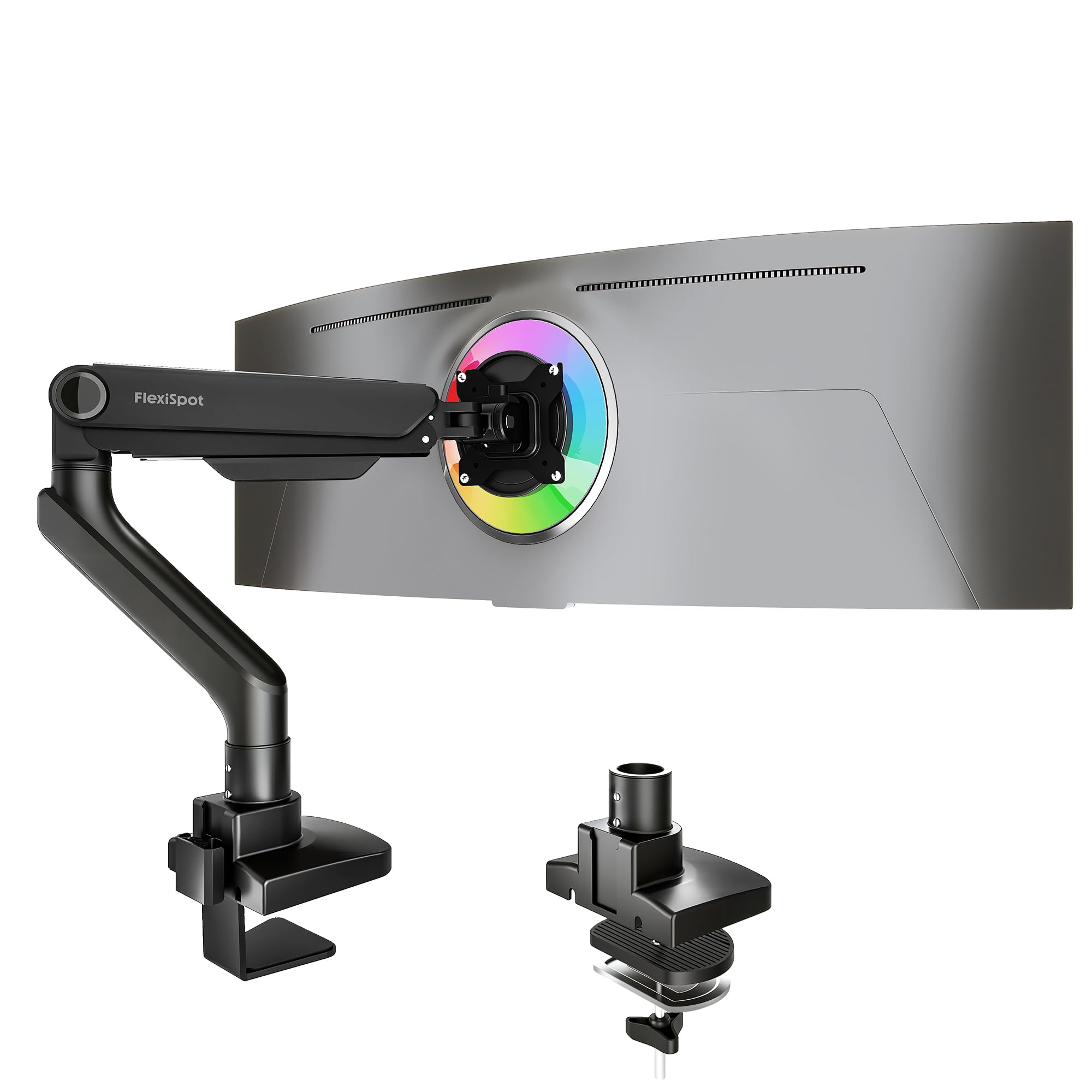
The one for a giant ultrawide — 49 inches and 44 lbs of screen, held on a gas spring.
Most arms top out at 32 or 35 inches. This one takes screens up to 49 inches and 44 lbs, which is the highest capacity here by a clear margin — double the 19.8 lbs the Pixio and PUTORSEN manage, and well beyond the VIVO pole arm’s 17.6 lbs. If you have a big curved gaming panel or a wide work display, that gap is the whole reason to look at this one. It uses standard 100x100mm and 75x75mm VESA plates, so Samsung Odyssey and LG UltraGear panels fit.
The gas spring is the other thing worth understanding. It delivers smooth one-hand adjustment, so instead of loosening a joint you push the screen and it glides and stays. Tilt runs from -90 to 15 degrees, extension reaches up to 24.5 inches, and height adjusts freely — a wide swing that suits both a seated desk session and an angling-down-to-watch position. The arm is rated to 20,000 cycles of durability testing and backed by a 5-year warranty, the longest coverage in this lineup.
Buyers report the gas spring holds heavy curved panels without sagging. The mixed note is mobility: some find the arm hard to maneuver, especially with a large panel where the weight is out at the end of a long lever. It also clamps a desk up to 2.17 inches thick or bolts through a grommet — a bedside desk solution, not an over-the-mattress arm.
What makes it the heavyweight pick
- Handles up to 49 inches and 44 lbs — the top capacity here
- Gas spring for one-hand positioning with -90 to 15 degree tilt
- 20,000-cycle durability rating and a 5-year warranty
- 24.5 inches of extension for a wide working arc
What to weigh first
- A big panel on a long arm takes effort to swing into place
- Desk clamp or grommet only — no wall or floor option
Choose it when: your display is an ultrawide or curved gaming panel that lighter arms cannot hold.
Pass on it if: you are mounting a standard 24 to 27 inch screen — the extra capacity is unneeded weight and reach.
Know the Specs
Weight capacity and counterbalance
The weight rating is how much screen an arm holds safely; the counterbalance is the spring inside that keeps it there. Gas-spring arms like the FlexiSpot use a spring tuned to a weight band, so a screen near the top of the rating floats well but one far below it may drift up. Pneumatic arms like the VIVO pole mount work the same way. Always read the minimum weight too — the VIVO laptop wall mount needs at least 4.4 lbs in the tray to counterbalance properly.
VESA patterns explained
VESA is the four-hole bolt layout on the back of your screen, measured in millimetres between the holes. The two you will see most often are 75x75mm and 100x100mm, and every mount here that takes a screen accepts both. Check the pattern on your screen before ordering — it is the single quickest way to rule a mount out.
Reach and height travel
Reach is the horizontal distance from clamp to screen; height travel is how far up and down it moves. A long reach like the elitehood’s 28 inches lets the screen swing over a bed, while a short reach keeps the screen tight to the clamp. For bedside use, favor reach over raw screen size — you can always buy a slightly smaller screen, but you cannot stretch the arm.
Clamp depth and mounting surface
Every clamp mount has a maximum opening — the PUTORSEN takes desk edges from 0.39 to 3.14 inches, the elitehood up to 2 inches. Measure your nightstand, desk edge, or headboard rail before you buy. If you have no clampable edge, look at a floor-standing pole like the Pholiten or a wall mount like the VIVO laptop arm instead.
Common Questions
Will a bed monitor mount work if my screen is 32 inches?
Do I need to drill into a wall for a bedside monitor mount?
What is the difference between a gas spring and a pneumatic monitor arm?
How much weight can a monitor arm hold above a bed?
Can I mount a monitor to my bed frame directly?
Will a 49 inch ultrawide fit on these arms?
Do these mounts take both 75x75mm and 100x100mm VESA patterns?
How thick a desk or nightstand edge can these clamps grip?
Is a floor-standing pole better than a desk clamp for bedside use?
Can I use one of these arms for a laptop instead of a monitor?
The Bottom Line
For most people setting up beside a bed, the best bed monitor mount is the Pixio PS1D Wave White Dual Monitor Arm — two arms on one clamp, 19.8 lbs each, and metal build quality that holds its position. If you want a steep downward tilt toward a pillow, grab the VIVO Pole Mounted Monitor Arm with its 70-degree tilt and 10 inches of pneumatic height travel. And for a giant ultrawide, the FlexiSpot Ultrawide Monitor Arm is the only one here rated to 49 inches and 44 lbs, backed by a 5-year warranty.
How we choose
We do not accept paid placement. Every pick is matched to a real buyer and a real use-case; we do not hands-on test units.
Sources
Specifications: manufacturer listings and product documentation. Review insights: verified customer reviews, as of November 2026. Pricing: not shown on this page (it changes often); check the current price via the retailer link.
As an Amazon Associate, My Heart Lives Here earns from qualifying purchases. This does not affect which products we feature.