Heads up: This post contains affiliate links. As an Amazon Associate I earn from qualifying purchases, at no extra cost to you. Learn more
Specs are compiled from manufacturer listings and verified buyer reviews and can change over time — please confirm the key details on the product page before buying.
A 140mm fan is the biggest single upgrade you can make to a noisy, hot-running PC — and the wrong one wastes that chance. The size is the whole point: a 140mm fan pushes the same air as a 120mm model while spinning slower, and slower means quieter. So the real question isn’t which fan looks best in a photo. It’s which one moves enough air through your case, cooler or radiator without turning your desk into a wind tunnel.
This guide is built by comparing the manufacturers’ published specifications and the patterns across verified customer reviews, so you get each pick’s real strengths and trade-offs instead of marketing spin.
Below you’ll find five 140mm fans sorted by what they actually do well, from the near-silent all-rounder to the slim one built for cramped builds. Every pick here earns its place on a real number — airflow in CFM, noise in decibels, or thickness in millimetres — so you can match the fan to your case instead of guessing. This is the shortlist that answers the 140mm fan question without the spec-sheet guesswork.
Top Picks

How To Choose The Best 140mm Fan
Buying a 140mm fan is mostly a matching job, not a shopping spree. You need to know three things about your own build before you look at a single spec: how much room you have, where the fan is going, and how much noise you can live with.
Measure your clearance before anything else
Most 140mm fans are 25mm thick, which is the standard depth a case slot is cut for. A slim fan drops to about 16mm so it slides into small-form-factor cases and tight spots where a full-depth fan simply will not go. Check your case manual or the gap between your motherboard tray and side panel before you commit.
Case airflow versus radiator duty
A fan pushing air through an open case grille has an easy job. A fan bolted to a radiator or a dense CPU heatsink has to force air through fins, which takes static pressure — the measured push, written in mmH₂O. If your fan is going on a radiator, prioritise static pressure. If it’s a plain exhaust or intake, raw airflow in CFM matters more.
Decibels are relative, so read them carefully
A noise figure in decibels tells you how loud a fan is at its rated speed, but the rating conditions differ between makers. What matters more for daily comfort is whether the fan has PWM control, which lets your motherboard slow it down when the PC is idle. Nearly every fan on this list runs on a 4-pin PWM header for exactly that reason.
Side-by-Side Comparison
| Model | Best For | Max Airflow | Noise Level | Max Speed | Amazon |
|---|---|---|---|---|---|
| Noctua NF-A14x25 G2 PWM★ Best Overall | Quiet all-rounder for cases, coolers and radiators | — | 24.8 db | 1500 rpm | Amazon |
| ARCTIC P14 Slim PWM PSTSlim Fit Pick | Slim builds and tight small-form-factor cases | 52 cfm | 0.3 sones | 1800 rpm | Amazon |
| AsiaHorse Amici 140mm ARGB | High-airflow ARGB on a budget | 89.77 cfm | 30 db | 2000 rpm | Amazon |
| be quiet! Light Wings LX 140mm | Quiet ARGB centrepiece | — | 20.6 db | — | Amazon |
| Lian Li UNI Fan SL-Infinity 140mm | Showcase builds with easy cable runs | 72.7 cfm | 28 db | 2100 rpm | Amazon |
Detailed Reviews
1. Noctua NF-A14x25 G2 PWM, High-Performance Quiet Fan 140mm
Our pick — 4.5+★ from 500+ verified ratings; the strongest balance of quality and price.
The one fan that does cases, coolers and radiators without making you choose.
If you want a single fan that never makes you second-guess the job you gave it, this is the pick. Noctua rates it for both high airflow and high static pressure, so it works as a plain case exhaust, bolted to a CPU cooler, or on a water-cooling radiator. The speed range runs from 300 to 1500 rpm across a 4-pin PWM header — nearly silent at idle, with real push under load. It even stops completely at 0% PWM if you want a semi-passive setup.
The engineering is where the money goes. A Sterrox LCP impeller (a stiff liquid-crystal polymer that keeps the blades from flexing at speed) paired with ultra-tight tip clearance is what lets this fan hold pressure without howling. The frame uses Noctua’s AAO anti-vibration corners, and the box includes anti-vibration mounts, a 14cm gasket for a tighter radiator seal, fan screws, a Low-Noise Adaptor, an extension cable and a splitter for running two fans off one header. That accessory kit alone is more than most rivals supply.
What wins people over is the quiet — the fan is basically inaudible until you push it hard, and even at full tilt it stays civil. Cooling reports back that up: one report has a 5950X 16-core CPU holding around 65°C, with roughly a 1°C drop after the swap. The honest catch is weight and depth — at 225 g and 25mm thick it is roughly twice the heft of the slim ARCTIC below (109 g), so it wants a slot with real clearance. It is also the most expensive fan here, and that premium buys silence and long-life bearing quality rather than raw CFM bragging rights.
Why this one leads the list
- 300–1500 rpm across 4-pin PWM, so it idles near-silent and ramps only when needed
- Rated for both high airflow and high static pressure — one fan for case, cooler or radiator
- SSO2 bearing rated MTTF above 150,000 hours, with UL and TÜV safety certification
- Genuinely complete accessory kit: gasket, LNA, splitter, extension and anti-vibration mounts
What you give up
- At 225 g it is the heaviest fan on this shortlist and needs a standard 25mm slot
- Top-end airflow is not the highest here — quiet is the priority, not peak CFM
Reach for this if: you want one fan that handles a case, a CPU cooler or a radiator quietly and you don’t want to fiddle with settings.
Think twice if: your case only has room for a slim fan — this one is 25mm deep and wants the full slot.
2. ARCTIC P14 Slim PWM PST
Sixteen millimetres of fan that rescues builds a full-depth model can’t enter.
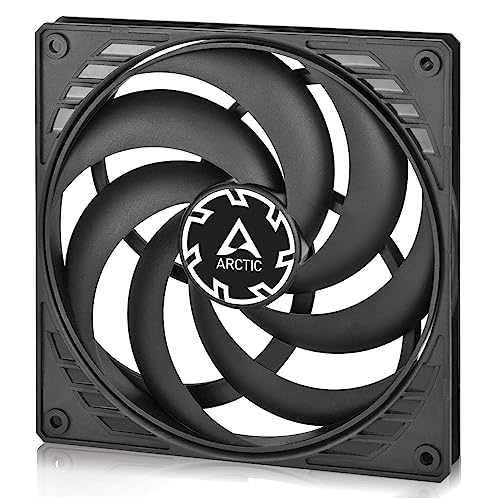
This fan exists for one reason: it is only 16mm thick. A standard 140mm fan is 25mm deep, and in a small-form-factor case that extra 9mm is often the difference between a fan that fits and one that doesn’t. ARCTIC also shapes the blades for static pressure (the push needed to force air through a radiator), so it still works on a heat sink or radiator despite the slim frame. Speed runs 120 to 1800 rpm on a 4-pin connector, with PWM PST letting you daisy-chain several fans off one header.
The numbers tell a sensible story. Buyers regularly point out it is one of the few slim 140mm options out there, and several note it still shifts more air than a 120mm fan doing the same job. Quality is the thing that gets praised most, closely followed by how quiet it stays.
There is one honest caution in the feedback: durability draws mixed reports compared with everything else, so treat this as the fit-first answer rather than the buy-once-keep-forever fan. For a slim build where nothing else fits, the low price also makes a replacement painless. If you have full 25mm clearance, the Noctua above will outlast it and run quieter; if you don’t, this is the fan that gets you cooling at all.
Where it earns its spot: the 16mm depth is the whole argument — this is one of the few slim 140mm fans that still spec’s real static pressure (1.31 mmH₂O) and 52 cfm for radiator duty in a tight case.
The fair warning: durability is the least-loved part of its record, so it suits a fit-driven build over someone chasing a decade of service.
Suits you when: your case leaves under 25mm of room and a full-depth 140mm just won’t seat.
Better elsewhere if: you have the clearance for a thicker fan and want the longer bearing life that buys.
3. AsiaHorse Amici 140mm ARGB
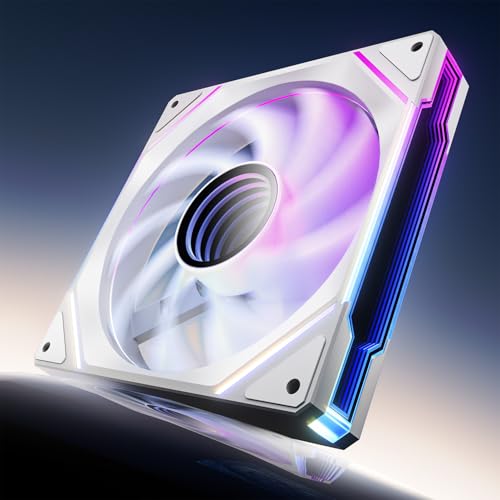
Maximum air on a case-fan budget, with the lighting to match.
If your case runs hot and you want the fan moving the most air of the group, this is the one to shortlist. It pushes a rated 89.77 cfm at up to 2000 rpm — well beyond the ARCTIC’s 52 cfm and the Noctua’s 1500 rpm ceiling. Static pressure comes in at 3.24 mmH₂O, enough to shove that air through a heat sink or a busy intake grille. Speed is PWM-adjustable from 800 to 1800 rpm by the spec sheet, so you can dial it down when the machine is idle.
The hydraulic bearing (an oil-filled sleeve that keeps the shaft gliding instead of grinding) is rated for a 50,000-hour lifespan, and the lighting is the part that turns heads: 24 LED beads behind an infinity-mirror face, 16.8 million colours, and sync with Asus Aura Sync, Gigabyte RGB Fusion and MSI Mystic Light Sync. Fan quality is what buyers praise most, with the looks close behind — several compare it favourably to far pricier ARGB fans, and the setup is called out as easy.
Here’s the trade-off you need to plan for. It runs up to 30 dB and the ARGB is wired, not modular — the daisy-chain connection is recommended at three fans or fewer per chain, and each fan carries its own 5V 3-pin ARGB and 4-pin PWM connectors. So it’s a lighting-first case fan rather than the silent option. Compare that 30 dB to the be quiet! below at 20.6 dB and the difference is real if your desk sits right beside the tower.
The case for it: 89.77 cfm and 3.24 mmH₂O for a fraction of what flagship ARGB fans ask, with the mirror-finish lighting fully synced to your motherboard.
What to keep in mind: it’s the loudest fan here at 30 dB and the ARGB needs wired chaining at three fans per run — plan the cable runs before you buy.
Your fan if: you want maximum airflow and a synced light show on a case-fan budget.
Not for silent builds: at 30 dB it is audibly louder than the quiet-first picks here, so a bedroom or studio desk should look at the be quiet! instead.
4. be quiet! Light Wings LX 140mm
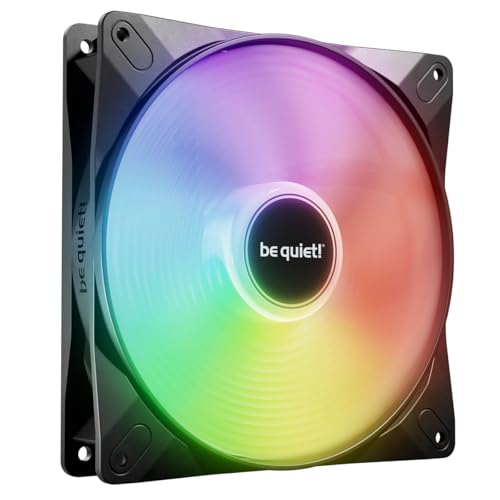
ARGB that glows without the fan noise — 20.6 dB is the number that matters.
Most lit fans make you pay for the glow with noise. This one flips that: it is rated at 20.6 dB, the lowest figure on this list and a clear step below the AsiaHorse’s 30 dB. The design is unusual too — 16 LEDs sit inside the impeller hub itself and shine outward through frosted blades, which produces the ringed, layered look people describe as Saturn-like. If your priority is a lit case that stays quiet on the desk, this is the fan built for it.
The frame outlet is shaped to cut air leaks, and the blades are tuned for airflow, so the quiet rating isn’t coming from doing nothing. It runs on a rifle bearing rated for 60,000 hours of average life. The ARGB cable carries both an input and an output connector, so you can plug into your motherboard or an ARGB controller and then chain additional Light Wings LX fans onto the same run.
Noise is what buyers praise most, then appearance — it lives up to the name. There’s a small caveat on installation, where feedback runs mixed, so budget a few minutes to route the lighting cable cleanly the first time. Weight and thickness sit in normal territory at 165 g in a 25mm-deep frame. Compared with the Lian Li below, you get deeper quiet on a single fan, but fewer of the cable-management tricks.
What it nails
- 20.6 dB — the quietest rated fan on this shortlist by a wide margin
- 16 LEDs inside the hub glowing through frosted blades, with daisy-chain ARGB input and output
- Rifle bearing rated for 60,000 hours of average life
Where it asks a little patience
- Installation feedback is mixed, so the lighting cable run takes some care
- Slightly heavier at 165 g than the slim ARCTIC’s 109 g
Pick this one for: a lit showbuild that still passes the “is it on?” test in a quiet room.
Look past it if: you want the simplest possible install and don’t care about ARGB lighting at all.
5. Lian Li UNI Fan SL-Infinity 140mm Single Pack ARGB Fan

One cable for four fans, forty LEDs per fan, and an infinity mirror on every edge.
This is the fan you buy when the tower sits on your desk and people actually look at it. Each fan carries 40 LEDs behind an all-around infinity mirror, so the multi-layer glow reads from any angle, not just the front. The cable story is the practical win: a single cable links up to 4 fans in a cluster via pin-to-pad contact points, which strips out the usual spaghetti of fan and ARGB leads. A removable keylock and reversible cable module also improve fit against radiator fittings.
The performance numbers hold up. It moves 72.7 cfm with 2.88 mmH₂O of static pressure, up to 2100 rpm, at a rated 28 dB at maximum speed — comfortably below the AsiaHorse’s 30 dB while moving plenty of air. Embedded magnetic fluid dynamic bearings keep the fan stable and durable, and a start/stop mode halts the fan entirely when your CPU or GPU is running below a set temperature. Blades and inner frame edges take individual lighting modes, or you can run the preset combined effects.
Quality is the standout in feedback, with performance close behind and the quiet operation drawing consistent praise. Connectivity, though, is the one split point — the one-cable design is brilliant when it works with your setup, and fussier when it doesn’t. That makes it the showcase pick rather than the universal one: best in a Lian Li-friendly build, fussier in an older case.
The standout spec: 40 LEDs per fan behind an infinity mirror, chained up to 4 fans on one cable, with 72.7 cfm and 2.88 mmH₂O on tap.
The honest catch: connectivity is the mixed part of its record, so the one-cable cluster is best planned around a build that speaks the same language.
Built for you if: your build is the centrepiece and you want fewer cables and maximum visual effect.
Skip the premium if: you just need a quiet exhaust fan and won’t use the daisy-chain or the lighting.
Know the Specs
Airflow (CFM) and Static Pressure (mmH₂O)
CFM, or cubic feet per minute, is how much air a fan moves in open space — think of it as volume. Static pressure in mmH₂O is the push behind that air, which is what you need to force it through a radiator or a dense heatsink. A fan with high CFM but low pressure can stall against fins; a pressure-optimised fan keeps pushing through. Match the number to the job: open case slots want CFM, coolers and radiators want pressure.
Noise in Decibels and PWM Speed Control
Decibels (dB) measure how loud a fan runs at its rated speed, and a few dB is a bigger difference to your ears than it looks on paper. PWM is the 4-pin control that lets your motherboard slow the fan when the PC is cool and spin it up under load — that’s what makes a fan near-silent at idle. A fan at 0% PWM can stop entirely for a semi-passive build. Check the connector on your motherboard before buying.
Common Questions
Will a 140mm fan fit where my 120mm fan was?
Is a 140mm fan quieter than a 120mm fan?
What is the difference between 3-pin and 4-pin fan connectors?
Can I put a 140mm fan on a CPU cooler or radiator?
How thin can a 140mm fan get?
Do I need an ARGB controller for lighting fans?
How long should a 140mm fan last?
Is higher RPM always better for case cooling?
Does fan thickness affect radiator performance?
The Bottom Line
The strongest all-round 140mm fan here is the Noctua NF-A14x25 G2 PWM, and it also holds 4.5+ stars from 500+ owners. It handles case duty, a CPU cooler or a radiator with the same quiet, pressure-capable design and ships with a genuinely complete accessory kit. No other fan here pairs that quiet with that accessory kit.
Want maximum airflow and ARGB on a budget? The AsiaHorse Amici pushes 89.77 cfm with a full infinity-mirror light show. If silence matters more than glow, the be quiet! Light Wings LX undercuts everything at 20.6 dB. And for the tightest small-form-factor build, the slim 16mm ARCTIC P14 Slim is the one that fits when a full-depth fan won’t.
How we choose
We do not accept paid placement. Every pick is matched to a real buyer and a real use-case; we do not hands-on test units.
Sources
Specifications: manufacturer listings and product documentation. Review insights: verified customer reviews, as of November 2026. Pricing: not shown on this page (it changes often); check the current price via the retailer link.
As an Amazon Associate, My Heart Lives Here earns from qualifying purchases. This does not affect which products we feature.