Heads up: This post contains affiliate links. As an Amazon Associate I earn from qualifying purchases, at no extra cost to you. Learn more
Specs are compiled from manufacturer listings and verified buyer reviews and can change over time — please confirm the key details on the product page before buying.
If your NAS or server is still crawling along a 1 Gigabit link, a 10 Gigabit LAN card is the single upgrade that changes how your whole network feels. Instead of waiting on big file copies, you move them in a fraction of the time — as long as your switch, cabling and storage can keep up. This guide separates the cards that genuinely negotiate a 10G link from the ones that fall back to slower speeds and leave you guessing why.
This guide is built by comparing the manufacturers’ published specifications and the patterns across verified customer reviews, so you get each pick’s real strengths and trade-offs instead of marketing spin.
You will see which controller sits inside each card, which slot it needs, and where the driver support gets thin. The goal is simple: match the card’s controller and slot to your board and switch, so the upgrade actually pays off. Here is how to pick the right 10 Gigabit LAN Card without overspending on a slot you cannot use.
Top Picks

How To Choose The Best 10 Gigabit LAN Card
The mistake most buyers make is assuming any 10G card will simply drop in and run at full speed. In practice, three things have to line up: the slot on your motherboard, the controller chip on the card, and the switch or router on the other end of the cable. Get the slot, controller and switch right and the upgrade is painless. Miss one and you will spend an evening wondering why you are stuck at 1 Gigabit.
Start with the slot on your board
A 10 Gigabit card needs a PCIe slot it can physically sit in and talk to at full width. Most of the cards here want an x4 slot, which you will find as an x4, x8 or x16 physical slot on typical desktop boards. A card built for PCIe 3.0 x4 has more headroom than a single 10G link needs, so the slot is rarely your bottleneck. What does trip people up is a card that only fits full-height cases — check that a low-profile bracket is included if you run a small chassis.
The controller chip sets the ceiling
The chip on the card — Intel X550, Marvell AQC113, or a vendor-specific part — decides which speeds it can negotiate and how well drivers behave across operating systems. Intel-based cards tend to have the widest driver coverage across Windows Server, Linux and VMware. Marvell AQC113 cards are common in newer budget boards and support the same multi-gig steps. Neither is automatically better; what matters is whether your OS has a working driver for the specific chip.
Match your switch and cable before you buy
A 10G card is only as fast as the link it can build. If your switch tops out at 2.5G, a good card will auto-negotiate down to that speed rather than fail. That is fine, but you should know it going in. Copper 10GBASE-T also wants decent cabling — the TP-Link pick even ships a CAT6A cable rated for the full 10 Gbps, which removes one variable from the equation.
Check driver support for your exact OS
This is where the disappointment usually happens. A card that installs without a driver on Windows 10 may need manual work on a firewall distro or a hypervisor. Read the listed OS support carefully. If you run something niche, pick a card whose controller has known driver support for that platform, and be ready to configure multi-gig speeds manually if auto-negotiation does not cooperate.
Side-by-Side Comparison
| Model | Best For | Controller | Ports | Interface | Amazon |
|---|---|---|---|---|---|
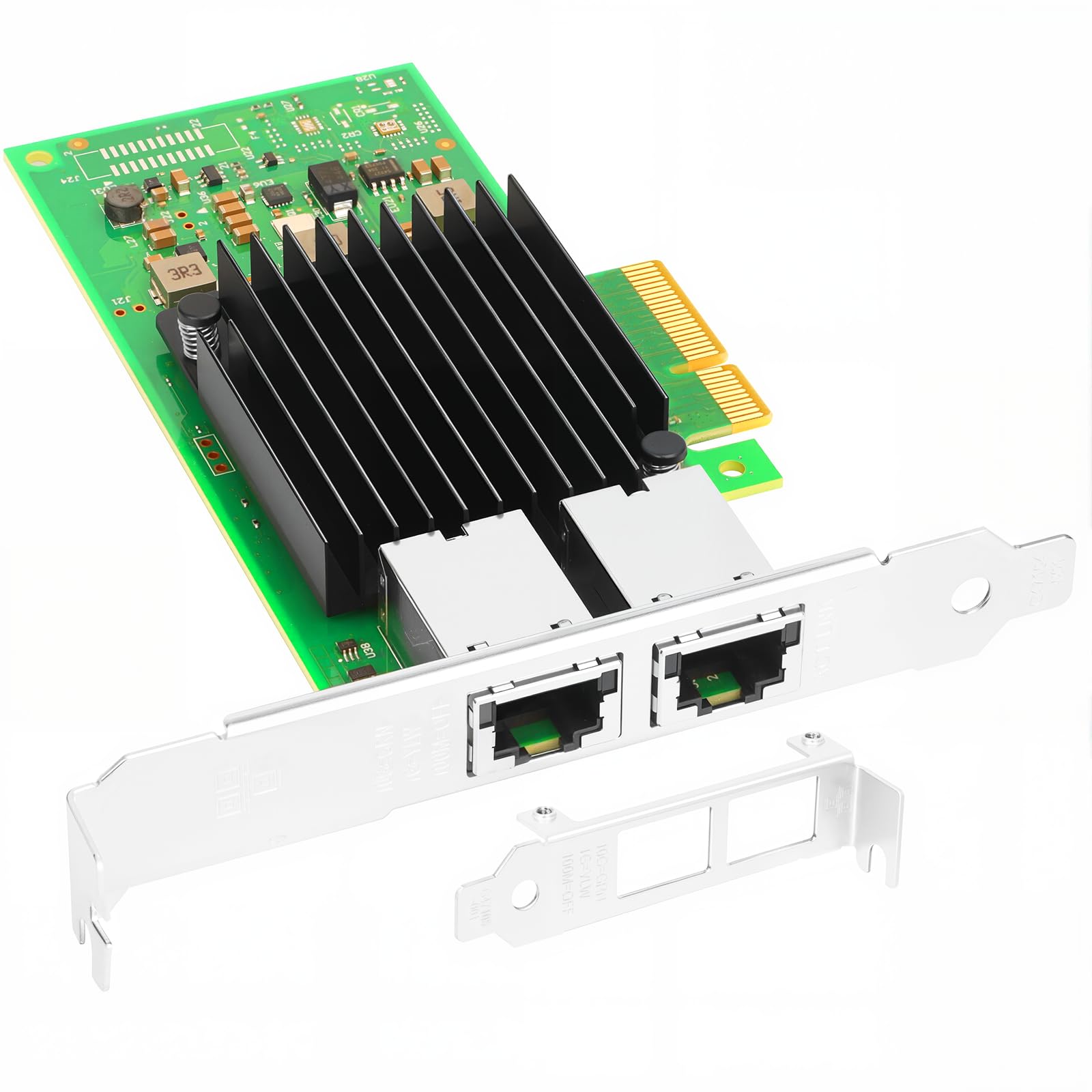
| Vogzone X550-T2★ Best Overall | Dual-port server builds | Intel ELX550AT2 | 2x RJ45 | PCIe 3.0 x4 | Amazon |
| Sonnet Solo 10GLaptop Pick | Thunderbolt laptops | — | 1x RJ45 | Thunderbolt 3 | Amazon |
| NICGIGA AQC113 | Budget single-port entry | Marvell AQC113 | 1x RJ45 | PCIe 3.0 x4 | Amazon |
| TP-Link TX401 | Gaming PCs and desktops | — | 1x RJ45 | PCIe x4 | Amazon |
| GigaPlus AQC113 | Workstations and servers | Marvell AQC113 | 1x RJ45 | PCIe x8 | Amazon |
| ASUS XG-C100C | Simple single-port upgrades | — | 1x RJ45 | PCIe x4 | Amazon |
| 10Gtek X550-T2 | Firewall and router builds | Intel X550-AT2 | 2x RJ45 | PCIe x4 | Amazon |
Detailed Reviews
1. Vogzone X550-T2 10GbE PCIe Network Card
Our pick — 4.0+★ from 200+ verified ratings; the strongest balance of quality and price.
Two copper ports and a real Intel controller make this the safest first step into 10G networking.
You get two 10 Gigabit connections on one board, so a NAS can act as a router or a server can feed a switch and a backup link at the same time. The dual copper RJ45 ports handle 100MbE, 1GbE, 2.5GbE, 5GbE and 10GbE, so the card matches whatever speed your switch can actually carry. Underneath sits the Intel ELX550AT2 controller, an enterprise-grade chip that supports single-root I/O virtualization (SR-IOV — a way for virtual machines to share the card’s lanes). That keeps a busy server’s networking stable when several workloads pull data at once.
Two ports plus a proven controller on one card is what makes this the overall pick. A single-port card works fine until you want to separate storage traffic from internet traffic. Speed is the other reason it earns its keep: the data transfer rate is listed at 10 gigabytes per second, and buyers consistently report it delivering on that promise, with real transfer tests landing in the multi-gig range. The size is the trade-off — at 8.8″L x 5.9″W x 1.1″H it is a noticeably larger card, so measure that footprint against your case before you commit.
The firmware story is the detail that sets this card apart from cheaper alternatives. It ships with Intel’s official NVM Update Utility, which lets you refresh the card’s firmware inside Windows, Linux or VMware ESXi without booting into a BIOS or juggling a USB drive. If you manage several servers, you can push firmware updates remotely instead of physically touching each machine. The card also includes a low-profile bracket, so it fits slim chassis. If you plan to run this in a firewall appliance where firmware control matters, it is a serious advantage over cards that lock firmware updates out entirely.
Where this card earns its keep
- Two 10 Gigabit RJ45 ports on one card — you can isolate storage and client traffic without a second slot.
- Intel ELX550AT2 controller with SR-IOV support, which helps when virtual machines share the link.
- Full 100M/1G/2.5G/5G/10G auto-negotiation so slower switches still work.
- Intel NVM Update Utility lets you refresh firmware without rebooting into BIOS.
The trade-offs to weigh
- At 1.1″H tall and 8.8″ long, it is a bulky card — leave room in your case.
- The highest speeds demand a switch and cabling rated for 10GBASE-T, so budget for that too.
- Some buyers find the 2.5G/5G steps need manual configuration rather than auto-negotiating.
The call: Choose this if you are building a server or NAS that needs two 10G ports and you want the widest OS and firmware control Intel can offer.
Look elsewhere if: you have a tight case or a single-port need — a slimmer card will suit you better.
2. Sonnet Technologies Solo 10G Thunderbolt 3 Adapter
For laptops with no free slot, this is 10 Gigabit without opening the case.
Every other card in this list wants an empty PCIe slot, which is a problem if your machine is a laptop or a sealed mini-desktop. The Solo 10G sidesteps that entirely by plugging into a Thunderbolt 3 port — the small reversible USB-C-shaped connector that carries 40Gbps. That headroom is plenty for a single 10GBASE-T link. Sonnet describes it as delivering up to 10 times the performance of Gigabit Ethernet, which is the jump most people notice on large file moves to a NAS.
What makes it genuinely pleasant to live with is the silence. There is no fan, so it adds nothing to a quiet editing bay or a shared office, and the aluminum body acts as its own spreader. It is also small enough to slip into a bag. Real-world numbers back up the claim: buyers report transfers running around 790MB/s to a 10GbE NAS, and one transfer of a 15-gigabyte file finished in about 15 seconds. That is the difference between a coffee break and a blink on a 15-gigabyte file.
The catch is stability, not speed. The recurring complaint is that the connection can drop multiple times a day, which is the classic Thunderbolt teething problem — usually a cable or port handshake rather than the adapter itself. It helps to use a certified Thunderbolt 3 cable and a port that is genuinely Thunderbolt 3, not plain USB-C. If your machine only has USB-C, this will not work for you. Sonnet backs it with a 2-year warranty.
The honest verdict: The fastest, easiest path to 10G on a Thunderbolt 3 laptop — when the host port and cable behave.
Who should skip it: Anyone whose laptop has only regular USB-C, or whose workflow cannot tolerate an occasional reconnect.
3. NICGIGA 10G Base-T PCIe Network Card (AQC113)

The cheapest way to add a single 10G copper port to a desktop that already has a free slot.
If you have one open slot and one cable to run, this is the entry-level route. The NICGIGA card uses the Marvell AQtion AQC113 controller — a widely supported chip that does the full 10 Gbps step and steps down through 5G, 2.5G, 1G and 100M automatically. That auto-negotiation (the card settling on the fastest shared speed with your switch) is what makes it forgiving on mixed networks. It also supports Wake-on-LAN (WOL), so a sleeping machine can be woken by a network signal — handy if you remote into a home server.
The included brackets are worth calling out because they decide whether the card physically fits. You get both a standard full-height bracket and a slim low-profile one, so it drops into a desktop, workstation, server or small mini-tower without hunting for extra hardware. It takes a PCIe x4, x8 or x16 slot, and the listing is clear that it needs a PCIe slot, not a legacy PCI one. Wake-on-LAN and the broad Windows 10/11, Windows Server and Linux support cover most home setups.
The honest note is that this is a fresh listing with very little review history so far — the kind of card where the controller is well known but the vendor’s support track record is still thin. That is a fair reason to prefer it for a second machine or a project build rather than the server everything in your house depends on. It is a sensible first card at a budget price, not a proven workhorse.
What it does well: Full multi-gig negotiation through a Marvell AQC113, plus both brackets in the box for a clean fit.
The reality check: Limited feedback so far means you are buying on the controller’s reputation more than the seller’s.
Worth it for: A spare desktop or a test rig where a single 10G port and a low budget are the priority.
Think twice if: this card is going into a machine you cannot afford to troubleshoot.
4. TP-Link 10GB PCIe Network Card (TX401)
The mass-market favourite, and the one that hands you a 10G-rated cable in the box.
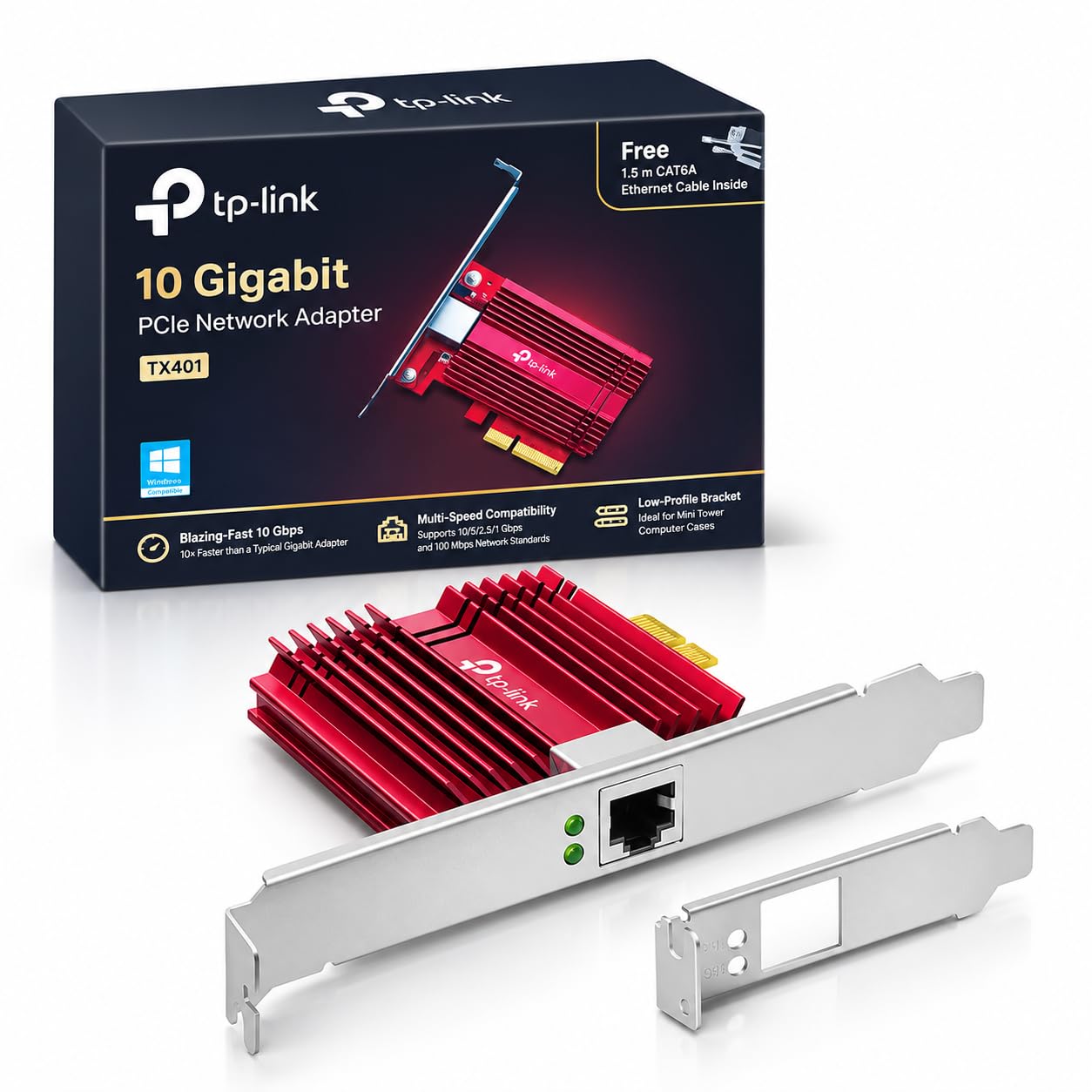
Buyers new to 10G tend to pick this card first because it removes the cable guesswork. TP-Link includes a 1.5 m CAT6A Ethernet cable rated for up to 10 Gbps — a regular cable is only rated for 1 Gbps — so you are not left wondering whether your old cable is holding you back. The card itself runs 10GBase-T at up to 10 Gbps and steps back through 5 Gbps, 2.5 Gbps, 1 Gbps and 100 Mbps automatically. A low-profile bracket is also included, so it fits mini towers.
For a gaming desktop, the QoS (Quality of Service) feature is what sets this card apart. QoS lets the card prioritise the traffic that matters — your game — and deprioritise background downloads, so a Windows update running in the corner does not spike your latency. It uses a PCIe x4 interface, the width most consumer boards have free. At 4.76″L x 3.87″W x 0.85″H it is noticeably more compact than the dual-port Vogzone board, so it tucks into a tight case. It also works across Windows 10/8.1/8/7, several Windows Server versions and Linux.
The mixed signals sit around reliability and compatibility in the wider review pool, which is typical for a card this widely sold across so many board and OS combinations. On a mainstream Windows desktop with a supported switch, it behaves. On an unusual distro or a heavily customised firmware stack, expect to do some driver legwork. The included cable also removes one variable — a real quality-of-life perk other cards here do not offer.
Why the crowd chooses it: The CAT6A cable, the QoS prioritisation and the compact 4.76″ footprint make it the lowest-friction install of the single-port cards.
What to watch: Very broad OS support claims can mean longer driver hunting on niche platforms.
5. GigaPlus 10Gb PCIe Network Card (AQC113)

A heatsink on a 10G copper card is not decoration — it is what keeps the link steady under load.
If your workstation or server runs hot and you need the link to stay up, this card is built for that. The GigaPlus board uses the AQtion AQC113 controller for up to 10 Gbps, and the standout detail is the high-quality heatsink — a metal block that pulls heat off the chip so it keeps negotiating a stable link during long transfers. 10G copper cards generate real heat, so a card that manages it will hold speed better than a bare one.
Build quality gets a second nod in the thickened gold-plated contacts, which reduce contact failures and help prevent packet loss — the silent killer of smooth transfers. It takes a PCIe x4, x8 or x16 slot and ships with both full-height and low-profile brackets for desktops, workstations, servers and mini-tower cases. Driver setup is genuinely easy: you scan a QR code on the card to download the driver rather than hunting through a support page. It supports Windows, Windows Server and VMware, and lists IEEE 802.3an and 802.3 support.
The honest catch is compatibility beyond the mainstream. Buyers who run Proxmox report issues with this card specifically, and that is a real cost if you virtualise your environment. The convenience of QR-code drivers is worth a lot on Windows and standard VMware, but if you run a niche hypervisor, verify support before you commit. Quality feedback is split — solid for some, fussy for others.
What makes it a workstation pick
- Heatsink keeps the AQC113 controller cool so the 10G link holds under sustained load.
- Gold-plated contacts reduce contact failures and packet loss.
- Both brackets included for any case size.
- QR-code driver download removes the usual hunt for drivers.
Where it can stumble
- Reported compatibility trouble on Proxmox — check your hypervisor before buying.
- Quality impressions are mixed across the buyer pool.
Fits best in: a Windows or standard VMware workstation that needs sustained 10G throughput.
The one caution: a Proxmox user is better served by confirming driver support first — this is not the card for a virtualisation lab without checking.
6. ASUS XG-C100C 10G Network Adapter
A mainstream name you trust, assuming your board hands it a full 10G link.
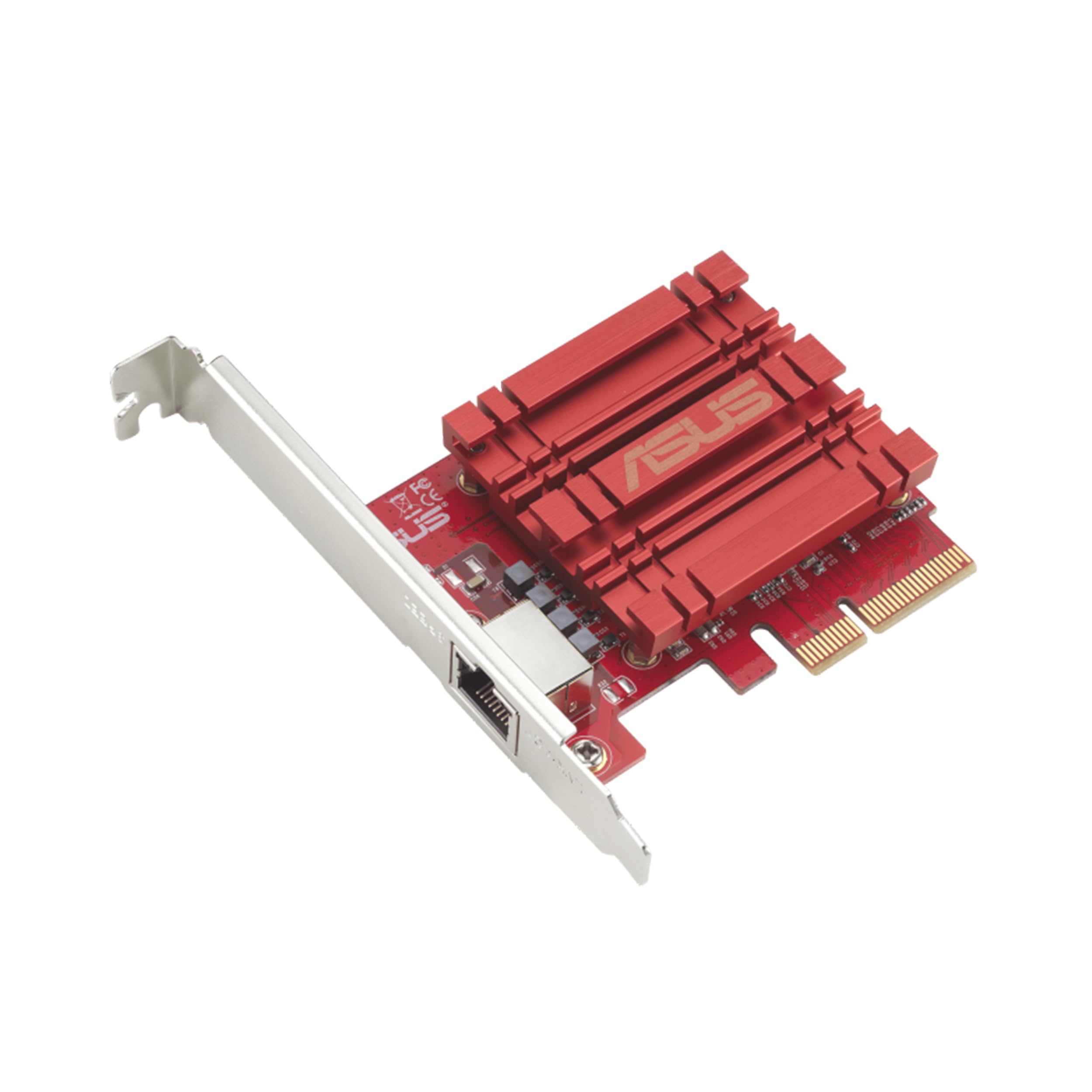
ASUS built this card for the buyer who wants a familiar brand and a standard RJ45 port that upgrades a desktop to 10Gbps over existing copper cable. It steps down through 10, 5, 2.5 and 1Gbps as well as 100Mbps, so it fits a network that is not fully 10G yet. Built-in QoS (Quality of Service) lets the card prioritise bandwidth-heavy traffic, which smooths out the experience when something else on the network wants the same pipe.
System support is listed for Windows 10/8.1/8/7 and several Linux kernel versions, so most desktop builds are covered. The card uses a PCIe x4 slot and lands at 4.72″L x 3.31″W x 0.98″H — a compact single-port board that fits a standard case. Installation and setup are reported as straightforward, so most buyers get the link up without a fight.
Speed results are where feedback splits. Data speed performance gets mixed reports — some owners mention running up to the full 10 Gbps, while others find themselves stuck below 2 Gbps. That gap almost always depends on the environment: a switch, cable or port that is not truly ready for 10GBASE-T. Treat the card as capable of 10G, but only as fast as the rest of your chain lets it run. If your switch and cable are verified, this is a solid brand-name choice; if not, fix the chain first.
A steady, familiar option: RJ45 copper, QoS prioritisation and a compact PCIe x4 footprint with broad Windows and Linux coverage.
The split verdict: You get 10G only if your switch and cabling truly support it — the card’s ceiling depends on everything downstream.
7. 10Gtek 10Gb PCIe Dual RJ45 NIC (Intel X550-T2)

Two Intel-fed ports aimed straight at firewall and router builds — with one firmware catch.
The 10Gtek card is built around the original Intel X550-AT2 controller, the chip that firewalls and routers lean on for stable, predictable throughput. Two copper RJ45 ports handle 100M/1G/2.5G/5G/10G, so you can put WAN on one port and LAN on the other from a single card. It is designed for data-center style environments and includes both a full-height and a low-profile bracket for tighter cases. Buyer feedback on performance is the strongest part of the story — real monitored speeds land right in line with what the card is rated for.
Around that performance, the experience gets more mixed. Some buyers find installation simple, others struggle with drivers. Compatibility with Windows 11 draws disagreement, and value-for-money opinions split. The listing is also blunt about several limits you should read before buying: this product does not support firmware updates, and it is explicitly not compatible with OPNsense version 25.7.3 (FreeBSD 14.3). It also does not support hot swapping — the card should be powered down before it is removed or swapped.
Those limits are the whole decision. If your firewall distro is on the supported list — Windows Server 2008/2012, Linux, FreeBSD 9 and 10, VMware ESXi 5.1 and 5.5 — this is a dependable dual-port card with real Intel silicon and a 3-year warranty. If you rely on newer firmware or run OPNsense on a recent FreeBSD, the lack of firmware updates and the explicit incompatibility make it the wrong tool. The card has real strengths, but its support envelope is fixed.
The case for it
- Two Intel-fed RJ45 ports for separating WAN and LAN from one card.
- Customers note monitored speeds that match the card’s spec.
- Both brackets included, and backed by a 3-year warranty.
The limits that decide it
- No firmware update support — the card is fixed at whatever it ships with.
- Explicitly not compatible with OPNsense 25.7.3 (FreeBSD 14.3).
- No hot swap; the machine must be powered down before swapping cards.
Choose it when: your firewall or router runs a listed OS and you want two Intel ports with a long warranty.
Pass it over when: you run OPNsense on a recent FreeBSD or expect to update firmware — that ceiling will bite.
Know the Specs
PCIe interface and slot width
PCIe (Peripheral Component Interconnect Express) is the slot on your motherboard that the card plugs into. The number after the “x” — x4, x8 or x16 — is the lane count, which sets how much data the slot can move. A 10 Gigabit card typically wants an x4 slot, which is more than a single link needs, so the slot itself is rarely the bottleneck. The bigger issue is physical: check whether a low-profile bracket is included if your case is small.
Controller chip and driver support
The controller is the chip that runs the network link. Intel X550 and Marvell AQC113 are the two common families in this category, and each has different driver coverage across operating systems. A card that installs without extra drivers on Windows may need manual setup on VMware or a firewall distro. Match the chip to your OS before buying, and be ready to configure 2.5G or 5G manually if auto-negotiation does not land where you expect.
Multi-gig negotiation (2.5G, 5G, 10G)
Most 10G cards here also support the intermediate speeds — 2.5Gbps and 5Gbps — plus the older 1G and 100M. Auto-negotiation is the card and switch agreeing on the fastest shared speed. If your switch tops out at 2.5G, the card simply drops to that step rather than failing. That fallback makes the upgrade forgiving, but the full 10G link only appears when the card, switch and cable are all rated for it.
Copper RJ45 versus other connectors
An RJ45 port is the familiar square network jack every home and office uses. 10GBASE-T is 10 Gigabit Ethernet running over that copper jack, which is why these cards look like ordinary network adapters from the outside. Copper keeps things simple and works with standard cables — but the cable must be rated for the speed, which is why a card that bundles a CAT6A cable removes a common point of failure.
Common Questions
Will a 10 Gigabit LAN card work in a regular PCIe x16 slot?
Do I need a 10G switch to benefit from one of these cards?
How do I know if my cable is rated for 10 Gigabit?
Is Thunderbolt 3 faster than PCIe for a 10G card?
Will the card work if my machine runs Windows 11?
What is the difference between the Intel X550 and Marvell AQC113 controllers?
Can I use a 10G card in a firewall build like OPNsense or pfSense?
Does a dual-port card give me anything a single-port card does not?
Will 10G over copper run hot enough to throttle?
What is QoS and does it matter for a home user?
The Bottom Line
For most people moving a NAS, server or busy desktop onto a 10 Gigabit link, the 10 gigabit lan card to beat is the Vogzone X550-T2. Two copper ports and a proven Intel ELX550AT2 controller give you real headroom, and the remote firmware update tool saves a reboot in a multi-machine setup. If your machine is a laptop, go with the Sonnet Solo 10G — no slot needed, no fan noise. And if you are building a firewall and your distro is on the supported list, the dual-port 10Gtek X550-T2 is the pick — just confirm your firmware and version before you commit. The one honest nudge: buy the card whose controller, slot and switch speed match your setup, not the cheapest listing, and you will skip the disconnect roulette entirely.
How we choose
We do not accept paid placement. Every pick is matched to a real buyer and a real use-case; we do not hands-on test units.
Sources
Specifications: manufacturer listings and product documentation. Review insights: verified customer reviews, as of November 2026. Pricing: not shown on this page (it changes often); check the current price via the retailer link.
As an Amazon Associate, My Heart Lives Here earns from qualifying purchases. This does not affect which products we feature.