Heads up: This post contains affiliate links. As an Amazon Associate I earn from qualifying purchases, at no extra cost to you. Learn more
Specs are compiled from manufacturer listings and verified buyer reviews and can change over time — please confirm the key details on the product page before buying.
You have an older laptop or desktop with a blue VGA plug and a modern TV or monitor that only accepts HDMI — and you want them talking in under a minute. The good news: a VGA-to-HDMI adapter works, but only in one direction — VGA source to HDMI display — and only if you buy that direction. Get the direction wrong and you will own a dud, because a VGA-to-HDMI signal path is one-way and cannot be flipped. This guide covers the seven adapters worth your money, what each one actually does with audio, and how to dodge the single most common mistake in this category.
This guide is built by comparing the manufacturers’ published specifications and the patterns across verified customer reviews, so you get each pick’s real strengths and trade-offs instead of marketing spin.
Direction is the whole game here: VGA-out to HDMI-in is what almost every home setup needs, while the reverse is a different product entirely. Below, every pick is sorted by what it actually converts, so you can match the adapter to your signal flow and connect your old screen and new display on the first try with the right vga to hdmi adapter.
Top Picks


How To Choose The Best VGA to HDMI Adapter
The first thing to settle is which end your signal leaves from. A VGA computer feeding an HDMI display needs a VGA-to-HDMI converter. An HDMI laptop feeding an old VGA monitor needs the opposite. These are not the same device and almost never work in reverse, so match the direction before you look at anything else.
Check the direction first, not the brand
Most of the picks here are one-way converters built for hooking an older VGA source — a desktop, laptop, or legacy machine — up to a modern HDMI TV, monitor, or projector. If your source is HDMI and your screen is the old VGA type, note that the Dell and StarTech units below are the HDMI-to-VGA direction. Buying against your signal flow is the mistake that sends these back most often.
Sort out audio before you plug in
VGA carries picture only — no sound — so adapters that want audio have to grab it separately through a 3.5mm audio cable. Several picks here bundle that cable and a USB power lead in the box. If sound matters for streaming or video calls, favor a unit that lists the audio input and includes the cable, rather than one that only moves video.
Expect a 1080P ceiling
These adapters convert analog VGA into digital HDMI, and that conversion caps out around 1920×1080 at 60Hz — full high definition, sharp enough for a TV or a presentation screen. One pick here also pushes 2K on the HDMI port. Anything above that is out of scope for an adapter, so set your expectations at crisp everyday 1080P rather than 4K.
Side-by-Side Comparison
| Model | Best For | Direction | Max Resolution | Ports | Amazon |
|---|---|---|---|---|---|
| Dell HDMI to VGA Adapter★ Best Overall | New laptop to old VGA monitor | HDMI source to VGA display | — | 2 | Amazon |
| FOINNEX VGA to HDMI Adapter with AudioTop Performer | Old PC to TV with sound | VGA source to HDMI display | 1080P | — | Amazon |
| AKWOR VGA to HDMI+VGA Dual Monitor Adapter | Two screens from one VGA port | VGA source to HDMI + VGA displays | 2K on HDMI / 1920x1080P@60Hz | 2 | Amazon |
| StarTech Active HDMI to VGA Adapter | Travel kit for legacy screens | HDMI source to VGA display | 1920×1200 / 1920×1080 60Hz | 1 | Amazon |
| FOINNEX 1080P Converter with USB Audio | Budget one-way VGA to HDMI | VGA source to HDMI display | 1080P | 2 | Amazon |
| Duttek VGA to HDMI Cable 5FT | Cable-style single run | VGA source to HDMI display | up to 1920×1080@60Hz | — | Amazon |
| JideTech VGA to HDMI Converter | Commercial and industrial setups | VGA source to HDMI display | 1920×1080 | 3 | Amazon |
Detailed Reviews
1. Dell HDMI to VGA Adapter
Our pick — 4.5+★ from 250+ verified ratings; the strongest balance of quality and price.
The clean, business-grade dongle for putting a modern HDMI laptop onto an old VGA screen.
Start with the direction — this is an HDMI-to-VGA adapter, not a VGA-to-HDMI one. It takes the HDMI output from a laptop, monitor, or projector source and drives a legacy VGA display. If you are trying to send an old VGA computer to a new HDMI TV, this is the wrong box for you, and no amount of plugging will flip it. For the reverse case, though, it is the pick most people quietly want: a single compact dongle from a name that builds office hardware.
The daily job it handles best is the conference room. You walk in with a modern laptop, the projector still runs a VGA cable, and this bridges the gap in one move. It weighs 1.6 ounces, light enough to live in a laptop bag without you noticing, and lists two ports — the HDMI end in, the VGA end out. Compatibility is spelled out plainly: laptops, monitors, projectors. Nothing exotic, nothing to configure.
What sells it is reliability, and the feedback backs that up — buyers consistently report it simply performs, including with older monitors that other adapters fumble. It is a straightforward, no-drama connector rather than a feature-packed converter. Use the pro-con read below to decide if that simplicity is your fit.
Where It Earns Its Keep
- One-way HDMI-to-VGA conversion for putting a new laptop on an old display
- Compact 1.6-ounce body slips into a laptop bag
- Built by Dell, aimed squarely at office and presentation use
- Performs dependably, including with older monitors
Where You Should Look Elsewhere
- It is HDMI-to-VGA — the opposite direction of an old PC to new TV job
- No audio pathway is listed, so treat it as a video-only bridge
Buy it when: you own a newer HDMI laptop and need to feed an old VGA projector or monitor at work.
Not your box: if your source is the old VGA machine and the screen is the new HDMI one — grab one of the VGA-source picks below instead.
2. FOINNEX VGA to HDMI Adapter with Audio
The one-direction VGA-to-HDMI workhorse that brings sound along for the ride.
If your goal is turning an old VGA computer into something a modern TV can display, this is the direction you actually need. It takes VGA out of a laptop or desktop and feeds it into an HDMI TV, monitor, or projector. Two cables come in the box that make it function properly: a 3.5mm audio lead and a micro USB power lead. Skip either and it will not do its job — the USB must draw from a 5V 2A computer port or a 5V 1A power adapter to power the active chip inside.
What seals it is the audio sync. VGA has no sound, so this adapter captures audio through its 3.5mm jack and folds it into the HDMI signal. That means one HDMI cable to the TV carries both picture and sound. The current rating is 2 A, and while it converts a signal it supports 1080P HD. Gold plating on the connector and multi-strand copper wiring are there to keep the picture stable — the pitch is smooth video without the double-image shimmer you get from cheap passthrough cables.
The functional side is what carries the day — working with most resolutions and easy to connect is the recurring theme, which is precisely what you want from a converter doing a dirty analog-to-digital job. Be honest about the edges: compatibility and build quality draw mixed notes, and a handful report trouble with odd 720×400 DOS/UNIX text at 70Hz. For ordinary Windows and TV use that is a non-issue, but if you are pushing legacy text modes, test it early.
Direction lock: it is strictly VGA source to HDMI display — the opposite of the Dell above, so the two are not interchangeable no matter how similar the price feels.
The real trade-off: it needs USB power and an HDMI cable you supply, so it is not cable-free. Treat the USB lead as part of the setup, not an optional extra.
Worth grabbing if: you have an older VGA laptop or desktop and a modern HDMI TV, and you want the sound to come through too.
Think twice if: you are running unusual low-resolution text modes — compatibility is the mixed part of the story here.
3. VGA to HDMI+VGA Adapter for Dual Monitors (AKWOR)

One VGA source, two screens at once — the splitter for desks and meeting-room projector runs.
Of all the picks here, this is the only one built to feed two displays simultaneously. It runs a VGA-source computer out to both an HDMI and a VGA output at the same time. The honest catch sits right in the spec sheet: when both ports run together, the two monitors mirror the same picture — you are not getting two different workspaces, you are getting the same content on two screens. For a projector-plus-monitor setup in a conference room, that is exactly what you want.
Resolution is where it pulls ahead of the pack. Both the HDMI and VGA outputs reach 1920x1080P@60Hz, and the HDMI port alone can handle 2K HD at 2560×1440@60Hz. That puts it above the plain 1080P ceiling most of these adapters settle for. The current rating is 1 A, and it needs the bundled micro USB charging cable connected, plus the 3.5mm audio cable to the computer, or you get picture without sound.
Here is where to be careful: functionality and quality both come in mixed — some units perform exactly as promised, others arrive not working. That is a real fit note, not a reason to skip the category, and the aluminium frosted shell is a genuine plus for trips and desk duty. If you buy it, test both ports the day it arrives so any issue surfaces while you can still return it.
Why two ports matter: the dual outputs are the whole point — and the port count here plus a 2K-capable HDMI port are hard to match elsewhere on this list.
The honest edge: splitter setups mirror rather than extend, and the working-versus-not-working split means early testing is smart.
Reach for it if: a single VGA PC needs to appear on both a TV/monitor and a projector at the same time.
Look elsewhere if: you need two independent extended desktops rather than a mirrored image.
4. StarTech Active HDMI to VGA Adapter (HD2VGAE3)
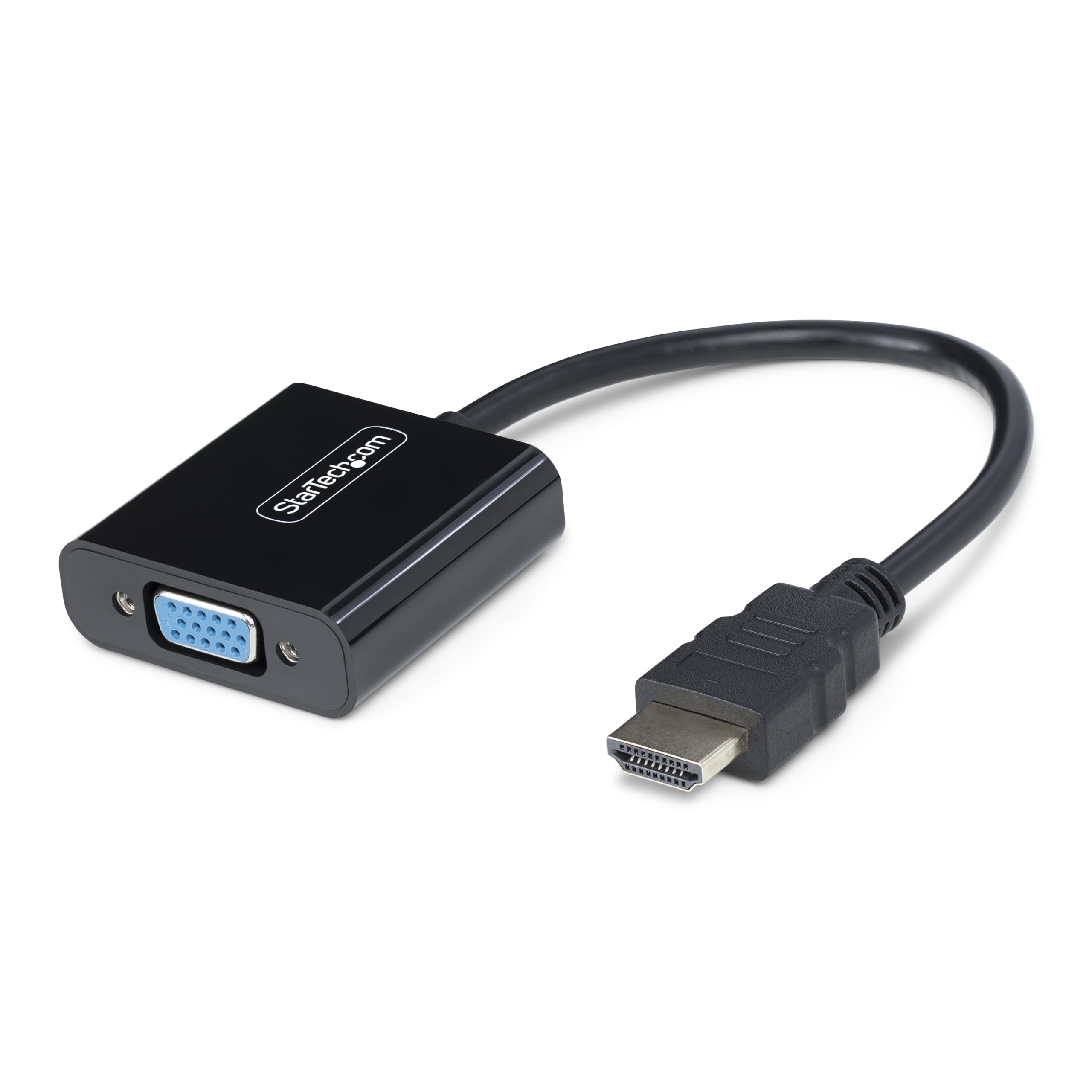
A no-power, no-driver dongle for hauling an HDMI laptop to a legacy VGA screen.
This is the second HDMI-to-VGA pick on the list, sitting in the same direction as the Dell — modern HDMI source into an old VGA display. Where it beats that rival is freedom from power: no external adapter, no USB lead, nothing to plug in but the connectors themselves. The integrated chip leans on your GPU so it keeps CPU load low. It supports resolutions up to 1920×1200 or 1920×1080 at 60Hz, and at 1.12 ounces it is the lightest thing here — travel-kit light, far below the dual-monitor AKWOR’s 1.8 ounces.
Its no-driver, any-OS design is the practical win: Windows, macOS, ChromeOS, Linux, and HDMI laptops from Intel, Nvidia, or AMD all work without a thought. The VGA end accepts screw-locking cables, so the plug will not wiggle loose mid-presentation — a small touch that matters when you are standing in front of a room. One port in, one cable out at 5.8 inches (14.7cm) of reach, black shell, done.
The reason it earns a spot is simple reliability: it works well and handles even ancient VGA screens without complaint. The main thing to digest is that it is unidirectional HDMI-to-VGA — buyers who mistakenly want the old-PC-to-new-TV direction will find it useless for that job. Check which way your signal runs first, then this becomes a quiet, capable tool.
Best fit: the frequent traveler with a modern laptop who keeps running into VGA projectors and old monitors.
Single caveat: it only converts HDMI to VGA, so it is the wrong direction for hooking an old VGA computer to a new TV.
5. FOINNEX VGA to HDMI Adapter, 1080P Converter with USB Audio

A short, tidy VGA-to-HDMI cable-converter for the old desktop you keep in the spare room.
For the classic job — old VGA computer into a smart TV — this one-way converter does the basics without fuss. It is expressly built for VGA-output laptops and desktops feeding HDMI-input TVs and monitors, and it repeats the golden rule in its own text: it will not run HDMI to VGA. Compatibility covers Windows 7/8/10 and Linux. The USB port has to be powered to drive the built-in active chip, and the box throws in a 3.5mm jack audio cable and a micro USB cable so you can hook both up right away.
Audio rides along the same way as the FOINNEX above: the 3.5mm interface carries R+L sound into the HDMI signal. The USB lead draws from a 5V 2A computer port or a 5V 1A adapter, and the current sits at 0.1 A. It handles 1080P HD, and gold-plated connectors plus multi-strand copper wiring are pitched at shielding outside interference. It also carries a 30-day refund and 24-month warranty — a longer safety net than most here advertise, and a fair reason to consider it as the low-cost VGA-to-HDMI pick.
Where it differs from the dual-port AKWOR above is scope: this one moves video and audio to a single HDMI display, not two screens at once. If you want a simple, single-screen bridge and like the reassurance of a two-year warranty, this is the value call. Keep the USB plugged in — that powered chip is not optional.
Go for it when: a single old VGA computer needs to reach one HDMI TV with sound, and you want a warranty behind it.
Remember: it is strictly one display, VGA-source only — not for mirroring to two screens.
6. Duttek VGA to HDMI Adapter Cable 5FT/1.5M

Skip the dongle-plus-cable dance — this is one built-in run from VGA to HDMI.
You never hunt for a missing cable, because this one has no loose parts: a single integrated 5FT/1.5M cable carries a VGA male end, an HDMI male end, a USB-A power plug, and a 3.5mm audio plug on one lead. Nothing gets lost in a drawer. It converts analog VGA output (the older screw-in video plug) to digital HDMI, and it works one way only — VGA in, HDMI out, with no HDMI-to-VGA trickery. Gold-plated VGA contacts resist corrosion, and the metal-braided shielding cuts electromagnetic interference (stray electrical noise) so the picture stays cleaner.
Its ceiling is the familiar one: up to 1920×1080@60Hz, full HD, sharp enough for streaming, presentations, and everyday screen work. The data transfer rate is 18 gigabits per second and the frequency is 60 Hz, which line up with a clean 1080P pipe. The frosted aluminum shell should hold up to being coiled and uncoiled in a bag, and at 1.5 meters it gives real reach between a desktop tower and a wall-mounted TV. Audio, again, does not travel through VGA — you feed it in through the separate 3.5mm input, and the USB lead powers only the chip, not data.
Yes, the compatible-devices list throws in Xbox, PS3, Roku, and TV Boxes, but read the fine print — those refer to devices with a VGA output port, and the cable will not work on HDMI-only media boxes. For an old VGA desktop or legacy Chromebook feeding a modern HDTV, though, the single-run design is genuinely tidy. It is the chosen route for anyone who hates chasing a missing converter block.
Why the single cable wins: one piece, four plugs, nothing loose to lose — the exact opposite of the two-cable FOINNEX adapters above.
The catch to note: those media-box compatibility mentions need a VGA output to matter, so an HDMI-only streamer will not work through this cable.
Pick this if: you want one integrated cord from an old VGA machine to an HDMI TV with no separate dongle to misplace.
Not for: HDMI-only consoles or streaming boxes — the cable needs a VGA source to convert.
7. JideTech VGA to HDMI Converter with Audio
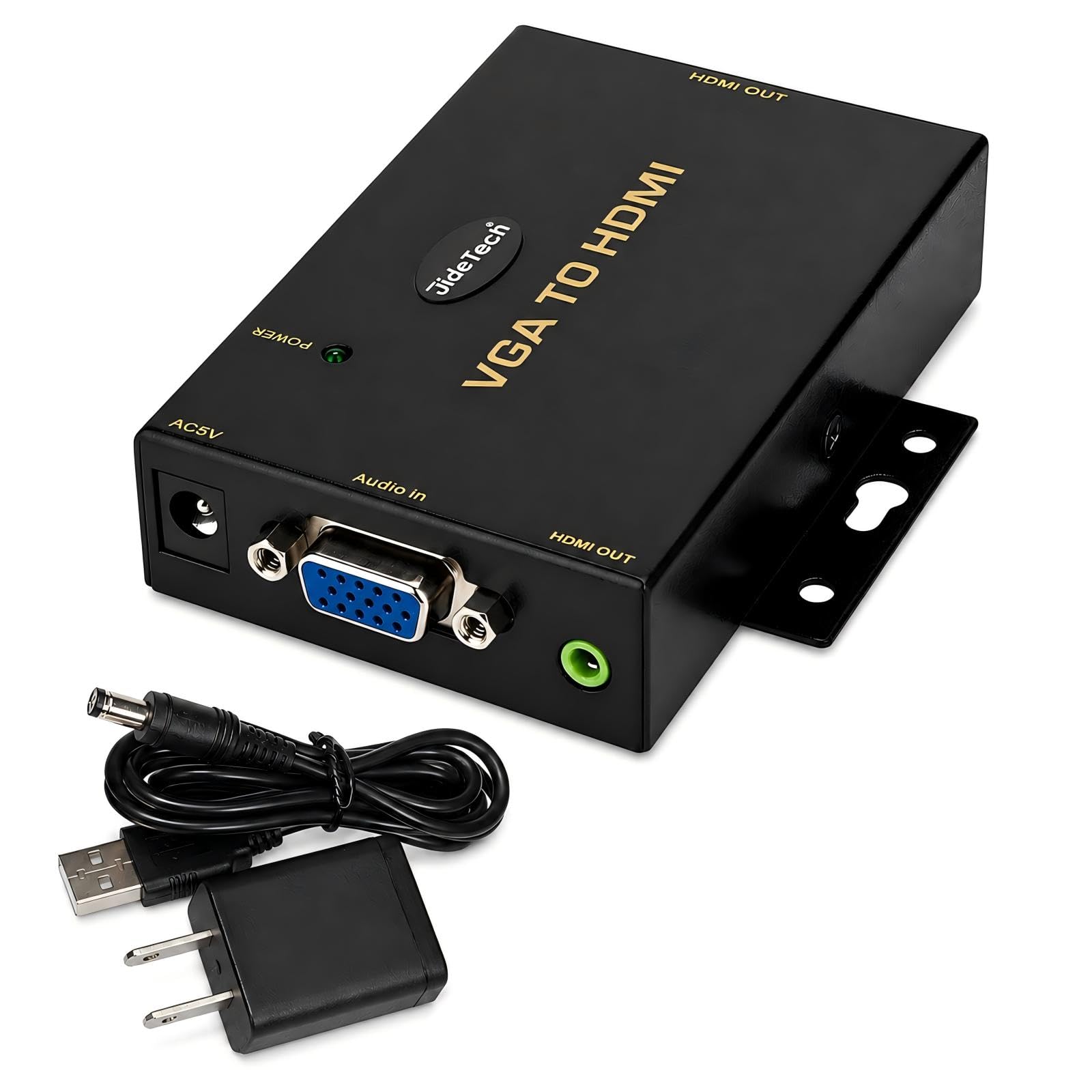
The heavier-duty converter built for POS terminals, classrooms, and always-on legacy equipment.
This is the pick for setups that run all day rather than the odd presentation. It converts VGA from computers, DVRs, POS systems, industrial PCs, and legacy devices into HDMI displays, and it is firmly one-way — no HDMI-to-VGA and no bidirectional tricks. It carries a built-in active conversion chipset for analog-to-digital work, powered by DC 5V with a North American Type A two-pin plug, at a 0.5 A current rating. Output tops out at 1920×1080 full HD.
Audio handling and build intent set it apart from the lighter adapters. A 3.5mm audio input (the standard headphone-style jack) folds picture and sound into one HDMI output, so a single cable carries both to the display — no separate sound lead to the TV. The three-port design and the supplied power plug suit fixed installations in conference rooms, classrooms, surveillance setups, and commercial AV, where the converter will not move for months. This is the one you bolt into a rack, not stuff in a laptop bag.
Buyers report it works well, installs easily, and behaves like a well-built plug-and-play converter. Picture clarity is the split note — some setups differ there, so test on day one. For a permanent commercial install where you can confirm the signal direction and check the picture immediately, that balance usually holds up. It is the premium choice among the VGA-to-HDMI converters here, and priced like the industrial tool it is.
Where it shines: dedicated DC 5V power and a three-port layout built for commercial, always-on duty rather than tabletop use.
The caution: picture clarity is where feedback splits, so check your exact VGA source and test early in a permanent install.
Choose it for: POS systems, industrial PCs, classrooms, or AV racks that need a fixed VGA-to-HDMI converter with its own power.
Overkill for: a one-off living-room hookup where a small adapter already covers the job.
Know the Specs
Direction (VGA source vs HDMI source)
An adapter only converts one way, so “VGA to HDMI” and “HDMI to VGA” are different products that cannot swap roles. VGA-to-HDMI takes an old computer’s VGA signal into a modern HDMI screen. HDMI-to-VGA does the reverse for a new laptop feeding an old monitor. Checking which end your signal starts from is the first and most important step, and it saves you from buying a dud that fits nothing.
Resolution ceiling (1080P and 60Hz)
These converters turn analog VGA into digital HDMI at up to 1920×1080 at 60Hz — full high definition at a smooth 60 frames per second, which is what everyday TV and presentation use needs. One pick here also reaches 2K on its HDMI port. Higher resolutions are outside what an adapter manages, so plan for crisp 1080P rather than 4K.
Audio path (3.5mm input)
VGA carries pictures only, so any sound has to arrive a different way — through a 3.5mm audio cable plugged into the source’s headphone jack. The adapter then folds that audio into the HDMI signal so a single HDMI cable carries both. If audio is part of your plan, confirm the adapter lists a 3.5mm input and includes the cable.
USB power for the active chip
“Active” means the adapter has a built-in chip that does the analog-to-digital conversion, and that chip often needs its own power from a USB lead — usually a 5V 2A computer port or a 5V 1A power adapter. Skip that connection and you get no picture at all. Treat the USB cable as a required part of setup, not an accessory.
Common Questions
Will a VGA to HDMI adapter let me connect my old PC to a smart TV?
What is the difference between VGA to HDMI and HDMI to VGA?
Do these adapters carry sound or just video?
Why does my adapter need a USB cable plugged in?
What resolution can a VGA to HDMI adapter output?
Will it work with a game console like a PS3 or Xbox?
Can I connect two monitors from one VGA port?
Do I still need a separate HDMI cable?
Will it help with very old low-resolution text like DOS screens?
Does the brand of my VGA computer matter for compatibility?
The Bottom Line
For most people turning an old VGA computer into something a modern TV can actually show, the FOINNEX VGA to HDMI Adapter with Audio is the pick — it handles the VGA-to-HDMI direction, brings sound through its 3.5mm jack, and ships with the audio and USB-power cables you need. If your desk needs two screens from one VGA port, reach for the AKWOR dual-output adapter, the only one here feeding both HDMI and VGA at once, and it touches 2K (2560 x 1440 pixels) on the HDMI port. And for a commercial rack, POS terminal, or classroom that runs all day, the JideTech converter with its dedicated DC 5V power is the tool built for the job. Whichever you choose, confirm the signal direction first — get that right and the rest is plug and play.
How we choose
We do not accept paid placement. Every pick is matched to a real buyer and a real use-case; we do not hands-on test units.
Sources
Specifications: manufacturer listings and product documentation. Review insights: verified customer reviews, as of November 2026. Pricing: not shown on this page (it changes often); check the current price via the retailer link.
As an Amazon Associate, My Heart Lives Here earns from qualifying purchases. This does not affect which products we feature.