Heads up: This post contains affiliate links. As an Amazon Associate I earn from qualifying purchases, at no extra cost to you. Learn more
Specs are compiled from manufacturer listings and verified buyer reviews and can change over time — please confirm the key details on the product page before buying.
If your desktop still connects over a plastic USB dongle, you already know the pain: dropped frames mid-match, a Bluetooth mouse that stutters, and a 6GHz router sitting unused because your PC can’t hear it. The fix is a small card that slides into a slot inside the case and taps Intel’s AX210 chip — the silicon that makes the 6GHz band available to a PC at all. This guide covers the six worth your money and, just as importantly, which one matches your motherboard.
This guide is built by comparing the manufacturers’ published specifications and the patterns across verified customer reviews, so you get each pick’s real strengths and trade-offs instead of marketing spin.
You can waste money fast by ordering a Wi-Fi card before checking whether your board takes a PCIe slot (the long slot for add-in cards) or an M.2 slot (the small slot for compact modules) — and the two are not interchangeable. Below, every pick is sorted by slot type, rated speed, and the setup quirks that actually trip people up, so you can match a card to your case in one pass and get the best AX210 Wi-Fi Card for your build.
Top Picks

How To Choose The Best AX210 Wi-Fi Card
Every card on this list carries the same Intel AX210 chip, so the wireless performance itself is close to identical across all six. What separates them is everything around the chip: the slot it plugs into, the antennas, the bracket, and how much setup work lands on you. Match all four to your build and any of the six will serve you well.
Check your slot before anything else
The single most common buying error here is ordering the wrong physical format. A PCIe card is a small board that screws into a free PCIe x1 slot and pokes its antennas out the back of the case. An M.2 2230 module is a tiny card — roughly the size of a postage stamp — that clips flat onto the motherboard where a laptop Wi-Fi card would sit. Your board has one or the other, and a PCIe card will never fit an M.2-only board.
Look at your motherboard manual for an “M.2 Key A+E” slot if you want the tiny module. Look for a free PCIe x1 slot if you want the full card with rear antennas. Desktops with a full-size case almost always have a PCIe slot free; small-form-factor builds and laptops usually need the M.2 module.
Understand what the 6GHz band really gives you
The AX210 is a tri-band radio (it can talk on three separate frequency ranges at once): 2.4GHz for distance through walls, 5GHz for a balance of speed and range, and 6GHz for the shortest range and the least interference. The 6GHz band is the whole point of Wi-Fi 6E — a newer, emptier slice of airwaves that neighbouring routers and older devices do not crowd. That uncrowded band is why gaming and 4K streaming see the biggest gains.
Here is the catch nobody mentions on the box: most cards require Windows 11 to see the 6GHz band at all. On Windows 10 you will usually get 2.4GHz and 5GHz working fine but no 6GHz option in the list. If you are staying on Windows 10 for now, treat the 5GHz performance as what you are buying.
Plan for the driver install
Windows 10 and 11 will often detect the card and install a basic driver automatically, and Wi-Fi will work within minutes. Bluetooth is the part that trips people up — it usually stays invisible in Device Manager until you install Intel’s own driver package from their website. Budget five minutes to download and run the Intel driver before you decide the card is broken.
Antennas and brackets matter more than you think
External antennas on a cable reach up and away from the metal case, which is where the signal wants to be. A card with two high-gain antennas on leads will generally hold a connection better than a bare module with tiny on-board antennas. Also check the box for both a full-height and a low-profile bracket if you have a slim case — a card without the low-profile bracket will not screw into a small-form-factor PC.
Side-by-Side Comparison
| Model | Best For | Slot Type | Top Speed | Bluetooth | Amazon |
|---|---|---|---|---|---|
| GIGABYTE GC-WBAX210★ Best Overall | Desktops wanting plug-and-play antennas | PCIe expansion card | 2400 Mbps | 5.2 | Amazon |
| TP-Link Archer TXE72EBest for Full Builds | Full-size desktop builds | PCIe x1 | 2402 Mbps (6GHz) | 5.3 | Amazon |
| FENVI FV-AXE3000 | Gaming rigs wanting dual antennas | PCIe x1/x4/x8/x16 | 2400 Mbps (6GHz) | 5.3 | Amazon |
| HighZer0 AX210NGW M.2 | Laptops and compact builds | M.2 Key A+E | 2.4 Gbps | 5.3 | Amazon |
| QFly PCIe AX210 | Value desktop upgrade | PCIe x1 | 2400 Mbps (6GHz) | 5.3 | Amazon |
| REKONG AX210NGW 5400Mbps | Laptops needing extra parts included | M.2 A/E Key | 2400 Mbps (6GHz) | 5.3 | Amazon |
Detailed Reviews
1. GIGABYTE WiFi 6E GC-WBAX210
Our pick — 4.5+★ from 3,500+ verified ratings; the strongest balance of quality and price.
A PCIe card that turns a stubborn desktop into a 6GHz machine with a magnetic antenna base and no manual required.
This is the pick most people should start with, and the reason is unusually boring: the antenna base is magnetic. Instead of two flimsy sticks screwed to the back of a metal case — where the case itself blocks half the signal — you get a weighted base that sticks on top of the desk or the side of the case and runs on a cable. That magnetic base is why reception holds up across a whole house instead of dying in the next room.
The radio inside is Intel’s AX210 module, running dual-stream on 2.4GHz, 5GHz and 6GHz, with a listed transfer rate of 2400 Mbps. Bluetooth comes in at 5.2 rather than the 5.3 on most of the other cards here, which matters if you are chasing the newest standard, but changes nothing for a headset, keyboard or controller. The card is IEEE 802.11ac R2 plus ax compliant, so it will talk to older routers as happily as a new Wi-Fi 6E one.
Buyers report over 850Mbps down and 200-240Mbps in far corners of the house, and the magnetic base earns its own following for solving the placement problem. It is also the most-reviewed card in this lineup by a wide margin, with 3,500+ ratings at 4.5+ stars, which is why it takes the top slot. The recurring gripe is setup rather than hardware: the connectivity, compatibility and driver-compatibility aspects all come back mixed, and the typical cause is a Windows 10 machine that never gets the Intel driver installed properly.
What earns it the crown
- Magnetic antenna base sticks to the case and clears the metal that blocks signal
- 2400 Mbps dual-stream AX210 radio across 2.4GHz, 5GHz and 6GHz
- Owners mention 850Mbps+ downloads and 200-240Mbps from rooms away
- Bluetooth 5.2 built in, so one card handles mouse, headset and controller
Where it asks patience
- Bluetooth 5.2 rather than the 5.3 found on most rivals here
- Driver setup is the weak spot — connectivity and compatibility feedback is mixed
- The box is bulky next to a bare M.2 module
Worth grabbing if: you have a standard desktop case with a free PCIe slot and you want the antennas off the metal.
Think again if: your build is small-form-factor or a laptop — this card needs a rear expansion slot you may not have.
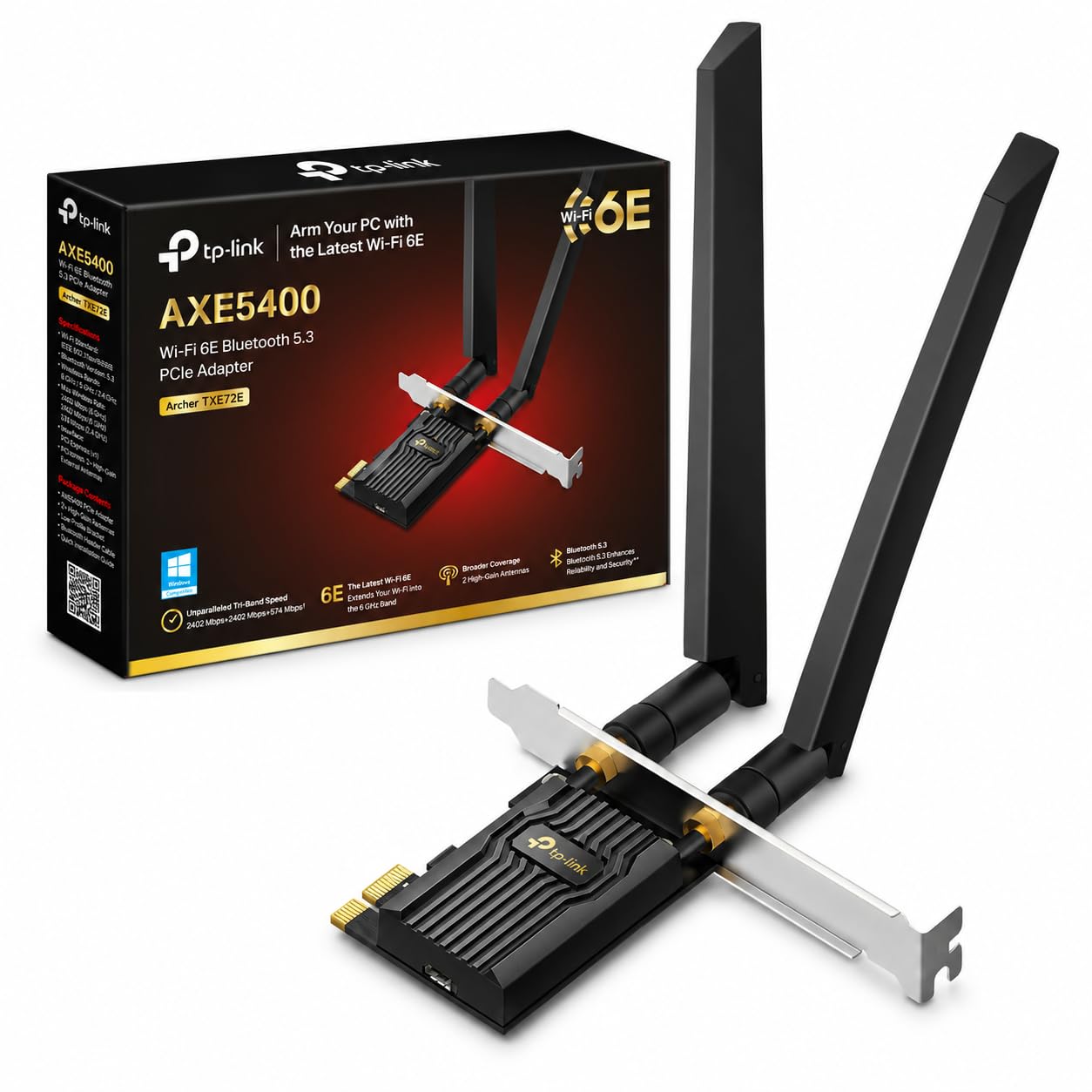
2. TP-Link WiFi 6E AXE5400 PCIe Card (Archer TXE72E)
Two high-gain antennas on leads, WPA3 on board, and the steadiest full-size card of the group.
Reach for the Archer TXE72E when your desktop sits in a room where the router is not. It ships with two high-gain antennas on cables that lift the signal clear of the case, and TP-Link rates it at 2402 Mbps on 6GHz, 2402 Mbps on 5GHz and 574 Mbps on 2.4GHz. Those three figures tell you exactly how to use it: park it on 6GHz for gaming and 4K streaming when you are near the router, and fall back to 2.4GHz when you need distance through walls.
Bluetooth here is version 5.3, which TP-Link lists as 2x faster and 4x broader in coverage than Bluetooth 4.2 — a real jump if you are coming off an old adapter and your controller keeps dropping. It also carries WPA3 encryption, so the connection to the router is protected with the newer security standard rather than the older WPA2. One thing the manual is clear about: Bluetooth only works once you plug the included header cable into the F_USB connector on the motherboard. Skip that step and you will chase a phantom fault for an hour.
Performance is what carries this one — buyers describe it working flawlessly with home networks and holding a consistent 500Mbps, and the card is among the most-reviewed picks here at 950+ ratings and 4.5+ stars. Where it wobbles is Bluetooth and general connectivity, both mixed, with some setups fighting the adapter on pairing. The low-profile bracket is included, so slim towers are covered too.
The honest trade-off: you pay a bit more for the TP-Link name and the WPA3 badge, and you get full-height plus low-profile brackets plus a proper antenna pair. What you do not get is immunity from the Bluetooth cable step — forget the F_USB connection and Bluetooth simply will not appear.
Best fit: a mid-tower or full-tower build where the router is a room or two away and you want both brackets in the box.
Less ideal for: a laptop or mini-PC, which cannot take a PCIe x1 card at all.
3. FENVI FV-AXE3000 WiFi 6E AX210 PCIe Card

Two big external antennas and a 5,400Mbps headline, in a package that fits nearly any PCIe slot.
FENVI built this one for people who care about signal reach. The two external antennas are the largest in this lineup and are there for a specific job: pushing coverage into bigger rooms and through multiple walls. The card carries the AX210 chipset and lists total tri-band speed up to 5400Mbps, split as 2400Mbps on 6GHz, 2400Mbps on 5GHz and 574Mbps on 2.4GHz.
The slot fit is unusually generous — it goes into PCIe x1, x4, x8 or x16 slots, so almost any desktop has room for it. Both full-height and low-profile brackets come in the box, along with the Bluetooth USB cable, and it supports Windows 10 and 11 64-bit. Bluetooth is 5.3 and gets its own push here, aimed at connecting a headset, keyboard, mouse and controller at the same time without one of them lagging behind.
Quality is the aspect that leads for this card, and the reviews bear out a solid, well-made board. It sits at 4.0+ stars across 850+ ratings — lower than the other full-size cards here, and the reason shows up in the feedback: connectivity and value both come back mixed, and reliability draws some negative notes. Pair it with a router you trust and expect to spend real time on the driver install. That is the fair reading of a card with strong antennas and a slightly more temperamental reputation.
Why consider it anyway: neither of the other full-size cards gives you two antennas this size, and the x1-through-x16 compatibility means you are not hunting for one particular slot.
Pick this one if: signal reach through walls is your main complaint and you have PCIe room to spare.
Steer elsewhere if: you want the smoothest setup on the first try — the TP-Link above is steadier from the start.
4. HighZer0 AX210NGW M.2 WiFi 6E Card
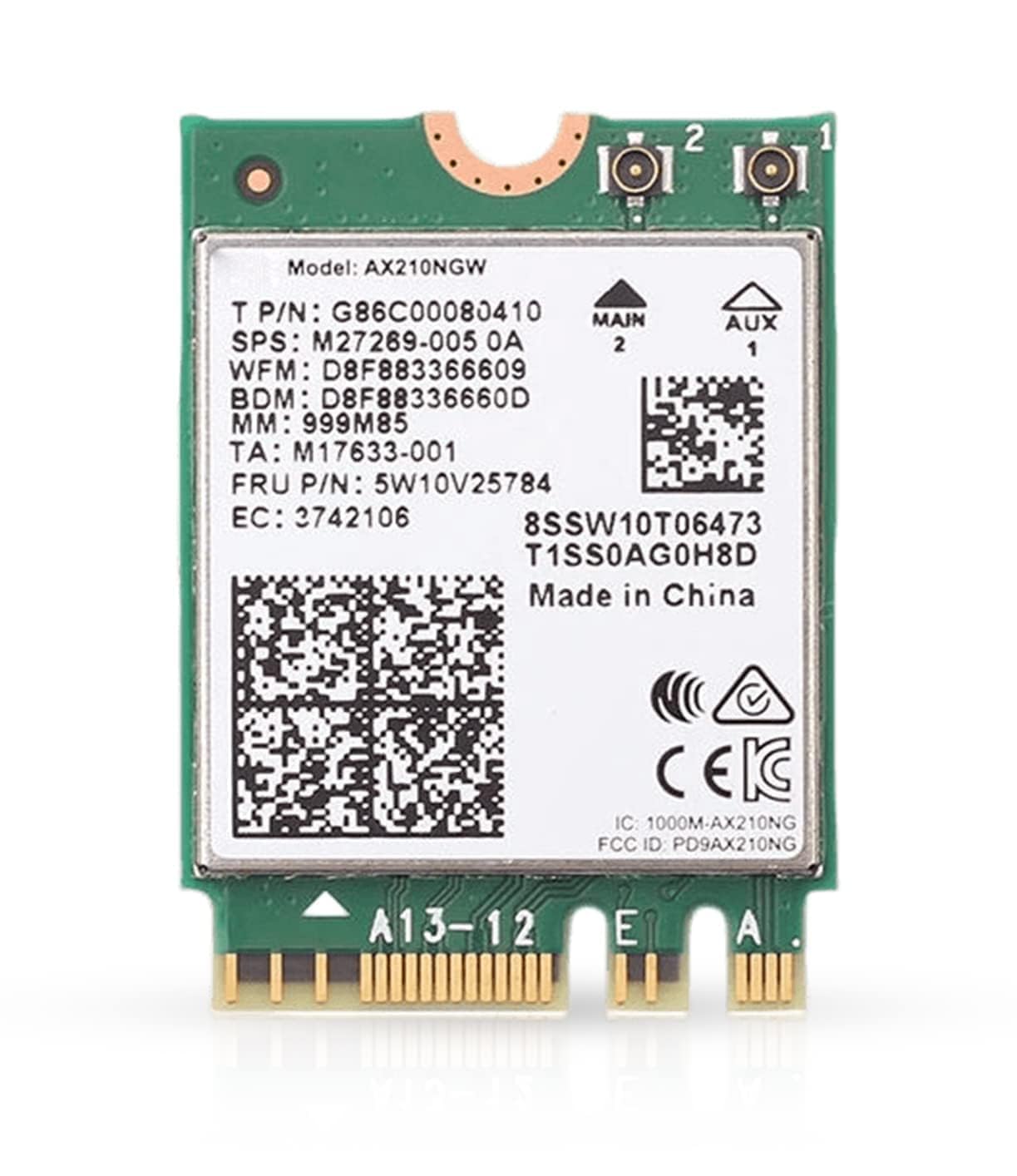
Barely wider than a thumb drive, and the simplest way to add 6GHz to a modern laptop.
If your machine is a laptop or a compact desktop, stop reading the PCIe cards and look here. This is the AX210NGW module in M.2 2230 format — it clips flat onto a Key A+E M.2 slot instead of taking up a rear expansion slot, and it lists a transfer rate of 2.4 Gbps. It handles Bluetooth 5.3 and earlier devices, and it is one of the few here that explicitly lists Linux support alongside Windows 10 and 11.
The M.2 form factor is the whole point. There is no antenna base and no bracket, which is exactly why it drops into a laptop that was never built for a Wi-Fi card upgrade. Read the listing carefully before buying, though: antennas and screws are not included, so if your laptop lid antennas are already in place you are fine, and if they are not, you need to source them. The card requires a free M.2 Key A+E PCIe slot — check your board’s manual before you click buy.
Speed and installation lead the feedback for this module, with buyers reporting steady downloads in the 400-500Mbps range and NAS transfers around 108MBps once it is dialled in. It holds 4.5+ stars across 650+ ratings, which puts it level with the top PCIe card on score. Setup is genuinely simple for most, with no driver hunt needed. Compatibility is the mixed spot — as with every M.2 Wi-Fi card, the wrong slot type or a board that uses a CNVi-only slot will not accept it.
What the form factor buys you: a laptop-grade AX210 with Wi-Fi 6E and Bluetooth 5.3, squeezed into a footprint that fits where no PCIe card ever could.
Reach for this if: you have an M.2 Key A+E slot free and your laptop’s existing antennas are already wired.
Look elsewhere if: you need antennas or screws in the box — this module ships without them.
5. QFly PCIe WiFi 6E Card, AX210

Two 6dBi screw-on antennas and a full accessory kit, at the lowest entry point for a PCIe card.
The QFly is the card for someone who wants 6GHz on a desktop without spending much, and it earns its place with the accessories rather than the badge. The box includes the card, a screw, a screwdriver, a manual, a driver CD and standard plus low-profile brackets. Two 6dBi high-gain external antennas screw on and are angled for signal penetration, and the card carries the Intel AX210NGW chipset.
Speeds are listed as 574Mbps on 2.4GHz, 2400Mbps on 5GHz and 2400Mbps on 6GHz. It supports OFDMA and MU-MIMO for sharing the connection across several devices, and channels run from 80MHz to 160MHz — the wider the channel, the more throughput in one go. Bluetooth 5.3 is here too, and QFly claims it expands Bluetooth range dramatically. One hard requirement: Bluetooth only works after you connect the included power cable to the motherboard’s 9-pin interface.
Functionality is the strength everyone points to — this card just works once it is seated. Installation runs a close second, and the speeds are rated well. It sits at 4.5+ stars across 150+ ratings, a lower review base than the top picks but a solid score. Keep one caveat in view: to actually use the 6GHz band you will likely need Windows 11, or an upgraded Windows 10 build, and older Windows versions will leave that band out of reach.
Why the value case holds up
- Two 6dBi external antennas on a card that undercuts most rivals on cost
- Full kit — screwdriver, screw and both bracket sizes included
- Bluetooth 5.3 with a stated range boost for controllers and headsets
- 160MHz channels and OFDMA for a busier network
Points to weigh
- 6GHz needs Windows 11 or a Windows 10 Dev build
- Bluetooth requires the 9-pin power cable connection
- A smaller review base than the cards above, so less of a track record
Good match for: a first Wi-Fi 6E upgrade on a desktop that takes a standard PCIe slot and is already on Windows 11.
Not the one if: you are running older Windows and actually want the 6GHz band — you will not be able to use it.
6. REKONG AX210NGW WiFi 6E 5400Mbps M.2 2230

The laptop module that ships with the screwdriver you will actually need.
Laptop Wi-Fi upgrades always run into the same wall: the tiny screw that holds the module down is often missing or stripped. REKONG solves that by including the screw, a screwdriver and a plastic clip in the box, which turns a fiddly job into a ten-minute one. The card itself is the AX210NGW in M.2 NGFF 2230 A/E Key format, on version-3.0-level 3000 megabits per second transfer, and it weighs 26 grams — light enough that it adds nothing to a laptop’s heft.
Speeds are split across the three bands: 2400Mbps on 6GHz, 2400Mbps on 5GHz and 574Mbps on 2.4GHz. It carries MU-MIMO for sharing the connection across several devices, and Bluetooth 5.3 is here for headsets, keyboards and controllers. Windows 10 and 11 64-bit are both supported, and the driver route is spelled out — download from Intel’s site, search “AX210NGW”, and install manually for the full Wi-Fi 6E and Bluetooth feature set. One quirk worth knowing: Bluetooth will only show up in Device Manager after that Intel driver install.
Owners describe it as a solid upgrade, reporting speeds roughly doubled over an older WiFi 5 card and strong signal. That makes it a straightforward choice for a laptop that has outgrown its original card. Before you buy, verify your laptop uses an M.2 WiFi slot rather than a CNVi-only one, because this module will not work in the latter.
The straightforward case: AX210 performance in the 2230 form factor, plus the installation hardware most kits leave out. It is the least fussy laptop upgrade on this list.
Suits you if: you are replacing a laptop’s Wi-Fi card and want the screw and tools included.
Not your card if: the laptop uses a CNVi-only slot, or you are upgrading a desktop with a free PCIe slot instead.
Know the Specs
Tri-band (2.4GHz, 5GHz, 6GHz)
These are the three radio lanes the AX210 can use. The 2.4GHz band travels furthest through walls but is the slowest and most crowded, so it is the fallback for distance. The 5GHz band is a middle ground — good speed with reasonable reach, and the one most home networks live on. The 6GHz band is the newest and the emptiest, with the least interference, but the shortest reach; it is what makes the card “Wi-Fi 6E” rather than plain Wi-Fi 6. In practice you will want 6GHz for gaming and 5GHz or 2.4GHz when you are far from the router.
PCIe card vs M.2 module
A PCIe card sits in a rear expansion slot and pokes antennas out the back of the case, which suits a desktop build. An M.2 module is a tiny flat card that clips onto the motherboard and is the only option for laptops and compact builds. They use the same AX210 chip, so the wireless performance is close — the difference is purely whether your board has the right slot. Check the motherboard manual for “M.2 Key A+E” for a module, or a free “PCIe x1” slot for a full card.
MU-MIMO and OFDMA
MU-MIMO lets the card talk to several devices at once instead of taking turns, so a phone, a laptop and a console do not queue behind each other. OFDMA splits the wireless channel into smaller sub-channels so many small transmissions — chat, voice, game state — share the air efficiently. Both keep latency lower on a busy network, which is why gaming and video calls feel smoother with these cards.
Bluetooth 5.3 and the F_USB cable
Bluetooth version matters less than you might expect for a mouse or headset, but the 5.3 standard on most cards here uses less power and lists a longer range than older versions. The bigger practical detail is the cable: a PCIe card needs an internal USB connection to the motherboard’s F_USB header before Bluetooth will function. Skip it, and Bluetooth will look broken even though Wi-Fi works fine.
Common Questions
Will an AX210 Wi-Fi card get me the 6GHz band on Windows 10?
Do I need a PCIe card or an M.2 module for my computer?
Why does Bluetooth not show up after I install the card?
Is an AX210 card a big improvement over my old Wi-Fi adapter?
How many Mbps does the AX210 give on each band?
Can I use the AX210 card with an AMD motherboard?
Should I choose a card with external antennas or a bare module?
Will this card work with my older router?
Do I need to download a driver before the card will work?
Is it worth upgrading from a USB Wi-Fi adapter to a card?
The Bottom Line
For most desktop builders, the winner is the GIGABYTE GC-WBAX210 — the magnetic antenna base does more for real signal than any speed figure on a box, and it is the most-reviewed card here at 4.5+ stars. If your router sits rooms away and you want two high-gain antennas on leads, the TP-Link Archer TXE72E is the sturdier pick. And for any laptop or compact build, skip the PCIe cards entirely and take the HighZer0 AX210NGW M.2 module, which slips into a Key A+E slot and adds 6GHz without a bracket in sight. One last nudge before you buy: whichever you pick, confirm the slot type first — that single check prevents more returns than anything else in this category.
How we choose
We do not accept paid placement. Every pick is matched to a real buyer and a real use-case; we do not hands-on test units.
Sources
Specifications: manufacturer listings and product documentation. Review insights: verified customer reviews, as of November 2026. Pricing: not shown on this page (it changes often); check the current price via the retailer link.
As an Amazon Associate, My Heart Lives Here earns from qualifying purchases. This does not affect which products we feature.