Heads up: This post contains affiliate links. As an Amazon Associate I earn from qualifying purchases, at no extra cost to you. Learn more
Specs are compiled from manufacturer listings and verified buyer reviews and can change over time — please confirm the key details on the product page before buying.
The short answer: buy the 8GB SO-DIMM that matches your laptop’s memory generation and pin count exactly, and you get a faster machine for a fraction of a new laptop. Get the generation or pin count wrong and the stick will not even seat in the slot. The seven picks below are all verified 8GB notebook modules, sorted so you can match your machine in under a minute.
This guide is built by comparing the manufacturers’ published specifications and the patterns across verified customer reviews, so you get each pick’s real strengths and trade-offs instead of marketing spin.
Every listing here is a single 8GB SO-DIMM module (the compact stick laptops use), so the decision is really about generation, speed and pin count — not brand hype. These are the practical picks for 8gb notebook ram.
Top Picks


How To Choose The Best 8GB Notebook RAM
Laptop RAM is not a “buy the biggest number” purchase. Your machine accepts exactly one memory generation, and it has to be the right shape and pin count or it simply will not go in. Match those three things first, then worry about speed.
Generation comes before everything
DDR3, DDR4 and DDR5 are different generations, and the slots are physically keyed differently so the wrong one will not seat. A DDR4 stick cannot go into a DDR3 slot, no matter what the speed label says. Check your laptop’s manual or the maker’s spec page for the generation before you buy.
Then check speed and what your laptop supports
A 3200MHz stick is the common DDR4 speed, but your laptop may only run it at 2933MHz or 2666MHz. That is normal — the RAM steps down to whatever the machine supports, and it still works. Buying faster than your laptop can use costs a little more and gains nothing in return.
Pin count and slot shape
Laptop sticks are SO-DIMM, the short module, and the pin count depends on generation: 204-pin for DDR3, 260-pin for DDR4. A desktop DIMM is a different, longer shape and will not fit a laptop slot. This is the single most common return reason on this category, so verify the number on your old stick before ordering.
Latency, ranks and dual channel
CL22 means 22 clock cycles of latency, the small delay before the memory answers. Lower CL numbers respond a touch quicker, but the gap is small next to generation and speed. Rank (1Rx8, 2Rx8) describes how the chips are laid out, and most laptops accept either. If you have two slots, a matching pair runs in dual channel and gives the smoothest multitasking.
Side-by-Side Comparison
| Model | Best For | Generation | Speed | Latency | Amazon |
|---|---|---|---|---|---|
| Crucial 8GB DDR4 3200MHz★ Best Overall | Most laptop upgrades | DDR4 | 3200 MHz | CL22 | Amazon |
| Adamanta 8GB DDR3L 1600MHzBudget Champion | Older Macs and laptops | DDR3 | 1600 MHz | CL11 | Amazon |
| Samsung 8GB DDR3 1600MHz | Brand-name DDR3 replacement | DDR3 | 1600 MHz | CL11 | Amazon |
| A-Tech 8GB DDR4 2133MHz | Budget DDR4 builds | DDR4 | 2133 MHz | CL15 | Amazon |
| Timetec 8GB DDR4 2666MHz | Value DDR4 upgrade | DDR4 | 2666 MHz | CL19 | Amazon |
| SK Hynix 8GB DDR4 3200 | OEM-grade replacement | DDR4 | 3200 MHz | — | Amazon |
| TEAMGROUP Elite 8GB DDR4 3200MHz | Speed-focused buyers | DDR4 | 3200 MHz | CL22 | Amazon |
Detailed Reviews
1. Crucial 8GB DDR4 RAM 3200MHz (PC4-25600)
Our pick — 4.5+★ from 25,500+ verified ratings; the strongest balance of quality and price.
The 260-pin DDR4 stick that fits almost any laptop from the last few years and boots without a settings change.
For most people upgrading a laptop from the last few years, this is the one to buy. It is a single 8GB DDR4 module rated at 3200MHz on the PC4-25600 spec (the bandwidth label DDR4 uses), and it steps down to 2933MHz or 2666MHz on laptops that cap out lower. That step-down is not a fault — it is how modern RAM behaves when the machine sets the pace.
What wins people over is how little drama there is. Buyers report it running flawlessly in dual channel, recognizing immediately in Dell G15 5511 and Lenovo IdeaPad Gaming 3 machines, and making websites load faster while games run smoother. Crucial backs it with its System Scanner — a small tool that reads your laptop and tells you which stick fits — which removes most of the guessing before you order. It is the crowd favorite here at 4.5+ stars across 25,000+ ratings, and that volume is why it takes the top slot.
The catch is speed headroom you may never use. A 2133MHz laptop will not run this at 3200MHz, so you are paying for ceiling you cannot reach. It is also a single stick, so a two-slot laptop stays on one channel unless you add a matching second module. Neither is a problem — it just means this is the right buy for a newer DDR4 laptop, not a rescue kit for an old one.
What works in its favour
- 3200MHz rated speed that downclocks to 2933MHz or 2666MHz when your laptop needs it
- System Scanner tool checks your model before you buy
- 25,000+ ratings and a 4.5+ star score is the strongest confidence signal in this list
- 260-pin SODIMM fits standard modern laptop slots
Where it asks a little of you
- No benefit on a laptop that only runs 2133MHz or 2666MHz memory
- Single module, so dual channel needs a second matching stick
- DDR4 only — it will not go near a DDR3 machine
Buy this if: your laptop is DDR4 and you want the safest one-stick upgrade with a fit-check tool behind it.
Keep looking if: your machine is DDR3, or you need two modules for dual channel in one order.
2. Adamanta 8GB (1x8GB) DDR3/DDR3L 1600MHz PC3L-12800 SODIMM
The cheapest 204-pin DDR3L stick here, and the one to buy when an old laptop needs a genuine revival.
If your machine takes DDR3, nothing on this list is cheaper to try. This is a 204-pin module (the shorter DDR3 laptop shape) running at 1600MHz with a CL11 latency — a low number that means it answers quickly. It is dual rank at 2Rx8, non-ECC and unbuffered, and it is assembled in the USA with every module tested by the maker.
The appeal for older Mac owners is real: the listing names iMac models from 2012 through mid-2015 with Retina 5K displays, MacBook Pro 13″ and 15″ units identified as 9,1 and 9,2, and Mac Mini 6,1 and 6,2. Functionality is what buyers talk about most, with memory quality close behind. One report of a T540p ThinkPad running beautifully after the swap is the sort of story this stick is built for. It also comes with a limited lifetime warranty and free technical support from the maker’s own technicians.
Here is the honest trade-off: the listing itself says it may not work on all devices, and it asks you to check your specs first. That is not a hedge — DDR3 machines vary a lot, and x64 operating systems may be needed to address the extra memory. Verify your model before ordering and this is the strongest value in the guide. Its 4.5+ stars sit on 400+ ratings, a solid record for a legacy part.
Speed check: 1600MHz is a measured step behind the Crucial’s 3200MHz, but on a DDR3 laptop the slot sets the limit, so this is the ceiling you can actually use.
Rank matters: at 204 pins it is a different shape from the 260-pin DDR4 sticks here, and that difference is exactly why a DDR3 machine needs this and not the pricier ones.
Reach for this if: you have a DDR3 laptop or a listed Mac model and want the least money spent for the biggest feel of change.
Think twice if: you are unsure of your model number — the maker is clear that some devices are excluded, so check the list first.
3. Samsung Original 8GB DDR3 1600MHz PC3L-12800 SODIMM

The Samsung M471B1G73EB0-YK0 module some laptops shipped with from the factory.
Some buyers do not want an equivalent — they want the original. This is a Samsung DDR3 1600MHz PC3L-12800 module with the model number M471B1G73EB0-YK0 stamped on it, a 204-pin SODIMM at CL11 with non-ECC memory. The PC3L label means low voltage, which matters for laptops that want a power-frugal stick.
Performance is the headline, and owners find it clearly perks up small machines. A micro PC that felt sluggish gets noticeably quicker, and laptops get back the speed they had when new. Installation gets the same warm reports — it goes in easily and boots without a fuss. Price-to-value lands well too, which is why it holds 4.5+ stars across 400+ ratings.
The part to weigh up is reliability. Feedback on that front is mixed, and some machines feel like new again while others run into issues. The specs themselves are simple and the fit is specified, but if you want the most reassuring DDR3 option, read the return policy before you commit. Its advantage over the Adamanta is the Samsung name and the exact factory part number. Its disadvantage is the slightly higher score risk.
Against the Adamanta: both run 1600MHz at CL11, but this one carries 4.6 stars against the Adamanta’s 4.7, so the cheaper stick wins on confidence while this wins on factory-match certainty.
The factory-match argument: if your laptop shipped with this exact model number, replacing like-for-like removes the fit question entirely.
Pick this when: you want the exact Samsung module your laptop already uses and you value the brand name over the absolute lowest spend.
Otherwise: mixed reliability reports mean it is worth checking the return window before you install it.
4. A-Tech 8GB DDR4 2133MHz SODIMM PC4-17000

The slowest DDR4 here at 2133MHz, and the only one aimed at early DDR4 laptops that cap at that speed.
Here is a case where the lower number is the point. This module runs at 2133MHz on the PC4-17000 spec, which is the original DDR4 laptop speed. If your laptop is an early DDR4 model that caps at 2133MHz, a 3200MHz stick buys you nothing — you would just be paying for speed the slot cannot deliver. This one matches that ceiling exactly, with CL15 latency, 1.2V JEDEC-standard voltage, and a 260-pin shape that fits DDR4 laptop slots.
What the listing adds is A-Tech’s lifetime warranty and a support team on both sides of the purchase. Owners find it works flawlessly and goes in easily, and quality gets called out as much as performance. It holds 4.5+ stars across 300+ ratings — a quiet, consistent record with no big swings in feedback.
Compare the numbers and the gap to the top pick is clear. The Crucial runs at 3200MHz with CL22, this at 2133MHz with CL15 — a lower latency but a slower clock, and the Crucial carries far more buyer volume. Neither is “better” in isolation. For an older DDR4 laptop, the tighter match here is the smarter buy. For anything newer, the Crucial’s extra headroom is the one to have.
Match it if: your DDR4 laptop is limited to 2133MHz and you would rather not overpay for unused speed.
Hold off if: your machine supports 2666MHz or higher — the Timetec or Crucial below makes better use of the slot.
5. Timetec 8GB DDR4 2666MHz (PC4-2666V) SODIMM
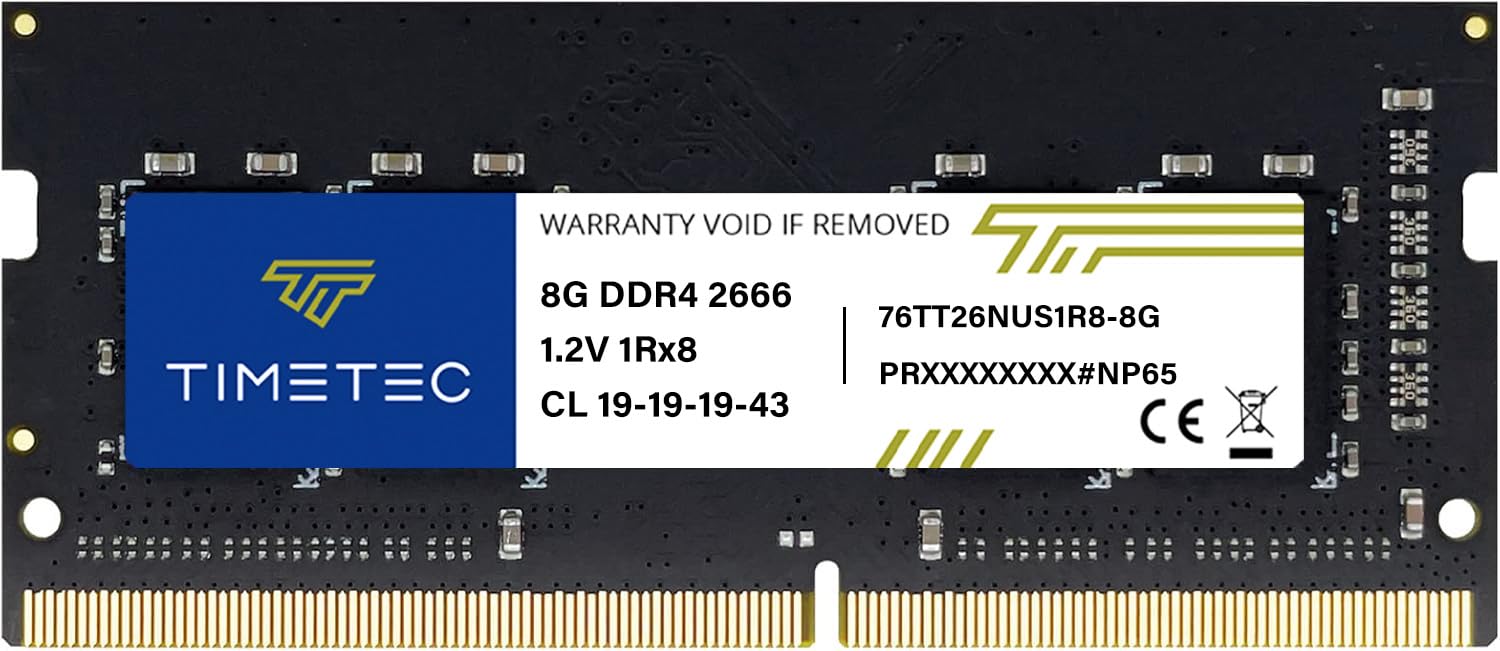
The 2666MHz DDR4 stick that turns an old Acer Aspire 3 into a usable machine again.
This is a 260-pin DDR4 SODIMM running up to 2666MHz on the PC4-21300 spec, at 1.2V with CL19 latency. It is non-ECC, unbuffered, and backed by Timetec’s limited lifetime warranty with US-based technical support. Plug it in and the laptop recognises it — there is no software step in the way.
Owners mention it working well in HP notebooks and inside Synology 920+ systems, and it gets picked up on the first boot. Speed is the stand-out: an old Acer Aspire 3 becomes considerably faster, and that is the exact scenario this module is built to solve. Quality and value get the same steady feedback, and it holds up well against the pricier SK Hynix on raw feel.
One honest wrinkle: the PCB colour and rank can vary by production batch, so you may get green or black, 1Rx8 or 2Rx8. The maker says performance is consistent regardless, and that matches the feedback — but if you are matching an existing stick for a dual-channel pair, order both at once so they come from the same batch. With 1,000+ ratings and a 4.5+ star score, it is the highest-volume mid-speed DDR4 stick here.
Why it earns a spot
- 2666MHz on PC4-21300 covers most mid-range DDR4 laptops
- Limited lifetime warranty plus US-based technical support
- 1,000+ ratings backing a 4.5+ star score
- Works in laptops, mini PCs and all-in-one systems with 260-pin slots
What to plan for
- Rank and PCB colour vary by batch — order a pair together if matching
- Won’t go in a desktop DIMM slot — it is the short laptop shape
- Slower than the 3200MHz picks above on paper
Simple choice if: your laptop is DDR4 and you want a well-reviewed 2666MHz stick with a lifetime warranty behind it.
skip it if: you are matching an existing module and cannot order both at the same time — the batch variance could leave you mismatched.
6. SK Hynix 8GB SODIMM DDR4 3200 PC4 1Rx16 HMAA1GS6CJR6N-XN

The OEM-grade SK Hynix module that ships inside factory Dell and Lenovo laptops and behaves exactly like it.
SK Hynix supplies memory to laptop makers, so this is the kind of part that ships inside a Dell or Lenovo from new. It is an 8GB DDR4 SODIMM rated at 3200MHz with a 1Rx16 rank (single rank, a specific chip layout), non-ECC and unbuffered, and it fits any system that supports DDR4 SODIMM. Simple as that — one line of compatibility, no caveats in the listing.
That predictability is the sell. Computers recognise it the moment they boot, it picks up well in Dell Inspiron 15 3000 machines, and one report has it upgrading cleanly from 8GB to 16GB in a single swap. Speed improvements follow the usual shape: laptops feel more responsive, and the memory quality is judged good rather than flashy. It carries 4.5+ stars across 500+ ratings.
The trade-off is that it is not the flashiest on paper. It has no bright-package look, no headline latency figure pushed at you, and no compatibility scanner like Crucial offers. What you get instead is an OEM-grade part with a straightforward promise. If your priority is a stick that behaves exactly like the factory one that came out of the machine, this is the closest you will get.
Versus the TEAMGROUP: both run 3200MHz DDR4, but this is a single-rank 1Rx16 module while the TEAMGROUP is CL22 — different tuning, same band. This one leans on factory familiarity, the TEAMGROUP on a published latency figure.
Go for this when: you want a stick that mirrors what the laptop shipped with and you would rather not think about tuning.
Look elsewhere if: you want a compatibility-checking tool or a published latency spec to compare against.
7. TEAMGROUP Elite DDR4 8GB 3200MHz CL22 SODIMM

Fast, JEDEC-compliant DDR4 with a lifetime warranty and no fuss.
This is a 3200MHz DDR4 SODIMM on the PC4-25600 spec, at CL22 latency and 1.2V, in a 260-pin laptop shape. TEAMGROUP builds it to JEDEC standards and RoHS compliance, so it is a mainstream part made to the reference spec rather than a tuned one. It can also run at 2933MHz or 2666MHz if your laptop supports only those speeds.
What customers note most is reliability, with value and memory quality close behind. It activates XMP profiles straight away in supported machines, snaps into place smoothly, and runs games like GTA5 without lag. One owner notes it doubles their RAM in a single swap — the exact job these 8GB sticks exist to do. It holds 4.5+ stars across 300+ ratings, matching the Crucial at the top of the list.
Where it edges ahead of some rivals: the 3200MHz clock is two steps above the Timetec’s 2666MHz and well above the A-Tech’s 2133MHz, and it comes with a lifetime warranty plus free technical support. Against the Crucial, the two are close siblings — same speed, same latency, same 260-pin shape. The Crucial wins on volume and the System Scanner. This one wins if you want the same speed from a different brand with a clear latency figure in the name.
Land on this if: you want 3200MHz DDR4 with a stated CL22 latency and a lifetime warranty from a brand other than Crucial.
One note: speed steps down to 2933MHz or 2666MHz on laptops that cap out lower — the extra clock is only there if the slot supports it.
Know the Specs
DDR4 vs DDR3
DDR4 and DDR3 are generations, and the slots are keyed so one cannot go into the other. DDR4 laptops use 260-pin SO-DIMM modules and often run 2133MHz to 3200MHz. DDR3 laptops use 204-pin modules at 1600MHz or so, and the “L” in DDR3L means low voltage. Read the generation from your laptop’s manual before you spend anything — this is the one spec that will kill the upgrade if you get it wrong.
Speed (MHz) and what a laptop can actually run
Speed is measured in megahertz (MHz), the number of clock cycles per second. A 3200MHz stick only runs at 3200MHz if the laptop and BIOS allow it. Many laptops cap at 2933MHz or 2666MHz, and the RAM simply steps down to the slower clock — no harm, no error, just unused ceiling. Buying 3200MHz makes sense on a newer machine and wastes money on an older one.
Latency (CL numbers)
CL22 means a 22-cycle delay before the memory responds. Lower is quicker, and CL11 is a low figure seen on DDR3 modules. The gap between CL22 and CL11 is small in everyday browsing and gaming next to the difference generation and speed make. Pick latency only after generation, pin count and speed are settled.
Pin count, rank and voltage
Pin count is the physical connector: 204-pin for DDR3 laptop modules and 260-pin for DDR4. Rank (1Rx8, 2Rx8, 1Rx16) describes the chip layout — most laptops take either. Voltage runs 1.2V on DDR4 and 1.35V on DDR3L, and the stick must match what the slot supplies. A mismatched pin count or voltage is a return, so check both before ordering.
Common Questions
Will 8GB RAM make my laptop noticeably faster?
How do I know if my laptop uses DDR3 or DDR4?
Can I mix an 8GB stick with the 4GB stick already in my laptop?
What is the difference between 2666MHz and 3200MHz RAM?
Will 3200MHz RAM work in a 2666MHz laptop?
How do I install laptop RAM and do I need any tools?
What does CL22 or CL11 mean and does it matter?
Can I put a desktop RAM stick in my laptop?
Will a single 8GB stick work, or do I need two?
Do I need a 64-bit operating system to add RAM?
The Bottom Line
If you want one answer and a modern DDR4 laptop, the Crucial 8GB DDR4 3200MHz is the safest bet on this list — 4.5+ stars, the largest owner base here, and a System Scanner that confirms your model fits before you buy. For an older DDR3 machine, the Adamanta 8GB DDR3L is the cheapest meaningful lift and lists Mac model numbers directly. And if your DDR4 laptop caps at 2666MHz, the Timetec 8GB DDR4 2666MHz matches that ceiling with a lifetime warranty behind it.
Match generation and pin count first, speed second, latency last, and you will pick the right 8GB SO-DIMM the first time.
How we choose
We do not accept paid placement. Every pick is matched to a real buyer and a real use-case; we do not hands-on test units.
Sources
Specifications: manufacturer listings and product documentation. Review insights: verified customer reviews, as of November 2026. Pricing: not shown on this page (it changes often); check the current price via the retailer link.
As an Amazon Associate, My Heart Lives Here earns from qualifying purchases. This does not affect which products we feature.